
Description
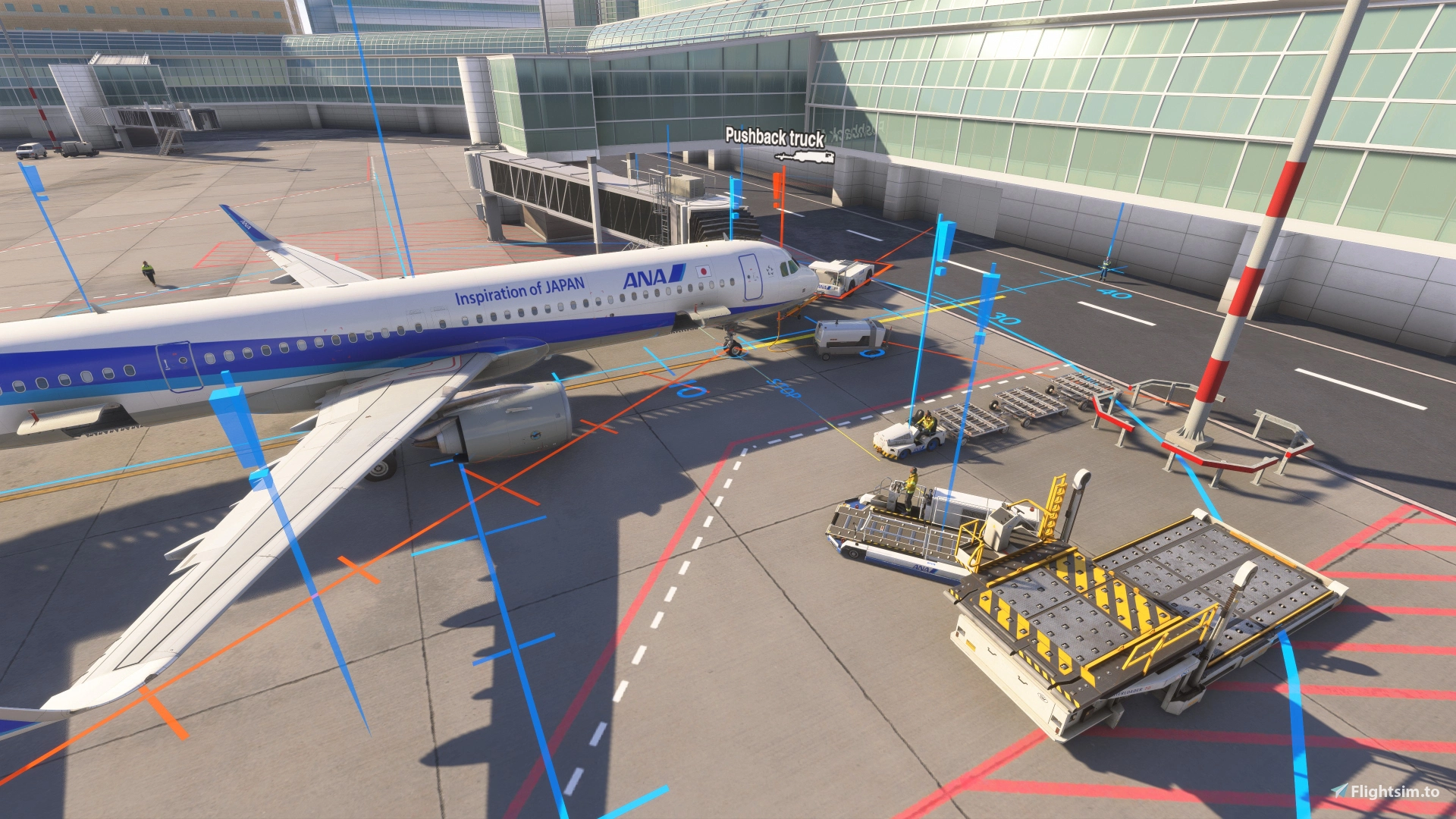
This is a basic GSX Profile for Tokyo Haneda (RJTT) using the default FS2024 MS/Gaya scenery (not FS2020, as the scenery is not the same between the sims). I plan on expanding it to touch all currently recognized parking locations in GSX eventually. Currently, the profile is limited to terminal 1 (Japan Airlines (also Star Flyer and Sky Mark)), terminal 2 (All Nippon Airlines (also Air Do and Solaseed)), and terminal 3 (International).
The gates and pushback routes I chose are based on the airport configuration represented in the sim using the default "hand-crafted" RJTT scenery which may be out-of-date and/or not directly comparable to the real world RJTT.
As of version 1.0; all of the gates I did (jetway gates) are mashalled (not VDGS). I will do VGDS in a later update if possible.
As noted at the begining, this is a profile for the default scenery. As such, there are some issues with the scenery I have to work with. So far, the most glaring issues I noticed are:
- Gate 143: The jetway intrudes on the parking line for that gate.
- At terminal 3 the gate numbers in the scenery are not directly aligned with the GSX numbers for those gates.
- Some of the parking lines, exclusion zones, wingspan limit lines at gates, and painted stop points are missing, or not well placed within the scenery. I don't know anything about editing sceneries, so all I could do was work with/around the issues inherent in the scenery.
- If you are reading this and want to help me make this profile better by providing real world knowledge, I will happily implement what I can in future updates.
How to install: Decompress/open the compressed file you just downloaded.
Extract/place the file within the compressed library into the GSX profile folder. The exact location of your GSX profile folder will vary based on your local folder names. Mine looks like this "C:\Users\UserName\AppData\Roaming\Virtuali\GSX\MSFS".
This is a hidden folder, so be sure to enable Windows Explorer functionality that allows viewing hidden folders.
Basically, it's just drag & drop, but NOT in the "Community" folder.
Bug reports can be made via the comments section here.
RJTT - GSX Profile
This add-on provides a basic GSX profile for Tokyo Haneda Airport (RJTT) using the default FS2024 MS/Gaya scenery. Currently, it covers terminal 1 (Japan Airlines), terminal 2 (All Nippon Airlines), and terminal 3 (International), with plans for expansion to all recognized parking locations. The profile includes jetway gates that are marshalled, though not equipped with VDGS, and it acknowledges certain limitations within the default scenery, such as misaligned gate numbers and missing ground markings. Future updates aim to improve the profile, incorporating user feedback and real-world knowledge.


Historique des versions
-File renamed (formerly rjtt-sewxu4u9) -Added bus ramps 601-607 (ANA, Star Flyer, Air Do, Skymark, & Solaseed) -Added Starflyer ICAO to gates 1-4 & 21-24 -Added ICAOs for Skymark, Air Do, & Sola Seed to gates 51-55 -Added ground operators for parking positions 801-810 and 701-709 -Added parking ramps 601-607 to passenger service options (pushback, ground operators, parking...etc) -Removed invalid 2nd pushback from gate 111 -Added JAC ground ops to parking ramps 701-712 & 801-810 (712 is 1227 and 708 is 1146 in GSX)
Similaires
KSTL GSX Profile
This GSX profile is designed for the FeelThere KSTL payware airport in Microsoft Flight Simulator 2024. It includes all officially listed jetway gates for major carriers at St. Louis Lambert International Airport. Specific gates for Lufthansa, British Airways, and other airlines are configured, while non-jetway ramps and private areas remain default. De-icing pads are not yet functional due to technical limitations.
par Acperience7
Basic GSX Profile KHOU
This GSX profile is designed specifically for Houston Hobby Airport using the FSim Studios and Texan Simulations KHOU scenery, not the default Asobo version. It includes customized parking, pushbacks, and airline assignments for all jetway-equipped gates, covering gates 1-51. Southwest is the primary handler with specific assignments for other major airlines at selected gates. The profile focuses on jetway gates, with potential updates based on user feedback for accuracy and operations.
par Acperience7
Connectez-vous pour participer à la discussion
Se connecterCommentaires(3)
5 months ago
6 months ago
8 months ago