
Description
---Introduction---
This program is made to check your Community folder for false installed Add-on's and is primarly for useres who have installed many Add-on's or are installing many Add-on's and dont want to check every folder for correct folder structure.
--For what is it looking?--
It is looking for the Layout.json in every Add-on because MSFS 2020 only loads Add-on's if it goes into a Add-on folder and finds these files if the Add-on's are in a folder which is deeper in the folder tree MSFS will not load it (these folder structures can hapen throug wrong unpacking or the Add-on creater uploaded the file in this wrong format).
---How to use---
To use this small program you first need Python!
Tutorial: https://youtu.be/J4AI0Gkyueo
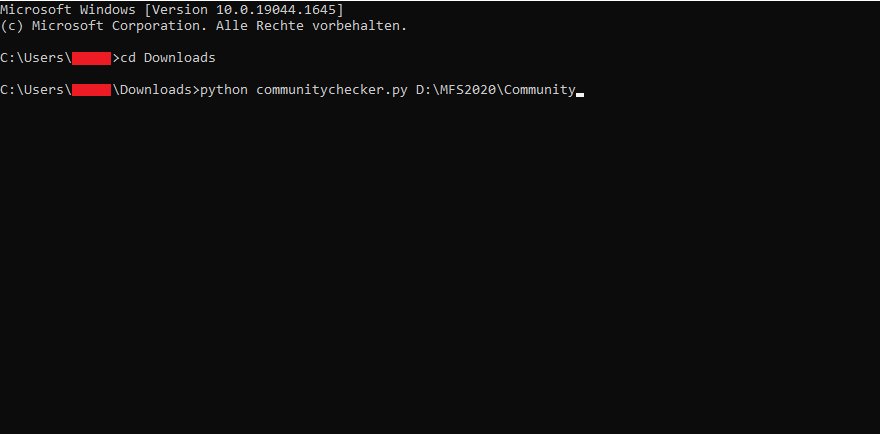
Then you can open your Terminal (just enter "cmd" in your Windows search bar) and now there should be something like that "C:\Users\YourUserName> ". First thing to do you'll need to enter "cd " and than paste in the path where this program lies, for example:
"C:\Users\YourUserName>cd Downloads"
the next line should look like that "C:\Users\YourUserName\Downloads> " or "C:\Users\YourUserName\your path to this file> "
Now we can start:
Enter: "python communitychecker.py [path to your Community floder]"
my example:
"python communitychecker.py D:\MFS2020\Community"
and just press enter and wait until there is written Finished, now you can see which folders are wrongly installed!
Community Folder Checker
A useful tool for Microsoft Flight Simulator users with many add-ons, this program checks your Community folder for incorrectly installed add-ons by looking for the Layout.json file. Guide your Terminal with Python to detect any add-ons with incorrect folder structures effortlessly.


Avis des utilisateurs
2 avis
Historique des versions
Aucun historique de version disponible.
Connectez-vous pour participer à la discussion
Se connecterCommentaires(13)
over 1 year ago
over 1 year ago
Have you made shure you have Python instaled?
over 1 year ago
about 2 years ago
over 1 year ago
almost 3 years ago
about 4 years ago
Helpful script, thanks! For your info, I had to add double quotation marks around the destination path to get it to work. That is:
Didn't work: python communitychecker.py D:\MFS2020\Community
Did work: python communitychecker.py "D:\MFS2020\Community"
Just letting you know in case anyone else has that issue! Thanks again!
------------------------------------------
PS, for your own bug-testing, I am using Windows 11, Python 3.10.5. If I didn't add double quotation marks around the destination path, I would get the following error:
Traceback (most recent call last):
File "C:\Users\[User]\Desktop\communitychecker.py", line 7, in <module>
dir_list = next(os.walk(save_path))[1]
StopIteration
over 4 years ago
Quick Questions:
Can you put your python script file anywhere? Can you unzip it to the folder you store your add-ons and then run it from there? Does it have to be outside of the folder it is checking in order to work?
over 4 years ago
You can place the file where ever you want, even in to the folder your checking.
over 4 years ago
Hi, I Would Like To Use This Program But Ive Had A Stroke And I Get Confused VERY Easy i Am Also Not very good With computor Terms Can You Make A Small Intructional Video Please
over 4 years ago
Is coming, I just need to find a bit of time
over 4 years ago
Thank you ! 8 )
over 4 years ago
Tutorial is online: https://youtu.be/J4AI0Gkyueo