
Description
Short Description
This is a Stream Deck profile for the Stream Deck Plus using the PilotsDeck plugin.
It has various functions some highlights are:
- 4 digit transponder with the 4 knobs of the SD+
- Dial Stack for easy frequency tuning
- G1000 MFD upper&lower knob simulated with a SD+ dial
Warning: Not everything will work with every aircraft, in particular addon aircraft as those sometimes use custom commands!
Feel free to also just get inspired what you can do with PilotsDeck as I think it is a very powerful plugin!
I can only provide limited support for my profile due to real life time constraints.
Prerequisites
- Stream Deck Plus
- MSFS 2024
- Amazing Pilots Deck https://flightsim.to/file/35298/pilot-s-deck-a-streamdeck-plugin OR https://github.com/Fragtality/PilotsDeck
Description of Pages
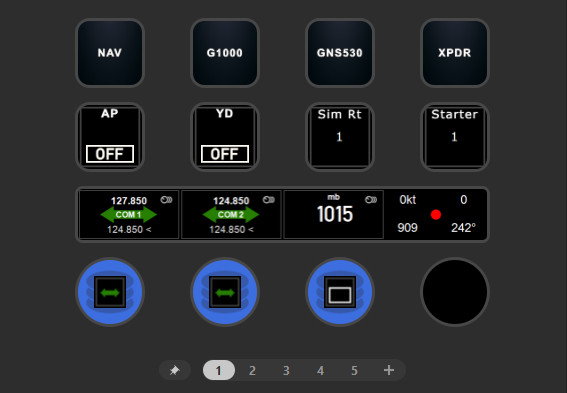
Page 1 Home:
First row contains navigation to the other pages.
AP button shows status of autopilot. Short press sends AP_ON and AP_OFF commands while long press sends TOGGLE_AP_MASTER commands.
YD button shows status of Yaw Damper and toggles it.
Sim Rt shows current sim rate and increases on short press and decreases simrate on long press.
Starter indicates which engine is selected for the Red/Green Dot Dial. See below. Only Engine 1 and 2 are supported.
Com 1 and Com 2 Dials show tuned frequency on top and standby on bottom. Standby can be tuned by turning dial. Switch between tuning mhz part and khz part by pressing the dial. Swap frequencies by tapping the touch screen.
Baro (hg/in) Tune baro setting by turning dial left right. Set standard pressure by tapping touch screen. Switch between inches of mercury and millibars by pressing the dial.
Red/Green Dot The dot changes color based on whether the selected engine (see Starter) is running. Turning the dials changes the selected engine (1 or 2). Holding the dial down operates the starter! So you can start your airplane with this. The display shows various useful numbers in flight: Indicated air speed, vertical speed (feet per min), current indicated altitude, and current heading. Hint: Besides aircraft using the default logic it also supports the COWS DA-40 XLS where you have to hold the starter. In general I try to keep the profile free of third party-specific logic but this is the one exception to prove the rule, because I think it is just very immersive on that specific aircraft.
Page 2 Nav:
Home button to go to Home Page
DME indicator shows DME distance in nautical miles. Press to switch between Nav1 and Nav 2. Check out the designer code to see a simple example of a internal variable in Pilot's Deck.
The 2 emtpy buttons I left empty to keep dependencies small, in my personal profile I have two stop watches there from a stream deck stopwatch plugin.
Nav, MKR and Nav2 audio selectors, to listen to the identifiers. Note that the MKR selector does not work with G1000 aircraft because the G1000 only has a MKR mute button.
The last button in the second row shows "O", "M", "I" when the corrsponding marker beacons are detected. Check out the image mapping in the special state tab to see how it works.
The 1st and 3rd dials are used for tuning NAV 1 and NAV 2 frequency. Dials show tuned frequency on top and standby on bottom. Standby can be tuned by turning dial. Switch between tuning mhz part and khz part by pressing the dial. Swap frequencies by tapping the touch screen.
The 2nd and fourth dials are used to select Course for nav1 and 2 respectively.
Page 3 G1000 GPS:
Home button to go to Home Page
The buttons corrspond to the similarly labeled buttons on the G1000 MFD. This only works with G1000 not with other GPS units with the same buttons.
Com 1 Freq Dial as on Page 1
Baro Dial as on page 2. Minor difference: it uses G1000 specific commands for increasing and decreasing the baro value so that the increments match the sim even if you have not selected the right units on the stream deck.
Range Dial, turning the dial changes the range on the MFD. Displayed is the current density altitude because I could not figure out a way to read out the current range.
G1000 Upper Lower Knob simulates the bottom right knobs on the G1000 MFD which are used for almost all data entry. Functionality: Turning dial turns the currently selected dial. Pressing dial switches between turning the upper (smaller) and lower (bigger) dial. Tapping the screen is like pressing the upper knob (Cursor) (regardless of which dial is selected on the stream deck.)
Page 4 GNS 530 GPS:
This is exactly the same as Page 3 just for the GNS 530. Note that t his does not work for the GNS 430 but if you need that it should probably be easy enough to adapt.
Only difference is here I added the CDI knob just because it's a useful button to have.
Page 5 Transponder:
XPNDR shows the transponder state and pressing switches between standby and ON
ALT shows OFF or ALT depending on whether altitude reporting is enabled and switches between altitude reporting on and off on press.
TCAS shows the current TCAS Mode (TA or TA/RA or just XPDR when only transponder bis on)
Ident shows whether ident is active and toggles ident state. Note that once pressed ident is autmatically turned off by the sim after 18 seconds or so.
Dials select the Squawk Code by turning the dials.
Hint: The addon planes I tested implemented this differently so not everything worked on this page for addon planes.
Known Issues
* Changing squawk can temporarily produce invalid digits (e.g. 8). This should be a MSFS bug.
* Some addon aircraft use non standard commands and certain functionality will not work.
* The GNS530 commands only work for GNS530 not for the GNS430 unfortunately, but should be easy enough for someone to adapt if needed.
Final Words
Thank you to Fragtality and his amazing plugin.
My profile is free to be used and modified. License: CC - BY https://creativecommons.org/licenses/by/4.0/
There is no warranty of fitness for any purpose but I hope it inspires you to use your stream deck plus for flight sim.
Commentaires(20)
Connectez-vous pour participer à la discussion
Se connecter2 months ago
2 months ago
Yeah I fully understand that the setup is not super easy.
I don't have a way to make it easier other than trying to improve the installation instructions.
11 months ago
11 months ago
about 1 year ago
about 1 year ago
From pilot's desk manual in case my explanation is unclear:
"
Use the Profile Manager App found in the Plugin Directory to install Profile Packages: Open it via Plugin Icon in the System-Tray / Notification Area and drop the Package File to be installed on the big Arrow
"
Source: https://github.com/Fragtality/PilotsDeck?tab=readme-ov-file#15---installing-profile-packages-ppp-files
I hope that helps
about 1 year ago
Why don't you realize a normal streamdeck profile with the Elgato manager ?
about 1 year ago
Doing it without Pilots Deck is not only much more effort but also would make it essentially a plugin you cannot extend or tweak much for your own use or it would be much more complicated to customize than with Pilots Deck.
I wholeheartedly recommend Pilots Deck for your flight sim stream deck use even if you are not using my profile. It's free!
I understand it might seem scary or unnecessary at first to install something additional, but in this case I truly believe it is the best solution to offer powerful and immersive interaction with the sim.
over 1 year ago
over 1 year ago
Thanks for the hint. I thought I had tested it properly but it turns out there is a bug, that it does not work because I have spaces in the profile name.
Fragtality already committed a fix https://github.com/Fragtality/PilotsDeck/commits/master/ so it should be fixed in the next pilot's deck release. Sorry for the trouble. It's my fault for choosing a stupid name.
over 1 year ago
about 1 year ago
over 1 year ago
I installed pilotsdeck. but, PPP file can not be dragged into the stream deck profile
over 1 year ago
about 1 year ago
over 1 year ago
over 1 year ago
about 1 month ago
Essentially what happens is the transponder code loses the leading 0 digits, which makes indexing fail when the leading digit is 0. It looks like there was a workaround applied, which leads to wonky things like displaying 8s.
The solution, in Action Designer:
- Use Preferred Type: Number
- Use Scale: 1
- Use Offset: 10000. THIS IS KEY, because it makes "0234" (which would normally report as '234') report as 10234, preserving the leading zero
- Use Digits 1.0
- Use Substring depending on the digit: First digit 1..1, second digit 2..1, third digit 3..1, fourth digit 4..1
Essentially, you turn your 4 digit code into a 5 digit code, and then grab digits 2, 3, 4, and 5. This way, it's 5 digits *even if your code has leading zeros*. Otherwise, you'll sometimes end up with a 4 digit code (1234, etc), sometimes with 3 (0234), sometimes with 2 (0034), sometimes with 1 (0004) and in one case, zero digits! (0000)
Hope this helps someone!
Generic GA Airplane Profile for PilotsDeck and StreamDeck Plus
This add-on provides a comprehensive Stream Deck Plus profile designed for use with the PilotsDeck plugin in Microsoft Flight Simulator 2024. It features customizable controls for essential aviation functions such as a 4-digit transponder, frequency tuning, and G1000 GPS simulation. While it offers a range of functionalities across different aircraft types, compatibility may vary with addon aircraft. The profile is free to use and modify, and the creator encourages users to explore the capabilities of the PilotsDeck plugin.

Avis des utilisateurs
3 avis
More Information
Historique des versions
V1.2 * Changed profile file name to eliminate spaces * Remove hardcoded path to my sim executable * Update screenshots and main description on flightsim.to * Added lua script for the COWS DA-40 so you can hold the starter. I'm not intending to support any 3rd party aircraft but I'm using this so much that I implemented it for myself.
about 1 month ago
Essentially what happens is the transponder code loses the leading 0 digits, which makes indexing fail when the leading digit is 0. It looks like there was a workaround applied, which leads to wonky things like displaying 8s.
The solution, in Action Designer:
- Use Preferred Type: Number
- Use Scale: 1
- Use Offset: 10000. THIS IS KEY, because it makes "0234" (which would normally report as '234') report as 10234, preserving the leading zero
- Use Digits 1.0
- Use Substring depending on the digit: First digit 1..1, second digit 2..1, third digit 3..1, fourth digit 4..1
Essentially, you turn your 4 digit code into a 5 digit code, and then grab digits 2, 3, 4, and 5. This way, it's 5 digits *even if your code has leading zeros*. Otherwise, you'll sometimes end up with a 4 digit code (1234, etc), sometimes with 3 (0234), sometimes with 2 (0034), sometimes with 1 (0004) and in one case, zero digits! (0000)
Hope this helps someone!