
Description
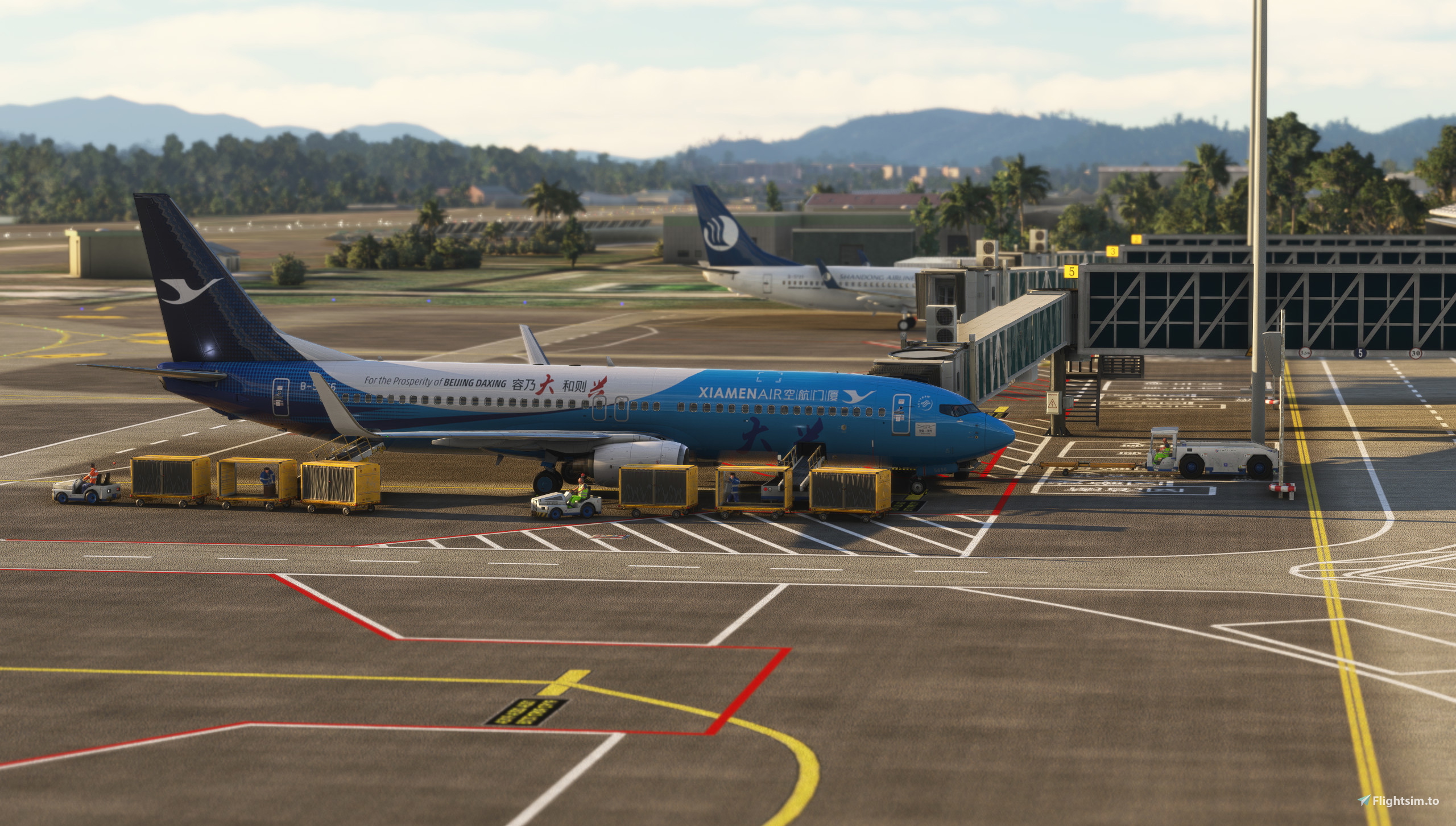
This is a simple version of WUYISHAN Airport,featured with fully fuctional Runway Light system and luminated aprons.The Airport also has a VOR named WUYIHSNA(identifier:WYS,frequency:117.9MHz),RWY03 has an ILS(identifier:IJW,frequency:111.7MHz).I add the apron Nr.1-3,Nr.5-9 and 2 fictional large aprons Nr.1L & Nr.2L(max wingspan:70m).I have also create the GSX profile of this airport,which has been uploaded before.
To install the airport,you just simply need to unzip the files and drag the scenery folders into the Community folder of the MSFS.As I use the jetway of ZSAM and the model of Weilong,you need the SamScene3D ZSAM and J-20 model as well.
To install the GSX profile ,just put the downloaded ZSWY-yyj31ll7.ini file here: %Appdata%/virtuali/GSX/MSFS ,then enjoy your game.
This version of profile only tested using fenix A319\A320\A321 series,PMDG 737-800 series,PMDG 777 series,Headwind A330neo and iniBuild A350 series, other aircrafts will be tested later.
If you have problems installing the scenery,please send a message to me.
Requirements:
J-20 The J-20 (English: Chengdu J-20, codename: Weilong) https://zh.flightsim.to/file/58636/j-20
ZSAM Xiamen Gaoqi airport by SamScene3D https://store.flightsim.to/product/china-the-xiamen-zsam
FSLTL Base Models (installed via FBW installer) https://fslivetrafficliveries.com/
YSSY - SYDNEY (KINGSFORD SMITH) AIRPORT by ASOBO STUDIO freeware in the MSFS marketplace
Attention:
The intersection of the localizer course and the runway centerline extension forms an angle of 1.5°.The intersection point is located 900m before the threshold. After establishing visual contact, apply correction as necessary.
If you using fenix A319\A320\A321 series,ILS 03 is not available as the direction of the airport LOC ingame is disagreed with the navdata,you can only use RNP RWY03(AR) for final approach.
Release Notes:
0.6:Replace the texture of the aprons.Fix some small bugs on the aprons.Add militery aprons of airport.Add more detail to the aprons refer to the reality.
0.5:Add more details to the aprons.
0.4:Add apron Nr.8-9 and a fictional large apron Nr.2L(max wingspan is 70m).Rectify the ILS direction deviation.Complete the self-sliding taxilines of Nr.8-9.A new version of GSX profile that compatible with the airport above 0.4.0.has been released.Pushback is not available in Nr.5-9.Rerectify the direction of ILS03(identifier:IJW,frequency:111.7MHz).The intersection of the localizer course and the runway centerline extension forms an angle of 1.5°.The intersection point is located 900m before the threshold. After establishing visual contact, apply correction as necessary.
0.3:Rectify some small errors.Rectify the position of aprons.
0.2:Replace the texture of runway and taxiway.Add the label to the aprons.Add the edge light of the taxiway.Rectify the ILS direction of RWY03(IJW,111.7MHz).Add static flights to the airport.Add the taxiway signs and runway entry lights.Rectify the error display of apron Nr.3.
This is our QQ group for Microsoft Flight Simulator's Virtual Xiamen Airlines:701748528. Welcome all fellow aviators to join and fly together online.
Dépendances
Location
ZSWY-WUYISHAN Airport(Simple Version)
This add-on provides a simplified version of Wuyishan Airport (ZSWY) with essential features, including a functional runway lighting system and illuminated aprons. The airport offers a VOR station (WYS) and an ILS for runway 03. Included are multiple aprons for various aircraft sizes, along with a GSX profile for enhanced operations. Installation requires J-20 The J-20 (English: Chengdu J-20, codename: Weilong).

Historique des versions
Fix a litte error display in MSFS 2024.The scenery now compatible with MSFS 2024.
Similaires
FIMP-Sea Enhancement for FSDG Mauritius & FIMP
This add-on enhances the FSDG Mauritius and FIMP Sir Seewoosagur Ramgoolam International Airport scenery by addressing missing features such as reef details, shallow water effects, satellite imagery, and the addition of hotels and resorts. Installation involves simply extracting the files and placing them into the MSFS Community folder. The enhancement requires FSDG Mauritius & FIMP Sir Seewoosagur Ramgoolam International Airport v1.6.0 for proper functionality.
par PeterCKing

ZSLO-Liancheng Guanzhaishan Airport(Simple Version)
ZSLO-Liancheng Guanzhaishan Airport is a simplified rendition of Longyan Liancheng Guanzhaishan Airport, featuring a fully functional runway lighting system and illuminated aprons. The airport includes VOR navigation with the identifier LCG (111.0 MHz) and an ILS approach for RWY21 (ILL, 109.9 MHz). It offers multiple general aviation aprons, accommodating aircraft with a maximum wingspan of 18m. Additionally, a GSX profile specific to this airport is provided for enhanced functionality.
par PeterCKing
![FlyByWire-A380 Livery for Xiamen Air [MSFS 2020/24]](https://cdn.flightsim.to/images/27/flybywire-a380-xiamen-b38a1--msfs-363752-1758890131-IJdcz.jpg?width=500)
FlyByWire-A380 Livery for Xiamen Air [MSFS 2020/24]
The FlyByWire A380 XiaMen-B38A1 add-on for Microsoft Flight Simulator features a detailed rendition of the Airbus A380 aircraft. Designed with accuracy and realism in mind, it offers an enhanced flying experience with high-quality textures and dynamic performance. This add-on includes custom systems and functionalities tailored to replicate the aircrafts capabilities. Users can explore a variety of flight scenarios while enjoying a faithful simulation of one of aviations largest commercial airliners.
par PeterCKing

Weather Preset - CAT I/II/III Weather
This add-on provides detailed weather presets for CAT I, II, and III landing conditions in Microsoft Flight Simulator. Each preset is designed to simulate specific minimum visibility and weather criteria, including various configurations for aerosol density, cloud altitude, precipitation, and thunderstorm intensity. Users can easily install the presets by placing the files in the Community folder. Suggestions for further configuration adjustments are welcome.
par PeterCKing
Connectez-vous pour participer à la discussion
Se connecterCommentaires(4)
8 months ago
8 months ago
9 months ago
9 months ago