Flightsim.to
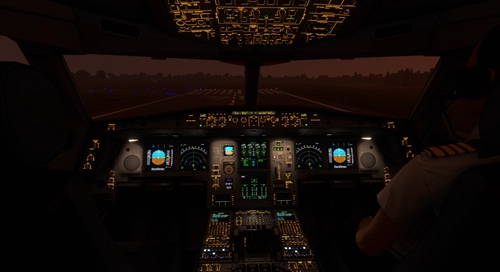
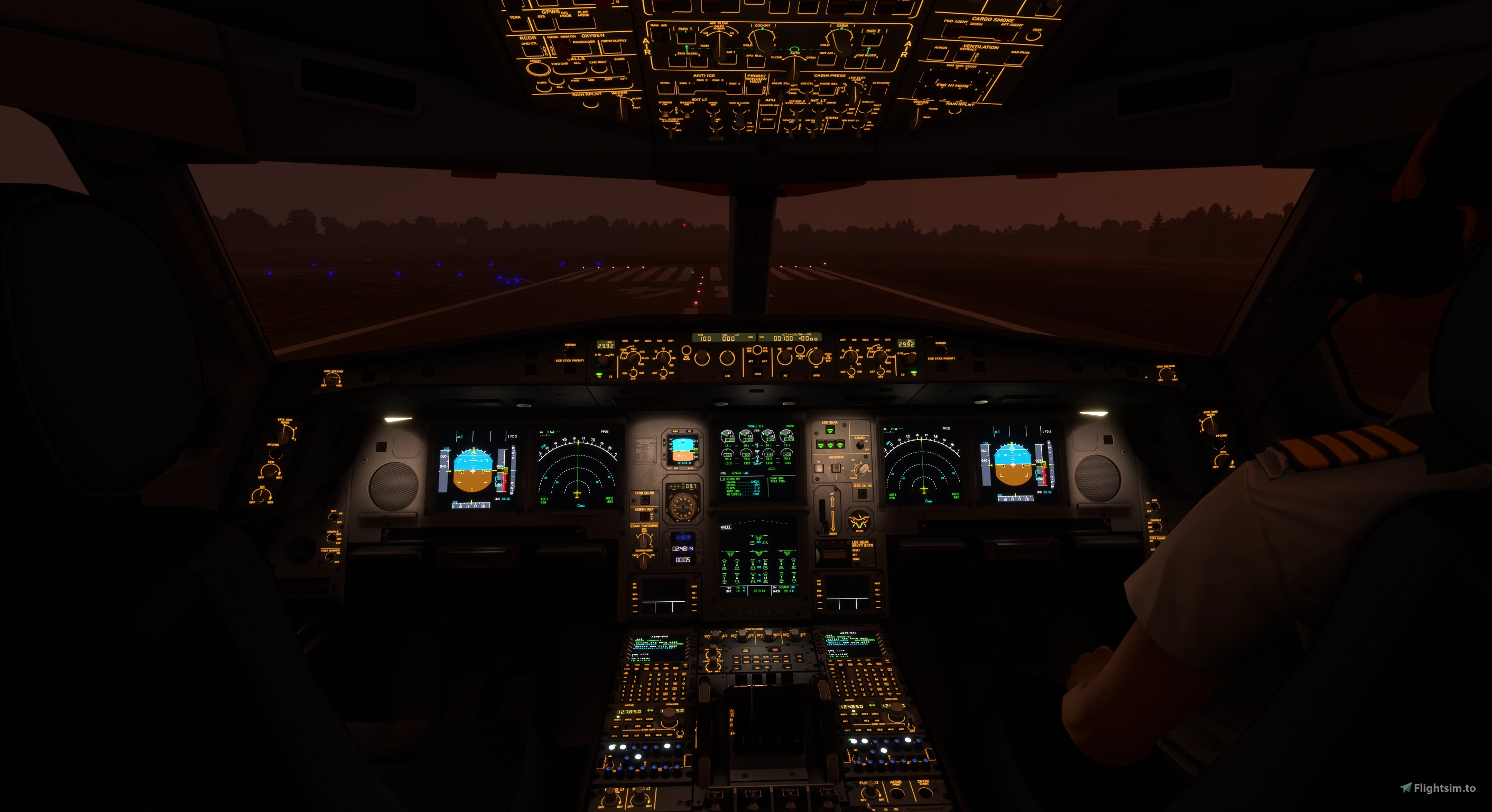
    Aerosoft/Toliss A346 Light Mod - Image 1

    Description

    Aerosoft/Toliss A346 Light Mod

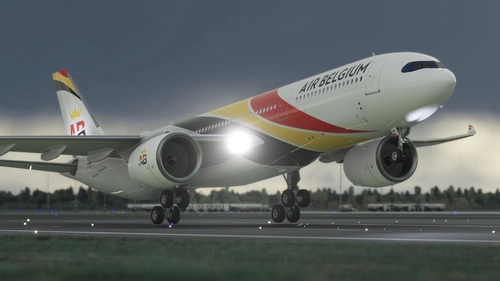
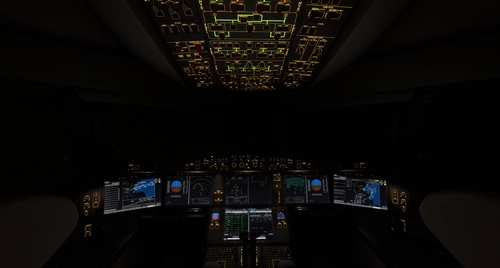
    VC and external light mod for the a346, now with realistic projector-style front panel flood lights. unfortunately, LCD brightness and integral light knobs are not mapped to light potentiometers in the model so cannot modulate brightness with the knob. Beacon effect is also baked

    into the model which is affected by distance (LOD) but this mod adds normal .fx beacons to overcome the issue (will see out of sync/overlapping beacons when up close to the model).

    v2.4

    1) compatibility with release v1.0.3 (FS20, FS24)

    2) FS24 light intensity readjustment

    v2.3

    1) softened projector flood light intensity transition

    v2.2

    1) tweak center floods (L & R same size)

    2) add flood light bounce near the sources

    v2.0

    1) projector-style front panel flood lights

    v1.1

    1) interior light tweaks (integral light illumination around the vc, etc.)

    2) brighter landing lights

    3) taxi light cone adjusted

    4) strobes reworked

    5) smaller white nav lights

    6) fix ghost beacons for fs24

    v1.0

    1) flood light throw pattern and color fixed

    2) LCD panel light emission under and around the glareshield for the volumetric effect (cannot be made responsive to panel brightness knob setting)

    3) flood/integral light bounce to overhead, pedestal, etc.

    4) tweak nav lights

    5) reworked cockpit reading/map/flood lights

    6) beacons are now visible from far distance/zoom out view, light bounce on wings added

    the ambient light levels in this mod were set using the Pimax Crystal Super QLED (local dimming=on) and a Samsung 4k monitor in full screen mode in a dark room.

    To install, place "za340-600_light_mod_fs20" folder in the /MSFS2020/Community folder.

    To install, place "za340-600_light_mod_fs24" folder in the /MSFS2024/Community folder.

    Commentaires(34)

    Connectez-vous pour participer à la discussion

    Se connecter
    X

    about 10 hours ago

    Hello, all the lights in the 1.0.3 version of the plugin are very dim. Could you fix this?
    c

    2 days ago

    Hi again kdfw, so are you saying with Aerosoft 1.03 .. in the day time if you turn the integ knob or glare shield back light knob up and down you can easily see the panels lettering get brighter or dimmer? For me .. in the day time I can barely . and sometimes not at all .. see the lighting change intensity of brightness of the panel lettering. At night though it works great. In Aerosoft 1.02 you could easily see the integ and glare panels back lights working in the day .. which helped a lot on dark stormy days, or flying into the sun. Your mod has nothing to do with this .. and again is brilliant, I was just hoping you might know how to get the old brighter intensity of 1.02's integ and glare panels lighting back :)
    c

    3 days ago

    Hey kdfw .. great update .. works again with my 1.03, and the light refection under the glare shield is just about perfect! Big thanks my friend! Ok now .. I know this has nothing to do with your light mod .. but now in version 1.03 the INTEG light knob on the center pedestal no matter how far turned up is not back lighting the panel lettering anymore during the day like it did in 1.02 .. and its the same with the glare shield panels .. knob fully cranked up no real discernible backlit lettering, this is a big bummer sitting on the ramp under a big dark rain cloud and the panel is all dark except for the DU's .. very unrealistic and an immersion breaker imo, its bad enough Asobo left out the ability to have working panel floods during the day like MSFS 2020 has .. but at least backlighting works in 2024 .. but again no more on the A340 since this latest 1.03 update :( Is this something you have the ability to fix .. get the INTEG backlighting back to the brightness level it was in 1.02? Thanks again for everything!

    Chris
    k
    kdfwAuthor

    3 days ago

    integral lights unaffected by this mod, still work fine for me, fs20 and fs24. enjoy.
    l

    6 days ago

    hey can you fix the cabin lights? they are not working since the 9 jun update
    c

    9 days ago

    Doesn't work with 1.0.3, and Aerosoft didn't fix the lighting .. in fact they made it worse, now the panel lettering backlighting is hardly visible during the day even with the knobs cranked. Only thing we got that I can see is the taxi cam back. Fortunately I backed up the old version and am back to it, looks a lot better with this mod and a couple others here.
    k
    kdfwAuthor

    9 days ago

    v2.4 here works with 1.0.3. sounds like 1.0.3 was a botched release so let's wait for aerosoft to pop out another version.
    r

    6 days ago

    For me, 2.4 isnt working with 1.0.3. But yeah idk how aerosoft could make things even worse...
    X

    13 days ago

    Update compatible version 1.0.3 for MSFS2024 please, thank you!
    c

    24 days ago

    Excellent! You saved my night flying! Are there some lines I can tweak to make the reflection lighting on the underside of the glare shield less bright? They are brighter in my 2024 sim than the example photos here .. and being able to turn the level down a smidge would be great! Big thanks!
    m

    24 days ago

    Hi, sorry one last thing. When I am looking at the plane from the outside plane view, the strobe lights can be seen from a good distance away. However, when I zoom out even a tiny distance, the navigation lights disappear. I need to be zoomed in pretty close to see the navigation lights. Is there some setting I should change? Thanks again for all your help and assitance.
    m

    about 1 month ago

    Hello, excellent work! Quick question, in your screenshots, you have the first officer or co-pilot visible. How were you able to do this as I do not see an option under settings to make the co-pilot visible for this plane? Thank you!
    k
    kdfwAuthor

    about 1 month ago

    there's a way to add copilot in fs20 by modifying the lod0 .gltf file. hesitant to include this in mod as ANY model change update breaks the model and becomes a maintenance headache.
    m

    about 1 month ago

    @kdfw Thank you. Actually, I am using Microsoft Flight Simulator 2024. I was going crazy trying to add the first officer to this plane haha. I didn't realize I had to modify a file. Thanks again for this mod and your response.
    k
    kdfwAuthor

    about 1 month ago

    the mod also works in fs24 as well. i may include them in the next update with a stern warning. best thing is to go to the aerosoft forum and ask the dev to include the option to show the copilot.
    J

    about 2 months ago

    I have already commented on how great this mod is and I love it. Is there any chance of tweaking the top beacon to be more bright and dynamic and the rear strobe if possible. Thanks again for making my flying more fun!
    k
    kdfwAuthor

    about 2 months ago

    top and bottom beacons use the same effects file.
    s

    2 months ago

    What does "fix ghost beacons" mean in the changelog?
    k
    kdfwAuthor

    2 months ago

    fs24's bugged lighting sometimes shows the light source from certain angles.
    MSFS 2020MSFS 2024

    Aerosoft/Toliss A346 Light Mod

    This add-on enhances the lighting for the Aerosoft and Toliss A340-600, improving both virtual cockpit and external lights. It introduces projector-style front panel flood lights and reworks key elements such as strobes, landing lights, and navigation lights. The mod addresses visibility issues with beacons by adding custom effects. Some limitations exist, such as static LCD brightness and light knob controls due to model constraints.


    Téléchargements3K
    Version2.4
    Taille du fichier1.3 MB
    PubliéIl y a 3 mois
    Mis à jourIl y a 1 semaine

    Avis des utilisateurs

    5.0

    9 avis

    5
    100%
    4
    0%
    3
    0%
    2
    0%
    1
    0%

    More Information

    Simulateur
    MSFS2020/24
    Sub-CategoryEnhanced Lighting

    Historique des versions

    1) compatibility with release v1.0.3 (FS20, FS24) 2) FS24 light intensity readjustment

    Similaires

    Inibuilds A350 Aircraft Light Mod

    Inibuilds A350 Aircraft Light Mod

    The Inibuilds A350 Aircraft Light Mod enhances both virtual cockpit and external lighting for the ini A350 aircraft, compatible with MFS2020 and MFS2024. This add-on includes a series of updates that improve light visibility, adjust light intensities, and ensure compatibility with various aircraft versions. Key features include refined internal ambient lighting and external light effects, aimed at providing a more realistic flying experience. Installation is straightforward, requiring placement of the mod into the appropriate Community folder for each simulator version.

    par kdfw
    4.4
    Fenix A319-A320-A321 Cockpit Light Mod

    Fenix A319-A320-A321 Cockpit Light Mod

    Fenix A319-A320-A321 Cockpit Light Mod, provides improved surface illumination through light projection and reflection in the cockpit. This mod includes subtle lighting cues to create a better sense of space and immersion, particularly beneficial for VR users flying at night. Simply place it in your MSFS2020Community folder for installation.

    par kdfw
    4.4
    Asobo Aircraft Dimmable VC flood light mod 6 pack

    Asobo Aircraft Dimmable VC flood light mod 6 pack

    Enhance the cockpit lighting in Microsoft Flight Simulator with the Asobo Aircraft Dimmable VC flood light mod 6 pack V6.0. This mod features improvements for various aircraft including the Boeing 747-8i, Boeing 787-10, and Citation Longitude, with updated light reflections and effects. Easily install this mod to elevate your flying experience by adjusting flood lights, strobes, and more. Explore the enhanced virtual cockpit lighting and make night flights more immersive.

    par kdfw
    5.0
    Flysimware MSFS Lear 35A Lighting Mod

    Flysimware MSFS Lear 35A Lighting Mod

    This add-on for the MSFS Lear 35A enhances the aircrafts lighting systems, including improvements to rotating beacons and strobes. Various versions include fixes for light bounces, adjustments to ambient effects, and compatibility with multiple updates of the aircraft model. Notable features involve dimming adjustments and refined flood light dynamics to create a more realistic visual experience in the cockpit and exterior. Installation is straightforward, requiring placement in the Community folder of MSFS 2020.

    par kdfw

    5.0