
Description
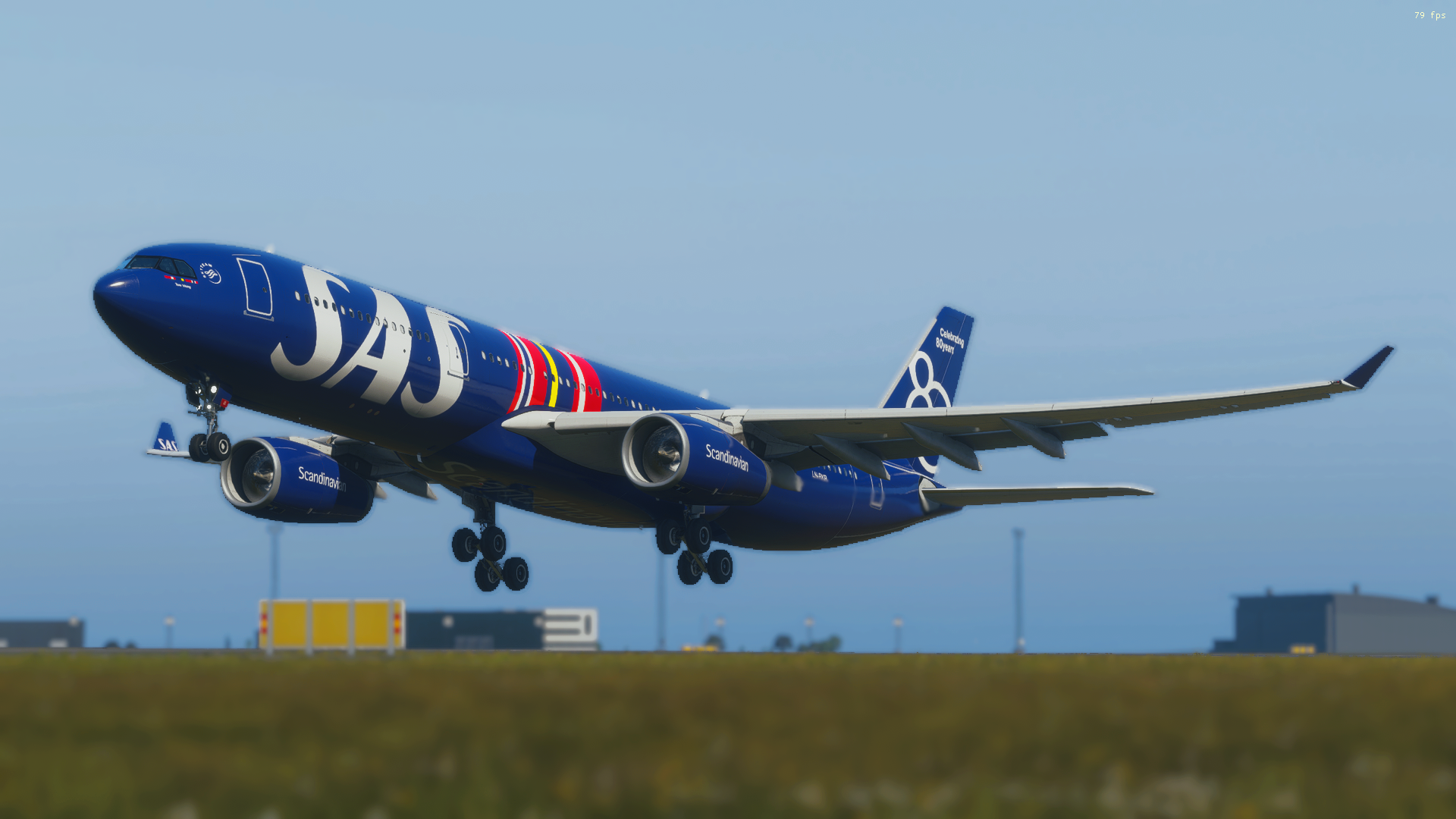
This is a replica of the SAS 80th Anniversary special livery for the iniBuilds Airbus A330-300 in Microsoft Flight Simulator 2024.
In 2026, Scandinavian Airlines celebrates 80 years of connecting Scandinavia with the world. To mark the milestone, SAS unveiled a dedicated livery on Airbus A330-300 LN-RKR, named "Tore Viking." The livery features an all-blue fuselage for the first time in SAS history, building on one of the airline's most iconic design elements. The design incorporates a reinterpreted version of the classic 1980s livery with stylized Scandinavian flags of Denmark, Norway, and Sweden alongside large SAS titles. The tail is decorated with a stylized "80" and the phrase "Celebrating 80 years."
The real aircraft's first flight in anniversary colors went from Copenhagen to New York, echoing the historic route that defined SAS's early international expansion. SAS's story began on September 17, 1946, when the airline launched its first intercontinental flight from Stockholm to New York.
Now you can fly this stunning anniversary livery yourself in MSFS 2024!
Created by Daniich.
Extra Feature
The landing gear wheel rims have been cleaned up by removing the default wear textures, giving them a fresh, brand-new appearance — as if newly fitted wheels have just been installed on the aircraft.
Known Issues
Due to limitations with the current iniBuilds A330-300 paintkit, the logos on the winglets will appear inverted. This is a paintkit issue and not something that can be fixed on the livery side at this time.
Installation Guide
Xbox / Microsoft Store version:
- Download and extract the .zip file.
- Navigate to your Community folder:
%USERPROFILE%\AppData\Roaming\Microsoft Flight Simulator 2024\Packages\Community - Drag and drop the livery folder into the Community folder.
- Launch MSFS 2024 and select the iniBuilds A330-300 — the LN-RKR 80th Anniversary livery will appear in the livery selector.
Steam version:
- Download and extract the .zip file.
- Navigate to your Community folder:
%USERPROFILE%\AppData\Local\Packages\Microsoft.Limitless_8wekyb3d8bbwe\LocalCache\Packages\Community - Drag and drop the livery folder into the Community folder.
- Launch MSFS 2024 and select the iniBuilds A330-300 — the LN-RKR 80th Anniversary livery will appear in the livery selector.
⚠️ Important note: After extracting the .zip file, the folder may be double-nested — meaning there is a folder inside a folder with the same or similar name. Make sure you open it and drag the inner folder into the Community folder, not the outer one. The correct folder typically contains a "layout.json" and a "manifest.json" file at its root level.
Enjoy and happy flying!
80 Year Anniversary | Scandinavian Airlines A330-300E LN-RKR
This add-on brings the SAS 80th Anniversary livery to the iniBuilds Airbus A330-300 in Microsoft Flight Simulator 2024, replicating the special design flown by LN-RKR "Tore Viking." The livery features an all-blue fuselage with reinterpretations of classic SAS elements and stylized Scandinavian flags. It honors SAS's 80 years of operations, referencing historic routes and branding. Installation instructions are included for both Xbox and Steam versions of MSFS 2024.

Avis des utilisateurs
9 avis
Historique des versions
Aucun historique de version disponible.
Présent dans des collections(1)

Similaires
![[A32NX] | [8K] SAS Scandinavian Airlines New Livery (SE-ROJ) Very Detailed Clean/Dirty Version](https://cdn.flightsim.to/images/13/Qn6PVkbC.png?width=500)
[A32NX] | [8K] SAS Scandinavian Airlines New Livery (SE-ROJ) Very Detailed Clean/Dirty Version
This is the new livery from SAS Scandinavian Airlines. The winglets where created with the newest painting technique so they aren't mirrored to get this livery even closer to the real livery. You can download this livery as a clean and a dirty version.
par xRentnerx
![[A32NX] Scandinavian Airlines 8K Beyond Ultra](https://cdn.flightsim.to/images/25/sas-scandinavian-airlines-8k-beyond-ultra-14335-1682180516-uy2mF.jpg?width=500)
[A32NX] Scandinavian Airlines 8K Beyond Ultra
The most detailed A32NX livery made so far: Literally 100s of hours of hard work resulted in a complete 8K rebuild from scratch using Substance Painter / Designer and Photoshop with new mesh merged using Blender and the FBW Exporter, making full use of MSFS PBR Textures and Normal Maps.
par Grinde81
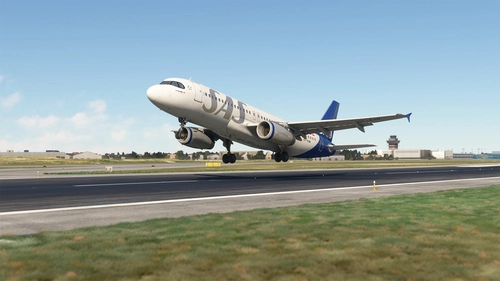
MSFS 2024 Fenix A320 WF Scandinavian Airlines (SAS) 2019 (OY-KAM) CFM with Cabin Interior
Scandinavian Airlines, more commonly known and styled as SAS, is the flag carrier of Denmark, Norway, and Sweden. SAS is an abbreviation of the company's full name, Scandinavian Airlines System[4] or legally Scandinavian Airlines System Denmark-Norway-Sweden.[5] Part of the SAS Group and headquartered at the SAS Frösundavik Office Building in Solna, Sweden, the airline operates 180 aircraft to 90 destinations (as of December 2019).
par SkySim
![A330-900neo Scandinavian Airlines (SAS) [8K]](https://cdn.flightsim.to/images/19/a330-900neo-scandinavian-airlines-sas-8k-LuovU.jpg?width=500)
A330-900neo Scandinavian Airlines (SAS) [8K]
A detailed 8K livery mod for the A330-900neo Scandinavian Airlines (SAS) aircraft. Please note the delay in updates due to personal reasons outlined by the creator. No known issues reported with this livery. If you appreciate the creators work, donations are encouraged.
par WhatzIt2Ya
Connectez-vous pour participer à la discussion
Se connecterCommentaires(29)
about 8 hours ago
about 1 month ago
3 months ago
3 months ago
about 2 months ago
3 months ago
3 months ago
3 months ago
3 months ago
4 months ago
6 months ago
5 months ago
6 months ago
)))
6 months ago
6 months ago
6 months ago
6 months ago
6 months ago