

Description
<div style="width: 100%; max-width: 1200px; margin: 0 auto; background: linear-gradient(135deg, #0A0F1E 0%, #0A1929 100%); border-radius: 24px; overflow: hidden; box-shadow: 0 20px 35px -10px rgba(0,0,0,0.5); font-family: 'Segoe UI', 'Roboto', 'Arial', sans-serif; border: 1px solid rgba(0,168,255,0.3);">
  <!-- Верхняя линия с акцентом -->
  <div style="height: 4px; background: linear-gradient(90deg, #00A8FF, #0055AA);"></div>

  <div style="display: flex; flex-wrap: wrap; align-items: center; justify-content: space-between; padding: 30px 40px;">
    <!-- Левый блок: логотип и название -->
    <div style="display: flex; align-items: center; gap: 20px; flex-wrap: wrap;">
      <div style="background: #1A2A3A; border-radius: 60px; padding: 15px 20px; box-shadow: 0 0 20px rgba(0,168,255,0.3);">
        <span style="font-size: 48px;">✈️</span>
      </div>
      <div>
        <h1 style="margin: 0; font-size: 42px; font-weight: 800; background: linear-gradient(135deg, #FFFFFF, #00A8FF); -webkit-background-clip: text; background-clip: text; color: transparent;">MSFS Ultimate Scanner</h1>
        <p style="margin: 5px 0 0; font-size: 18px; color: #A0B0D0;">by Master SEHNYENY (Pterodacktell)</p>
        <div style="margin-top: 8px; display: flex; gap: 12px; flex-wrap: wrap;">
          <span style="background: #00A8FF20; color: #00A8FF; padding: 4px 12px; border-radius: 20px; font-size: 13px; border: 1px solid #00A8FF40;">✓ ICAO Conflict Detector</span>
          <span style="background: #00A8FF20; color: #00A8FF; padding: 4px 12px; border-radius: 20px; font-size: 13px; border: 1px solid #00A8FF40;">✓ JSON Validator</span>
          <span style="background: #00A8FF20; color: #00A8FF; padding: 4px 12px; border-radius: 20px; font-size: 13px; border: 1px solid #00A8FF40;">✓ Smart Auto‑Fix</span>
          <span style="background: #00A8FF20; color: #00A8FF; padding: 4px 12px; border-radius: 20px; font-size: 13px; border: 1px solid #00A8FF40;">✓ 8 Languages</span>
        </div>
      </div>
  </div>

  <!-- Блок слогана и статистики (пример) -->
  <div style="background: rgba(0,0,0,0.3); padding: 20px 40px; border-top: 1px solid #1F2A40; border-bottom: 1px solid #1F2A40; display: flex; flex-wrap: wrap; justify-content: space-between; align-items: baseline;">

    <div style="font-size: 16px; color: #CCDDFF;"><span style="color: #00A8FF;">✈</span> «Flight safety is our profession»</div>

    <div style="font-size: 14px; color: #80A0D0;">📊 Scans 3000+ addons in seconds | 🛠️ Mode Control Panel Interface | 📑 HTML Reports</div>
  </div>

  <!-- Нижний колонтитул -->
  <div style="text-align: center; padding: 16px 20px; font-size: 12px; color: #6080B0; border-top: 1px solid #1F2A40; background: #07111F;">
    Supports MSFS 2020 & 2024 | Freeware | Version 6.1
  </div>
</div>

<!-- Пространство под баннером -->
<div style="height: 20px;"></div>"""
✈️ MSFS Ultimate Scanner v6.1Professional Addon Conflict Detector for MSFS 2020 & 2024
by Master SEHNYENY (Pterodacktell)
📌 Overview
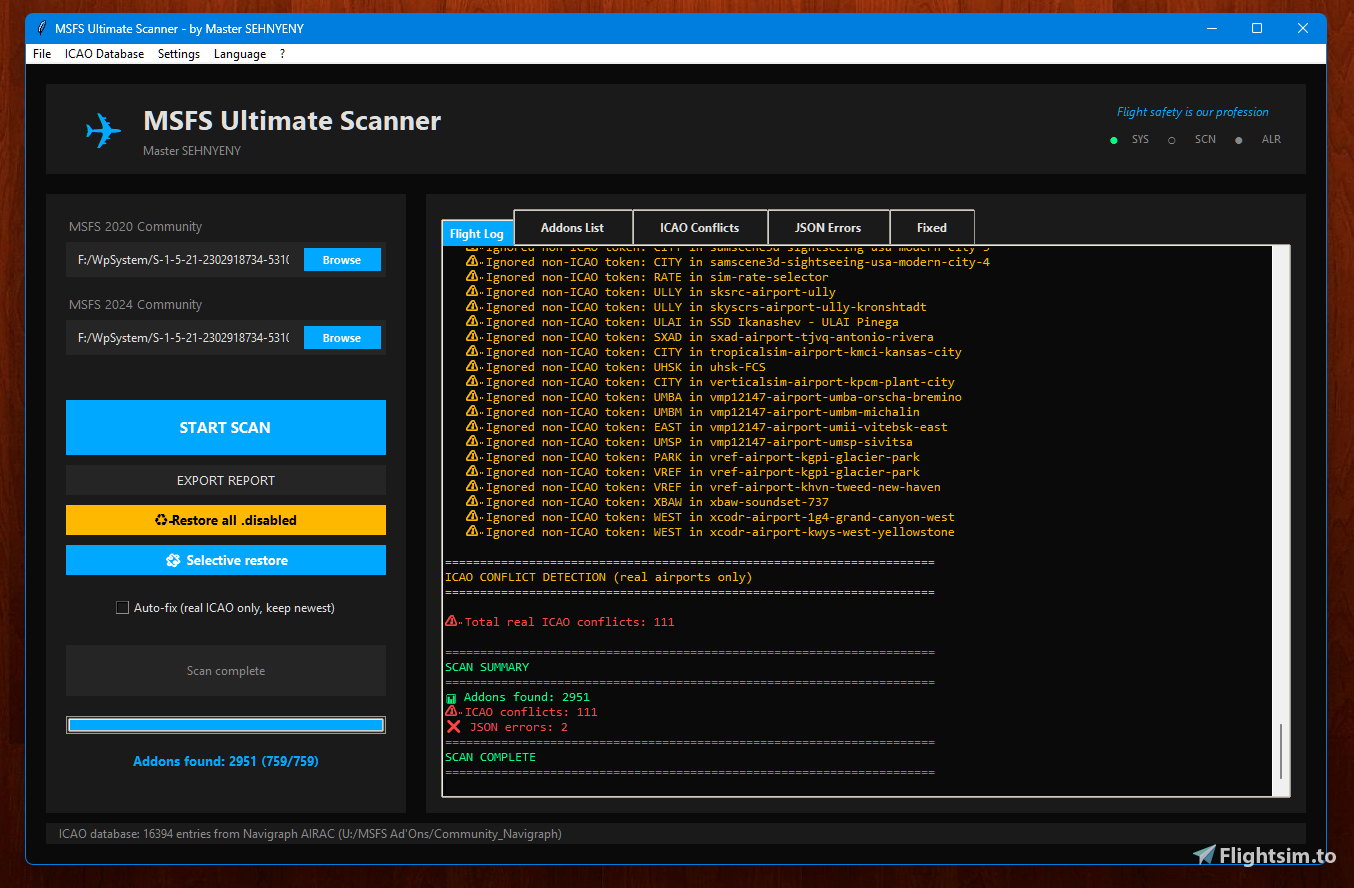
MSFS Ultimate Scanner** is a professional tool for detecting and automatically resolving conflicts between addons in Microsoft Flight Simulator 2020 and 2024. It scans your Community folder, finds duplicate airports (by ICAO codes), validates JSON files manifest.json, layout.json), and can automatically disable older duplicates, keeping the newest versions.
The program features a modern dark interface with 8 languages, and five detailed result tabs.
✨ Key Features
Feature Description:
🔍 ICAO Conflict Detection
Scans folder names and .bgl.xml files, extracts 4‑letter codes, filters false positives (LAKE, USFS, ROAD, etc.) and checks against a real ICAO database (import from Navigraph AIRAC or SimConnect).
✅ JSON Validation
Checks existence and correctness of manifest.json and layout.json. On error, displays **cause → consequence → solution**.
🔧 Smart Auto‑Fix
For each conflicting ICAO, keeps only the addon with the highest version (from manifest.json). Others are renamed to name.disabled.
♻️ Restore disabled addons
Two buttons: “Restore all .disabled” (removes .disabled suffix from every folder) and “Selective restore” (checkbox list). |
📊 Detailed HTML report
Exports scan results to a professional HTML file – statistics, conflict lists, versions, and detailed JSON error explanations. |
🎨 6 Color themes
MSFS 2024, Steampunk, Dark Mode, Light Mode, Vintage Wood, Matrix. Fully themed tabs and progress bar. |
🌍 8 languages
English, Deutsch, Français, Español, Russian, 中文, 日本語, العربية.
🗺️ ICAO database import – **SimConnect**
(live extraction from running MSFS).
Navigraph AIRAC folder
(point to your Navigraph data – scans for ICAO codes). |
📖 Installation & Usage
Installation:
1. Download the archive with MSFS_Ultimate_Scanner_v6_1.exe.
2. Extract to any folder (e.g., C:\MSFS_Scanner).
3. **Run as Administrator** (required to read Community folder).
First run:
1. Click **“Browse”** next to “MSFS 2020 Community” and select your ...\Community folder.
2. Do the same for “MSFS 2024 Community” (optional).
3. **(Recommended)** Import ICAO database via **“ICAO Database”** menu:
**Update from SimConnect** – start MSFS, then click this button.
**Import Navigraph AIRAC folder** – select your Navigraph data folder (scans .bgl, .dat, .csv).
Scanning
1. Click “START SCAN”.
2. Monitor progress.
3. After completion, review the tabs:
**ICAO Conflicts** – duplicate airports with versions.
**JSON Errors** – detailed issue descriptions.
**Fixed** – auto‑fix log.
Auto‑Fix
- Check “Auto-fix” in the left panel.
- Run scan again.
- The tool keeps the highest‑version addon for each conflicting ICAO and disables others (adds .disabled).
Restoring
- “Restore all .disabled” – renames every .disabled folder back.
- “Selective restore” – opens a dialog with checkboxes; select and restore only what you need.
Export Report
- Click “EXPORT REPORT”.
- Choose a location for the HTML file.
- Open in any browser.
💻 System Requirements
Component Minimum:
Windows 10 / 11 (64-bit)
MSFS 2020 or 2024
*Disk space - 50 MB
*Privileges - Administrator (to access Community folder)
*Optional SimConnect for SimConnect feature
❓ FAQ
Q: Why doesn’t the program see some of my addons?**
A: Verify the correct Community folder path. Marketplace addons (Official folder) are not scanned. Folders with .disabled suffix are ignored.
Q: All addons show version 0.0.0 even though manifest.json contains a version.**
A: Version 6.1 looks for multiple keys: version, Version, packageVersion, package_version, ver. If your addon uses a different key, please report it.
Q: Can I use the tool for both MSFS 2020 and 2024 at the same time?**
A: Yes, provide both paths. Conflicts are handled independently.
Q: What if Auto‑fix disabled a necessary addon?**
A: Click **“Restore all .disabled”** – all folders return to original names. Or use selective restore.
Q: Why are no ICAO conflicts shown in the report?**
A: You probably haven’t imported the ICAO database. Without it, the tool only uses heuristics (search for APXairport files). Import via “ICAO Database” menu.
Q: Does the tool slow down the simulator?**
A: No, it runs only manually and doesn’t stay in memory.
Q: Is Auto‑fix safe?**
A: Yes, it only renames folders (adds .disabled). You can always restore them.
📜 License & Credits
**Freeware**. You may use, copy, and distribute freely while retaining the author’s name **Master SEHNYENY (Pterodacktell)**. Commercial resale is prohibited.
Special thanks to the MSFS community and Navigraph for their data.
---
✈️ Flight safety is our profession! ✈️
Version 6.1 – May 2026
Download from the Files tab above.
MSFS Ultimate Scanner v.6.1
MSFS Scanner is a utility designed to identify conflicts in Microsoft Flight Simulator 2020 and 2024 add-ons. The program can be run from any location after specifying the simulator add-on folders. It helps users manage and troubleshoot their add-on installations efficiently. The auto-fix mode will simply disable the problematic modules, and for a complete solution you will need to decide on your own what to do using the log file or the list specified in this program. No special installation process is required.


Avis des utilisateurs
3 avis
Historique des versions
Aucun historique de version disponible.
Similaires

PMDG 737800 AEROFLOT 1980
This add-on features a lightweight livery for the Boeing 737-800, themed after Aeroflot in the 1980s. Designed at the request of users, it presents a unique reimagining of the aircraft as if produced during the Cold War era. Future updates aim to enhance the livery with 8K textures and refined font details.
par Storm

Aeroflot USSR 1980 Fiction Livery
A fictional livery for a Boeing 777-300 imagining Aeroflot in the USSR era. Fly this unique livery and bring a touch of retro nostalgia to your MSFS experience. Beta version available for testing in the Community folder - leave your feedback for future updates.
par Storm (Master SEHNYENY)

Aeroflot USSR
This add-on features a detailed Aeroflot livery inspired by the USSR, designed for the aircraft equipped with the PS-90 77 engine. Currently in beta testing, it aims to enhance the experience for Aeroflot enthusiasts. The package includes artistic elements reflective of the airlines historical branding and is intended for users seeking to immerse themselves in Aeroflots legacy within Microsoft Flight Simulator.
par Storm

Fenix A-320 Livery Aeroflot USSR
This add-on features a custom Aeroflot livery for the Fenix A-320, designed to reflect what an A320 might have looked like if it had been created as a gift for the USSR by the European Union. Users can enjoy a unique and historically inspired visual experience while flying in Microsoft Flight Simulator.
par Storm
Connectez-vous pour participer à la discussion
Se connecterCommentaires22
Ce commentaire a été supprimé
Ce commentaire a été supprimé
Ce commentaire a été supprimé