
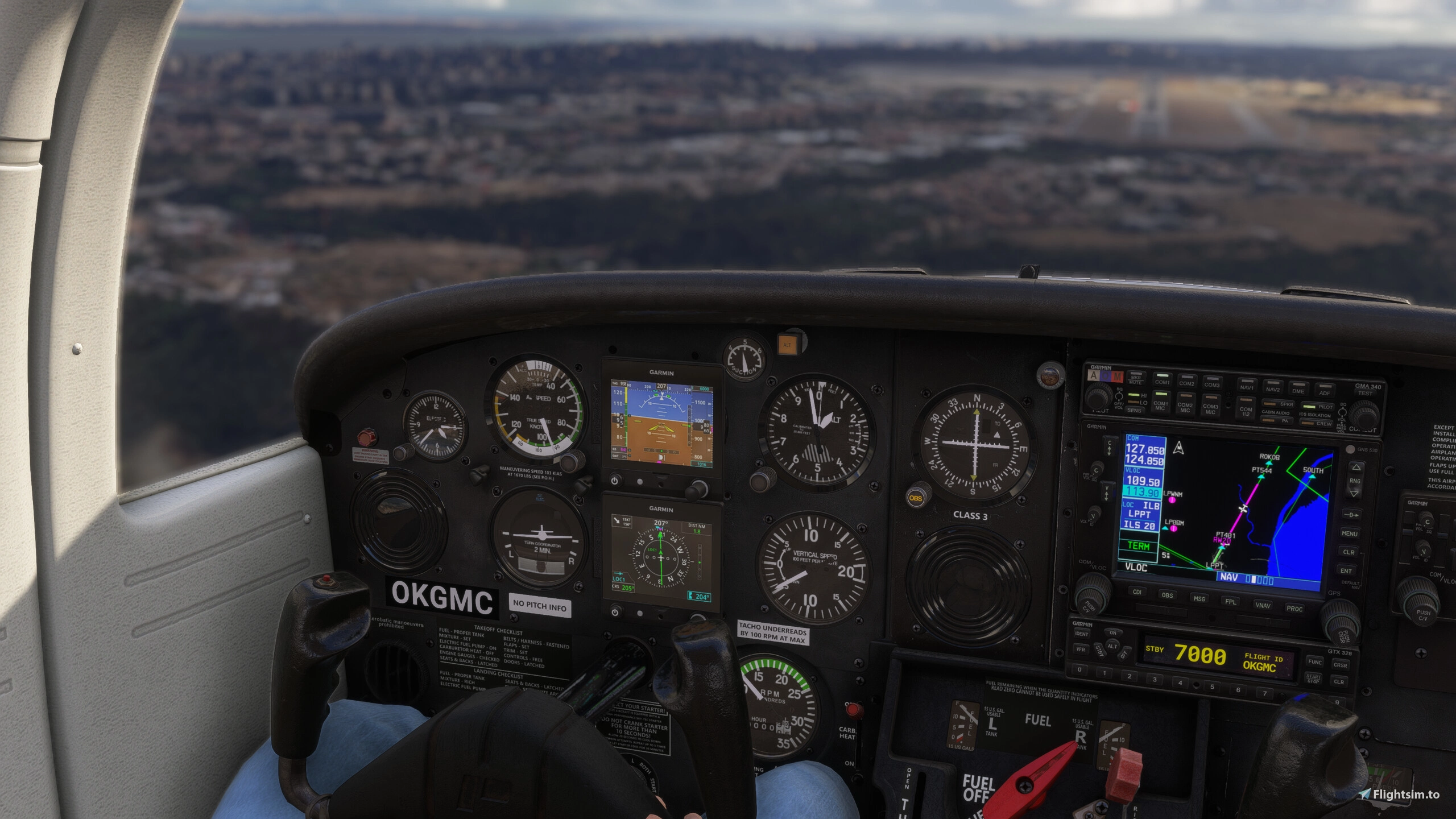
Description
This addon is based on the original addon by tb110188 and Sal1800: Enhanced Garmin G5 Attachment.
I started this project while training for my instrument rating to familiarize myself with the avionics used in the plane I fly in real life. As the original plugin by tb110188 and Sal1800 lacked many IFR-essential features and differed visually in some ways, I first modified the original source files, but eventually decided to completely rewrite it natively for the MSFS 2024 using the new SDK.
Installation
As a community addon, place the addon folder into your MSFS Community folder, or use a tool like MSFS Addons Linker to manage your addons.
After installation, you should see the C172 (and other supported aircrafts) with enhanced G5 avionics in the variants configuration or the separate aircrafts, for the planes which don't have native MSFS 2024 support.
Supported aircrafts
- Asobo Cessna 172SP
2 new presets for the classic C172, with Analog gauges combined with G5 and IFD variant with G5.
- Asobo Cessna 152
A new preset for the C152, replacing the attitude indicator and directional gyro with G5.
- Microsoft Cessna 185F Skywagon
A new preset for the C185F, replacing the attitude indicator and heading compass with G5 PFD and MFD.
- Microsoft Piper PA28-236 Dakota
A new preset for the Dakota, replacing the attitude indicator and HSI with G5.
- Just Flight's PA28 Warrior II (version 0.4.4)
A new aircraft type inheriting from JF PA28. Tested in combination with GTN units.
- Just Flight's PA38 Tomahawk (version 0.1.5)
A new aircraft type inheriting from JF PA38. Tested in combination with GTN units.
- Carenado's C182 RG II (version 1.0.2)
A new aircraft type inheriting from the Carenado C182RG, replacing the AI and HSI.
The issue with custom variants for third-party aircrafts, such as PA28/38 is that any update to the base aircraft can break the G5 unit. Due to that, it's better to request support for custom variants directly from manufacturer of the aircraft. Once the addon is installed, for the third-party aircrafts (PA28, PA38 and C182 RG II), there will be a new aircraft type based on original plane available list. For the classic C172, new variants are available in the aircraft configuration.
PFD
I tried to make the PFD features and visuals as close to the real G5 (the one I use in real life) as possible, even though there are some compromises, e.g., due to the different screen aspect ratios. As I fly in Europe, the baro uses hPa as a default, but it's configurable via PFD setup page.
A few things that were added/redesigned:
- Reference speed badges (Vy, Vx, Vg, Vr)
- Speed tape design
- Turn & Slip indicator including Rate-1 turn indications on attitude indicator
- Ball, CDI and VDI visual
- Vertical speed indicator
- QNH in hPa and inHg (via PFD setup page)
- Horizontal compass displays varios info, such as ground track or nav course
- AP info box which displays when AP is active (or any annunciation is available)
- Flight director, for aircrafts which support it. As of now only MSFS 2024 native C172SP supports it.
- OAT box below the ground speed, in °C or °F (toggled via Setup → OAT Units)
- TAS box at the top of the airspeed tape (toggled via Setup → TAS)
For AP there are currently only basic modes available and none FD, because none of the aircraft has more complex AP (such as GFC500) available, which would have this functionality.
MFD
The MFD tries to mimic the MFD I use in real life as well; however there are more configuration options and navigation modes, which depend on avionics integration. For example, as the C172 model from Asobo lacks a standalone DME, I decided to keep the HSI waypoint distance visible for VLOC mode as well, even though normally it should not be displayed.
A few things that were added/redesigned:
- Bearing pointers and their setup in the menu
- Menu, submenus and dropdowns, e.g. to select bearing pointer source
- OBS course selector
- Heading vs track indication
- VDI
- DTK/CRS modes in lower left panel
- NAV mode and phase indications
- GPSS mode, which simulates the GPS steering by adjusting the heading
- Wind box in the top left corner, showing wind direction arrow, speed and direction (toggled via Setup → Wind). The wind data is shown only when airborne with TAS of at least 30 kt, otherwise
NO WIND DATAis displayed.
Setup Page Differences
On the real G5, the OAT, TAS and wind displays are enabled in the installer configuration mode, not in the pilot-accessible setup menu. As the simulated unit has no configuration mode, these options were added to the PFD and MFD setup pages instead.
For more information and any requests, please visit my project repository at https://github.com/johnygomez/msfs-garmin-g5-ifr and give it a star if you like it :)
In case you want to report bugs and problems, or OTOH request support for new aircrafts and add features, please open the issue in the Github repository.
Known Issues
- The exterior view of our custom Carenado C182 RG II aircraft, the cockpit texture is not loaded properly, as incompatibility with MSFS 2024 LOD logic breaks the chain. As a result, the interior is visible only when zoomed in. Any modifications to LOD mechanism/minSizes are ignored.
- The IFD and legacy MSFS 2020 GPS integrations are a little buggy. They probably don't write the new MSFS 2024 SimVars and as a result, it's not possible to resolve the GPS mode (CDI scale) properly. As a result, the MFD says GPS is in e.g. ENR route, when TERM should already be there. To avoid the issue, I recommend using PMS and modern MSFS 2024 GPS variants.
On Just Flight's PA28 Warrior II, the aircraft doesn't allow adding custom electrical circuits, so both G5 units have to share one of its existing ones. As a result, pressing the power knob on either unit turns both G5s on or off at the same time.
Support the Project ☕
Garmin G5 IFR is free and will stay free. All features are available to everyone, whether or not you donate.
If you enjoy it and want to support its development, you can make a voluntary contribution. Donations go toward purchasing aircraft for MSFS 2024 so I can build and test G5 support for them. Many of the most requested planes are payware, and I can't develop or test compatibility without owning them.
Garmin G5 IFR
This add-on provides a native MSFS 2024 implementation of the Garmin G5 avionics suite, tailored for IFR training and usage. It features an enhanced PFD with realistic reference speeds, turn indicators, and a redesigned speed tape. The MFD includes customizable bearing pointers, advanced menu options, and improved navigation display elements. Designed for the C172, it aims to closely replicate real-world Garmin G5 functionality.


Avis des utilisateurs
17 avis
Historique des versions
This is a small bugfix release, which should isolate the plugin from conflicting with other G5 addons touching the same base simulator files. What changed - fix: 🐛 The simulator no longer carries and overrides a global AS5 file, which other G5s could also be overriding
Connectez-vous pour participer à la discussion
Se connecterCommentaires(148)
5 days ago
5 days ago
7 days ago
5 days ago
9 days ago
Ce commentaire a été supprimé
11 days ago
11 days ago
Additionally, the aircraft with the black cockpit shown in the screenshot is the Just Flight PA-38 Tomahawk. There is no Cessna 152 in the screenshot. However, if you install this mod, you will also be able to use the G5 in the Cessna 152.
12 days ago
12 days ago
It could be a conflict with some other addon or keyboard binding though.
12 days ago
Of course, I also tried reinstalling the game and tested it with a completely clean setup, including an empty Community folder. The issue still occurs under those conditions.
I would appreciate it if you could test this in Legacy mode following the steps I described above.
11 days ago
13 days ago
The same thing happens with the PFD knob. When I turn the knob, the heading bug rotates at the same time.
I'm not sure whether this issue was introduced with the latest Sim Update or if it has been present for a while.
I'm curious if anyone else is experiencing the same problem, or if it's just me.
16 days ago
16 days ago
16 days ago
18 days ago
18 days ago
Just so it’s clear: this is a free project and I’m not selling support for any aircraft. Donations are voluntary and don’t buy support for a specific plane. If it works out, I’ll be glad to add it!