
Description
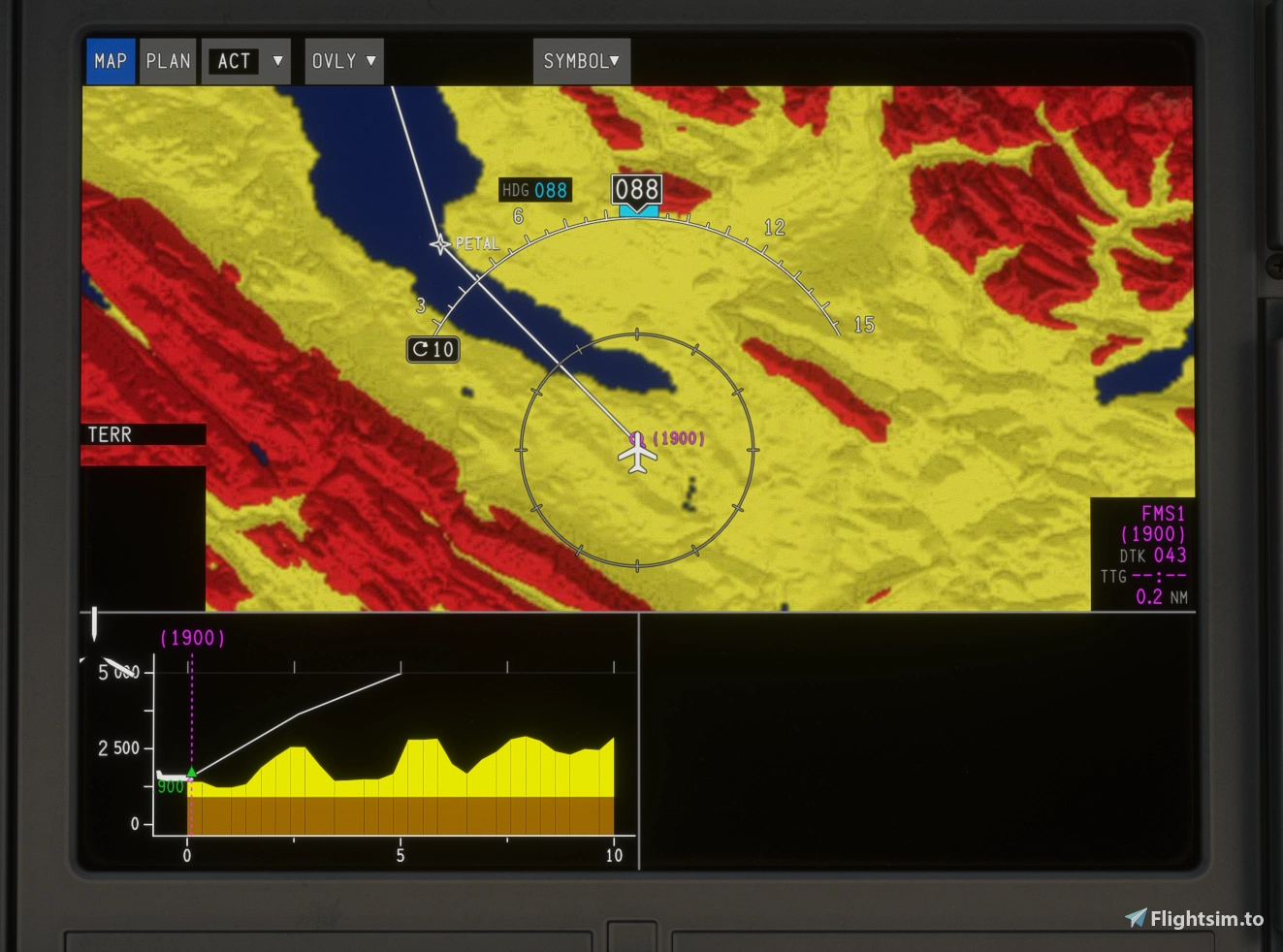
Adds terrain on VSD for the A220.
Only works for 2024 because only 2024 has the necessary API call.
Any feedback please let me know. Thank you.
Drag and drop into community
Currently not compatible with cpdlc mod
I have removed the WXR element, as Fulop has done a much better job.
We have worked together to make the mod compatible with each other.
Download his work: https://flightsim.to/addon/115905/weather-radar-for-synaptic-a220
And use this mod for the VSD.
Terrain on VSD For Synaptic A220
This add-on enables terrain display on the Vertical Situation Display for the Synaptic A220 aircraft. Compatibility is limited to Microsoft Flight Simulator 2024 due to required system calls. The modification enhances situational awareness by adding elevation data visualization. User feedback is welcomed by the developer.
Avis des utilisateurs
4 avis
Historique des versions
Removed WXR Element Works with FULOP WXR mod.
Connectez-vous pour participer à la discussion
Se connecterCommentaires(48)
23 days ago
about 8 hours ago
9 days ago
EDIT: I found that it was the FulopD wxr mod that was renaming the texture and breaking GlassOut.
7 days ago
17 days ago
All three addons provide their own `DisplayUnits/instrument.html`, so the startup path depends on which package takes priority. There was already some integration: WXR loads ACARS, and ACARS automatically loads GM5. Simply merging all their script imports would therefore risk initializing GM5 twice.
The correction involves three files:
- **`instrument.html`**: one shared entry point loads GM5, ACARS and WXR/VSD in a fixed order, followed by Synaptic’s native `instrument.index.js`. The separate GM5 and WXR DisplayUnits host scripts are no longer used.
- **ACARS `plugin.js`**: its automatic GM5 loader now checks whether GM5 has already started.
- **`gm5-a220-amm.js`**: an initialization guard prevents a second execution from creating duplicate map instances, timers, animation loops and TLAF processing.
The package’s `layout.json` and `manifest.json` were also rebuilt. The WXR/VSD scripts, CTP controls and both WASM modules were preserved unchanged.
This addresses the overlapping startup mechanisms without attributing the issue to one addon alone. The duplicate-initialization risk was verified during integration testing; it was not established as the cause of the original installation’s behavior.
All three addons are now working together on my installation.
For making this compatibility fix available to other users, I see three possible approaches:
1. **A combined package, with permission from all three developers.** With your approval to modify and redistribute the three addons together, I could share the package with users who want to run all three simultaneously. The main challenge would be ongoing maintenance: without access to your original source projects and build environments, future updates would need to be reviewed and the compatibility changes reapplied or adapted.
2. **Coordination between the three developers.** You could agree on a shared loading mechanism and integrate the necessary changes into your respective addons. Each addon would remain independently distributed and maintained by its author. This would probably be the most sustainable solution.
3. **A standalone Windows batch patcher, with your permission.** If all three developers approve the modifications to their files, I could provide a batch tool that applies the corrections to users’ own installed copies. Users would download the original addons from your respective pages, and the patcher would contain no complete addon files. It would create backups, support restoration and verify compatible versions before applying changes. Future addon updates could still require an updated patcher.
15 days ago
18 days ago
https://flightsim.to/addon/114744/a220-airport-moving-map
16 days ago
19 days ago
18 days ago
17 days ago
23 days ago
24 days ago
23 days ago
24 days ago
24 days ago
24 days ago
24 days ago
24 days ago
Returning to normal after removing this file from community folder