
Flightsim.to
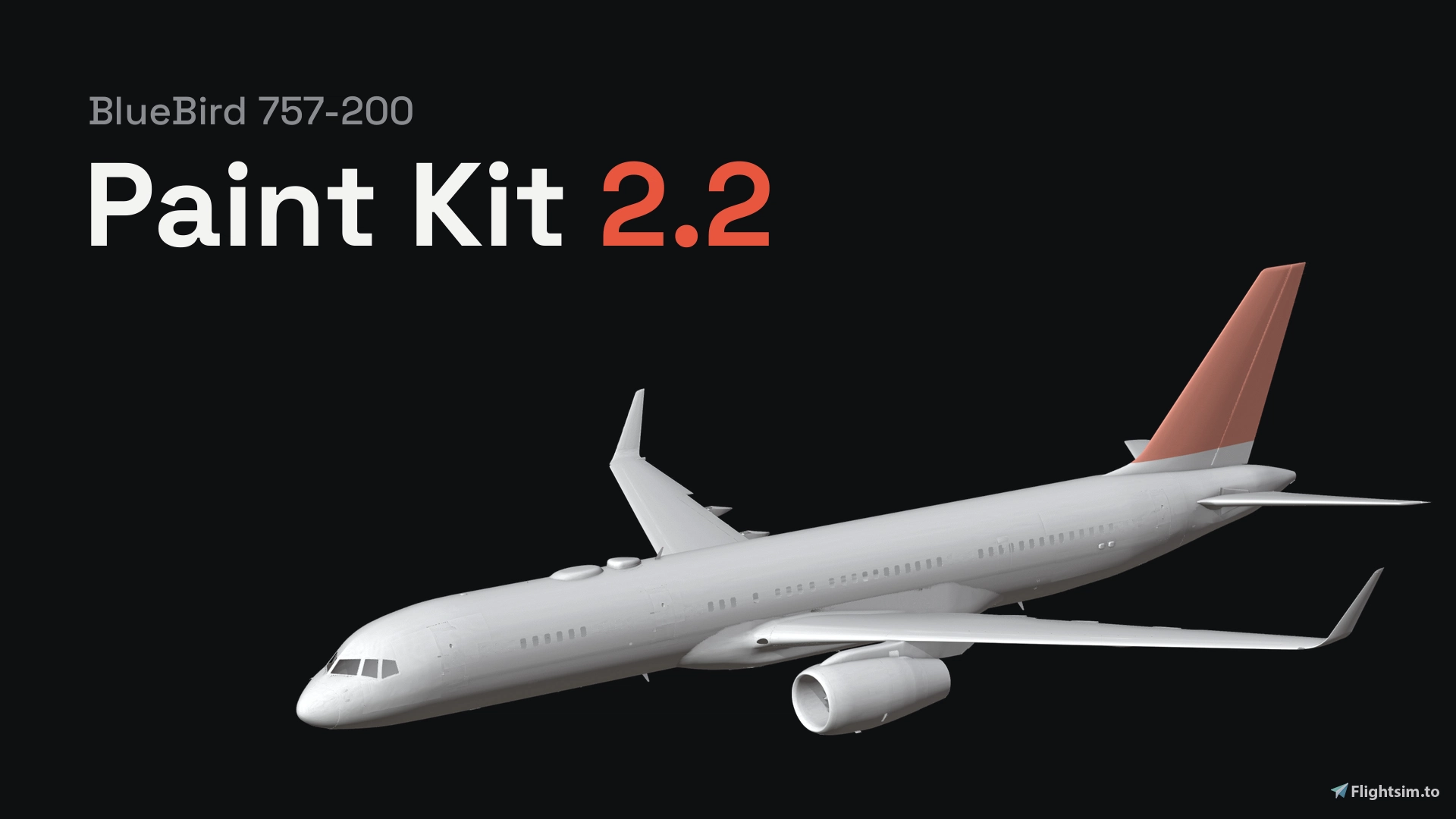
    Unofficial BlueBird 757-200 Paint Kit 2.2 (Blender add-on, Substance Painter, PNG) - Image 1

    Description

    This is a paintkit for painting the BlueBird 757-200, both the RR and the PW. 2.2 version is a full rewrite to solve problems with the previous version. Now It's a Blender add-on.

    Install:

    To install, drag the zip into Blender (don't unzip it), press N in the 3D view and open the 757 Paint Kit tab.

    • Close the sim and hit Set up the kit.
    • It reads the 757 from your Community folder and builds the paint project and the pictures on your PC and it takes 10 to 15 minutes the first time.
    • None of BlueBird's files are in the download.

    Info:

    • You can paint right on the plane in Blender, or paint the pictures in the Paint folder in Photoshop, GIMP or Krita. If you use Substance Painter, tick the box before setup and you get a Painter project too, with guides and two of BlueBird's liveries for reference.
    • You will still need Blender to make the livery.
    • When you're happy with it, type your registration and press Make the livery. Your paint gets merged with BlueBird's textures at full resolution.
    • You can build for the

      RR, the PW or both + the no-winglet and four-door versions. Your registration and SELCAL go on the cockpit plate, and you can recolor the cargo door plate if you want.

    Requirements:

    You'll need the BlueBird 757-200, MSFS 2024, Blender 4.2 or newer and about 8 GB of space. There's a beginner guide in the panel under More options and help, and if something breaks, send me the log from there.

    This is unofficial, not made or supported by BlueBird. Please share your liveries, not the kit folder or the .blend, since the model and textures are BlueBird's.

    Activité des interactions
    TéléchargementsCommentairesÉchelles distinctes pour les téléchargements et les commentaires
    21 oct. Téléchargements: 0 Commentaires: 022 oct. Téléchargements: 0 Commentaires: 023 oct. Téléchargements: 0 Commentaires: 024 oct. Téléchargements: 0 Commentaires: 025 oct. Téléchargements: 189 Commentaires: 9 Retour: 5 Bug: 3 Général: 126 oct. Téléchargements: 132 Commentaires: 2 Bug: 1 Question: 127 oct. Téléchargements: 74 Commentaires: 2 Bug: 1 Question: 128 oct. Téléchargements: 85 Commentaires: 1 Question: 129 oct. Téléchargements: 52 Commentaires: 1 Question: 130 oct. Téléchargements: 36 Commentaires: 1 Bug: 131 oct. Téléchargements: 26 Commentaires: 2 Retour: 1 Bug: 101 nov. Téléchargements: 28 Commentaires: 1 Retour: 102 nov. Téléchargements: 25 Commentaires: 003 nov. Téléchargements: 17 Commentaires: 004 nov. Téléchargements: 18 Commentaires: 1 Question: 105 nov. Téléchargements: 12 Commentaires: 006 nov. Téléchargements: 13 Commentaires: 1 Bug: 107 nov. Téléchargements: 5 Commentaires: 008 nov. Téléchargements: 13 Commentaires: 009 nov. Téléchargements: 10 Commentaires: 1 Question: 110 nov. Téléchargements: 10 Commentaires: 2 Question: 211 nov. Téléchargements: 35 Commentaires: 1 Retour: 112 nov. Téléchargements: 23 Commentaires: 2 Retour: 1 Bug: 113 nov. Téléchargements: 21 Commentaires: 014 nov. Téléchargements: 17 Commentaires: 015 nov. Téléchargements: 15 Commentaires: 016 nov. Téléchargements: 10 Commentaires: 017 nov. Téléchargements: 6 Commentaires: 018 nov. Téléchargements: 4 Commentaires: 1 Général: 119 nov. Téléchargements: 0 Commentaires: 0
    21 oct.04 nov.19 nov.
    876
    Téléchargements
    28
    Commentaires
    Dernier commentaire aujourd’hui
    Le créateur répond à 46% des commentaires

    Connectez-vous pour participer à la discussion

    Se connecter

    Commentaires55

    Commentaire épinglé
    DashyDoggoAuthorGénéral·6 days ago
    Hi everyone, thanks for all the support and feedback. I'm having trouble enabling donations through flightsim.to, so I am linking my Ko-Fi for those that have requested to donate, thanks 💙

    https://ko-fi.com/dashydoggo
    liverydo
    Général·about 1 hour ago
    Amazing Work
    DashyDoggoAuthorGénéral·6 days ago
    Hi everyone, thanks for all the support and feedback. I'm having trouble enabling donations through flightsim.to, so I am linking my Ko-Fi for those that have requested to donate, thanks 💙

    https://ko-fi.com/dashydoggo
    chesareBug·7 days ago
    the tire shows out of the door , and some times its hard to paint that part because the whole nose landing gear it takes some color
    DashyDoggoAuthor·6 days ago
    door variant and gear door issues fixed
    chesare
    Retour·7 days ago
    great job , i dont see the donation button
    InigoRV
    Retour·7 days ago
    I really appreciate your har work delivering this paintkit to all of us. I wanted to let you know that there are some parts missing nearby the 1 and 4 doors. I'll attached the picture whre you could see the "hole" in the 3D model. Maybe someone has found out how to resolve it.

    Thank you!!
    chesareQuestion·9 days ago
    how can i remove the wingletsa from my livery thaks
    DashyDoggoAuthor·8 days ago
    Paintkit updated, check it out
    chesareQuestion·9 days ago
    there is a like bubble in the nose landignf gear door and i cano not paint that any chance to know how to fiex it ? thnaks
    chesareQuestion·10 days ago
    Hey everyone! I’m working on a TAESA livery for the BlueBird 757 in Blender. I’ve got the base textures painted, but I’m having trouble adding the logos and markings. When I apply a PNG using the stencil, the colors come out noticeably more washed out than in the original image.

    Has anyone found a good way to place logos directly on the 3D model without using a stencil and still get them onto the final texture? Or, if you use the stencil, what settings or workflow help you keep the original colors?

    If anyone’s willing to walk me through how they do it, I’d really appreciate it. I can share screenshots of my setup and how the logo looks after applying it. Thanks!
    Wolf_aviatorBug·13 days ago
    Hello,

    I keep getting the following error message when trying to open Blender
    "Error: script failed, file: 'C:\PaintKits\Tools\build_blender_project.py', exiting."
    FCB_andrinQuestion·14 days ago
    Hey, first of all thanks so much for creating the paintkit! Second, how do I paint the FWD Cargo door for the Fuselage with AWE? I only find the door on the fuse with OWE...
    LairyliamRetour·17 days ago
    anyone who manages to unpick that photoshop template deserves a medal! back to learning Blenr! - i think it will be quicker than messing with Photoshop! :-)

    Fair play to you for this work though! - Makes life very simple! - thank you.
    Maasi81Bug·18 days ago
    Tried to follow the README file. But when I try "start here" - the Smart App blocks it. Is there any way to bypass that? Otherwise I need to turn off Smart App, then I need to wipe my WIN11 before turning it back on. Thank you.
    CAPTAIN_BURGER
    Retour·18 days ago
    Bro, this is my first time ever making liveries. I followed youtube tutorials and stuff for hours and used Blender for the first time. Your kit here helped me build my first livery ever and I'm super stoked! Thank you! Hopefully the pic attaches.
    DashyDoggoAuthor·18 days ago
    That makes me so happy to hear :D
    Lairyliam·17 days ago
    Which tutorial did you use? :-)
    chesare·10 days ago
    Wich tutorial did you use ?

    Hey everyone! I’m working on a TAESA livery for the BlueBird 757 in Blender. I’ve got the base textures painted, but I’m having trouble adding the logos and markings. When I apply a PNG using the stencil, the colors come out noticeably more washed out than in the original image.

    Has anyone found a good way to place logos directly on the 3D model without using a stencil and still get them onto the final texture? Or, if you use the stencil, what settings or workflow help you keep the original colors?

    If anyone’s willing to walk me through how they do it, I’d really appreciate it. I can share screenshots of my setup and how the logo looks after applying it. Thanks!
    MSFS 2020MSFS 2024

    Unofficial BlueBird 757-200 Paint Kit 2.2 (Blender add-on, Substance Painter, PNG)

    A paint kit for the BlueBird 757-200, RR and PW, that runs inside Blender. It builds itself from your own 757 and turns your paint into a livery for MSFS 2024, including the no-winglet and four-door versions.
    Téléchargements876
    Version2.2.0
    Taille du fichier14.3 MB
    PubliéIl y a 3 semaines
    Mis à jourIl y a 6 jours

    Avis des utilisateurs

    4.9

    8 avis

    5
    88%
    4
    13%
    3
    0%
    2
    0%
    1
    0%

    Historique des versions

    Fixed the door variant issues