

Description
Isobar – Weather Radar for the Fenix A320 (MSFS 2024)
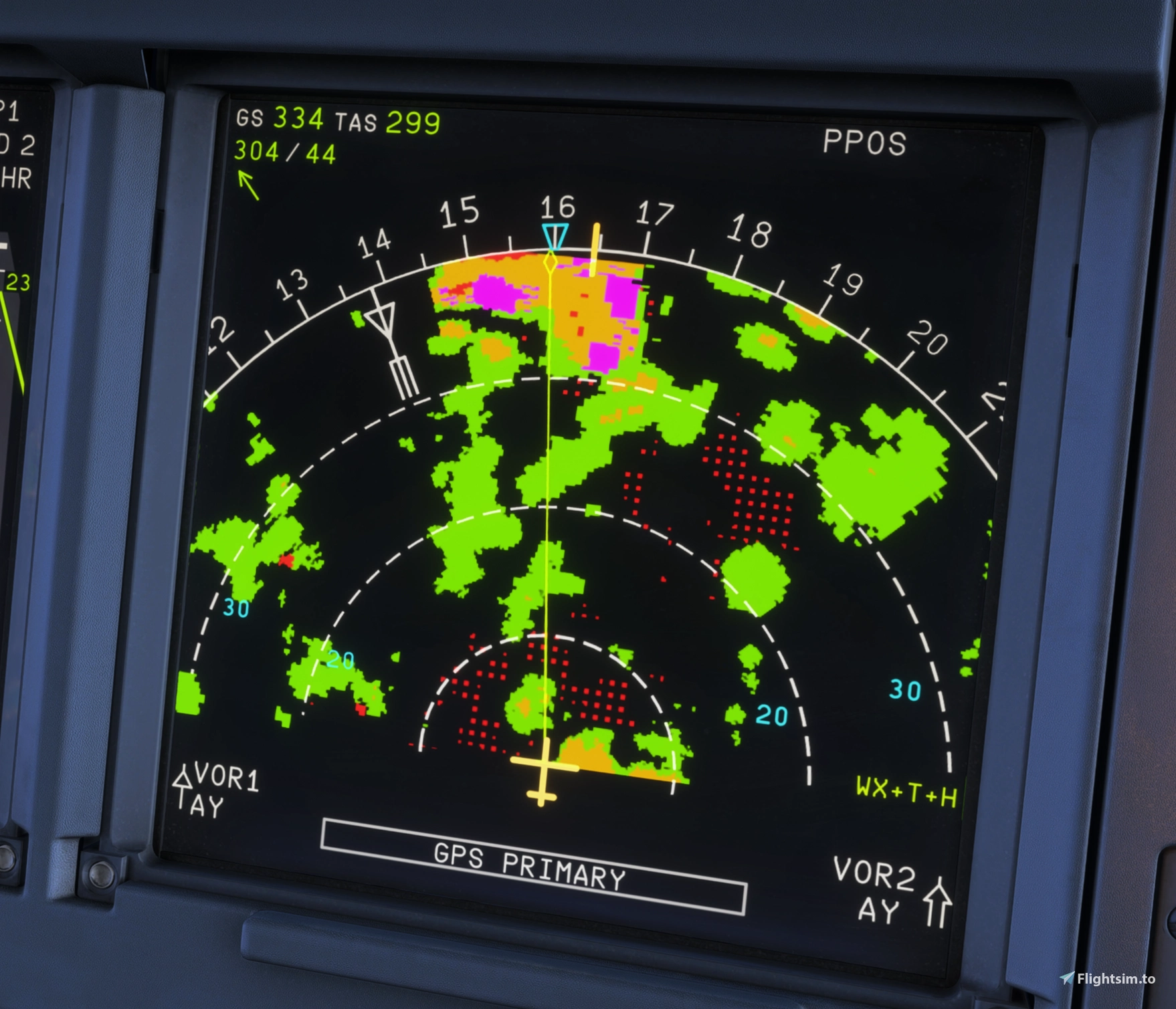
Isobar adds a working weather radar to the Fenix A320, modelled on the Collins WXR-2100 MultiScan with ThreatTrack. It shows the rain that's actually in MSFS's Live Weather on both NDs, and never changes the sim's weather. Isobar is experimental and still a work in progress
Tested with Fenix A3xx V3.0.0.7613 (2 November 2026).
Features
- Models WXR-2100. Colours: green from 0.7 mm/h, amber from 4, red from 12
- WX, WX+T, WX+T+HZD and MAP modes, in ARC and ROSE NAV
- ThreatTrack hazards (estimated): severe and ride-quality turbulence, lightning, anvil tops, Predictive OverFlight and Core Threat
- Auto and manual tilt, gain with CAL, ground returns from real terrain (AWS Terrain Tiles, downloaded and cached)
- Faster windshear scan at low level (Takeoff, approach and landing)
- Works with or without AtmosphereMod. Starts and closes with MSFS
New in 0.2.5
Fixed:
- If your sim's folders were moved to another drive with a folder link (junction), setup stopped with "The path cannot be traversed because it contains an untrusted mount point" and Isobar didn't start with the sim. Setup now writes EXE.xml in the real folder behind the link.
- GCS OFF did nothing. In AUTO, holding GCS OFF now shows ground returns at full strength.
- The PFD/ND XFR buttons now swap cleanly: the radar moves with the ND to the other screen and back, and never paints over the PFD.
- The tilt knob now follows the real A320's scale: quarter-degree steps on a non-linear dial, up to 15 degrees either way. Each click moves it one step, the knob turns there smoothly, and the ND shows the tilt to 0.25 degrees.
- Less load on the sim while the radar is off: the add-on rests while no radar is showing and wakes within a couple of seconds of the radar coming on.
How it works
A ReShade add-on reads the sim's weather data from the GPU. The Isobar app works out where the rain is, and a custom gauge draws it on the Fenix NDs. No Fenix files are modified.
Limitations
The radar can only show what the sim's weather contains:
- MSFS's rain is shallow, so storm height is estimated by Isobar. Tilt and the height-based hazards work from that estimate, not from real storm tops.
- Turbulence and ThreatTrack hazards are estimated from the rain, not read from the sim.
- Storms
: MSFS stores rain only low in the cloud and has no hail, updraft or turbulence data. Storm height, turbulence and ThreatTrack hazards are therefore Isobar's estimates. Storms drawn only on screen, such as AtmosphereMod's towers, won't appear on the radar.
Installation
You need ReShade WITH FULL ADD-ON SUPPORT (https://reshade.me/), installed for FlightSimulator2024.exe with Direct3D 10/11/12. The standard ReShade won't work. Already using OptiShade? It includes the right ReShade, so skip this step (tested with 0.21.6).
- Close MSFS, Fenix and Isobar.
- Run the Isobar installer.
- Load the Fenix A320 with weather on Live.
To update, run the new installer over the old one.
Problems? Attach both logs from the buttons in Isobar's window. Tested on one PC so far (Microsoft Store, NVIDIA).
Experimental
Isobar reads weather data the sim was never designed to share, so expect rough edges. It approximates the WXR-2100, and its hazards are estimates. It may break after a sim, Fenix or ReShade update. Uninstalling removes everything it added.
Unofficial and free. Not connected with Fenix Simulations, Microsoft, Asobo or Collins Aerospace.
Isobar – Weather Radar for the Fenix
Isobar adds a functional weather radar to the Fenix A320 in Microsoft Flight Simulator 2024. It reads in-sim weather data and displays precipitation, turbulence, and hazard indications directly on both Navigation Displays. The add-on supports different radar modes, antenna tilt, and gain adjustment, matching real-world operation. Installation requires the latest ReShade with full add-on support.


Avis des utilisateurs
14 avis
Historique des versions
Isobar 0.2.5 CHANGELOG Thanks to everyone who sent reports. Changes since 0.2.4: Fixed: - If your sim's folders were moved to another drive with a folder link (junction), setup stopped with "The path cannot be traversed because it contains an untrusted mount point" and Isobar didn't start with the sim. Setup now writes EXE.xml in the real folder behind the link. - GCS OFF did nothing. In AUTO, holding GCS OFF now shows ground returns at full strength. - The PFD/ND XFR buttons now swap cleanly: the radar moves with the ND to the other screen and back, and never paints over the PFD. Changed: - The tilt knob now follows the real A320's scale: quarter-degree steps on a non-linear dial, up to 15 degrees either way. Each click moves it one step, the knob turns there smoothly, and the ND shows the tilt to 0.25 degrees. - Less load on the sim while the radar is off: the add-on rests while no radar is showing and wakes within a couple of seconds of the radar coming on.
Présent dans des collections(1)




Similaires
PMDG 777 Wingflex Realism Mod
This mod enhances the wing flex realism for the PMDG 777 series in Microsoft Flight Simulator by implementing individual, physics-driven wing animations and improved engine movement. It offers dynamic responses to ground bumps, turbulence, fuel weight, and spoilers, ensuring each wing behaves independently. All flex characteristics and engine jiggle settings can be customized through an included configuration file. Installation requires Python and modifies local animation files for supported PMDG 777 variants without affecting the flight model.
par jpakman26
Inibuilds A380 Wing Flex/Engine Wobble Mod
This add-on introduces dynamic wing flex and engine wobble effects for the iniBuilds A380 in MSFS 2024, simulating realistic reactions to weather, ground conditions, and aircraft weight. The mod operates via a companion app requiring Python 3.11 or newer, without modifying any aircraft files. All features are adjustable through a simple config file. The app restores the aircraft to default behavior when closed and is compatible with the Marketplace version of the A380.
par jpakman26
Connectez-vous pour participer à la discussion
Se connecterCommentaires89
Ever since I installed this mod, the ND, PFD, FCU, and FMGS on my Fenix have started freezing.
I tried reinstalling the Fenix, I deleted all the files and performed a clean installation, but as soon as I add this mod, the systems start freezing again. When I remove the mod, the Fenix goes back to working normally.
https://youtu.be/PSHAwgfmsQo
Ce commentaire a été supprimé
Ce commentaire a été supprimé
Setup shows: "Radar not installed. Fenix itself is untouched. Fenix A320 not found in H:\MSFS2024\Community 70 Zeichen:23"
Environment
Community folder H:\MSFS2024\Community. Every package there is an NTFS junction to H:\MSFS_Community\..., e.g. fnx-aircraft-a32x-common → H:\MSFS_Community\a_Aircraft\Airliner\Fenix\fnx-aircraft-a32x-common\.
Fenix A320 is installed, with the folders fnx-aircraft-320, fnx-aircraft-319-321 and fnx-aircraft-a32x-common.
The file ...\fnx-aircraft-a32x-common\SimObjects\Airplanes\FNX_32X\attachments\fnx\Part_Interior_Cockpit\panel\panel.cfg exists (3250 bytes).
What I observed
The setup's own check (Test-Path on the fnx-aircraft-a32x-common folder in isobar-setup.ps1) passes.
The call to gauge\install.ps1 then throws at line 70 (if (-not $hasFenix) { throw ... }). That means Test-Path -LiteralPath \panel.cfg returned false from inside the setup.
Run by hand with the same Community path, install.ps1 -Check and -DryRun find the file, and the patch works. The failure only occurs when started from the setup. Repeating the setup gave the same error.
Separately, with the default -Wasm path, a manual run fails because ..\wasm\build\WxrTilt.wasm is missing. The installed gauge\ folder doesn't seem to include a WxrTilt.wasm at that path.
Suspicion (not confirmed)
The setup (Inno Setup, probably elevated) sees the junction target differently from a normal user session. Please log the full path checked, the result of Test-Path on the package folder, and the user and elevation state, as in the following snippet in install.ps1:
if (-not $hasFenix) {
Write-Host "Fenix A320 not found. Looked for: $src (package folder exists: $(Test-Path -LiteralPath (Join-Path $Community $fenixPkg)); user: $([Security.Principal.WindowsIdentity]::GetCurrent().Name))"
exit 4
}
I have attached a picture of a small bug that I found on accident. When you swap the PFD and ND, the radar will display on the PFD.
Is this why I get is MSFS on with live weather message in the Isobar task app.