Flightsim.to
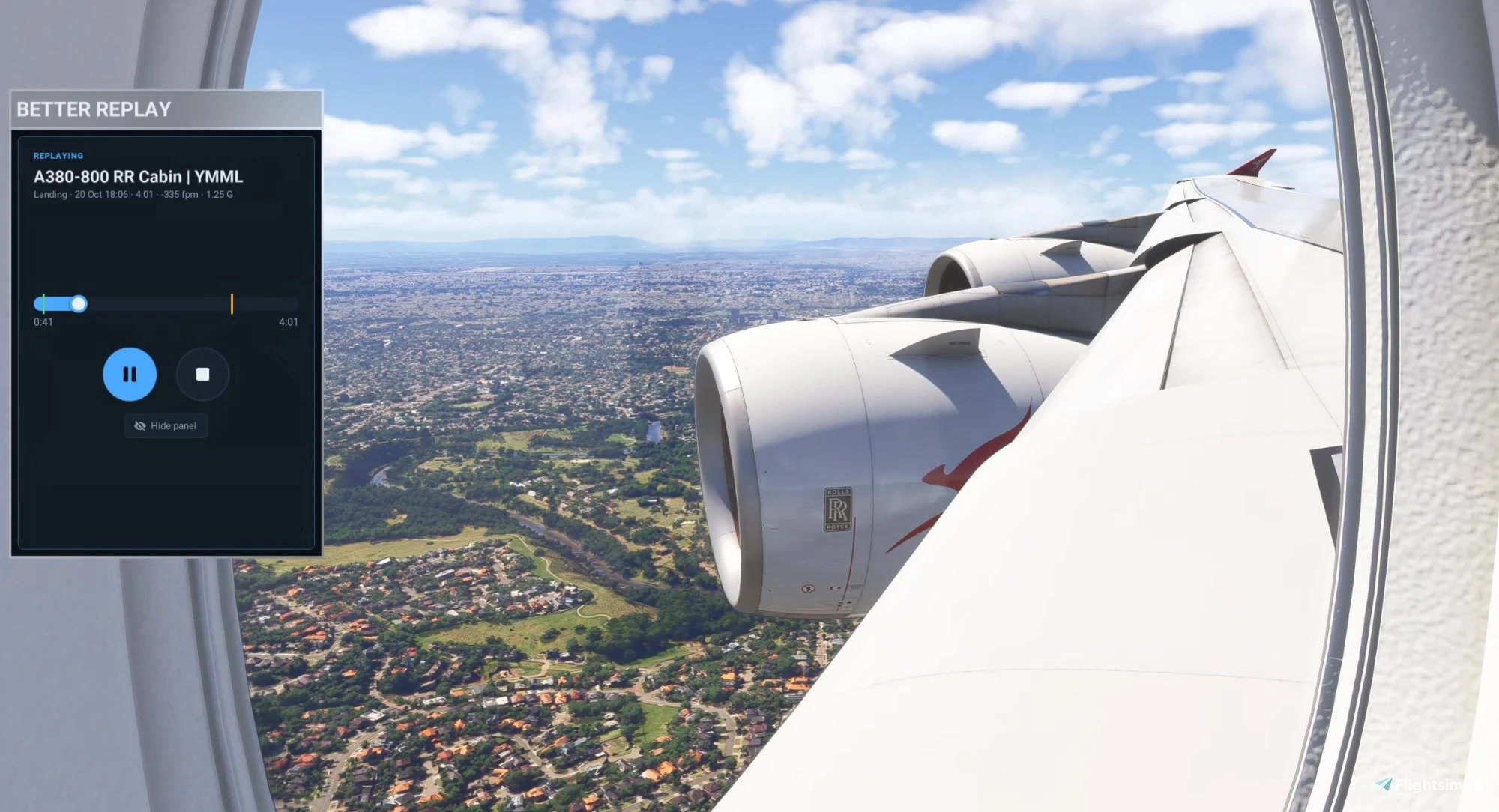
    BetterReplay: Automatic Takeoff and Landing Replays - Image 1

    Description

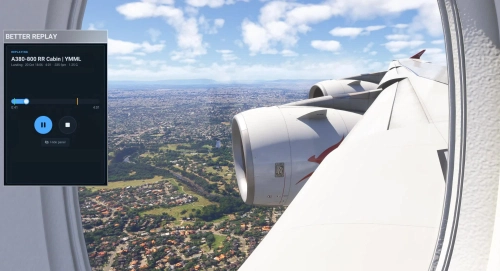
    BetterReplay is an auto replay recorder for Microsoft Flight Simulator 2024. It records your flight in the background, saves every takeoff and landing as a clip, and replays them from a toolbar panel. It all runs inside the sim: it's a single folder in Community, with no external app to start alongside it.

    Features

    1. Automatic clips of every takeoff and landing. Landings show touchdown vertical speed, peak G and bounces.
    2. Always recording the last 10 minutes of your flight, whether or not the panel is open. "Save last 10 minutes" keeps it as a clip.
    3. Replays in the aircraft you recorded with, with a seek bar that marks touchdown and gear down.
    4. Gear, flaps, spoilers, throttle and reversers replay too. Many aircraft work these their own way, so a short guided control setup teaches BetterReplay a new aircraft: you move each control, it replays your movement and asks whether it worked, and it remembers what did.

    Included aircraft profiles (these replay right away, without the setup)

    1. Fenix A320 Family (A319/A320/A321)
    2. FlyByWire A32NX (A320neo) and A380X
    3. iniBuilds A320neo V2 / A321LR (default)
    4. iniBuilds A330 (default)
    5. Working Title 787-10 and 747-8 (default)
    6. iniBuilds A340, A350 and A380
    7. Synaptic A220
    8. FlightSim Studio E-Jets
    9. PMDG 737 and 777

    Any other aircraft can be taught with the control setup.

    Installation

    1. Extract the zip into your Community folder, so you have Community\betterreplay-recorder. To update, delete the old betterreplay-recorder folder first.
    2. Start the sim. If the BetterReplay icon isn't on the toolbar, enable it in the toolbar's settings.

    What gets recorded

    1. Takeoff: from 30 seconds before you roll onto the runway until the flaps are up (or 2 minutes after liftoff if you took off without flaps).
    2. Landing: from 3 minutes before touchdown until you stop or leave the runway. Bounces stay part of the same landing.
    3. Recording pauses while the sim is paused, in slew, in the menus and during the sim's own replay.
    4. The newest 10 takeoff and landing clips of each aircraft are kept, and older ones are deleted automatically. "Save last 10 minutes" clips are never deleted automatically.

    Known issues

    1. iniBuilds A350 and A380: the engine whine can sound wrong in replays (on the A350 in the cabin after the thrust reduction, on the A380 from some outside angles).
    2. Working Title 787-10 and 747-8: in takeoff replays the engines run about 4.5 to 6% N1 off the recorded flight.

    Reporting a problem

    Please leave a comment, or raise an issue on GitHub: https://github.com/jtsorlinis/BetterReplay/issues

    The log, betterreplay.log, helps a lot. It's in:
    Steam: %APPDATA%\Microsoft Flight Simulator 2024\WASM\MSFS2024\betterreplay-recorder\work\
    Microsoft Store: %LOCALAPPDATA%\Packages\Microsoft.Limitless_8wekyb3d8bbwe\LocalState\WASM\MSFS2024\betterreplay-recorder\work\

    Planned

    1. Lights on all aircraft
    2. Manual recording, so a whole flight can be recorded
    3. Weather and time of day from the clip

    BetterReplay is free and open source under the MIT license.

    Activité des interactions
    TéléchargementsCommentairesÉchelles distinctes pour les téléchargements et les commentaires
    24 oct. Téléchargements: 0 Commentaires: 025 oct. Téléchargements: 0 Commentaires: 026 oct. Téléchargements: 0 Commentaires: 027 oct. Téléchargements: 0 Commentaires: 028 oct. Téléchargements: 0 Commentaires: 029 oct. Téléchargements: 0 Commentaires: 030 oct. Téléchargements: 0 Commentaires: 031 oct. Téléchargements: 0 Commentaires: 001 nov. Téléchargements: 0 Commentaires: 002 nov. Téléchargements: 0 Commentaires: 003 nov. Téléchargements: 74 Commentaires: 2 Avis: 1 Question: 104 nov. Téléchargements: 143 Commentaires: 1 Retour: 105 nov. Téléchargements: 117 Commentaires: 1 Retour: 106 nov. Téléchargements: 144 Commentaires: 4 Retour: 1 Avis: 1 Bug: 207 nov. Téléchargements: 140 Commentaires: 3 Avis: 2 Bug: 108 nov. Téléchargements: 103 Commentaires: 2 Retour: 1 Question: 109 nov. Téléchargements: 149 Commentaires: 1 Retour: 110 nov. Téléchargements: 52 Commentaires: 011 nov. Téléchargements: 92 Commentaires: 1 Retour: 112 nov. Téléchargements: 99 Commentaires: 1 Retour: 113 nov. Téléchargements: 90 Commentaires: 1 Retour: 114 nov. Téléchargements: 88 Commentaires: 2 Général: 215 nov. Téléchargements: 83 Commentaires: 1 Général: 116 nov. Téléchargements: 47 Commentaires: 1 Général: 117 nov. Téléchargements: 31 Commentaires: 018 nov. Téléchargements: 30 Commentaires: 1 Général: 119 nov. Téléchargements: 15 Commentaires: 020 nov. Téléchargements: 29 Commentaires: 2 Avis: 1 Question: 121 nov. Téléchargements: 63 Commentaires: 1 Général: 122 nov. Téléchargements: 110 Commentaires: 1 Général: 1
    24 oct.07 nov.22 nov.
    1 699
    Téléchargements
    26
    Commentaires
    Dernier commentaire aujourd’hui
    Le créateur répond à 50% des commentaires

    Connectez-vous pour participer à la discussion

    Se connecter

    Commentaires56

    ritmix30
    Général·about 4 hours ago
    КЛАСС !!!
    CaptainMag
    Général·1 day ago
    Ok, Microsoft/Asobo need to give you lots and lots of money to integrate this into the sim. Brilliant!
    JoonbuggQuestion·3 days ago
    No readme file? Where does it store the video clips? Where do you go to play them back? I'm curious to see if I did the setup correct for the vision jet but I can't seem to find the files
    portsidekal
    Avis·3 days ago
    The BEST replay tool for MSFS, and the fact its freeware is insane. Kudos to you for this!
    Skiesnolimit224·3 days ago
    i couldnt get it to show up in the sim after downloading it and extracting the file in the community folder, what'd you do?
    curt1186Général·4 days ago
    Great tool so far for Inibuilds aircraft with pre-built profiles that I've tested with. I can't get it set up with the Aerosoft/Toliss A340-600 because it's not detecting that engines are running (or it'll detect them for a split second and then revert back to asking me to get the engines running prior to setup).
    itsjaseAuthor·4 days ago
    Unfortunately I don't have the toliss a340-600 to test but if you could send me a log i should be able to fix it!
    l4ur_css
    Général·6 days ago
    the best of the best ! Very usefull tool I recommend to download and try it's all you need :).
    kkbelos2Général·7 days ago
    Great! This is exactly the kind of recorder I was looking for since 2020. Easy to use, simple, no need for external exe! And it works with complex aircraft including control surfaces, landing gear, engines... and for free! I can´t be happier
    brandanpdx
    Général·9 days ago
    This is really really good
    Rob200987
    Général·9 days ago
    Perfect for what i need - thanks :)
    jay6zeroRetour·10 days ago
    EXACTLY WHAT I WAS LOOKING FOR! THANK YOU!!
    BaxtergRetour·11 days ago
    I got an idea, can you make it an application so it is easier to make videos? BTW love this adon!
    itsjaseAuthor·11 days ago
    Hey I think there are some out there that have applications. I specifically want something that ran totally in-sim without any external applications that's why i made this
    Bobita
    Retour·11 days ago
    Not good!
    amin89·11 days ago
    it's better to tell us why than simply saying not good for a work that takes hours of developer's time ...
    itsjaseAuthor·11 days ago
    Would love to hear what issues you have with it! hopefully I can fix/improve them
    MattS2218·10 days ago
    It's always someone who has never created and uploaded anything who makes rude and useless comments like yours.
    MSFS 2020MSFS 2024

    BetterReplay: Automatic Takeoff and Landing Replays

    BetterReplay is an automatic replay recorder for Microsoft Flight Simulator 2024 that captures takeoff and landing events as clips, which can be replayed from a toolbar panel. It operates entirely within the sim, requiring no external application. The tool records key flight variables, manages clips for multiple aircraft types, and allows custom setup for unsupported planes. Recent flight clips are kept for easy review, with options to manually save additional segments of your flight.


    Téléchargements2K
    Version0.4.1
    Taille du fichier355.5 KB
    PubliéIl y a 2 semaines
    Mis à jourIl y a 1 semaine

    Avis des utilisateurs

    4.6

    14 avis

    5
    86%
    4
    7%
    3
    0%
    2
    0%
    1
    7%

    Historique des versions

    0.4.1 - Cessna 172 Skyhawk G1000 included: it replays right away, without the control setup. - The control setup could leave the C172's flaps unable to lower for the rest of that flight. It no longer does. If it happened to you in 0.4.0, start a new flight (or restart the sim); your setup doesn't need redoing.

    Présent dans des collections(2)