
Description
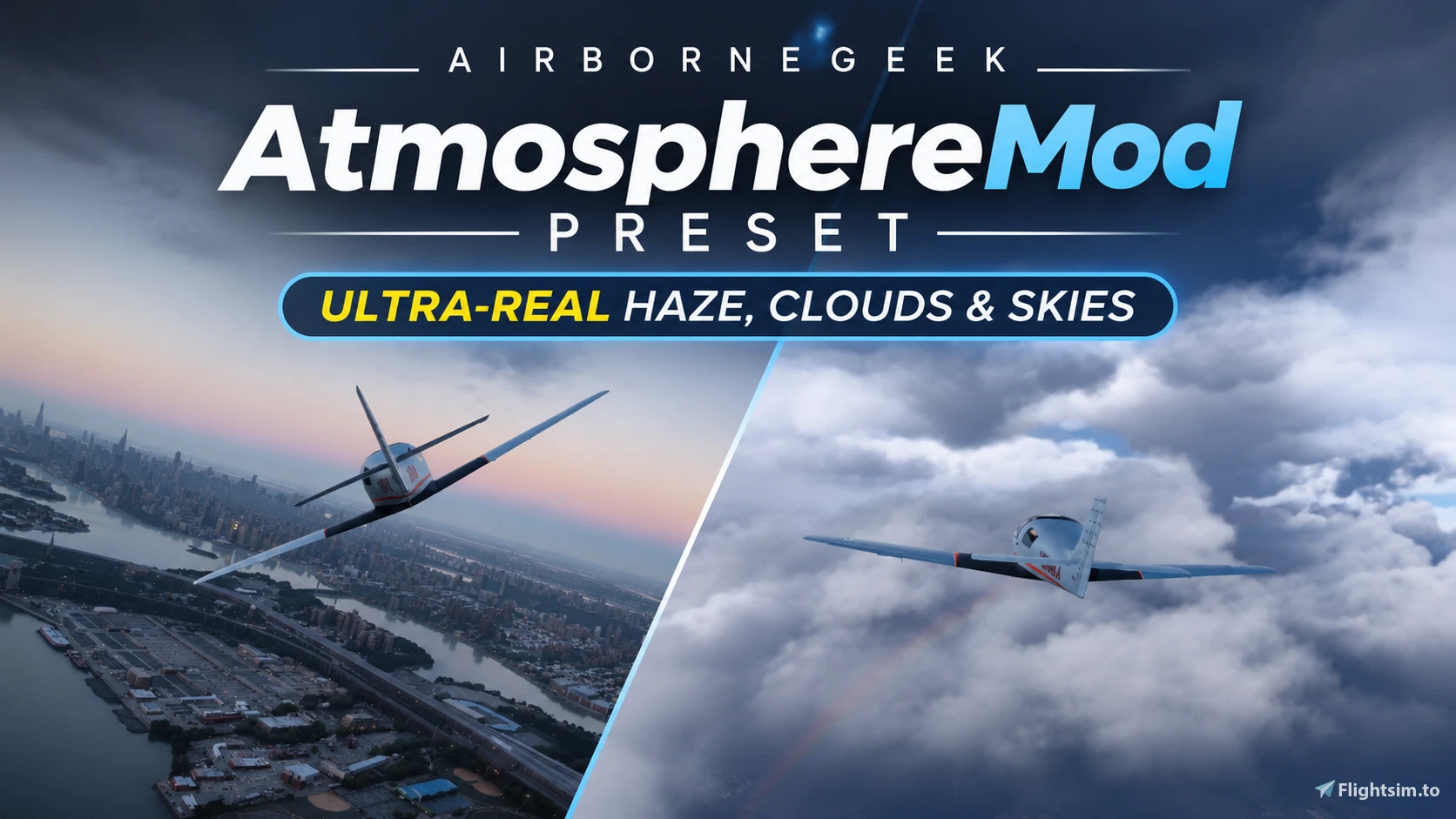
A more natural, immersive atmosphere for Microsoft Flight Simulator 2024. The screenshots may have DLSS 5 enabled on some of them. I cannot recall which ones but regardless DLSS 5 does not affect atmosphere and clouds.
Video demo cinematic is here: https://youtu.be/gk3AUbzzEH0
After experimenting with the ABSOLUTELY AMAZING Atmosphere Mod and its extensive customization options, I've put together my own version of realism-focused preset to bring a more realistic look to MSFS 2024.
Installation Instructions
Step 1 – Install ReShade or Optishade (I use it with Optishade and it works just fine)
- Download ReShade from the official website: https://reshade.me/
- Install ReShade 6.8 or newer.
- Select Microsoft Flight Simulator 2024 during installation.
- Choose the appropriate graphics API for MSFS 2024.
- Ensure you're using a ReShade installation with full add-on support, as required by AtmosphereMod.
Important: The standard restricted add-on configuration may not support all AtmosphereMod functionality.
Step 2 – Install AtmosphereMod
- Download the latest compatible version of AtmosphereMod from its official distribution page. https://flightsim.to/addon/117451/atmospheremod-experimental-haze-sky-and-cloud-lighting
- Follow the developer's installation instructions.
- Install all required AtmosphereMod files in the specified locations.
- Launch MSFS 2024 and confirm that AtmosphereMod loads correctly.
AtmosphereMod is required for this preset to function.
This download contains my preset settings, not the complete AtmosphereMod application.
Step 3 – Install the AirborneGeek Preset
- Download and extract the AirborneGeek preset.
- Launch Microsoft Flight Simulator 2024.
- Open the AtmosphereMod configuration interface using its in-simulator EFB page.
- Navigate to the preset management section.
- Select the option to import a preset.
- Import the supplied AirborneGeek preset file.
- Apply the imported preset and save your configuration if required.
The exact import controls may differ depending on your installed Atmosphere Mod version.
Step 4 – Enjoy Your New Atmosphere!
Load into your favorite aircraft and try the preset in different conditions:
- Clear-weather VFR flights
- Overcast approaches
- Low-visibility operations
- Sunrise and sunset flights
- High-altitude cloud cruising
Important Notes
- This is a community-created configuration preset.
- It is not a standalone weather engine or ReShade installation.
- The underlying AtmosphereMod add-on must be installed separately.
- AtmosphereMod is experimental and may change with future updates.
- Simulator updates or AtmosphereMod updates may affect compatibility but I will keep my preset up-to-date here as much as I can.
- Screenshots represent specific in-simulator conditions; results will vary.
- Please follow the original AtmosphereMod developer's requirements and documentation.
About AirborneGeek
I'm a private pilot, engineer, and flight simulation enthusiast who enjoys exploring the technical and visual side of aviation simulation.
On my YouTube channel, AirborneGeek, I cover Microsoft Flight Simulator 2024, X-Plane 12, flight simulation performance, aircraft systems, and ways to make our simulators feel more immersive.
If you enjoy this preset, consider checking out the channel!
YouTube: https://www.youtube.com/@AirborneGeek
If you have suggestions, feedback, or screenshots from your flights using this preset, I'd love to hear about them.
Enjoy the skies!
— AirborneGeek
AirborneGeek Atmosphere Mod Preset – Ultra-Realistic Haze, Clouds & Skies
This preset enhances Microsoft Flight Simulator 2024 with a more realistic and natural atmosphere by adjusting haze, cloud, and sky settings. It is a configuration file designed for use with the experimental AtmosphereMod add-on and requires both ReShade and AtmosphereMod to function. The preset aims to deliver improved visual immersion across various weather conditions. Only the preset settings are included, not the full AtmosphereMod application.

Avis des utilisateurs
21 avis
Historique des versions
- *New addition in 0.7.3* Adjusted Sun-facing cloud lighting (Note that I am using 50% here along with Powder effect for now even though the guideline says to not do that because I think it looks amazing that way. Please report any issues in the comments) - Powder effect increased by 10% as a parallel adjustment to the above change
Résumé des commentaires
Les retours sur le preset Atmosphere Mod d’AirborneGeek sont majoritairement positifs. De nombreux utilisateurs apprécient les améliorations visuelles, notamment le rendu réaliste de la brume et la qualité de l’éclairage des nuages. Plusieurs commentaires soulignent la compatibilité avec différentes versions de ReShade et d’OptiShade, bien qu’il existe une certaine confusion sur les meilleures combinaisons avec d’autres mods météo. Certains signalent des difficultés d’installation, comme l’erreur « preset non valide », des fichiers zip vides ou des messages d’overlay de ReShade. Des questions reviennent concernant la compatibilité avec REX Atmos, Active Sky et les mises à jour de Atmosphere Mod. Quelques problèmes de performance sont mentionnés, mais la plupart des utilisateurs ne constatent pas de baisse d’images par seconde significative. Enfin, des astuces portent sur l’utilisation des raccourcis clavier pour masquer les messages de tutoriel et sur la désactivation de plugins pouvant entrer en conflit.
Résumé du 25 nov. 2026
Connectez-vous pour participer à la discussion
Se connecterCommentaires101
AirborneGeek - Live Weather - Realistic
AirborneGeek - Realistic Atmos
AirborneGeek - Realistic Enviro
I now have installed this mod by the book (and the help of a video)
Now I constantly get a very disturbing 3 lines ReShade 6.8.0 message at the top of the MSFS24 screen, 3rd line saying:
ReShade wurde erfolgreich installiert! Drücke 'Pos1' um das Tutorial zu starten
Translation:
ReShade was installed successfully! Press 'Pos1' to start the Turorial
How can I get rid of this message?
Where could I find a 'Pos1' menu or key?
Thanks for any help
Ich soeben durch Versuche entdeckt, dass die pos1 Taste auf der Schweizer Tastatur die 'home' Taste ist.
Die pos1 existiert nicht.
Ozone (FS Ozone Studio)
What do you think of this software? Maybe a video to give us your opinion.