
Description
Due to the actions of Flightsim.To's management, I am withdrawing my products from distribution on this platform.
My content continues to be available on https://novawing24.com/ and http://gumroad.com/novawing24
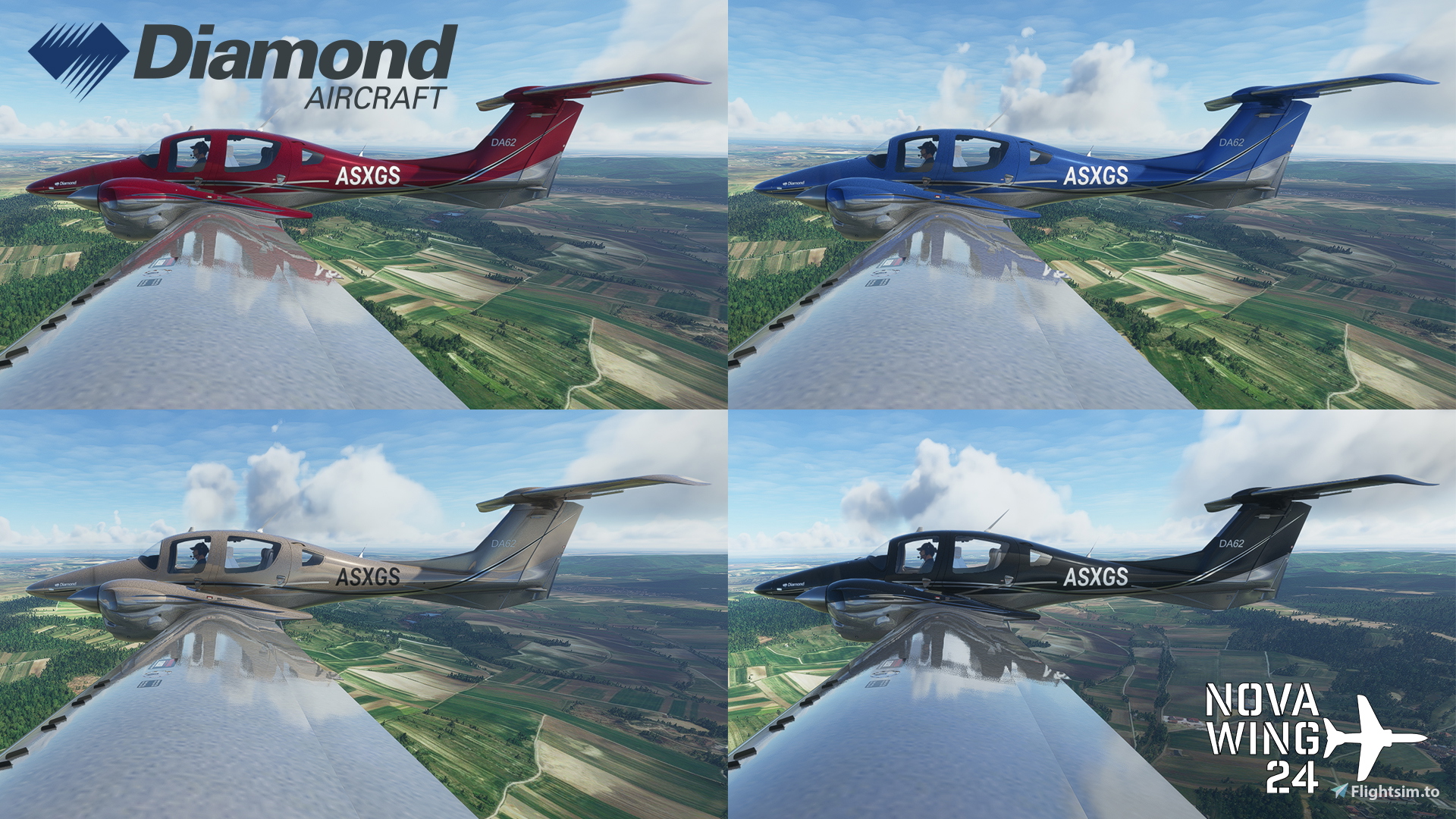
The Diamond DA62 is class leading twin engine light aircraft offering outstanding fuel economy and payload capabilities.
From the factory, there are a range of paint schemes and colour themes that you can choose when customizing your new aircraft.
This pack recreates 4 of the factory Delight (Curved) Paint Scheme Colour options as outlined on their website in 2021.
This package is fully compatible with the Working Title NXi mod.
For users of the DA62 Improvement Mod, there are instructions provided as a seperate download or available here if you wish to use these liveries with that mod.
Two Packages are available for you to choose:
The Main package includes a self installation executable. The alternate package is an installerless zip file. They are labelled accordingly. Only download the one you wish to use.
If you enjoy my work, why not shout me a coffee or support me on Patreon?
Keep an eye on my website http://novawing24.com/ and http://gumroad.com/novawing24 for my latest releases and premium content not found here!
A copy of the manual is available here: https://novawing24.com/wp-content/uploads/2021/09/Diamond-DA62-Factory-Schemes-Series-Delight-Curved-Readme.pdf
Questions fréquemment posées
Diamond DA62 Delight (Curved) Factory Schemes
Explore 4 factory Delight (Curved) Paint Schemes for the Diamond DA62 aircraft in this add-on. Fully compatible with Working Title NXi mod and includes instructions for DA62 Improvement Mod users. Choose between a self-installation executable or an installerless zip file. For more content, visit the creators website and support options are available.
Supprimé par le créateur
Cet add-on a été supprimé par son créateur et n’est plus disponible.

Avis des utilisateurs
3 avis
Historique des versions
Version 2.1 - Update of fallback paths following SU5 - Update to Panel files to reflect new changes in SU5 - Clean up of unnecessary files
Connectez-vous pour participer à la discussion
Se connecterCommentaires13
I will download it when it is compatible with the DA62X improvement mod. I hope very soon.
Instructions on how to make this pack compatible with the Improvement mod have now been released.
Great liveries! Many thanks. Are the tail numbers editable? When I use a custom tail number it displays a white box on the fuselage. Also tried editing the aircraft.cfg for each livery with a custom tail number to no effect. The tail number shows on the cockpit plate fine and oddly the gold paint works 100% fine. Any ideas?
I've just flight tested all of my DA62 liveries and cannot replicate the issue you are describing. I was able to enter my registration on the Aircraft Customization screen before starting the flight then saw it correctly in sim. Editing the aircraft.cfg will have no effect on this issue as what you are seeing is related to the panel setups.
Are you using any modifications of your panel files or "realism" mods? This pack does not support them as I modify the panel entry to allow the registration to be white. That would also explain why the Gold texture is working as it does not modify the Panel file at all.
I was using the DA62X mod. That explains it.
I too would prefer it without the installer so it can be managed with other programs but apparently you refuse to consider anything other than your own way.
Shame...they looked great.
Interestingly enough my content, even with the installer, can still be used with the mod manager tools that are out there :)
I wish you all the best in your simulation journey!
Update: Going to give it a two and a half star, seems like others want an option of an installer less version, I'm sure most users here already know how to install files with ease.
Whilst I understand that you, and many others, are well versed in how to manipulate mods for Flightsim, that is not the case for every member of the community. My goal has always been and will continue to be inclusiveness of all members of the greater flight simulation community; from the arm chair pilot with 10000 hours to the fledgling virtual aviator starting up a desktop simulator for the first time.
As such I will cater for everyone's level of experience, and not act as a gatekeeper of any kind to our hobby.
If you do not wish to use an installer, then I respect your choice; Please respect mine as a content creator and as a veteran of this community for many many years to offer this to the community. At the end of the day, the end result is exactly the same is it not? Whether it is a zip file or a conveniently packaged installer, both result in being able to enhance our experience of our virtual world.
Tell me ThatsDirty, do you not purchase PMDG aircraft because they use an installer? Aerosoft? How about IndiaFoxtecho? Do you spurn their products because they use an installer as well? Or are you perfectly fine using their installers.... but not from another 3rd Party Developer (which BTW I am a MSFS 3rd Party Dev) just because you didn't pay money for it?
If you are desperate to not have an installer point to your sims Community folder, then may I suggest that you install the livery to a temporary folder; copy the contents from there to your Community folder and then run the conveniently included uninstaller to remove the temporary install from your system.
I wish you all the best in your flight simulation journey.