

Description
This is the download that I wish had existed when I started making things - a written guide with sample files on how to do scenery creation.
It took me a pitifully long time to learn some of the most basic things. Hopefully this will shove a Falcon Heavy up your jacksy and send you off to the mod creating stars.
One of life's most ghastly developments is the transfer of knowledge dissmenination from the written word to Youtube.
I have of course learnt from it too. But I could've learnt the same in a fraction of the time without spending hours rewinding looking for the right section after he or she coughs.
There are other written guides out there, but things move so fast they're often hopelessly out of date. Others are so infuriatingly vague they're effectively useless.
This is designed for a total know nothing, but there might be some information people who are already creating may not have picked up. I can't tell how comprehensible this is for someone who has never done this before but I did my best.
There's loads of stuff I still don't know. I might also have some appalling habits that will make any reader in the know push their great aunt's head through the wall. I do not care. And stop that.
What's present in this download
- A written guide about how to create an airport from initial folder set up to the finished deal.
- Project files for the example airport in the above - KPVC Provincetown in this case - in varying stages, from the initial empty folder set up, to a complete ish project with a 3d model and custom ground textures.
- Project files and the relevant models for a heliport in various stages of failure.
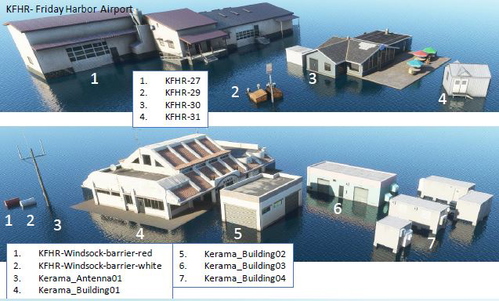
- Project files for a seaplane airport on water.
- Project files for adding light to KMEM Memphis for those who want to see what a pure airport light project looks like.
- Project files for non airport scenery. In this case it's one giraffe at Provincetown.
There are separate briefer guides on -
- How to get 3d models into the sim. Also thrown in are two 3d models in various stages to go with it.
- How to add custom textures along with some sample textures.
- How to add DEM data to a project file for better elevations along with the project and source files.
- How to clean up a model from 3dwarehouse in Blender to get it usable along with the model files.
Also included are the original Word files if you want to translate the text. Microsoft Office Word online can translate entire Word documents.
I didn't realise how crap pdfs are so you might need these to read certain bits.
Because of the SDK's now ludicrously overwrought file paths you may get that 'filename is too long' error when trying to unzip this. In this case you'll need to unzip in the C: root folder most likely.
If you insist on being a video watcher this is a very good up to date series by Mamu82 - https://www.youtube.com/playlist?list=PLJxUgoFBRXImPokQktx6iBNfCVpvRNeo0
V 1.4
There is no change to the main file so don't bother re downloading if you have 1.3.
I've added as a separate download, that you'll see when you press the download button, a file about how to create water masks in the same style as this one - https://flightsim.to/file/3615/eghe-st-mary-s-airport-isles-of-scilly-uk-upgrade
This includes example images, project files, 3d models and a description as a PDF and Word file. This method is far from perfect, but I think it's the only way it can be done by us lot.
It is now your job to populate the world with more of them.
A Written MSFS SDK Scenery Creation Tutorial
A comprehensive written tutorial and sample files for MSFS scenery creation, covering airport and non-airport projects, 3D models, custom textures, elevations, and more. Includes separate guides on model cleanup, DEM data integration, and texture addition, with original Word files for translation. Version 1.4 offers additional water mask creation resources for aspiring mod creators.


Avis des utilisateurs
22 avis
Historique des versions
The main file is unchanged so don't bother updating that. I've uploaded a separate download that you'll see when you press the download button. This details how to make and insert a water mask into the sim.
Présent dans des collections(1)

Similaires
Animated Human 3D Models Library
A library of nearly 300 animated human models and animals for Microsoft Flight Simulator, offering a variety of actions and colors. Models include civilians, business people, airport staff, animals, and more. Includes SDK object search guidelines and a separate section for developers with tutorials on creating custom content. Version 1.3 update brings new models and props like cyclists, wheelchair users, and livestock for enhanced realism.
par superspud
EKVG - Vagar Airport - Faroe Islands - Upgrade
Enhance your Faroe Islands experience with an upgraded EKVG - Vagar Airport add-on. Enjoy new ground textures, markings, and added details throughout the airport. Featuring a new taxi system, helicopter parking spots, and custom buildings courtesy of Simon Nordendal. Explore the Faroe Islands with improved ground textures, markings, and door openings for GSX profile.
par superspud
EGHE - St Mary's Airport & Isles of Scilly Scenery UK - Upgrade
Upgrade your experience with an enhanced version of EGHE St Marys Airport & Isles of Scilly scenery in the UK. This add-on features improved ground textures, added parking spots, spruced-up surroundings with road surfaces and foliage, and embedded rocks in runway approaches. Additionally, the scenery file includes boats, quays, lighthouses, helipads, and more, providing a realistic and immersive environment for flight simulation enthusiasts.
par superspud
Moving Boats 3D Model Library
A vast library of over 200 3D model boats ready to be placed in your projects, including cargo, fishing, leisure, naval, and more. Each watercraft comes with its own worldscript for easy placement, allowing you to create your own routes for added customization. This download includes instructions for developers looking to enhance these models in their own projects in a supportive environment. Version 1.2 introduces hundreds of new moving boats with updated routes and a guide on how to create custom routes using worldscripts.
par superspud
Connectez-vous pour participer à la discussion
Se connecterCommentaires(101)
about 1 month ago
11 months ago
11 months ago
about 1 year ago
couldn't agree more! I hate watching videos it's so much easier/faster to read - and you can't CTRL+F a video! but at least a video is longer lasting than a discord channel which seems to be everyone's new favourite.
Anyway, thanks for taking the time to write this all out. I'm sure there are some bits that will have changed but this is an excellent starting point for a beginner - thanks!
over 1 year ago
over 1 year ago
almost 2 years ago
almost 2 years ago
Do you think you will be doing a 2024 update, I'm sure it will need it?
almost 2 years ago
I will digest 2024 further and then go from there. It looks like model LODs is the really big arse ache.
about 2 years ago
about 2 years ago
about 2 years ago
What I've learnt since then that's not written in it is that you should multiple LODS with the further ones set slightly higher above the ground to stop flickering.
This is so out of date it's becoming a menace, but there's the odd useful nugget still. I will update it at some point.
almost 3 years ago
Mayyybe some update would be nice, but most of it still applies, so that's okay.
almost 3 years ago
It is indeed painfully out of date in more than a few aspects. I certainly didn't expect things to move that quick. I will return to it when I can.
almost 3 years ago
almost 3 years ago
about 3 years ago
Thank you very much, a very useful and very needed resource.
over 3 years ago
A great resource, thanks for taking the time to prepare this!
over 3 years ago
amazing. This will save you many hours of searching for information