
Description
This mod will change your Taxi Ribbon to make it smaller, and recoloured to green to blend well with the taxiway centrelights. This mod will make the taxi ribbon less obtrusive and more immersive when using it.
Installation (MSFS 2020):
- Choose only one of the size option inside the zip file and open that folder.
- Extract the fs-base folder from that chosen size option folder to your Official Folder. It depends on where you install your MSFS. But If you're on STEAM version and you use the default install folder without changing your installation path, your default Official folder is at:
%AppData%\Microsoft Flight Simulator\Packages\Official\Steam - Replace the file when asked (this is important because if the dialog box to replace a file doesn't appear, that means you're extracting the file to a different folder structure. The main MSFS file have to be replaced with the modded file from here to make the taxi ribbon mod works).
- If you want to use the animated orb for taxi ribbon. Extract the animated-taxi-ribbon folder into your Community folder.
Uninstallation:
- Download the Backup-Restore file and extract the fs-base folder to your Official folder. If you're on STEAM version, your default Official folder is at:
%AppData%\Microsoft Flight Simulator\Packages\Official\Steam - Replace the file when asked
Installation (MSFS 2024):
- Only the Animated Taxi Ribbon orb is compatible with MSFS 2024.
- Extract the animated-taxi-ribbon folder and place it into your MSFS 2024 community folder. By default, your community folder is at:
-
%AppData%\Microsoft Flight Simulator 2024\Packages\Community
If you prefer to retain the parking box, I recommend you check out RXP Small Taxi Helpers 3D-VR mod by CptLucky that modifies the parking box to look like painted lines on the apron while also making the taxi ribbon smaller and more immersive.
Credits:- Cygnific for the community based Animated Taxi Ribbon mod assets. If you like this Subtle Taxi Ribbon mod update, make sure you go to Cygnific's page and like and give stars to his original mod. Without it, this update will not have been possible.
- CptLucky for the Taxi Navigation Ribbon Asobo_UI modification details and recipe.
Subtle Taxi Ribbon
Enhance your taxiing experience with the Subtle Taxi Ribbon mod, which reduces the size and changes the color of the taxi ribbon for a more seamless integration with taxiway centerlights. Easily install or uninstall this mod to customize your MSFS experience. For an alternative option with parking box retention, check out the RXP Small Taxi Helpers 3D-VR mod by CptLucky.
Starred
Sélectionné à la main par notre équipe — cet addon améliore considérablement l'expérience MSFS et est un incontournable de votre setup.

Avis des utilisateurs
79 avis
Historique des versions
- Restored the animated taxi ribbon from Cygnific which I have recolored green.
Similaires
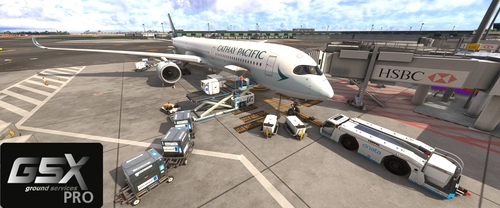
GSX Pro Profile - iniBuilds A350-900/1000
This add-on provides a customized GSX Pro profile for the iniBuilds A350-900 and A350-1000 variants, enhancing boarding and cargo operations. Key features include the activation of all passenger doors on the port side and setting the front door as the preferred entry/exit point to streamline passenger flow. Additionally, bulk cargo functionality has been refined with proper door checks for realistic loading. Installation involves extracting the profile folder into a designated directory.
par NeoKingArthur
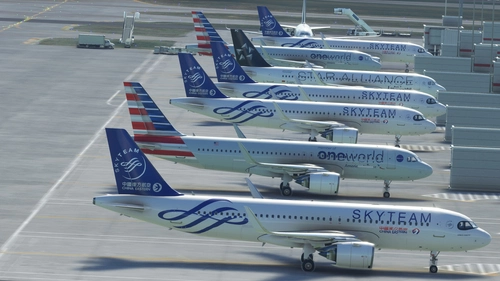
Generic A320 Traffic
This is a mod that disables the sim to use the Generic Traffic model to be used for populating the aircraft and to be used as moving Traffic. Instead, this mod will force the sim to use the Asobo A320 aircraft to become the Generic Traffic. So if you do not have a matching aircraft model, the sim will use the A320 model by default.
par NeoKingArthur
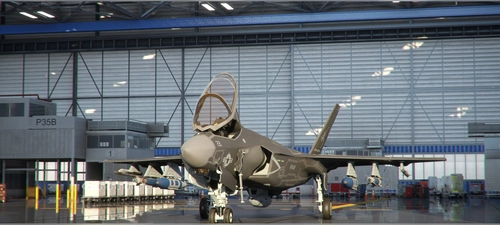
Indiafoxtecho F-35 Lightning II - Default Weapons Payload
This mod gives you alternative payload configuration for the Indiafoxtecho F-35 Lightning II aircraft. This mod doesn't modify the base performance and general specification of the aircraft. This mod only modifies the default Weight Payload that is loaded when the aircraft is selected in the Free Flight selection. The purpose of this mod is to give you the weapons payload by default, so that you can just choose the aircraft and start your flight straightaway with full weapons loadout. That way, you don't have to manually enter the pay load for each station one by one everytime you start a new flight. This mod also changes the Station # labels into their actual weapons name.
par NeoKingArthur
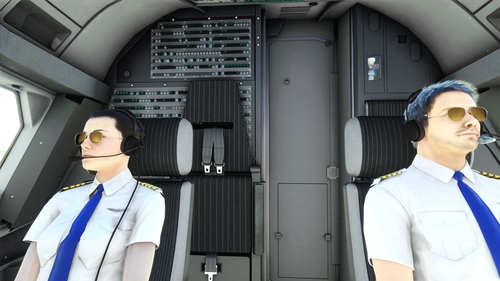
FBW A32NX - Pilot & Copilot Avatar
This mod adds visible Pilot & Copilot avatars to the cockpit of the FBW A32NX aircraft. Choose the appropriate version (Stable or Dev/Exp), download the zip file, and follow the installation instructions to enhance your flight experience. Special thanks to FlyByWire Simulations and Fluegelmann for their contributions to this mod.
par NeoKingArthur
Résumé des commentaires
Les retours des utilisateurs sur l’add-on Subtle Taxi Ribbon sont très majoritairement positifs : beaucoup saluent son apparence discrète par rapport aux grandes flèches bleues par défaut de Microsoft Flight Simulator. De nombreux commentaires apprécient l’amélioration de l’immersion, surtout en mode carrière, et jugent le guidage au sol bien plus agréable. Les discussions portent fréquemment sur la personnalisation souhaitée (taille et couleur du ruban), ainsi que sur la compatibilité avec différentes versions du simulateur : pour MSFS 2024, seule la version « orb animé » fonctionne actuellement, à cause de la nouvelle gestion des fichiers. Certains signalent un problème en VR, où l’orb animé empêche l’EFB de s’afficher, tandis que d’autres rencontrent des difficultés à l’installation, car l’add-on nécessite souvent une manipulation des dossiers système plutôt qu’un simple glisser-déposer dans le dossier Community. Une réinstallation du mod est souvent conseillée après une mise à jour du simulateur, qui peut rétablir les fichiers d’origine. Quelques utilisateurs évoquent un manque de clarté des instructions et aimeraient une installation plus simple, une distance d’affichage accrue ou davantage d’options. Des alternatives, comme GSX Pro, ou des suggestions de fusion avec d’autres mods sont également mentionnées. Globalement, ce mod est apprécié pour rendre l’affichage du taxi ribbon plus réaliste et discret, mais la communauté demande une meilleure documentation et une adaptation continue au fil des évolutions du simulateur.
Résumé du 13 nov. 2026
Connectez-vous pour participer à la discussion
Se connecterCommentaires438
The only .BGL files of any type in AddData are:
\AppData\Local\Programs\Neofly\addons\neofly-neofly-cargo\Scenery\neofly-cargo\NEOF2\NEOF2.bgl
\AppData\Roaming\Microsoft Flight Simulator 2024\Packages\Community\neofly-neofly-cargo\Scenery\neofly-cargo\NEOF2\NEOF2.bgl
I tested it (SU4 Beta) and it don't work for me with BATC.
After this Test it won't work again also with the Standard ATC.