
Description
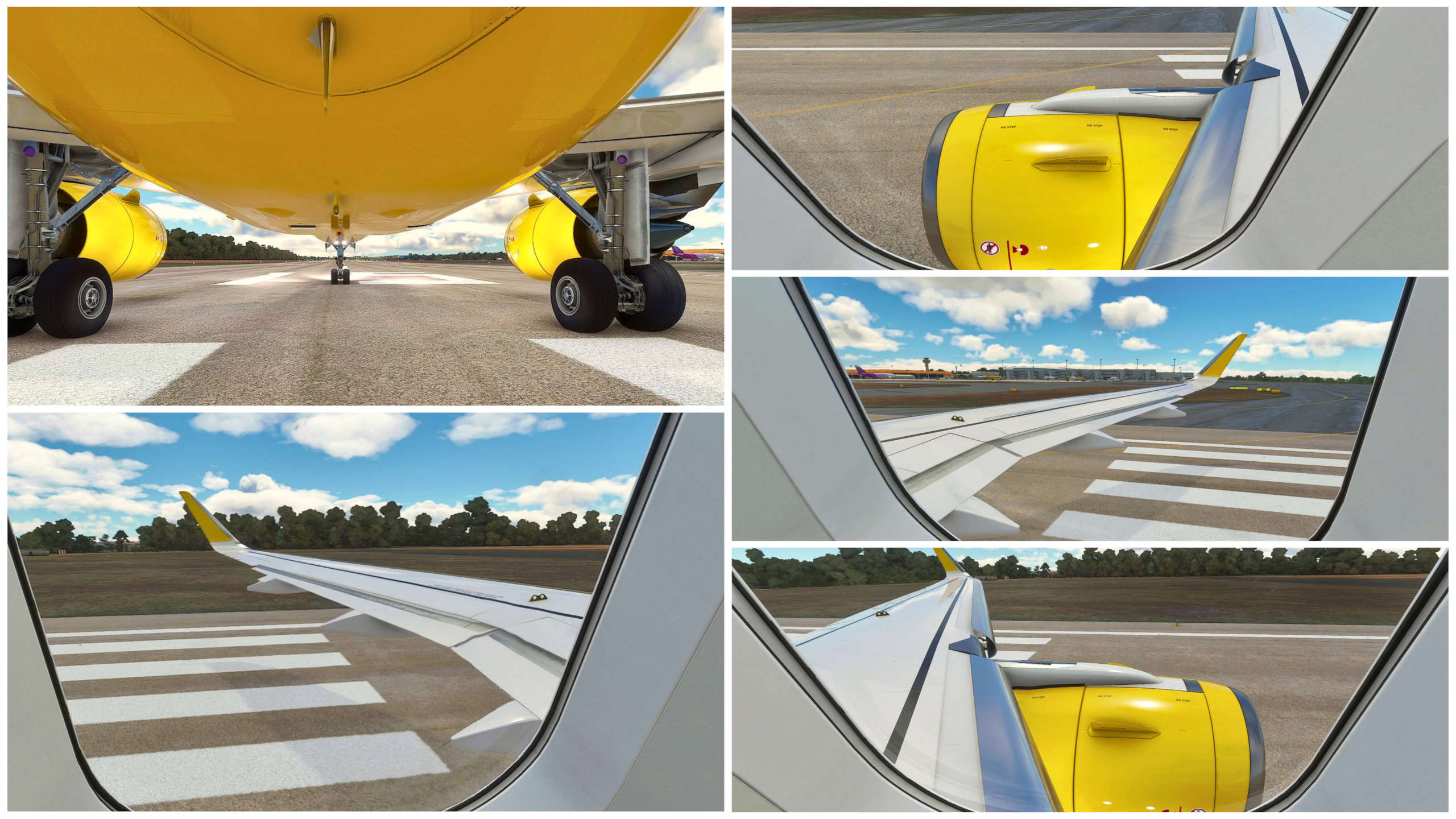
A320neo FBW Custom Camera Views A32NX UPDATED MARCH/24 - This package contains custom camera views for AIRBUS A320neo by FlyByWire A32NX including 4 new window view!
The custom cameras have been defined as follows:
Camera 1 - Pilot View
Camera 2 - MCDU
Camera 3 - Tablet
Camera 4 - Pedestal
Camera 5 - Overhead
Camera 6 - Left Wing view
Camera 7 - Left Engine view
Camera 8 - Right Wing view
Camera 9 - Right Engine view
Camera 0 - Windshield view
📖 INSTALLATION
Unzip the folder 'FlyByWire_A320_NEO' into 'AIRPLANES' folder located at C:\Users\[UserName]\AppData\Local\Packages\Microsoft.FlightSimulator_8wekyb3d8bbwe\LocalCache\SimObjects\Airplanes
Overwrite it if the folder already exists!
Don't extract the folder or file in the community folder, it won't work!
📖 INSTALAÇÃO
Extraia a pasta FlyByWire_A320_NEO dentro da pasta Airplanes localizado C:\Users\[UserName]\AppData\Local\Packages\Microsoft.FlightSimulator_8wekyb3d8bbwe\LocalCache\SimObjects\Airplanes
Sobrescreva a pasta se já existir!
Não coloque a pasta ou o arquivo na pasta community que não irá funcionar!
▧ ▨ ▦ ▩ ▧ ▨ ▦ ▩ ▧ ▨ ▦ ▩ ▧ ▨ ▦ ▩
❤️ Follow me on social networks
Youtube Channel ☛ www.youtube.com/vicgames2000
Instagram ☛ https://www.instagram.com/vicgames2000/
Twitter ☛ https://twitter.com/VICgames15
Enjoy!
A320neo FBW Custom Camera Views A32NX
Customize your flight experience with A320neo FBW Custom Camera Views for FlyByWire A32NX, featuring 4 new window views! This package includes various camera perspectives such as Pilot View, MCDU, Tablet, and more. Easily install by unzipping the folder into the correct directory and enjoy a new level of immersion.


Historique des versions
Updated to A320neo FBW development version - March/24
Connectez-vous pour participer à la discussion
Se connecterCommentaires(16)
6 minutes ago
7 minutes ago
23 minutes ago
30 minutes ago
16 days ago
about 2 months ago
https://classrooms-6x.com/
11 months ago
over 1 year ago
almost 2 years ago
almost 2 years ago
about 2 years ago
over 2 years ago
over 2 years ago
about 4 years ago
How to delete these if i owerwritten my .cfg file
about 4 years ago
Just remove the file, it will automatically create a new one when you save a custom camera in the game
over 4 years ago
where can I find the file if I custom place my msfs2020 into a different harddrive?
about 4 years ago
Try going to the start menu, then just pasting this:
%localappdata%\Packages\Microsoft.FlightSimulator_8wekyb3d8bbwe\LocalCache\Packages\Community
over 4 years ago
Thought I would make an ass of this but now works fine thanks