
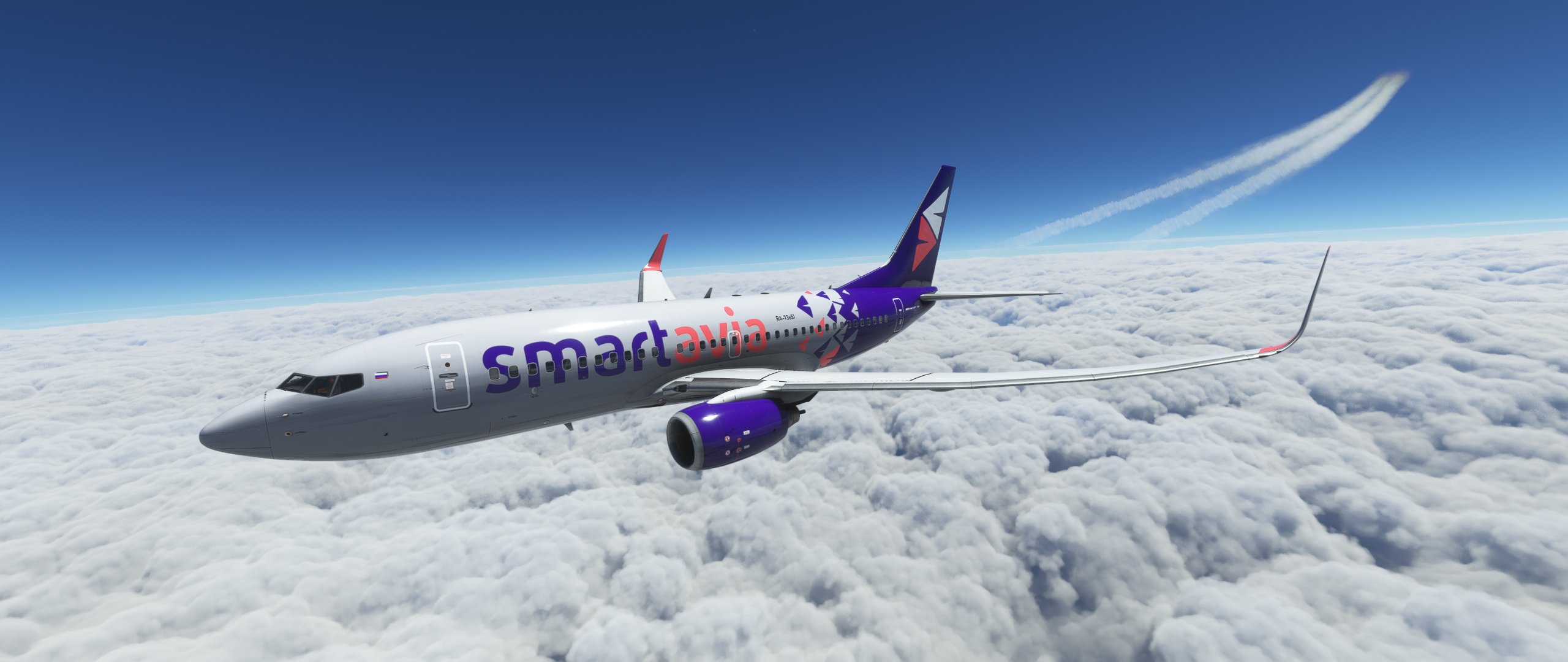
Description
[ENG]
Installation:
1. Extract your PTP file from .rar
2. Open PMDG Operations Center
3. Click on Aircraft and Liveries/Livery Utilities
4. Select simulator, product and model (PMDG 737-700)
5. Click "Install from PTP"
6. Select your PTP file
[RUS]
Установка:
1. Откройте архив и распакуйте .ptp файл в любое место
2. Откройте PMDG Operations Center
3. В верхнем меню нажмите на Aircraft and Liveries, а затем выберите Livery Utilities
4. Выберите симулятор, продукт и модель (PMDG 737-700)
5. Нажмите на кнопку "Install from PTP"
6. Выберите ваш .ptp файл
PMDG 737-700 Smartavia | RA-73651, RA-73652
Add the Smartavia livery to your PMDG 737-700 with this detailed installation guide in both English and Russian. Follow the steps to enhance your flight simulator experience with these new liveries.

Avis des utilisateurs
1 avis
Historique des versions
[ENG] Added RA-73652 [RUS] Добавлен RA-73652
Connectez-vous pour participer à la discussion
Se connecterCommentaires(8)
almost 2 years ago
over 2 years ago
Upd:Спасибо!
over 2 years ago
over 3 years ago
Очень ждём ливрею для 737-800
over 4 years ago
Присоединяюсь. Спасибо.
over 4 years ago
Спасибо.