
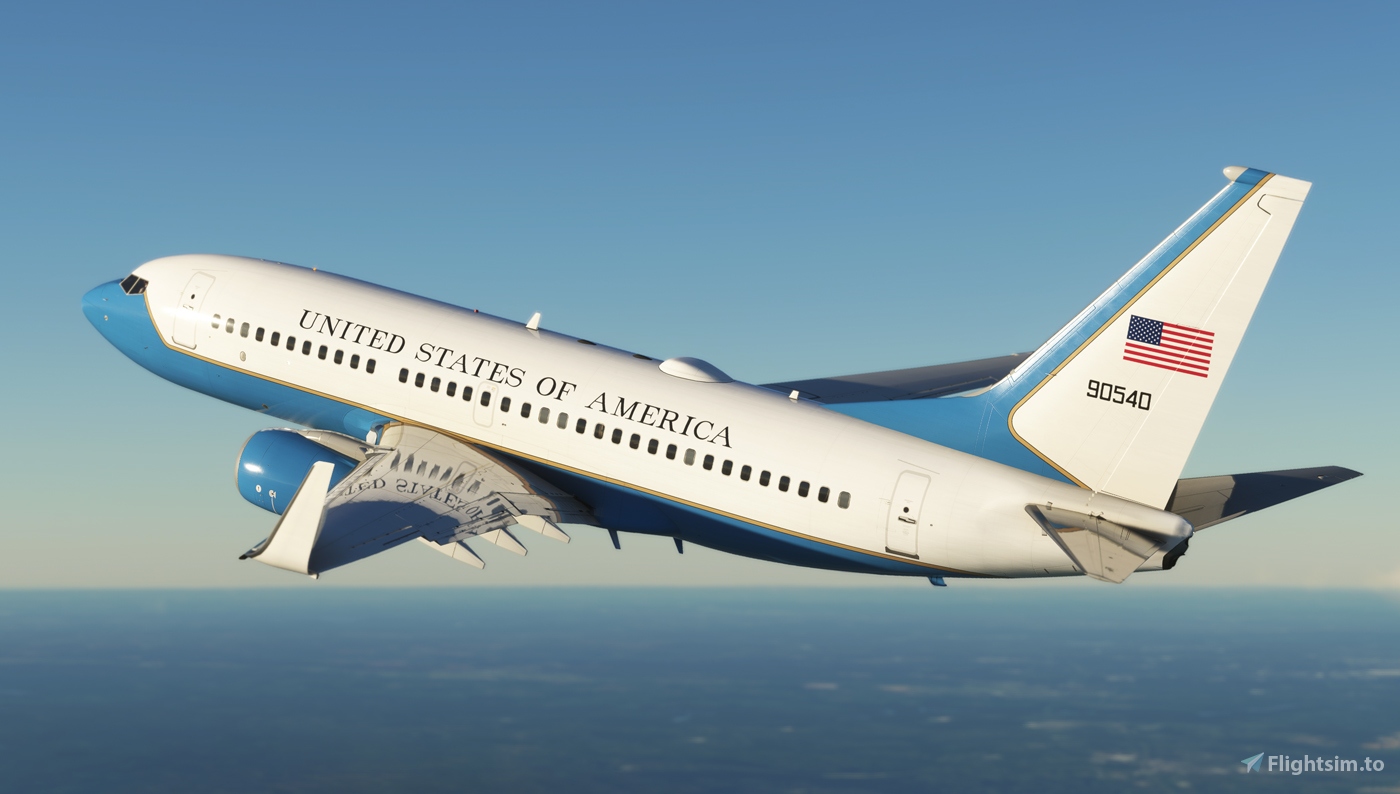
Description
To install:
import the file using PMDG operation center
choose Aircraft and Liveries>liveries utilities
then Install from PTP file on the left bottom corner.
United States Air Force C-40C 09-0540 8K
Explore the meticulously detailed United States Air Force C-40C 09-0540 8K add-on for Microsoft Flight Simulator. Easy installation process through PMDG operation center. Choose from a variety of liveries to customize your aircraft. Enhance your flight simulation experience with this high-quality aircraft model.


Avis des utilisateurs
3 avis
Historique des versions
Aucun historique de version disponible.
Similaires
![[A32NX] Easyjet A320 neo G-UZHA 8K](https://cdn.flightsim.to/images/22/easyjet-a320-neo-g-uzha-8k-eCpHU.jpg?width=500)
[A32NX] Easyjet A320 neo G-UZHA 8K
Experience a realistic Easyjet A320neo G-UZHA livery in stunning 8K resolution, with added scratches for an authentic look. Stick with the old version for a clean, glossy appearance.
par OrientePS
![[A32NX] Lufthansa A320neo D-AINH 8k](https://cdn.flightsim.to/images/22/lufthansa-a320neo-d-ainh-true-8k-aiC4e.jpg?width=500)
[A32NX] Lufthansa A320neo D-AINH 8k
Experience the Lufthansa A320neo D-AINH in stunning 8k resolution with this add-on. Includes first to fly version and a new livery option.
par OrientePS
![[A32NX] Air New Zealand A320 neo ZK-NHA 8K](https://cdn.flightsim.to/images/22/air-new-zealand-a320-neo-zk-nha-8k-BuR5I.jpg?width=500)
[A32NX] Air New Zealand A320 neo ZK-NHA 8K
Experience the Air New Zealand A320 neo ZK-NHA in stunning 8K resolution with this A32NX mod.
par OrientePS
![[A32NX] Easyjet A320 neo G-UZHN 8K](https://cdn.flightsim.to/images/22/easyjet-a320-neo-g-uzhn-8k-6jJSt.jpg?width=500)
[A32NX] Easyjet A320 neo G-UZHN 8K
Enhance your Microsoft Flight Simulator experience with the Easyjet A320 neo G-UZHN 8K modification, featuring version 2.2 updates including added scratches for a more realistic look. Stick with the old version if you prefer a clean, glossy plane.
par OrientePS
Connectez-vous pour participer à la discussion
Se connecterCommentaires(21)
about 1 month ago
5 months ago
almost 2 years ago
almost 2 years ago
over 3 years ago
Can you make a 01-0040 version? I believe 09-0540 is based at Scott and id like an Andrews bird
over 3 years ago
would it be possible to get this for the 737-600?
about 4 years ago
Does anyone know the callsign on ATC of these aircraft?
almost 4 years ago
AVALON with the 375th AW, Scott AFB, IL
BOXER With the 201st AS, DC ANG Joint Base Andrews MD
HOOK With the 1st AS Joint Base Andrews MD
MANGO With the 15WG/65th AS Joint Base Hickam-Pearl Harbor AFB HI
SPAR With the 76AS Ramstein AB GE
almost 4 years ago
Yes, it's REACH (RCH)
over 3 years ago
If the president is flying in this aircraft, it is Air Force One. But if the vice president is using it, it would be Air Force Two.
about 4 years ago
Can you do it for the 737-800?
about 4 years ago
is it possible to cover up some of the windows? to make it more similar to actual C-40
about 4 years ago
Very nice job. Do you think you could do a bit painting on the Interior too? Looked at that plane the first time Miss Pelosi used it for her Journey. So ill guess would be nice addition maybe some Government Logos on the cabin inside? Don´t know.
over 4 years ago
can we get a tail reg versions:
01-0015 https://www.planespotters.net/photo/1111301/01-0015-usaf-united-states-air-force-boeing-c-40b-737-7dmwl-bbj
01-0040 https://www.planespotters.net/photo/110143/01-0040-usaf-united-states-air-force-boeing-c-40b-737-7dmbbj
over 4 years ago
Love your livery!! any chance for 10040?
over 4 years ago
Beautiful livery! Can you create a livery that can be drag and drop to the community folder directly?
about 4 years ago
What's wrong with the Ops Center? Did you get your copy of the 737 from, *ahem*, shady sources?
about 4 years ago
I had problems with the operations centre and almost resorted to drag and drop liveries only, I finally got it working in the end (its a good program). Also, the version from 'shady sources' definetly works with the operations centre.
over 3 years ago
u just admitted to pirating it homie