
Description
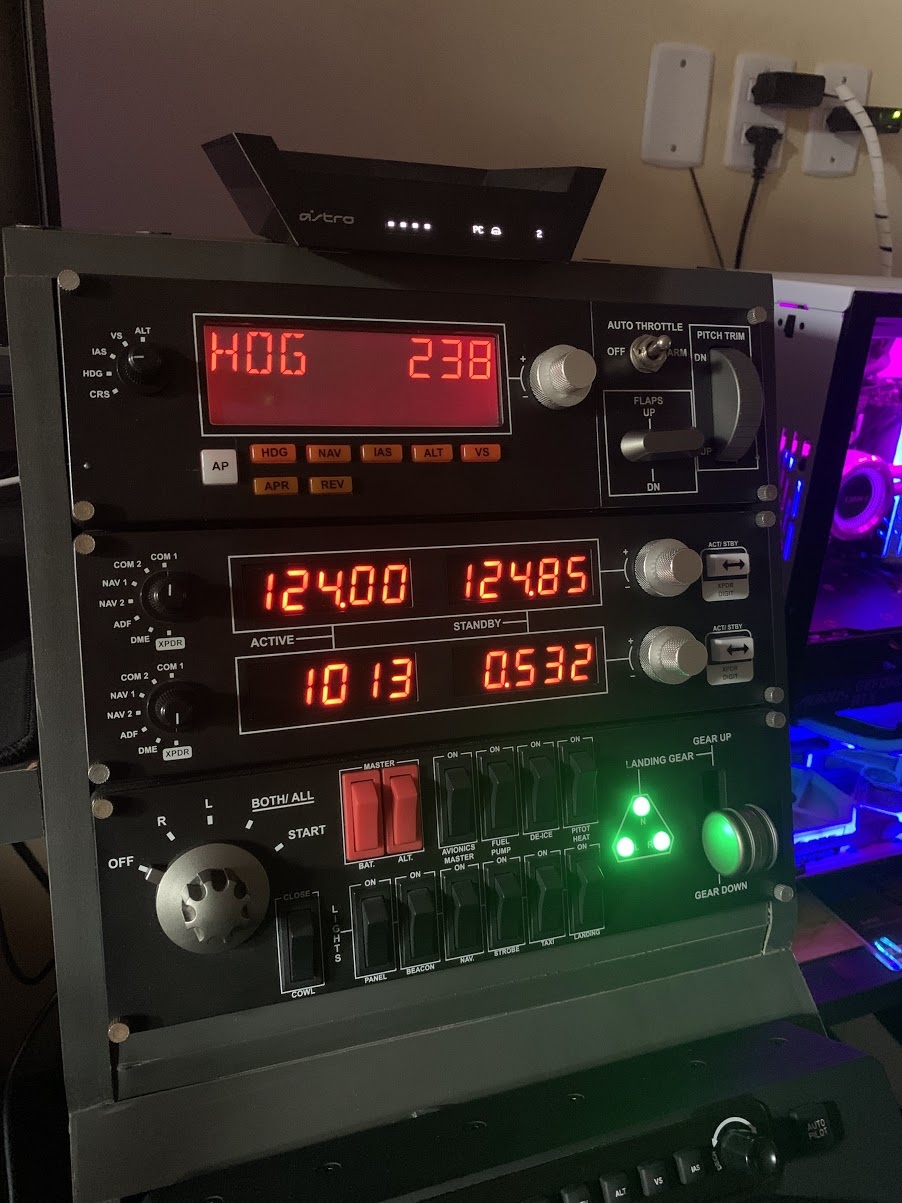
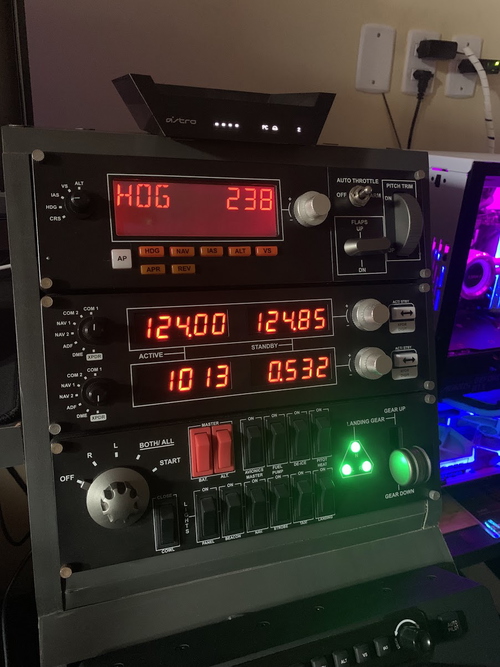
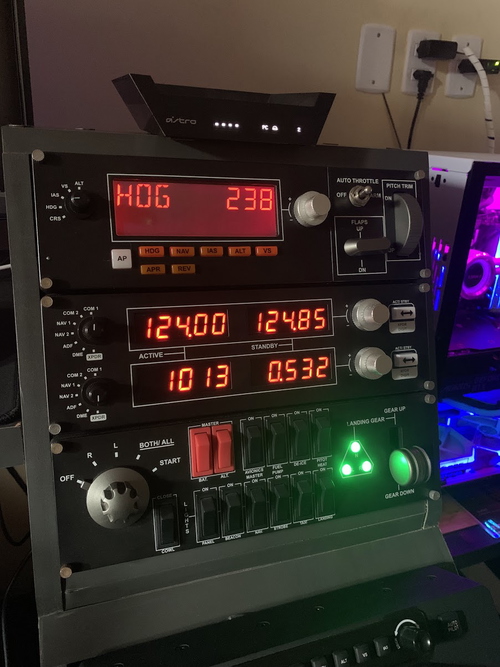
This is a preset to be used on Logitech/Saitek panels (Multi Panel, Switch Panel and Radio Panel), Thrustmaster TCA Captain Pack Airbus and Honeycomb Bravo Throttle Quadrant, through SPAD.neXt software. The entire configuration was made to be used, preferably, in the Airbus 320 of Fenix.
Installation:
Place the file "Fenix A320 - By CMTE_CAVOK" in the SPAD.neXt profile folder.
Default location: C:\Users\[seu nome]\Documents\SPAD.neXt\profiles
Feel free to suggest improvements and fixes!
ENGLISH GUIDE
Thrustmaster TCA Captain Pack Airbus Edition:
WARNING: Remember to disable FS 2020 controls to avoid double commands. Only use Spad.Next!
T.A320 PILOT: (in progress)
Elevator (Y Axis)
Ailerons (X Axis)
Wiper Left: Button 16
Wiper Right: Button 10
- 1st click: Slow
- 2nd click: Fast
- 3rd click: Off
Packs Left: Button 15
Packs Right: Button 09
- 1st click: On
- 2nd click: Off
Chrono Commander: Button 14
Chrono First Officer: Button 08
- 1st click: starts the stopwatch
- 2nd click: pause the timer
- 3rd click: resets the timer
Switching CLR: Button 05
Pedal Disconnect (button 11)
Nose Wheel Operation (RZ axis)
TCA Q-ENG 1&2:
Throttle 1: Reverse / Reverse Idle / Idle / Climb / Flex-Mct / Toga-GA
Throttle 2: Reverse / Reverse Idle / Idle / Climb / Flex-Mct / Toga-GA
Button Pressed Throttle: Autothrust ON/OFF
Engine Mode: Crank Mode / Normal Mode / Ignition Mode
Eng 1: Start ON/OFF
Eng 2: Start ON/OFF
Take Off: (button 5)
External Power: (button 6)
TCA Q-LEFT ADDON:
Speed Break: Retract, 1/4, 1/2, 3/4 and Full.
Auto Break: Disarm / Lo/ Med / Max
Gear (button 21):
- UP: Spoilers ARMED
- DOWN: Spoilers DISARMED
TCA Q-RIGHT ADDON:
Flaps: 0, 1, 2, 3, and Full.
Parking Brake: Set/Release
Rudder Trim: Left, Right and Reset
SWITCH PANEL:
Magnetos: EFIS OFF (LS) R (VOR) L (NAV) BOTH (ARC) START (PLAN)
Master Battery [BAT]: bat1 + bat2 (delay 500ms)
MASTER ALT: apu + start apu + bleed (delay 500ms + delay 1s)
Avionics Master: GNADIRS 1, 3 and 2 (NAV + NAV + NAV)
Fuel Pump: ON/OFF = SWITCHES PUMPS + HYD PUMPS (ELEC 2 - ELEC 1)
De-Ice: ON/OFF WING ANTI-ICE + ENG ANTI-ICE (1 - 2)
Pitot Heat: ON/OFF PROBE WINDOW HEAT
Close Cowl: ON/OFF Dome Lights
Panel: Turns ON/OFF brightness intensity at 20% / 30% (Overhead, Pedestal, FCU, EFIS and AP)
Strobe: ON/OFF as strobe lights
Beacon: ON/OFF as Beacon lights
Nav: ON/OFF Nav&Logo + Emergency Lights + Crew Supply
Landing Lights: Turns landing lights ON/OFF (Also, sets nose light to Takeoff position + runway turnoff + wing lights)
Taxi: Turn the taxi lights ON/OFF
Landing Gear Lever: Controls landing gear lever position
Gear Lights:
- Green - Fully extended
- Yellow - Fully extended, but with airspeed equal to, or greater than 200 knots
- Red - Not fully extended
- Off - Retracted
MULTI PANEL:
*Dysplays (IN PROGRESS)
ALT tab: Displays selected altitude and selected vertical speed. The Knob changes selected altitude by ft.
VS tab: Displays selected altitude and selected vertical speed. Knob changes selected vertical speed by ft.
IAS tab: Displays selected autothrottle speed. Knob changes selected speed by kt.
HDG tab: Displays selected heading. Knob changes selected heading by directional degrees
CRS tab: Displays selected course
*Knobs and Buttons
[AP]: Turns left autopilot ON (to disconnect the AP use your SideStick).
[HDG]: Turns heading mode ON/OFF
[NAV]: Turns ON/OFF button LNAV
[IAS]: Turns managed speed mode ON/OFF
[ALT]: Turns managed altitude mode
- Pressed for a longer = Turns manual altitude mode
- Pressed for a short = Turns managed altitude mode
[VS]: Turns vertical speed mode ON/OFF
[APR]:
- Pressed for a longer = Activate the LOC button
- Pressed for a short = Turns approach mode ON/OFF
[REV]: Changes altitude increment switch position to 1000ft / 100ft
[AUTO THROTTLE]: ON/OFF Sealt Belts
[FLAPS]:
- Active Short UP = increases range ND
- Active Short DN = reduces range ND
[Pitch Trim]:
- UP = increases the brightness of lights to Glass cockpit)
- DN = reduces the brightness of lights to Glass cockpit)
RADIO PANEL: (IN PROGRESS)
NAV1, NAV2, COM1 and COM2: STANDARD usability
[ADF]: Not communication with the SIM
[DME]: Not communication with the SIM
[XPDR]:
- Left Display - By turning the knob, it is possible to change the QNH.
- Right display - Turning the knob, it is possible to change the TRANSPONDER, according to the PEDESTAL operation.
[ACT/STBY]: Long press to switch between QNH or QNE (STD).
*TRANSPONDER = Not communication with the SIM
Honeycomb Bravo Throttle Quadrant (in progress)
***ATTENTION:
For the regular operation of some features of logitech radios, it is necessary to wait for the FENIX update, such as the synchronization of the Multi Panel and Radio Panel leds with the aircraft. However, the command buttons are working perfectly. Over time I will implement these functions, as updates from Fenix.
For now there is no possibility to synchronize the displays of the logitech panels with the cockpit. Fenix did not produce the codes for home cockpit support due to the license with ProSim. We have to wait for future updates. For now we will use the panels in the same way as Honeycomb Bravo, only with manual actions, without visuals.
Donation
If you like this tool and would like to support the development, please consider donating via PayPal by clicking here.
Fenix A320 PanelsLogitech/TCA Airbus/HoneyComb - SPAD.neXt
Enhance your Airbus A320 experience with Fenix A320 Panels preset for Logitech, Thrustmaster TCA Airbus, and Honeycomb Bravo Throttle Quadrant via SPAD.neXt software. This configuration includes detailed instructions and ongoing updates for optimal simulation immersion.

Soutiens
Avis des utilisateurs
8 avis
Historique des versions
ADDED NEW FEATURES: T.A320 PILOT: (in progress) - Elevator (Y Axis) - Ailerons (X Axis) - Nose Wheel Operation (RZ axis) *****WARNING: Remember to disable FS 2020 controls to avoid double commands. Only use Spad.Next!
Similaires
PMDG B737-700 Logitech/Saitek - SPAD.neXt
Enhance your Logitech/Saitek panels for the PMDG B737-700 with this SPAD.neXt preset. The configuration is tailored for seamless integration and functionality, offering a comprehensive experience for cockpit enthusiasts. Follow the installation instructions to optimize your setup and enjoy full compatibility with PMDGNG3-Events and PMDGNG3-Data. Explore a range of features for Multi Panel, Switch Panel, and Radio Panel, enhancing your flight simulation experience with precision and detail.
par CMTE_CAVOK
Cessna 172 (G1000 NXi) Logitech/Saitek - SPAD.neXt
Enhance your Cessna 172 (G1000 NXi) experience with this Logitech/Saitek preset using SPAD.neXt software. Customized for the Default FS2020, this preset optimizes the use of Logitech panels - Multi Panel, Switch Panel and Radio Panel. Enjoy a realistic cockpit feel with specialized functions for each panel component.
par CMTE_CAVOK
PA28R Arrow III (Just Flight) Logitech/Saitek - SPAD.neXt
Enhance your PA28R Arrow III experience with this Logitech/Saitek preset for the Multi Panel, Switch Panel, and Radio Panel using SPAD.neXt software. Easily control autopilot, navigation, flaps, trim, and more with this detailed configuration. Standard usability for NAV, COM, ADF, DME, and XPDR functions on the Radio Panel, while the Switch Panel offers control over lights, engine, and gear operations. No role assigned for Taxi Light and De-Ice functions.
par CMTE_CAVOK
Connectez-vous pour participer à la discussion
Se connecterCommentaires(54)
over 4 years ago
Switched to Alpha. So far I've gotten the radio panel (except Squawk) and the AP button to work on the Multipanel. Pretty excited just for that. Keep up the great work! Donating.
about 1 year ago
12 months ago
over 3 years ago
Hi,
Can I use this profile for just the multi panel without the need to use the tca? The bindings I have for my tca work fine as they are that’s all
over 3 years ago
Yes, as long as you disable the TCA function on the spad.
I already addressed this question in the description.
over 3 years ago
Great work! Is there a way to dissable the woman speking, callin out the different modes as you switching to select different modes?
over 3 years ago
Yes there is.
But I abandoned the project because I didn't have time to program.
It took a lot of time and I had no financial return.
about 4 years ago
Great Profile! But i would consider to change to COM digit system. it takes far too long to turn in frequencies.
For Example:
now its: XX.XXX
better would be: XXX.XX
i hope you understand what i mean
almost 4 years ago
Thanks for the feedback! I haven't used the SIM for a few months, but I will implement your suggestion in the next update.
about 4 years ago
Hi,
Thanks for sharing this profile it is really well done.
I installed it and everything works except for the Multi Panel which does not display the same value as in the sim.
Example when I select Altitude 35000ft in the sim, the multi panel displays 0.
Do you know how I could solve this problem?
Thanks in advance
about 4 years ago
Thanks, for the feedback!
For now there is no possibility to synchronize the displays of the logitech panels with the cockpit. Fenix did not produce the codes for home cockpit support due to the license with ProSim. We have to wait for future updates. For now we will use the panels in the same way as Honeycomb Bravo, only with manual actions, without visuals.
about 4 years ago
Thank you for the work you made, it is really nice to share it.
about 4 years ago
thanks for feedback!
over 4 years ago
hello,
i can not make it work, when i load your profile and turn on switches with the switch panel, it activates multiples light in the same time.
Anyone can help please?
over 4 years ago
I didn't have time to turn on the SIM after the last Fenix update.
Until the last version of Fenix everything was 100% functional.
over 4 years ago
Problem solved, it was a conflict with my honeycomb quadrant.
Thanks
over 4 years ago
Estou a tentar por a funcionar o Transponer pelo radio painel do saitek mas nao estou a conseguir interagir com o A320 da Fenix , sabes me dizer se tens a soluçao obrigado
over 4 years ago
Conforme explicado no post, por questões de contrato de exclusividade entre a Fenix e a PROSIM(desenvolvedora do cockpit da aeronave da Fenix), não é possível sincronizar informações dos displays com hardware externo.