Flightsim.to
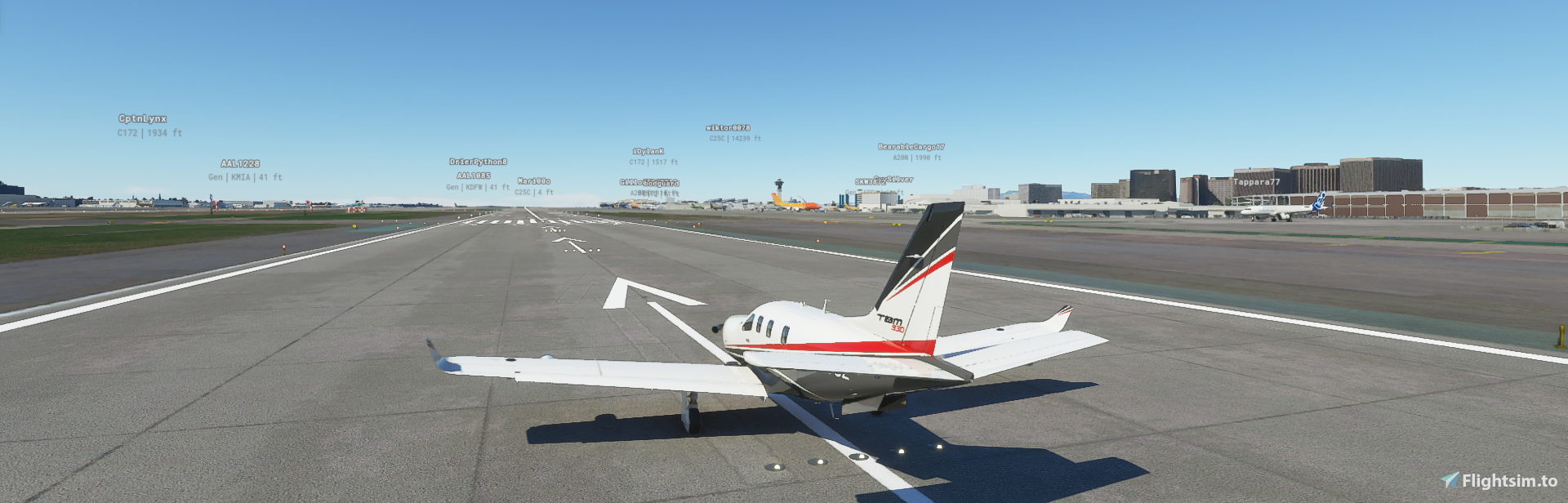
    UI mods and tweaks (full pack) - Image 1

    Description

    PLEASE READ CAREFULLY!

    Due to some simulator limitations, some mods no longer work. Therefore, they are not included in the current version. Be sure to remove all old MUGZ-UIMOD modifications before installing a fresh version.

    FAQ:

    - Q: How to change keybind?
    - A: Edit [uimod]-mugz-hiddenui\html_ui\mJS\mugzUI.js and change (hKey, iKey, mKey value. You can get keycode from https://keycode.info/ site)

    - Q: How to change scale factor for HUD?
    - A: Edit [uimod]-mugz-hiddenui\html_ui\mCSS\mugzHud.css and change --hud-scale to desired value.

    WORKING MODS:

    [uimod]-mugz-hiddenui - This CORE mod add ability to toggle in game UI ellement (such POI/HUD/Nameplates, if they are enabled) on the fly by pressing one button. By default it’s BackSpace Also F12/NumLock key work for separately toggle Hud/IGM. For correct operation, you must install my other mod for every desired UI element. This mod not compatible with **msfs-toolbar-nohandle** mod. Also mod contain better toolbar handler and smaller HUD size (you can control it)

    [uimod]-mugz-tinyplates - Restylish traffic nameplates with ability to turn on/off on the fly. (Required: [uimod]-mugz-hiddenui)

    [uimod]-mugz-worldmap - This small style correction for WorldMap POI/City/Airport names. Added separator for UI scale less 80%, changed smaller font size for city names and corrected line spaces. This is optional mod.

    [uimod]-mugz-tinypoi - This smaller style for POI/Airport with ability to turn on/off on the fly. Smaller size, No Background. (Required: [uimod]-mugz-hiddenui)

    NOT WORKING MOD:

    [uimod]-mugz-addcontrols
    [uimod]-mugz-hidentooltip
    [uimod]-mugz-tinyhud


    All mods sources also available at my GitHub project page.

    All news/dev/suggestion in my discord chanel.

    ⬇️⬇️⬇️ Don't forget to support! =) ⬇️⬇️⬇️

    Activité des interactions
    TéléchargementsCommentairesÉchelles distinctes pour les téléchargements et les commentaires
    22 oct. Téléchargements: 0 Commentaires: 023 oct. Téléchargements: 0 Commentaires: 024 oct. Téléchargements: 0 Commentaires: 025 oct. Téléchargements: 0 Commentaires: 026 oct. Téléchargements: 0 Commentaires: 027 oct. Téléchargements: 0 Commentaires: 028 oct. Téléchargements: 0 Commentaires: 029 oct. Téléchargements: 0 Commentaires: 030 oct. Téléchargements: 0 Commentaires: 031 oct. Téléchargements: 0 Commentaires: 001 nov. Téléchargements: 0 Commentaires: 002 nov. Téléchargements: 0 Commentaires: 003 nov. Téléchargements: 0 Commentaires: 004 nov. Téléchargements: 0 Commentaires: 005 nov. Téléchargements: 0 Commentaires: 006 nov. Téléchargements: 0 Commentaires: 007 nov. Téléchargements: 0 Commentaires: 008 nov. Téléchargements: 0 Commentaires: 009 nov. Téléchargements: 0 Commentaires: 010 nov. Téléchargements: 0 Commentaires: 011 nov. Téléchargements: 0 Commentaires: 012 nov. Téléchargements: 0 Commentaires: 013 nov. Téléchargements: 0 Commentaires: 014 nov. Téléchargements: 0 Commentaires: 015 nov. Téléchargements: 0 Commentaires: 016 nov. Téléchargements: 0 Commentaires: 017 nov. Téléchargements: 0 Commentaires: 018 nov. Téléchargements: 0 Commentaires: 019 nov. Téléchargements: 0 Commentaires: 020 nov. Téléchargements: 0 Commentaires: 0
    22 oct.05 nov.20 nov.
    0
    Téléchargements
    0
    Commentaires
    Dernier commentaire il y a 800 jours
    Le créateur répond à 35% des commentaires

    Connectez-vous pour participer à la discussion

    Se connecter

    Commentaires252

    Commentaire épinglé
    MugzAuthor·over 3 years ago

    toggling hud and nameplatest not work if you installed toolbar-pushback. Use content.xml to make order to load ui-mod

    pacha35·about 2 years ago
    Hi,
    I have tried the "[uimod]-mugz-hiddenui" with several aircrafts and this is the results :
    - PA28 from Justflight : OK
    - C172 all models : OK
    - DR400 all models : OK
    - Cub Savage : OK
    - Xcub Crafters : NO
    - TBM 930 and TBM850 : NO
    EverydayAvatior
    ·almost 3 years ago
    Rating 5 because I have loved this mod since it came out, however all of a sudden now only the compass only shows up and no longer the thrust, fuel, altitude indicator etc. Any ideas for a fix? I've already tried deleting and re downloading and installing.
    Elistoff
    ·almost 3 years ago
    Hello, with the FSReborn plane: FSR500, this mod removes the locks on the screen in exterior vision! Can this be corrected?
    with:
    [uimod]-mugz-hiddenui
    [uimod]-mugz-tinyplates


    ECLIPSE9473
    ·almost 3 years ago
    Many thanks for this superb work, and at the same time wish you all the best for 2024.
    FYI with the last update it works really well.
    Well done!
    A.d.
    samflyer54
    ·almost 3 years ago
    Many thanks for this superb work. Update 1.35.21 conflict with "MS FS 2020 - Modern UI" (https://de.flightsim.to/file/6646/ms-fs-2020-modern-ui), if this Mod installed, update 1.35.21 dosen't work.
    flying59
    ·almost 3 years ago
    Thanks for putting out the fix for post-SU14 issues. All seems to be working fine with the 1.35.21.1 version of the external view HUD. This external HUD and the Addons Linker app are two of the most essential addons out there for MSFS2020. Thanks Mugz!!
    Dougal·almost 3 years ago
    HUGE thanks for updating this after SU14 broke it. Didn't realise how much i relied on the small HUD.
    FoxyRabbit_67
    ·almost 3 years ago
    Fantastic mod!
    CentrumSilver
    ·almost 3 years ago
    Use at your own risk. I tried it. File Wouldn't delete out of community folder. The Mouse as going crazy opening hundreds of files until PC bottled up. Couldn't boot in safe mode. Finally got in device manager and keyboarded to delete mice . Two reboots later, mouse regained normal function. Browsers could not accept any data to do searches via keyboard. Not sure what this app does, but if you're not 100% sure, it could really screw up your whole Pc.
    hugojans·almost 3 years ago
    Add Controls is back: how to use, and for what purpose?
    Hidden Tooltip is back: what is the visible effect of this mod?

    Sorry, found the answers in https://github.com/mixMugz/msfs2020-uimod/tree/v1.35.21.9
    hugojans·almost 3 years ago
    Super! Many thanks!
    For me --hud-scale: 75%; works better.
    And for the compass: less width, and top 5% lower (then the Devmode toolbar does not overlap the current bearing):
    glasscockpit-hsi {
    position: absolute;
    /* width: calc(var(--hud-scale) * 1.25);*/
    width: var(--hud-scale);
    top: 15%;
    left: 0px;
    }
    Deleted Account
    ·almost 3 years ago
    Lovely ! i like this
    Deleted Account·almost 3 years ago
    hugojans
    ·almost 3 years ago
    I found a temporary partial solution:
    - Go to the folder zzzz-[uimod]-mugz-hiddenui\html_ui\mCSS
    - Open the file mugzHud.css in a text editor (Notepad, Notepad++, ...)
    - Comment out these lines (/* is begin of comment, */ is end of comment):
    /*
    analogic-power,
    digital-power {
    position: absolute;
    width: var(--hud-scale);
    bottom: 0;
    }

    analogic-altimeter,
    digital-altimeter {
    position: absolute;
    width: var(--hud-scale);
    bottom: 0;
    right: 0;
    }
    */
    It seems these definitions are not compatible with the HUD as it is now implemented in SU14, although I have no clue why...
    - Result is that the HUD now is visible again, but in the original scale, which I can't change, alas. Much too big for me...
    - Moreover, the hKey, iKey, mKey toggle switches are operational, allowing hiding the ingame panels and the HUD.
    I hope someone (Mugz!) can come up with a really good implementation!
    nickb007·almost 3 years ago
    thank you that worked for me
    zzGhost4·almost 3 years ago
    Worked for me as well. Thanks!
    Deleted Account·almost 3 years ago
    solved as you told partionaly, i will look if i can find the scaling in it via the SDK package later this week , ty :)
    A: Edit [uimod]-mugz-hiddenui\html_ui\mCSS\mugzHud.css and change --hud-scale to desired value.
    bluegolf24·almost 3 years ago
    Same problem here. Mod doesn't work with Sim Update 14. Therefore, I already sent a message onto his discord channel.
    Deleted Account·almost 3 years ago
    same here ,
    CTD and no longer possible to activate/deactivate the HUD in external view from the SU14, i think he does not support annymore ...
    Catalina29·almost 3 years ago
    CTD and no longer possible to activate/deactivate the HUD in external view from the SU14
    ...
    MSFS 2020MSFS 2024

    UI mods and tweaks (full pack)

    Enhance your flight simulation experience with this comprehensive pack of UI mods and tweaks. Easily toggle in-game UI elements, restyle traffic nameplates, modify the WorldMap display, and customize POI/airport styles on the fly. Note any limitations and find detailed customization instructions included.

    Supprimé par le créateur

    Cet add-on a été supprimé par son créateur et n’est plus disponible.

    Téléchargements10K
    Version1.21.18.1
    Taille du fichier144.72 KB
    PubliéIl y a 6 ans
    Mis à jourIl y a 4 ans
    Classification
    Utilities4.7 (57)

    Avis des utilisateurs

    4.7

    57 avis

    5
    75%
    4
    12%
    3
    0%
    2
    0%
    1
    2%

    Historique des versions

    - Changed visibility behavior (nameplates now toggling instant, no more disapear lag) - Performance degradation with hidden nameplates now fixed - Tiny POI now working with name toggle