
Description
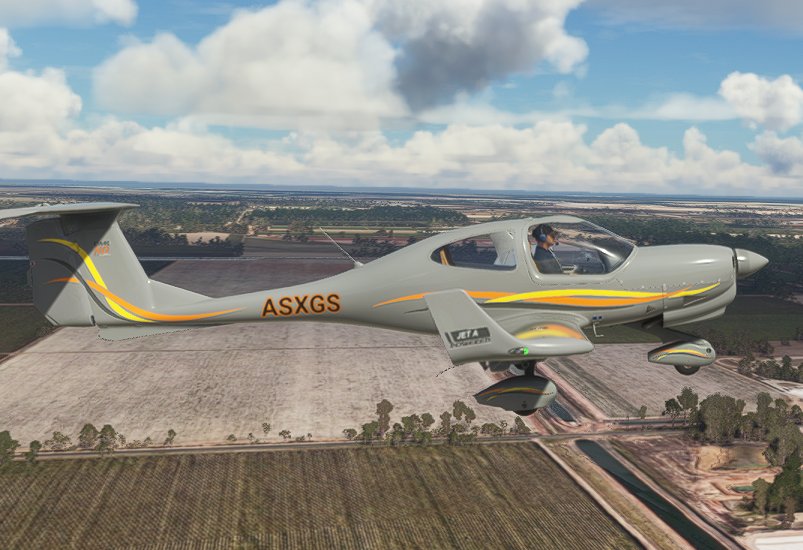
Repaint of the DA40 NG default livery.
- You can use your own tail number.
- Tail number in bi-colour.
- 9 different exterior colour combinations.
- 7 interior colours - Red (1 aircraft), Blue- (1 aircraft), Black (1 aircraft), Beige (2 aircraft), Green (1 aircraft), Tan (2 aircraft) and Default white (1 aircraft).
- 4 different prop brands (eg Hartzell etc)
- More realistic prop blur with reduced strobing compared to the MSFS standard aircraft.
- Compatible with both the DA40 NGX mod and the default DA40 NG.
INSTALLATION
- Copy folder starting with “2” for the colour of your choice to your community folder.
TROUBLESHOOTING
See "Read_Me_1st.pdf" included in zipfile.
CONTACT
You can contact me by messaging me on Flightsim.to.
EULA
These repaints are provided free of change and are not to be repurposed for inclusion with any commercial package or uploaded to another site without my permission. The use of the downloaded repaints is done at your own discretion and risk and with agreement that you will be solely responsible for any damage to your computer system or loss of data that results from such activities.
DA40 NG Repaints
Enhance your DA40 NG experience with these detailed repaint options, including customizable tail numbers, bi-color tail designs, and a variety of exterior and interior color combinations. This add-on also features realistic prop blur effects and is compatible with both the DA40 NGX mod and default DA40 NG aircraft. Installation is easy - simply copy your chosen color folder to your community folder. For more details and troubleshooting, refer to the included "Read_Me_1st.pdf" file.
Supprimé par le créateur
Cet add-on a été supprimé par son créateur et n’est plus disponible.

Avis des utilisateurs
3 avis
Historique des versions
1. Updated all liveries to a "Use your own tail number" version. 2. Added bi-colour tail numbers for user assigned tail numbers. 3. Updated interior colours.
Connectez-vous pour participer à la discussion
Se connecterCommentaires15
Great repaints. Would it be possible to have this package minus the aircraft registration numbers so that we can use our own customized registrations on the aircraft (even if these don't look as good as your own work)?. It would be great if you could release them as requested. Thank you.
These are the 1st repaints I did for MSFS, so they are very old. They are just the default livery recoloured, so a use your own tail number would be possible. However you would may lose the font colour and end up with the default black tail number, as MSFS tail numbers often will not follow the colour you specify yourself. I'll have a look at it an do a "use your own tail number" update.
That would be great. Like I said, I do like your repaints and would be great to have them with the ability to use a custom registration number. If you make them available with that option, please don't forget to remove the flags so there are no discrepancies with the flags / registration. Thank you.
Version 3.0 now has user assigned tail numbers.
Thank you very much. Great job!
My sim crashes when starting the engine... this is 100% reproducible. I can´t imagine how a livery should cause this kind of error but I tested with standard liveries and they do work.
Nevertheless the repaints look fantastic!
I was able to start the engine without getting a CTD with these repaints. I just used Ctrl+E to start the engines, and it started right up without any problems. I tried it both with the DA40 NGX mod installed and with it not installed. I am also using the NXi mod so tried it with and without that as well and had no porblems.
Generally repaints would not cause a CTD, especially simple ones like this. A couple of things to try. 1. Try it with nothing else in your Community folder except these repaints and see if the problem persists. 2. One thing that does cause MSFS problems is the ATC_ID line in the aircraft.cfg, if it contains a space. By default my liveries use a null character, not a space. This is to hide the MSFS generated tail number on the fuselage. If you changed this line, then changed it back you may have used a space when the original had a null character. 3. Also try just adding a tail number to this line like atc_id = "ASXGS".
Sorry, but it is almost impossible to solve a problem I am not having myself.
nice. is it working with SU5 and WU6? thanks
Yes it is working. The comment about compatibility on Flightsim.to was mass applied to all uploads done prior to WU6, whether they are compatible or not. Not sure why they did this as many liveries were not affected by the recent MSFS update, and it just causes more confusion.