
Description
Description:
TBM930 PFD/MFD/SFD Color ver1.2.0
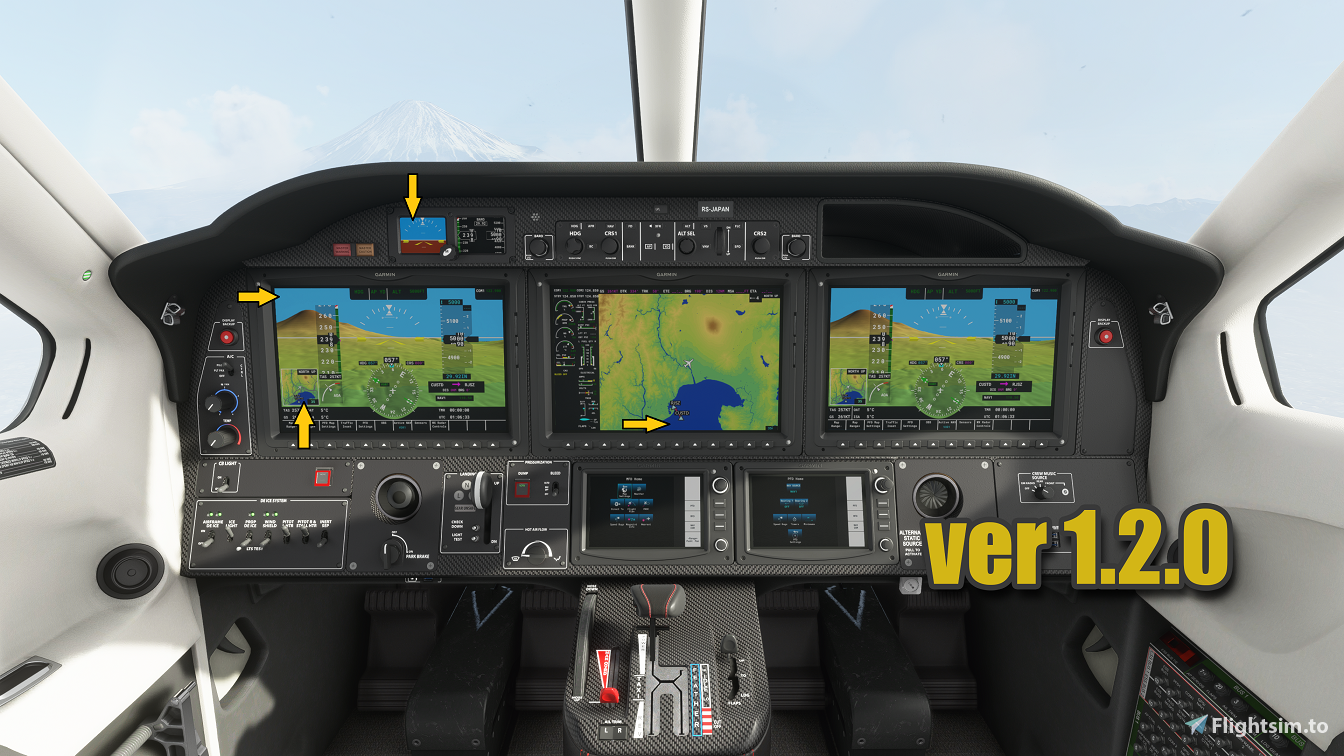
Standby Flight Display Color Changed (Horizon Top and Horizon Bottom Color)
PFD Sky color changed/Inner map water color changed
MFD water color changed
Important: If you are using "workingtitle-G3000" mod, PFD Sky color, inner map water color, and MFD water color will not change. ("workingtitle-G3000" mod automatically rewrite color code)
Installation: Unzip the downloaded folder, simply drag and drop "TBM930 PFD-MFD-SFD Color" folder into your community folder.
Uninstall: Simply delete the "TBM930 PFD-MFD-SFD Color" folder from your community folder.
Enjoy Flying!
MSFS 2020MSFS 2024
TBM930 PFD/MFD/SFD Color Updete!
Enhance the visuals of your TBM930 with updated PFD/MFD/SFD colors in version 1.2.0. Changes include new stand-by flight display colors and adjusted sky and water colors on the displays. Note that compatibility with the "workingtitle-G3000" mod is limited. Installation is simple: just drag and drop the provided folder into your community folder. Elevate your flying experience with these visual enhancements.
Téléchargements3K
Version1.2.0
Taille du fichier11.80 KB
PubliéIl y a 5 ans
Mis à jourIl y a 5 ans


Avis des utilisateurs
5.0
1 avis
5
100%
4
0%
3
0%
2
0%
1
0%
Connectez-vous pour participer à la discussion
Se connecterCommentaires(14)