

Description
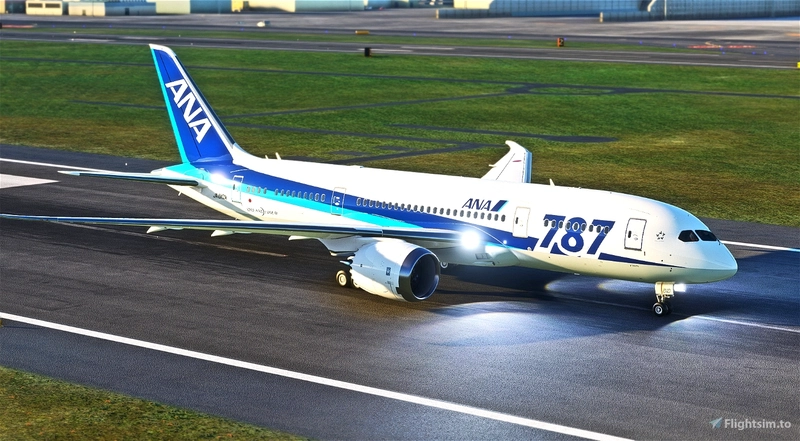
Kuro_B787-8 | Base Livery + Fuselage Blend file
v2.1.0
It is for tech people with experiences.
If you are new to paint liveries, practice on B787-10 or similar before working on B787-8.
Kuro_B787-8 | B787-8 Dreamliner » Microsoft Flight Simulator
[v2] Kuro_B787-8 | Base Livery + Fuselage Blend file
Customize your Boeing 787-8 aircraft in Microsoft Flight Simulator with the Kuro_B787-8 base livery and fuselage blend file. This add-on is designed for experienced tech enthusiasts, offering a unique painting experience for your simulator. Practice on the B787-10 or similar aircraft before delving into this detailed customization option.

Avis des utilisateurs
5 avis
Historique des versions
- Steering has been adjusted in Kuro_B787-8_v2.1.0. (Changelog : [FM/EXT] Steering fix (Kuro)) Liveries using the decal method must be updated with the models included in Kuro_B787-8_v2.1.0. - Added KLM_Livery_UV.png for Nose gear door decals - If you modify and upload liveries which are included by default(ANA/ACA/etc...), write a credit "Based on livery by Kurorin" in their description.
Connectez-vous pour participer à la discussion
Se connecterCommentaires(34)
over 3 years ago
v2.0.0+(AAU2) support and update to new (v2) exterior models.
v2 exterior model: Unmirrored Tail/Engines/Wings/Bottom-Gear-Door/Cargo-Hinge sections.
important difference for v2.0.0+:
- "aircraft.cfg>panel, sound" sections are required
- “texture.cfg”>
fallback.6=..\..\Kuro_B787_8\texture.RR
or
fallback.6=..\..\Kuro_B787_8\texture.GE
needs to be added
(You can still use v1 model for livery(keep blank "aircraft.cfg>model"section),
but I highly recommend to use v2 model for new livery creation.)
about 1 year ago
over 2 years ago
over 2 years ago
about 3 years ago
If they can be pointed out in the UV Maps, I can fix these manually.
Additionally, could we get the engine covers added to the Blender files to make it easier to paint/"sticker" these...
Thanks!
about 3 years ago
over 3 years ago
I have tried to download and unzip several times with the same results. The last few times I cannot get the full download. I get the file pkv2.1_TU7GU.zip.
Gnacino
about 1 year ago
over 3 years ago
If you have modified and published liveries which are included by default(ANA/ACA/etc...), credit “based on kurorin’s livery” in their description.
over 3 years ago
Is there a PSD version? Blender is hard to use and takes more time to paint compared to PSD version
over 3 years ago
The Blender model is all pink, and even though I change the base color, I cannot paint on the fuselage textures. Any tips on how to get it to work with the Blender paiting technique?
Edit: Nevermind, it works! And man is it ever a fantastic pantkit. Thanks for sharing!
over 3 years ago
I can't get mine to work. Same issues as you had
about 3 years ago
over 1 year ago
over 3 years ago
v2.0.0+(AAU2) support and update to new (v2) exterior models.
v2 exterior model: Unmirrored Tail/Engines/Wings/Bottom-Gear-Door/Cargo-Hinge sections.
important difference for v2.0.0+:
- "aircraft.cfg>panel, sound" sections are required
- “texture.cfg”>
fallback.6=..\..\Kuro_B787_8\texture.RR
or
fallback.6=..\..\Kuro_B787_8\texture.GE
needs to be added
(You can still use v1 model for livery(keep blank "aircraft.cfg>model"section),
but I highly recommend to use v2 model for new livery creation.)
over 3 years ago
Hey,
I'm in the process of updating my liveries to fix the mirror problem while I wait for V2 to be released to get a head start. Thanks for fixing this!
However it seems that the bottom still has this problem contrary to what is written in the changelogs! The rest works fine! :)
over 3 years ago
It was typo...
Unmirrored : Tail/Engines/Wings/Bottom-Gear-Door/Cargo-Hinge sections.
over 3 years ago
For everyone who wants to remove the tail number from user-made liveries, simply find your panel.cfg file (community/livery_folder/SimObjects/Airplanes/livery_name/panel.XXX.cfg) and insert the following at the bottom (ensure there is a line break between it and other text):
[VPainting01]
size_mm = 2048,512
texture = RegistrationNumber
location = exterior
painting00=Registration/Registration.html?font_color=0x00000000, 0, 0, 2048, 512
(do NOT copy text after this) If there is a VPainting01 in the file already, change the text in brackets to [VPainting02] or 03 or so on depending on how many VPaintings already exist. If there is already a VPainting with a texture of RegistrationNumber (and the registrations still appear on the fuselage), replace everything underneath the [VPaintingXX] header with this:
size_mm = 2048,512
texture = RegistrationNumber
location = exterior
painting00=Registration/Registration.html?font_color=0x00000000, 0, 0, 2048, 512