
Description
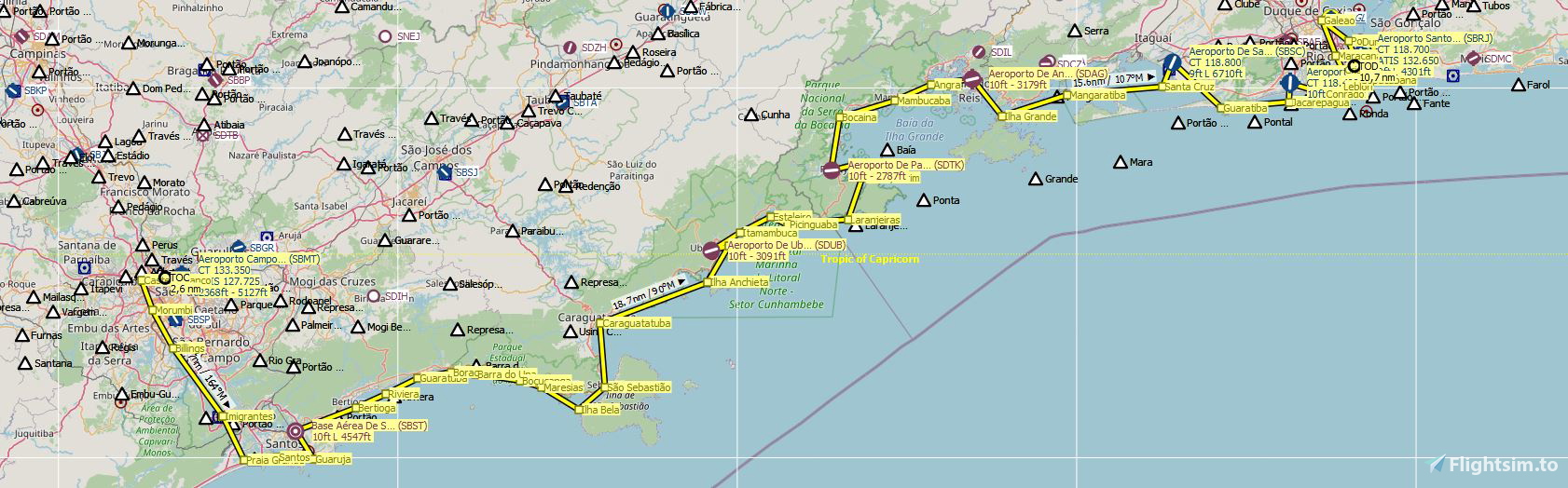
Enjoy flying over the beautiful Brazilian Coast.
Bush Trip from São Paulo City (SBMT) to Rio de Janeiro City (SBRJ).
Installation:
Unzip the SBMT-SBRJ-Mission.rar folder and drop it into your Community folder.
Bush Trip from São Paulo City (SBMT) to Rio de Janeiro City (SBRJ).
Installation:
Unzip the SBMT-SBRJ-Mission.rar folder and drop it into your Community folder.
MSFS 2020MSFS 2024
Flying from São Paulo (SBMT) to Rio de Janeiro (SBRJ)
Embark on a scenic bush trip from São Paulo (SBMT) to Rio de Janeiro (SBRJ) along the stunning Brazilian Coast. Simply unzip the provided folder and add it to your Community folder to start your adventure!
Téléchargements1K
Version1.0
Taille du fichier35.27 MB
PubliéIl y a 5 ans
Mis à jourIl y a 5 ans


Avis des utilisateurs
4.8
2 avis
5
50%
4
0%
3
0%
2
0%
1
0%
Historique des versions
Aucun historique de version disponible.


Connectez-vous pour participer à la discussion
Se connecterCommentaires(11)
about 5 years ago
Where can I find this mission in the game? Landings Challenge? Adventures?
about 5 years ago
anyone? same problem here.
about 5 years ago
I got it! You need to open MSFS and go to "World Map", press "Space" and select "Load/Save"> "load"...when a windows box show, find the file that you past inside "Community" and click "SBMT-SBRJ-Mission" (theres 2 files, select InDesign 3D Party.....
over 5 years ago
over 5 years ago
But I thought it would add enhanced sceneries to the path - there are serious mistakes in MSFS original scenery - example, Riviera de Sao Lourenco seems flooded!
almost 6 years ago
about 5 years ago
Where can I find this mission in the game? Landings Challenge? Adventures?
almost 6 years ago
almost 6 years ago
What recommended aircraft to fly this mission?
almost 6 years ago
about 5 years ago
Where can I find this mission in the game? Landings Challenge? Adventures?