
Description
ENGLISH:
Hello!
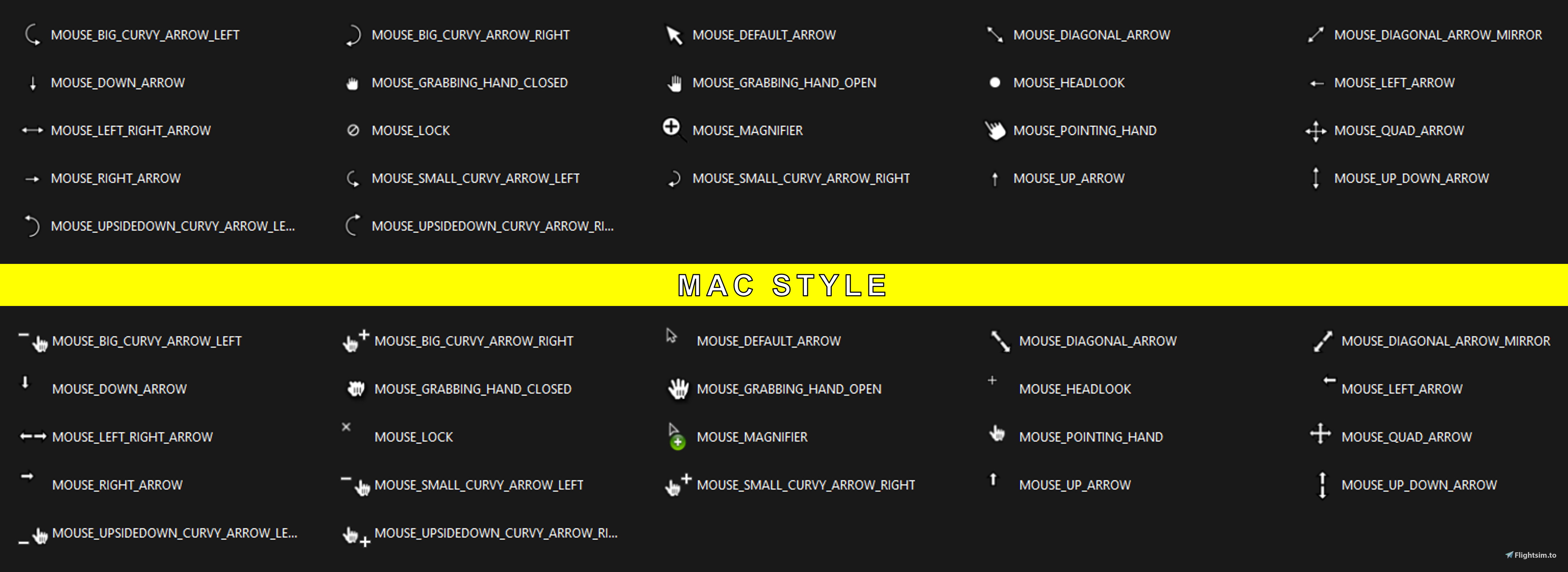
I developed new styles of cursors for Microsoft Flight Simulator. I never really liked the default version of the simulator, after a while of research and a lot of hours spent in development, I created new cursor options, currently the CROSSHAIR STYLE version and the MAC STYLE. Both are small and precise trying to bring a more pleasant and professional look to the simulator. I would really appreciate your feedback and if you would like some different type of cursor. Thanks!
Hope you like!
- HOW TO INSTALL
First look for your main Microsoft Flight Simulator folder, where it contains its executable. There will be a folder called " SYSICO ". Copy the 22 cursor files you chose and replace them with the ones in this folder. Remember to back up the original cursors in case you decide to use them again.
- BACKUP
I also uploaded a file that contains all the original cursors in case you decide to use the originals back, or even change any of your preference!
- - - - - - - - - - - - - - - - - - - - - -
PORTUGUÊS/BR:
Olá!
Desenvolvi novos estilos de cursores para o Microsoft Flight Simulator. Nunca gostei muito da versão default do simulador, depois de um tempo de pesquisas e bastante horas gastas de desenvolvimento, criei novas opções de cursores, atualmente a versão CROSSHAIR STYLE e a MAC STYLE. Ambas são pequenas e precisas tentando trazer um visual mais agradável e profissional ao simulador. Gostaria muito do seu feedback e se você gostaria de algum tipo de cursor diferente. Obrigado!
Espero que você goste!
- COMO INSTALAR
Primeiro procure sua pasta principal do Microsoft Flight Simulator, onde contém o executável dele. Lá terá uma pasta chamada " SYSICO ". Copie os 22 arquivos de cursores que você escolheu e substitua pelos desta pasta. Lembre-se de fazer backup dos cursores originais caso você decida voltar a usa-los.
- BACKUP
Também fiz upload dos arquivos originais caso você decida utilizá-los novamente, você também pode trocar qualquer um que você preferir!
New Cursor Options
I developed two versions of the cursor for Microsoft Flight Simulator: MAC STYLE and CROSSHAIR STYLE. The intention is to change the default cursor for those who don't like it, like me. The two options compared to the default are smaller and more accurate, trying to bring a more pleasant and professional look to the simulator.

Avis des utilisateurs
7 avis
Historique des versions
---> CROSSHAIR STYLE is in version 2, here the simple changes made compared to the previous version: - Small tweaks to the design; - Now the sign " - " is on the left. ---> MAC STYLE is the new cursor style that I developed based on MAC cursors. Small, simple and accurate. Many hours were spent developing it and mostly testing it, all I ask for is honest feedback so I can always improve!

Connectez-vous pour participer à la discussion
Se connecterCommentaires(23)
almost 2 years ago
almost 2 years ago
almost 2 years ago
https://drive.google.com/drive/folders/15-bAj5vS_TSejeJ-lq7H0a6q8aJBUBMB?usp=sharing
over 2 years ago
over 2 years ago
over 2 years ago
over 2 years ago
Sorry about that!
over 2 years ago
over 3 years ago
Perfect! Thank you very much!
over 3 years ago
Great mod, but can you make the cursor Icons bigger?
over 3 years ago
Sure! I'm solving some problems with this addon, this whole process of creating an addon is new to me, but once I solve it, I will continue to create new styles and sizes!
Thanks for the feedback!
over 3 years ago
A brilliant idea and brilliantly implemented. Thank you for your great work
over 3 years ago
i was asking for that dcs style from the very first day !!
EDIT
Too bad,i can't have access to that folder.No matter if i change the privileges,it still doesn't let me to change anything
over 3 years ago
I am really sorry about that! You are not the first one to report the problem, could you tell me which version of MSFS are you using? Steam or Microsoft Store? I hope I can better understand the problem and look for a way to solve it as soon as possible!
over 3 years ago
I can't gain access either. I have the Microsoft Store version.
over 3 years ago
Microsoft store version.Sorry,i forgot to mention it
It would be great if you can make it a community folder drag and drop.That will solve this problem
over 3 years ago
Thanks for the answer!
I'm already studying how to solve the problem, as well as creating a way to make it available as a file for the Community folder