
Description
About
With this app you are able to follow your current flight and get different infomations about icing, altitude, flighttime, speed, wind, weather, clouds, rains....
Supported simulator: Microsoft Flight Simulator 2020 (MSFS)
Installation Instructions
1. unzip the app folder everywhere on your system
2. start your Simulator
3. load any flight
4. create a flightplan with . KML- ending for ex from simbrief.com
5. start the serv app ( serv.exe)
6. open your browser on: http://localhost:5000
7. to get Simbrief Information, open config.txt and add your username.
Probably you need to whitelist the app in your antivirus and open, no installation is required.
My App is under current development
Aircraft color descriptions:on map:
Red: cruising
Blue: on decent
grey: on climb
black: vatsim
Please let me know, if you have any questions and friendly critics:
Thank you
Credits:
Inspirations for code programming and learning, a lot of thanks to:
https://github.com/mracko/MSFS-Mobile-Companion-App
https://pypi.org/project/SimConnect/
https://nodejs.org/en
https://stackoverflow.com/questions/54234262/how-to-move-markers-on-openstreetmap-using-leaflet
https://tkardi.ee/writeup/post/2019/04/27/building-a-totally-useless-map/
https://gis.stackexchange.com/questions/356491/keeping-popup-text-open-after-marker-refresh-in-leaflet
https://leafletjs.com/
https://github.com/baspete/Split-Flap
known bugs:
Traffic Board: issue with some airport json data, when pressed, no information, because of wrong json data
different localtime / departure time ( timezones) Im working on it to solve.
issues with node modules ( library for exe )
Commentaires(22)
Connectez-vous pour participer à la discussion
Se connecter4 months ago
11 months ago
almost 2 years ago
You know, write the airport you take of from, and Arrival whit out Simbrief flight plan. That would be my suggestion :) Like Fly live does. But Fly Live crashes al the time.
That would be very nice, so my viewers knew how long they are in flight.
best regards
Robijet
almost 2 years ago
almost 2 years ago
good flights.
almost 2 years ago
almost 2 years ago
almost 2 years ago
almost 2 years ago
it only connects to the official simconnect from msfs2020.
start it with admin rights for example. Do you have all parts of files in one folder? Start the serv. exe only when you are on a airport with your aircraft or plane. you should see a black small screen, where you can see this:
192.168.1.117
* Serving Flask app 'serv'
* Debug mode: off
********* Welcome to Flight Information App *********
Open 192.168.1.117:5000 in your browser to access FLight Information.
please check ipconfig in command prompt when running over Wifi
**************************************************
please tell me more of the issues. thank you
almost 3 years ago
almost 3 years ago
almost 3 years ago
thats it.
over 2 years ago
almost 3 years ago
almost 3 years ago
almost 3 years ago
happy weekend
about 3 years ago
Very cool and thank you for your efforts!
about 3 years ago
thank you
Flight Information Map - 2024
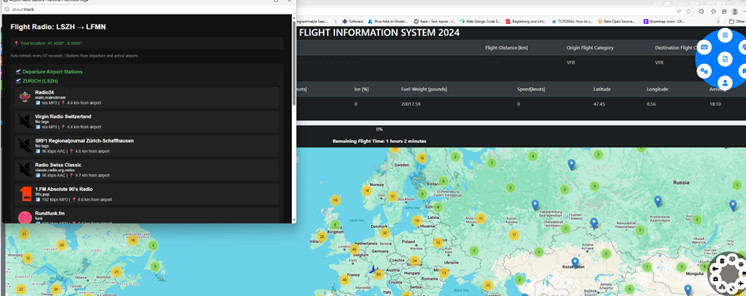
Flightplanning with Weatherinformation. You can to calculate your flighttime, your arrival time and your flightdistance within one click. You get, if you own fbw airbus or fenix, a display to manage your flight within one app. So you have a worldmap, weathermap, real traffic map and different flight informations in one application. In addition you can get your latest simbrief data to plan your flight.
Téléchargements suspendus
Le créateur a temporairement suspendu les téléchargements pour cet add-on. Veuillez réessayer plus tard.

Avis des utilisateurs
4 avis
More Information
Historique des versions
added : Nearby Radio Stations you can hear different stations nearby your latitude and longitude of your aircraft you find the icon in the middle of the blue circle menu
Similaires

Douglas DC9-FSX Converted for 2024
The Douglas DC9-FSX add-on has been converted for use in Microsoft Flight Simulator 2024, originally designed by Erick Cantu for Flight Simulator X. The package includes modified textures and models, utilizing both DDS and KTX formats, to enhance compatibility. While most functionalities such as animations and cockpit integration are operational, there are known issues with textures and effects that are still being addressed. Users will need to have the FlyByWire A320 installed to fully utilize cockpit features during the conversion phase.
par turmspringer123

FSX-CONVERTED DC9-30
Revisit the classic DC9-30 in Microsoft Flight Simulator with this FSX-converted model. Enjoy a modified cockpit experience using the Asobo A320 cockpit, enhanced with unique functions. Optimized flight model based on original FSX data, modeled by Eric Cantu for MS2004 and converted to FSX. Download for a nostalgic flight experience in this iconic old aircraft.
par turmspringer123
bredok airbus a380 mod
A comprehensive mod for the Bredok Airbus A380, enhancing lights, Eicas, MCDU, and sound systems. Various improvements have been implemented to address existing issues and enhance the overall flying experience. Installation is straightforward - simply unzip the folder and place it in your community folder. Fly safer and smarter with these enhancements.
par turmspringer123
![Airbus A340-600 [FSX CONVERTED]](https://cdn.flightsim.to/images/26/airbus-a340-600--fsx-converted-9765-1706463904-LzA6q.jpg?width=500)
Airbus A340-600 [FSX CONVERTED]
A converted FSX Airbus A340-600 add-on for Microsoft Flight Simulator, featuring a Boeing 747 cockpit from ASOBO. This mod allows you to start the aircraft anywhere from the gate, with all engines running and functional systems if you own the 747-8i. Enjoy exterior views and showcase cameras to observe wings and engines. Note some minor issues with textures, virtual cockpit shadows, and exterior lights.
par turmspringer123
4 months ago
A couple of questions:
1) I inserted my Simbrief user name in the right place, but I don’t see the route on the map. Where do I make wrong?
2) Is there an option/button to get the “Follow Aircraft “ condition?
Regards.