
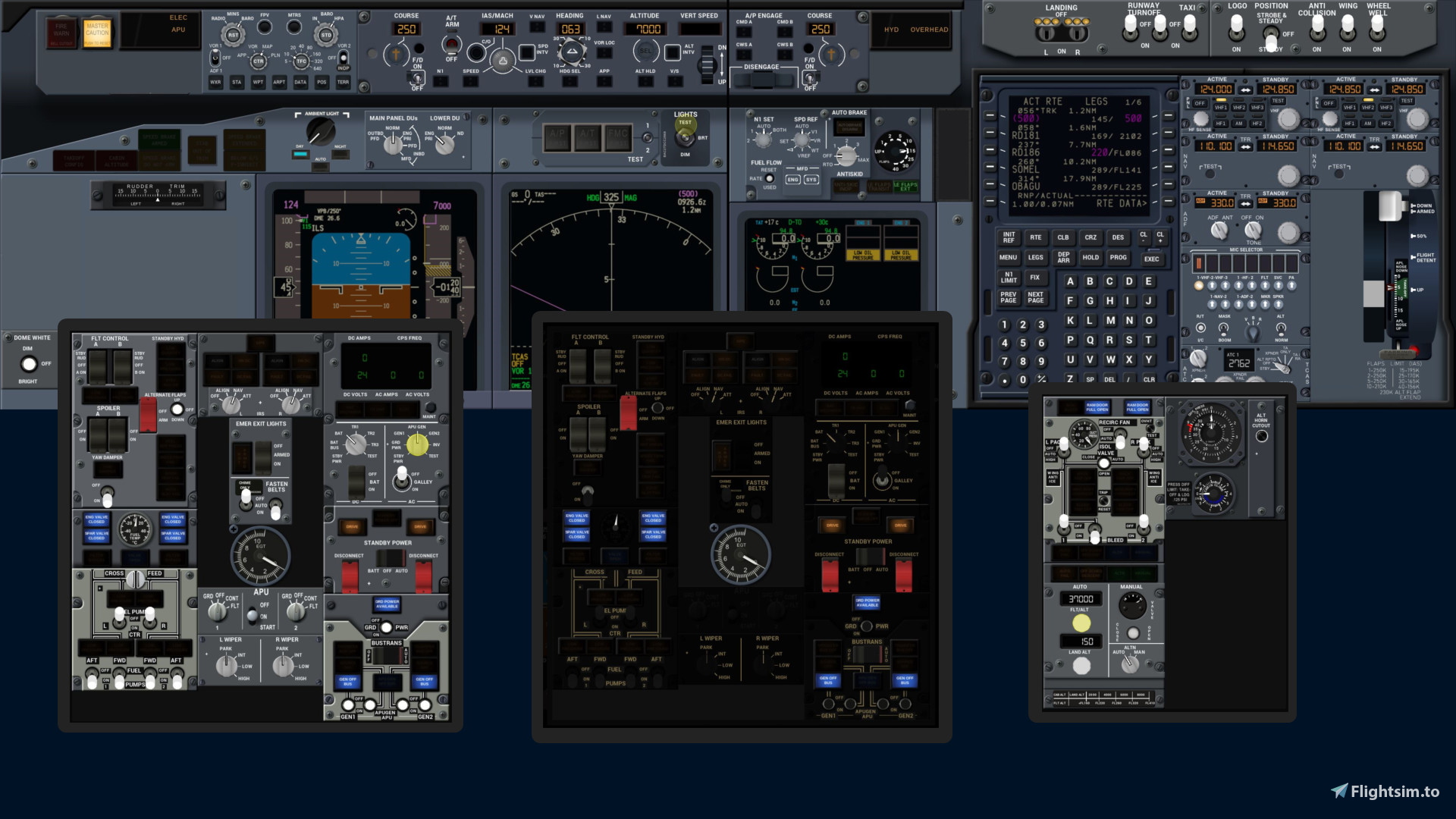
Description
This package includes instrument .siff files for import with Sim Innovations Air Manager for Desktop.
You need:
- PMDG Boeing 737-700 for MSFS. (See remarks on variants below.)
- Sim Innovations Air Manager for Desktop (full version)
- FSUIPC7 (full version), if you want to use the FSUIPC-dependent instruments. See Doc provided.
Since not all so called simulation variables needed for the instruments, are provided by PMDG, I had to find a solution that uses Pete and John Dowsons FSUIPC7 (payware version). So that program is also needed.
Note, that PFD, ND, CDU, upper and lower multi function screen instruments are NOT INCLUDED. They must be popped out if you want them on a different monitor.
All instruments are provided as single instruments. So you can arrange them as you like and need to use your own panel background.
My instruments are made for the MSFS PMDG 737-700 Version 3.0.65. They should work for later versions, provided PMDG has not changed variables, event codes or relevant behaviour. Most of the instruments should also work for the -800 variant and others. But I could not test that. And – of course – those aircrafts have some differences for example in the air condition system.
The package comes with a documentation file explaining how to install everything and also with a small trouble shooting guide.
I do use the instruments myself. So the chance is good, that I’ll keep them working even when PMDG changes its aircraft. If only one or two instruments change, I will not assemble complete packages like this one, but instead I plan to just provide the updated instruments. If you import them, they will override the old ones.
If you start from scratch, you need to install the base package first and then the single updated instruments.
Air Manager instrument set for PMDG 737-700 – Base package
This set of instruments can be put on additional monitors so that you can use one monitor exclusively for the view through the forward window. The instruments are made for the PMDG 737-700. Other than the aircraft PMDG Boeing 737-700 for MSFS you need the following programs (full versions): Sim Innovations Air Manager for Desktop, FSUIPC7.


Avis des utilisateurs
3 avis
Historique des versions
Aucun historique de version disponible.
Similaires
Air Manager instrument for PMDG 737-700 – Adaptive Background
Create a personalized panel background with the Air Manager instrument for PMDG 737-700. Experience an adaptive background that changes along with your instruments lighting, enhancing your flight simulation experience. Take full control of your cockpit ambiance with this innovative add-on. Explore more details in the accompanying Air Manager instrument set for PMDG 737-700.
par Det737
Air Manager instrument set for Asobo (Hans Hartmann) ATR 72/42-600 – Base package
Enhance your cockpit experience with this Air Manager instrument set designed for the Asobo ATR 72/42-600 in Microsoft Flight Simulator. This package includes individual instrument files for customization, along with two complete panels. Keep your setup up-to-date with planned updates for any aircraft changes. Make sure to have Asobo ATR 72-600 or ATR 42-600 and Sim Innovations Air Manager for Desktop (Beta version) installed.
par Det737
Air Manager instruments for PMDG 737-700 – MCDU (FMC) Overlay and Fuel Switches Update
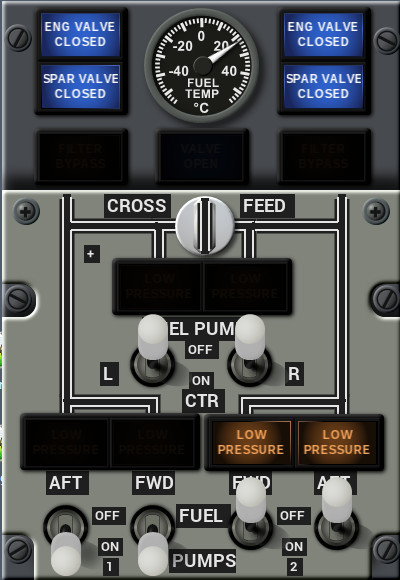
Enhance your PMDG 737-700 experience with this Air Manager update featuring FMC Overlay improvements and realistic Fuel Switches. Includes User Property for Pilot/First Officer side and operable crossfeed switch. Requires PMDG Boeing 737, Siminnovations Airmanager for PC, and base package installation. Simply import the provided .siff files in Airmanager for easy installation.
par Det737

Airmanager instrument collection for the FS2024 PMDG 737-800 aircraft
The Airmanager instrument collection for the FS2024 PMDG 737-800 aircraft provides a range of .siff files, including base and overhead panel configurations, alongside a Lua script for FSUIPC7 and troubleshooting resources. Users must have Microsoft Flight Simulator FS2024, the PMDG 737-800 aircraft, and Airmanager version 5.x, along with FSUIPC7. The add-on includes installation instructions and guidance for configuring the instruments for an enhanced virtual flying experience.
par Det737
Connectez-vous pour participer à la discussion
Se connecterCommentaires(54)
9 months ago
9 months ago
I put a query in the siminnovations' discord support but got no response. My query is can you make the NAV instrument NAV1 or NAV2?
Thank you.
9 months ago
9 months ago
9 months ago
9 months ago
Thanks, Detlef
9 months ago
10 months ago
Yesterday I upgraded the Air Manager to the last version 5.1.0. And now all the instruments don't work! I double checked things like PmdgOk.lua , 737_Options.ini and FSUIPC7 - they are OK.
The interesting thing is that some instruments (such as AUTOBRAKE FLAPS panel) work fine in MSFS 2024!
I attach an image of MCP as it looks now in MSFS 2020.
Am I missing something?
Can you please look into this matter and advise.
THANKS!
9 months ago
9 months ago
Detlef
about 1 year ago
about 1 year ago
about 1 year ago
about 1 year ago
I have version 4.1.5 of Air Manager, and when I install the instruments and panels I get a black screen. What should I do next? Or what could be the problem? Can you tell me how to solve it?
about 1 year ago
over 1 year ago
about 1 year ago
over 1 year ago
I am now trying to follow your troubleshooting steps starting with step 3, however I cannot locate the Utility4.siff file.
Thanks for your help.
over 1 year ago