

Description
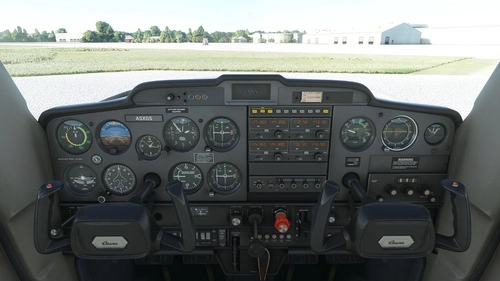
JPLogistics (now WBSim) have given us a significantly upgraded Cessna 152 with optional GTN750 and autopilot. Nevertheless the interior still looks like the cheapest flight school trainer you can find. Of course the C152's main use IS as a trainer, but still there are some of them out there that have been upgraded to at least offer a little more comfort on the inside.
So I decided to spruce up the humble trainer and make it look more like its bigger brother - the C172.
First I lightened up the interior shell to make it less dark and friendlier. Next I took the dark grey instrument panel from my previous interior mod, put in some darker leather seats and installed a nice grey carpet in the cockpit and the luggage area. Last not least I switched out the old mountings for the seats and replaced them with elegant stainless steel ones.
This mod will work with the following versions of the C152:
- Asobo C152 (MSFS2020 only)
- Asobo C152 Aerobat (MSFS2020 only)
- WBSim C152 (MSFS2020 and MSFS2024)
- WBSim C152 with Fairings (MSFS2020 and MSFS2024)
- WBSim C152 Taildragger (MSFS2020 and MSFS2024)
Installation:
Just drag and drop into your Community folder
This mod will most likely NOT work with 3rd party liveries that have their own interiors.
Happy flying
Archer374
WBSim / Asobo - Cessna C152 - Grey Interior with Carpet
Enhance your Cessna C152 experience with a grey interior makeover, featuring a lighter and friendlier atmosphere resembling the C172. This mod by JPLogistics/WBSim offers upgraded seats, carpet, and sleek stainless steel mountings for a touch of elegance. Compatible with various C152 versions, simply drag and drop into your Community folder to enjoy a more comfortable cockpit during your flights.

Avis des utilisateurs
2 avis
Historique des versions
corrected mod to work with all default WBSim liveries.
Similaires
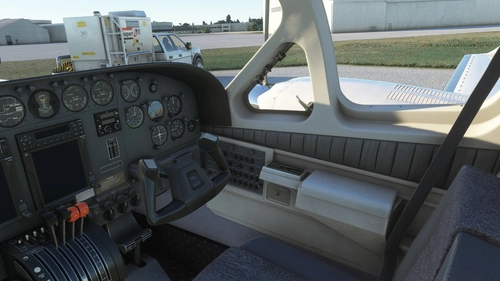
Flysimware Cessna C414 Chancellor - Grey Interior + Different Panels
Upgrade your Cessna C414 Chancellor with a sleek grey interior featuring darker seats. Customize your experience with three different panel options. Simply drag and drop the mods into your Community folder for easy installation. Experience a modern twist on your cockpit with Flysimwares latest mod.
par Archer374
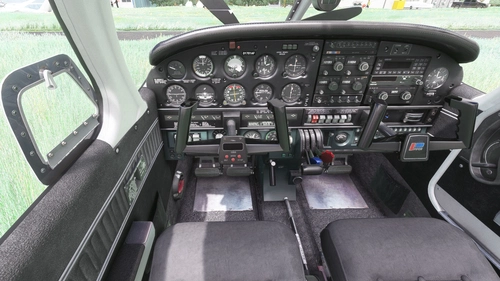
JustFlight Piper PA28R Arrow III - Clean Grey Interior
Enhance your Piper PA28R Arrow III experience with this mod offering a clean grey interior option. Customize your tablet color and instrument panel with ease to suit your preferences. Simple installation process by dropping the mod folder into your Community folder. Enjoy a fresh look for your virtual cockpit with this modification from Archer374.
par Archer374 - Idea for the panel: icemany
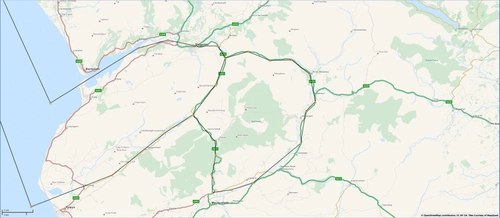
Mach Loop - Low Flying Area 7 (RAF/USAF), Wales, Snowdonia, UK (Flight Plans)
Experience the thrill of flying through the infamous Mach Loop in Wales with these meticulously crafted flight plans. Witness RAF Typhoons, Tornados, C130s, USAF F15s, and Ospreys as they soar through the valleys of Snowdonia below you. Choose between two routes, starting from RAF Valley, for an unforgettable low flying adventure.
par Dave Symanow
WBSim / Asobo Cessna C152 - Dark Cockpit Panel
Enhance your Cessna 152 experience with a dark cockpit panel modification created by Archer374. This add-on changes the cockpit panel to a sleek dark grey, along with minor tweaks to the seats for a more authentic feel. Compatible with both stock Asobo C152 and JP Logistics C152 mod. Simply drag and drop into your Community folder to install.
par Archer374
Connectez-vous pour participer à la discussion
Se connecterCommentaires(24)
12 months ago
about 1 year ago
over 1 year ago
Unfortunately, it doesn't work with the additional liveries included in the 2.1.2 package. Now I don't like doing requests since I don't take freeware work for granted... But would it be possible to add your interior to these, as well? :)
BTW: I noticed the dome light stopped working properly - it turns on as soon as the battery switch is on, the dome light switch clicks and moves but doesn't affect the dome light. Dome light breaker is still working, though: dome light goes off if you pull the breaker.
Not sure why the texture would affect the switch... with the original interiors the dome light works properly.
Would be great if you could take a look at these... thanks for your work to the MSFS community, much appreciated!
over 1 year ago
However I can't find a reason for the dome light issue. I cannot switch it off either, and have to use the circuit breaker.
over 1 year ago
(BTW: I just discovered that layout generator thing, so I went on and added the basic "CESSNA_152_COCKPIT_INPUTS_ALBD.PNG.DDS" and the respective .json to the fairing "blueM2" and "N2577E" textures, so the carb heat, throttle and mixture levers are also fresh and new and not the used up ones from the black cockpit - just wanted to mention that, in case you want to update that, as well :D )
And never mind the cabin light issue - I did some additional testing and couldn't really reproduce that bug. Sometimes it's there, sometimes it's not. But when it's there, it's only on the faired version. "Naked" and taildragger were fine... I'll leave it at that :D
Thanks again!
over 1 year ago
over 1 year ago
In what way? Can you be more specific?
I failed to reproduce the problem. It's also unlikely that my mod causes this problem since it neither makes changes to any system files, nor any instrument textures.
over 2 years ago
over 2 years ago
over 2 years ago
over 2 years ago
Hab dann den Kanal hier gesehen, und das hat mich auf die Idee gebracht sie ein wenig aufzuhübschen - wenn auch farblich völlig anders.
https://www.youtube.com/@flymetothefun
Die Livery zu dem Flieger gibt's übrigens auch hier:
https://flightsim.to/file/36564/cessna-c152-n22318-flymetothefun
over 2 years ago
But how do I get the AP to work? I don't see the GTN750 either.
Anyway, thank you so much, am loving it!
over 2 years ago
Thanks very much
For the autopilot and the GTN750 to work, you need the WBSim/JPLogistics C152 mod:
https://simdoc.eu/
over 2 years ago
over 2 years ago
over 2 years ago
The only thing I can think of: did you rename the aircraft folder or the folder of this mod? If so: this mod always has to come later alphabetically than the plane itself (jplogistics-aircraft-c152)
Also if you use any other mods or liveries that alter the interior in any way it is possible that my mod will not work.
over 2 years ago
over 2 years ago
over 2 years ago
over 2 years ago
Just redownloaded both the JPL-C152 as well as my mod from this site, and can't reproduce the problem.
I just also checked that I had already used the most secure method for this mod - i.e. I gave each version ALL the files separately instead of linking them via the texture.cfg file.
This method uses up more disk space but ensures that each version of the C152 - from default Asobo to JPL Taildragger - has its own set of texture files. So basically it's impossible that it doesn't work unless you are using custom liveries that use their own interior files, or something went wrong that I cannot predict like a mod that interferes with mine (can't imagine how, but stranger things have happened).
So please first check whether you by any chance changed any of the folder names and if so only use the default folder names provided.
Second: redownload both mods and install them both in an EMPTY Community folder. Start MSFS once AFTER you delete your current versions but BEFORE you install the new ones in the empty Community folder. That should make sure MSFS doesn't load anything in the wrong order.
If it still doesn't work, I'm out of ideas.