

Description
(V1.1)
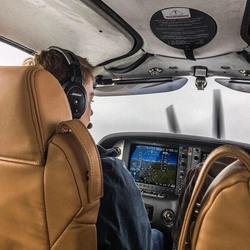
Livery for the WT/Asobo Cirrus SR22T G6 in Monarch Blue/Sterling Silver, in the 2020 Carbon variation. Based upon "N722XX".
Installation
- Place the "livery-zb-sr22t-n722xx" file in your Community folder.
Please note, this requires the SU14 Beta SR22T, and is not compatible with the older SR22 G2.
Cirrus SR22T G6 | Monarch Blue — 2020 Carbon | N722XX (8K)
Add a touch of elegance to your Microsoft Flight Simulator experience with this Monarch Blue/Sterling Silver livery for the Cirrus SR22T G6, designed in the 2020 Carbon variation based on the "N722XX" aircraft. Compatible with the SU14 Beta SR22T, simply install the "livery-zb-sr22t-n722xx" file in your Community folder to enjoy this sleek new look.
Avis des utilisateurs
3 avis
Historique des versions
- Fixed white rivets on tail - Improved carbon panel, not perfect, but improved. I have an idea to further bypass the overlying decal, should have that complete within ~1-2 days.
Similaires

Cirrus SR22T G6 | Corso Red — 2020 Carbon | N321TT (8K)
Fly in style with this livery for the WT/Asobo Cirrus SR22T G6, featuring the Corso Red/Sterling Silver design in the 2020 Carbon variation based on "N321TT". Make sure to install it in your Community folder for a sleek new look during your virtual flights. Note that this livery is designed for the SU14 Beta SR22T version only.
par ZachB

Cirrus SR22T G6 | Volt — 2020 Carbon | N205WH (8K)
Livery for the modern Cirrus SR22T G6 aircraft in a Volt/Sterling Silver color scheme with a 2020 Carbon variation based on the "N205WH" model. This add-on is designed for the SU14 Beta SR22T and requires installation in the Community folder. Note that it is not compatible with the older SR22 G2 version.
par ZachB

Cirrus SR22T G6 | Titan Grey — 2020 Carbon | N715SV (2K)
Customize your Cirrus SR22T G6 with this sleek Titan Grey livery inspired by the 2020 Carbon variation of "N715SV". Update to version 1.1 and enhance your flying experience.
par ZachB

Cirrus SR22T G6 | Titan Grey — 2020 Carbon | N715SV (8K)
Customize your Cirrus SR22T G6 with this Titan Grey livery inspired by the 2020 Carbon edition. Representing N715SV, this mod is designed for the WT/Asobo Cirrus SR22T G6 aircraft. Just install the "livery-zb-sr22t-n715sv" file in your Community folder and enjoy this sleek new look. Note: SU14 Beta SR22T is required for compatibility.
par ZachB
Connectez-vous pour participer à la discussion
Se connecterCommentaires17
I unzipped the red and the blue one and put them in the Community folder, but I only get a white, unfinished version of the Standard livery.
But one thing: since in this case the livery is split into so many parts there's no reason for a resolution that is THIS high.
Just for comparison: the A2A Comanche has THREE files for the whole fuselage and wings at 8192x8192. In the case of the SR-22T the fuselage and wings are split into 51 files. Currently your livery occupies 3 GB (!) of disk space. That's more than most aircraft have. :-)
Reducing the resolution to 2048x2048 shouldn't reduce the visual quality in any noticable way. In fact the wing textures you use actually have a much lower resolution.
Edit: I reduced the resolution to 2048x2048 and it still looks as stunning as before while the whole livery has now a managable size of 200MB.
https://flightsim.to/file/1197/default-thumbnail-generator
After reducing the resolution, e.g. to 2K, you can delete all *.com.png.dds and(!) corresponding *.com.png. json and *.com.png. FLAGS and *.instrumentpanel.*
MSFS will load standard .com files.
Additionally, you can remove mipmaps from textures:
texconv.exe -m 1 -y *.dds
texconv.exe->google.com
Effect: 72MB
You can also use Microsoft compression for the Community folder
Effect: 9.24 MB :)
Sorry, author
In the end only the result matters
I paste the path to the textures folder from Total Commander, much more convenient and faster.