
Description
✈️ flyLAT — Your airline. Your crew. Your skies.
Give your flights a purpose. Build your own virtual airline, fly with friends, move passengers and cargo, and watch your operation grow.
Start small, build a fleet, or join an existing airline and leave the paperwork to someone else. Someone has to pretend they know what they’re doing.
🚀 Meet the new flyLAT Launcher
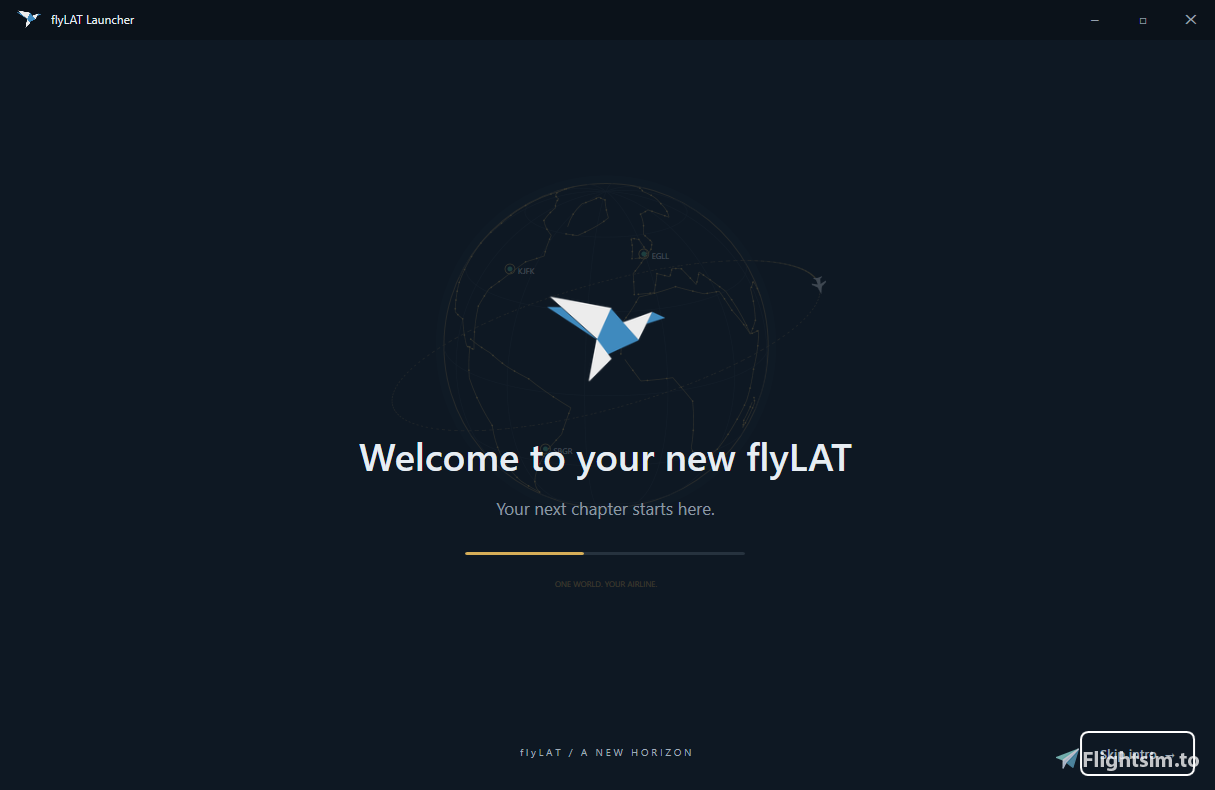
flyLAT has moved to the web! Your airline management and flight operations now live in your browser, with our new Windows launcher helping you get connected.
Use the launcher to:
- Install, update and repair flyLAT Web Bridge.
- Open the flyLAT web portal.
- Check your installed client’s status.
- Follow the setup guide when moving from the old desktop app.
The launcher gets you set up. The portal is your airline HQ. Web Bridge connects your simulator to flyLAT.
💼 Your airline, your decisions
Manage your fleet, routes, facilities, finances and employees from one portal. Build your airline’s identity, recruit pilots and decide where the business goes next.
Prefer flying to running the company? Join an airline as a pilot and get straight to the part you enjoy.
📦 Passengers, cargo and a reason to fly
Operate passenger services shaped by demand and reputation, or build your business around cargo contracts, commodities and warehouse operations.
Plan your routes, position your aircraft and put your fleet to work. Every completed flight contributes to the airline you’re building.
👥 Bring your crew
Invite friends, recruit pilots and use AI employees to support your operation. Keep everyone connected through messaging, group chats, voice notes and notifications.
📊 See your progress
Track flights live, review your flightbook and follow your airline’s performance. Flight hours, finances, achievements and statistics give you a clear view of how far you’ve come.
📱 Away from the cockpit? Stay connected.
We are rebuilding our mobile app to give you full airline control in your mobile device.
🖥️ Simulator compatibility
This launcher is for Windows 10/11, 64-bit.
flyLAT Web Bridge connects to Microsoft Flight Simulator 2020, Microsoft Flight Simulator 2024, X-Plane 11 and X-Plane 12, with automatic simulator detection.
Flying X-Plane on macOS or Linux? Use the native flyLAT X-Plane plugin available through the portal downloads page.
🛠️ Getting started
- Download the launcher ZIP from this page.
- Extract the entire ZIP into a folder on your computer. Do not put it in your simulator’s Community folder.
- Run flyLAT.EasyInstall.exe.
- Open the Web Bridge section and install the current release.
- Open the flyLAT portal and sign in or create an account.
- Start your simulator and load an aircraft. Open Web Bridge, leave the connection set to Automatic, then select Link flyLAT and follow the browser instructions.
- Confirm the portal is receiving live simulator data, then prepare your flight.
Keep Web Bridge running while flying so flyLAT can receive your simulator data.
🔄 Moving from the old desktop app?
Use your existing flyLAT account. You do not need to create another account or airline.
Close the old desktop app and use the web portal with the current Web Bridge. Once your new connection is working, you can uninstall the retired desktop app.
💬 Need a hand or found a bug?
Join our Discord community
Read the simulator connection guide
Your airline… with a better HQ. Welcome to the new flyLAT.
flyLAT Web Bridge
✈️ flyLAT — Your airline. Your crew. Your skies. Give your flights a purpose. Build your own virtual airline, fly with friends, move passengers and cargo, and watch your operation grow. Start small, build a fleet, or join an existing airline and leave the paperwork to someone else. Someone has to pretend they know what they’re doing. 🚀 Meet the new flyLAT Launcher flyLAT has moved to the web! Your airline management and flight operations now live in your browser, with our new Windows launcher helping you get connected.


Soutiens

Avis des utilisateurs
21 avis
Historique des versions
Desktop to Web




Connectez-vous pour participer à la discussion
Se connecterCommentaires96
If so, reach out to me luke@flylat.net
Can you please tell me what is AI crew doing in application and in sim?
If you need anymore help, join our discord! Link via the website https://flylat.net/
Happy flying
Ce commentaire a été supprimé
when will be the next update ?
There was an update released today.
In regards to your issue that you experiences, you can get in touch with us over at https://support.heronstudio.net/
Thank you for taking the time to share your feedback, we really appreciate it.
flyLAT is still very much a work in progress and currently developed by just two of us in our spare time. We complete understand that some areas may feel unfinished or rough around the edges, we cannot afford testing team or focus groups. I would rather invest my spare money to pay for servers as they do cost a bit. This is why we allow people to use the app when it's being developed. However, your comments help us identify where to improve.
Our focus right now is on improving stability, adding features that our community wants, refining systems and bridging the gap that simply does not exist by other software's. We want flyLAT to be fun and challenging, offering a structured airline management experience that still feels rewarding and accessible.
We also understand that flyLAT might not suit everyone's playstyle, it's designed for those who enjoy a more realistic approach to flying and airline operations, where accuracy and fair play are part of the challenge.
We're continuing to work on clearer rules, better communication and an overall smoother experience for all players. Support can occasionally take some time, but please keep in mind it's just the two of us managing everything in our spare time.
Thank you again for giving flyLAT a try and for sharing your thoughts. Your patience and feedback does help us shape the project into something better with every update.
Luke
Creator of flyLAT