
![[A32NX] FlyByWire | Airbus A320neo Transavia France F-GNEO - Image 1](https://cdn.flightsim.to/images/26/a32nx-flybywire--airbus-a320neo-transavia-france-f-gneo-49429-1705051319-i9Ckx.jpg)
Description
A32NX] FlyByWire | Airbus A320neo Transavia France F-GNEO
New A320neo aircraft for Transavia France F-GNEO
Features :
- FlyByWire version
- Real aircraft identification "F-GNEO
- SimUpdate 14+ compatible
Simple installation:
1 - Extract the ZIP
2 - Open the new folder - In the folder there is another folder with the same name
3 - Copy the file "FlyByWire_A320neo_FGNEO" and paste it into your community folder.
[A32NX] FlyByWire | Airbus A320neo Transavia France F-GNEO
Enhance your A320neo experience with this FlyByWire mod featuring the Transavia France F-GNEO livery. Compatible with SimUpdate 14+, this addon offers a realistic aircraft identification and simple installation process.


Avis des utilisateurs
11 avis
Historique des versions
Added a few more details. Custom security door
Similaires
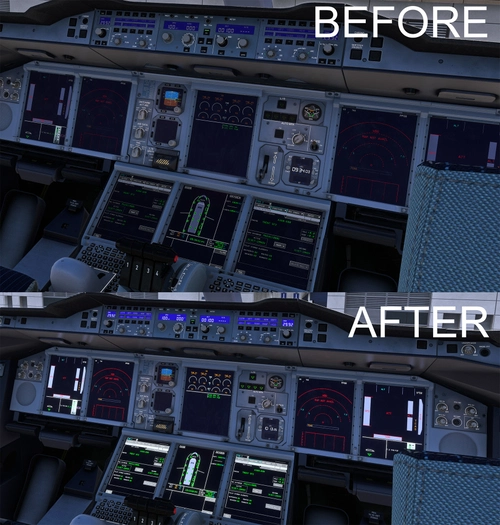
Bright Light FBW A380X
This add-on addresses the dim lighting issues on the FBW A380s screens during daylight, specifically enhancing the brightness of the Navigation Display (ND), Primary Flight Display (PFD), and ECAM displays. It also increases the visibility of various buttons, such as L/D, EXT PWR, and FUEL PUMP. This is a temporary workaround while awaiting an official fix from FBW for the screen contrast problem.
par Aero3D

RAAS Honeywell Voice
This add-on modifies the default RAAS sounds in Microsoft Flight Simulator by replacing them with Honeywell voices, aiming to deliver a more authentic auditory experience. It requires FS2Crew RAAS Professional for proper functionality. Please note that runway announcements including the term "center" will continue using the original sounds until an update is released to address this. Installation involves replacing the existing "Audio" folder with the new one provided in the download.
par Aero3D
Connectez-vous pour participer à la discussion
Se connecterCommentaires(35)
about 1 month ago
over 1 year ago
over 1 year ago
thanks!
over 1 year ago
over 1 year ago
about 2 years ago
Tu as prévu de faire les autres regs? :)
A bientôt!
about 2 years ago
over 2 years ago
over 2 years ago
https://ibb.co/8Bm8djK
You will see that logos under fuselage are more more big =)
Bye.
over 2 years ago
over 2 years ago
Here's a preflight of th real one:
https://www.youtube.com/watch?v=lbEWkVl1NHk
over 2 years ago
Is it possible to correct that : https://ibb.co/DVXNbsf
over 2 years ago
over 2 years ago
over 2 years ago
over 2 years ago
over 2 years ago
over 2 years ago
Can you make also the dutch version of Transavia?
over 2 years ago
https://www.jetphotos.com/photo/11189574
over 2 years ago