
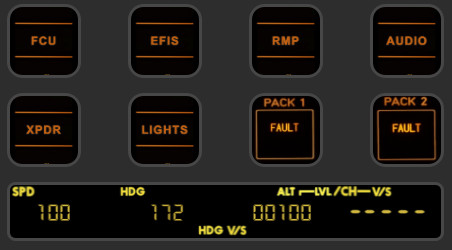
Description
The FENIX A320 StreamDeck+ Plus Night Flying FCU release is Version 2.7 Stable Release Please read all version release notes so you may understand the functionality that is devilvered with each modification.
This app pairs perfectly with my A320 Night Flying Profile for the StreamDeckXL, like always the "Night Profiles" aim to capture that unique ambience of the avionics lighting during night flying. :)
https://flightsim.to/file/42664/fenix-a320-streamdeck-xl-night-flying-profile
This StreamDeck+ profile is tested with the FENIX A321/A320/A319 through current release v2.4.0.1986 for Microsoft Flight Simulator 2024. As always, thanks to my friend Guenseli (https://flightsim.to/profile/Guenseli) for his A320 script pack for Axis and Ohs. This profile enhances the A320 FCU experience inclusive of current Fenix MSFS 2024 capabilities. One of the few current profile that provides in-Sim dial actuation and audio feedback. Concept development is independent and self developed by EuroTexan Northstar Scenery and Avionics. We never charge for our community released products.
Profile Requirements:
1. Axis and Ohs Version and StreamDeck Plugin 4.54(b08) for MSFS 2024 or 2020.
2. Streamdeck Software 6.9.1 Performance testing conducted at the default refresh settings of 100ms.
3. Tested with Microsoft Flight Simulator 2024 v1 AND Microsoft Flight Simulator 40th Edition SIM UPDATE 15
Installation:
1. Download the A320_Night_Flying_FCU_v2_7.zip file.
2. Extract contents to a working directory of your choice. You must have the latest Axis and Ohs (AAP) and Elgato StreamDeck Plugin version installed prior to using this Plugin!! Import the base script "FENIX A320 AAO SCRIPTS_v_2_7.xml" into AAO (Scripting --> import Scripts).
3. Doubleclick the StreamDeck profiles to begin installation to the StreamDeck Profile Manager. There are two profiles available, one with a "Foldered" option for non-swipe navigation and one that uses the Swipe feature on the touch strip.
Troubleshooting:
For connection issues such as StreamDeck plugin not working, StreamDeck buttons with yellow "?", or no reaction of aircraft to StreamDeck commands please consult the AAO manual for further details. If you can execute test functions from Axis and Ohs and the aircraft is responding to those commands, the problem is with SteamDeck communicating to/from AAO. Consult AAO for trouble shooting documentation. Read all user guides, especially AxisAndOhs_WebAPI_Troubleshooting.PDF.
Please enjoy the full nightime flying experience!!
Important: Stating the obvious, this profile is for simulation and entertainment use only. There is no implied functionalty for simulators meeting FAA certification criteria nor any assumed functionality with certified, designed, or licensed componentry of the Airbus A3XX. Do not use this profile for any real world training.
Like my profile design concepts? Please follow me for updates, send me your suggestions, and rate my products with your feedback. Consider any donation to support my development work in the community. https://www.buymeacoffee.com/eurotexan
Dépendances
FENIX A320 Block2 StreamDeck+ Plus Night Flying FCU
Enhance your A320 FCU experience with the FENIX A320 Block2 StreamDeck+ Plus Night Flying FCU. This stable release offers in-Sim dial actuation, audio feedback, and compatibility with current Fenix Block 2 capabilities. Designed by EuroTexan Northstar Scenery and Avionics, this profile is exclusively for Fenix Block 2 A320 users, providing a unique night flying ambience. Compatible with Axis and Ohs & StreamDeck plugins, immerse yourself in the full nighttime flying experience.
Avis des utilisateurs
8 avis
Historique des versions
Error in GCS switching repaired per user report.
Similaires
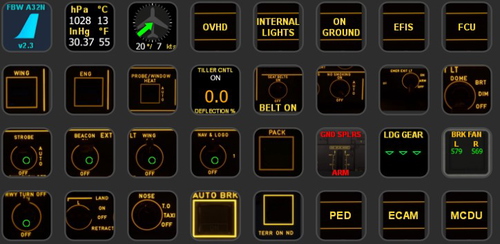
FBW A320 StreamDeck XL Night Flying Profile
The FBW A32N StreamDeckXL profile for pilots that love NIGHT FLYING!! The template is based on current open source A320 FBW panels and functionality, but please read the documentation carefully to ensure you get to enjoy the full experience in MSFS.
par EuroTexan
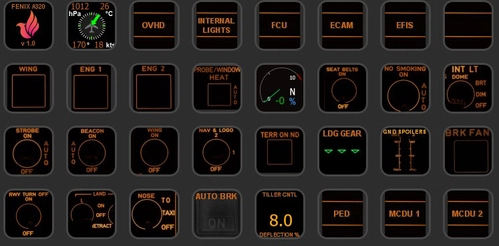
FENIX A320 StreamDeck XL Night Flying Profile
Enhance your night flying experience with the FENIX A320 StreamDeck XL Night Flying Profile. This profile is designed for the FENIX Block 2 A320 and requires specific software and system configurations for optimal performance. Follow the installation instructions to integrate this profile with your StreamDeck and Axis and Ohs setup. Dive into the immersive world of nighttime flying with this meticulously crafted profile.
par EuroTexan
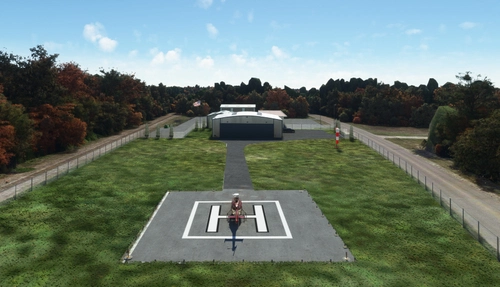
The Woodlands Area Heliport Galaxy FBO
Experience the Woodlands Area Heliport (Galaxy FBO) by Northstar Scenery, located in The Woodlands, Texas. This helipad facility features an 80 x 80 ft concrete pad, perimeter fencing, security gate, and a spacious hangar. Conveniently situated 10nm north of Houston Intercontinental Airport, it offers a unique flying experience in the area.
par EuroTexan
Connectez-vous pour participer à la discussion
Se connecterCommentaires(39)
3 months ago
6 months ago
5 months ago
8 months ago
5 months ago
9 months ago
(Can you make one for the FSL A321N ?? ;) )
A couple of things I have noticed after using your profile a lot:
1) If you tune radio 2 (VHF2), then switch to VHF1, when you switch back to VHF2, the frequency for VHF2 resets and is not saved - it must be entered in again.
2) when the transponder code begins with '0", the input gets wonky. It works, but formatting may need to be tweaked??
9 months ago
about 1 year ago
about 1 year ago
Sorry it took me a couple weeks to get back....well, life got a little busy as life does! :)
about 1 year ago
about 1 year ago
Edit: I figured out my connection issue. Didn't realize that there is a separate AAO folder and executable for MSFS 2024. All good now!
about 1 year ago
about 1 year ago
almost 2 years ago
One thing I am not able to make it work: How can I dial the "big" numbers of the frequencies? I can dial the numbers behind the comma and swap it to the active frequency, but I am not able to dial the numbers in front of the comma. I know, the problem sits in front of the streamdeck+. Any hint from your side?
over 1 year ago
over 1 year ago
almost 2 years ago
I can't change the altitude with the rotary control.
However, if I set a different altitude in the cockpit, this is shown correctly in the SD+ display.
Is there a solution? Thank you.
almost 2 years ago
Upgrade AaOh´s to 4.51 b09 (MSFS2024) and everything works fine
almost 2 years ago