
Description
GSX Boarding and Deboarding Sound Replacement V3.3 - New Youtube Video!
I created this sound pack originally for P3D and FSX. It received a complete overhaul and is now working with MSFS2020,
P3D and even FSX as long as you have GSX Pro.
Although the boarding sound of GSX has improved with recent updates, this sound pack gives you a more realistic atmosphere.
Are you bored hearing "I’m right next to her", "Hello" and "How you doing" for about 200 times during your boarding?
Then you're about to download the right sound file!
Please follow the instructions carefully!
Unfortunately GSX only uses 1 sound file for boarding and deboarding which means we have to stick to just 1 file. The good news is, we
can use the sounds for the internal notification that boarding or deboarding has started and this is exactly what I did.
This file contains two folders:
- "Option 1 with announcements"
- "Option 2 Clear Sound"
The sound file in "Option 1 with announcements" contains some crew announcements while the passengers are boarding the aircraft.
The sound file in "Option 2 Clear Sound" contains a clear boarding sound WITHOUT the crew announcements, if you prefer it that way.
How to install:
Watch the trailer & installation video here: https://youtu.be/FPNuMy_Fz04?si=5YzQNUIA485mRGWZ
1. Locate your GSX installation path. The default path is
C:\Program Files (x86)\Addon Manager\couatl\GSX\sounds
2. Choose the sound pack with or without announcements and open that folder. You will find 1 sound file and another folder called "gsx"
3. Copy and paste both, the sound file and the "gsx" folder into C:\Program Files (x86)\Addon Manager\couatl\GSX\sounds
4. Select "Replace the files in the destination" when prompted
5. Make sure you've enabled the notification sounds within GSX so that you'll hear "boarding requested", "passanger bus is coming" etc.
6. Fire up MSFS, P3D or even FSX and board your aircraft.
Some people find the "hello sounds" annoying. If you want, you can delete all the other "Hello" files e.g. "Hello1", "Hello2" etc.
This is totally up to you and it doesn't influence the boarding and deboarding sounds.
If you're not happy with the new boarding sound, try the other sound file and copy and paste it the same way as described above.
If you don't like them at all and you want to stick to the default one, just run the FSDT Live Update. It'll replace the boarding
sound with the default sounds (boarding sound & all "hello's").
That means, everytime you run the updater in order to install updates, you'll have to copy and paste the sound files from this
pack into the GSX install path again!
Please be aware that both sound files are 6 minutes and 10 seconds long. That means GSX will play the entire sound file even when all passangers
have boarded/deboarded. The length of the sound files ensures, that you will hear the boarding sound no matter if you're flying a
smaller airplane, if you board via a jetway, a longer walking gate or if you fill up a 747 or A380.
Known issues:
- If you hit ESC during boarding or deboarding in order to get to the main menu, GSX will stop playing the boarding and deboarding sound for some reason. This is something I ave no control over and this can't be changed or fixed unless GSX updates this.
- If you board the airplane with a passenger bus, the boarding sound will start from the beginning. This might be annoying for some but sadly there's no workaround or fix for this unless GSX changes how sounds are being played.
Q&A:
- I don't hear any sounds.
- Make sure you've enabled the notification sounds within GSX so that you'll hear "boarding requested", "passanger bus is coming" etc.
- The "airplane_boarding" sound file is empty/mute
- This sound file is intentionally muted and does not contain any audio. This file plays everytime you board AND deboard the airplane which means you would hear the same sound. My solution fixes that by providing the sound from the notification sound file.
- The sounds are too loud or not loud enough.
- Depending on the airplane you're flying, the sound levels might not be to your liking. In that case just google "Volume changer" and search for a website or app which can change the volume and adjust it to your liking.
- I can hear the boarding sound when I'm outside of the airplane i.e. external camera. I don't want that.
- Unfortunatelythis can't be changed unless GSX changes this for the notification sound which they probably won't. But you should be busy getting your airplane set-up for departure anyway :P
Changelog:
V1:
initial release
V2:
Complete overhaul of both sound files with extra sound effects
V3:
-Adjusted the volume
-New and realistic effects and announcements
-Separate sound files for boarding AND deboarding
-All announcements have been removed from the deboarding sound
V3.1:
-Added a completely new recording from a real flight
-Extended boarding sound to 7 minutes
-Adjusted volume
-Added some more sound effects (people sneezing, baby crying etc.)
V3.2:
-Adjusted the volume of some SFX
-Delayed initial boarding announcement so it will start later and not straight from the beginning so GSX pax are boarding when the announcement is made
V3.3:
-Delayed initial boarding announcement even further for a more realistic sound
-Extended boarding and deboarding sound to 8,5 minutes - plenty of time to board a ATR or a 777 with GSX and other add-ons i.e. Passenger2, SLC, PACX etc.
-Added even more sound effects
GSX Boarding Sound Replacement V3.3
Enhance your boarding experience in Microsoft Flight Simulator with this GSX Boarding Sound Replacement pack. Choose between two options: one with crew announcements for added realism or a clear sound option without announcements. Simply follow the instructions to install and enjoy a more immersive atmosphere while boarding and deboarding your aircraft.


Soutiens
Avis des utilisateurs
11 avis
Historique des versions
V3.3: -Delayed initial boarding announcement even further for a more realistic sound -Extended boarding and deboarding sound to 8,5 minutes - plenty of time to board a ATR or a 777 with GSX and other add-ons i.e. Passenger2, SLC, PACX etc. -Added even more sound effects -Added new Demo video to youtube with installation instructions
Similaires
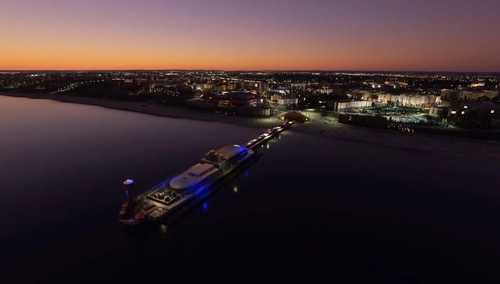
Bournemouth, Christchurch & Poole Landmarks Pack
Explore the Bournemouth, Christchurch, and Poole region with this landmarks pack featuring iconic sites like Bournemouth Pier, Christchurch Priory Church, and Poole Harbour in stunning detail. Enhance your flight simulation experience with these enhanced sceneries for Microsoft Flight Simulator.
par Th3Scop3DJ - Kevin Kiessig
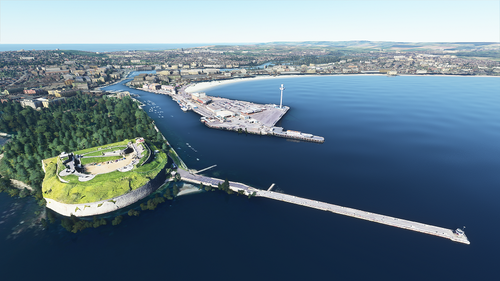
Weymouth Landmarks
Discover the key landmarks of Weymouth, Dorset, UK in this small package created by Kevin Kiessig. Explore iconic sites such as Durdle Door, Portland Bill Lighthouse with a spinning light, Nothe Fort, Weymouth Pavilion, Weymouth Station, and even an ASDA Superstore. Easily install each landmark by copying its respective folder into your MSFS community folder. Contact the creator for support and join the MSFS Facebook group for more updates.
par Th3Scop3DJ - Kevin Kiessig
Connectez-vous pour participer à la discussion
Se connecterCommentaires(66)
9 months ago
12 months ago
12 months ago
about 1 year ago
over 1 year ago
almost 2 years ago
almost 2 years ago
almost 2 years ago
almost 2 years ago
almost 2 years ago
almost 2 years ago
about 2 years ago
about 2 years ago
about 2 years ago
about 2 years ago
about 2 years ago
"you've enabled the notification sounds within GSX".... where to find? is it in the gsx settings?
about 2 years ago
about 2 years ago