
Description
Microsoft Flight Simulator 2024: Interface Scale Option
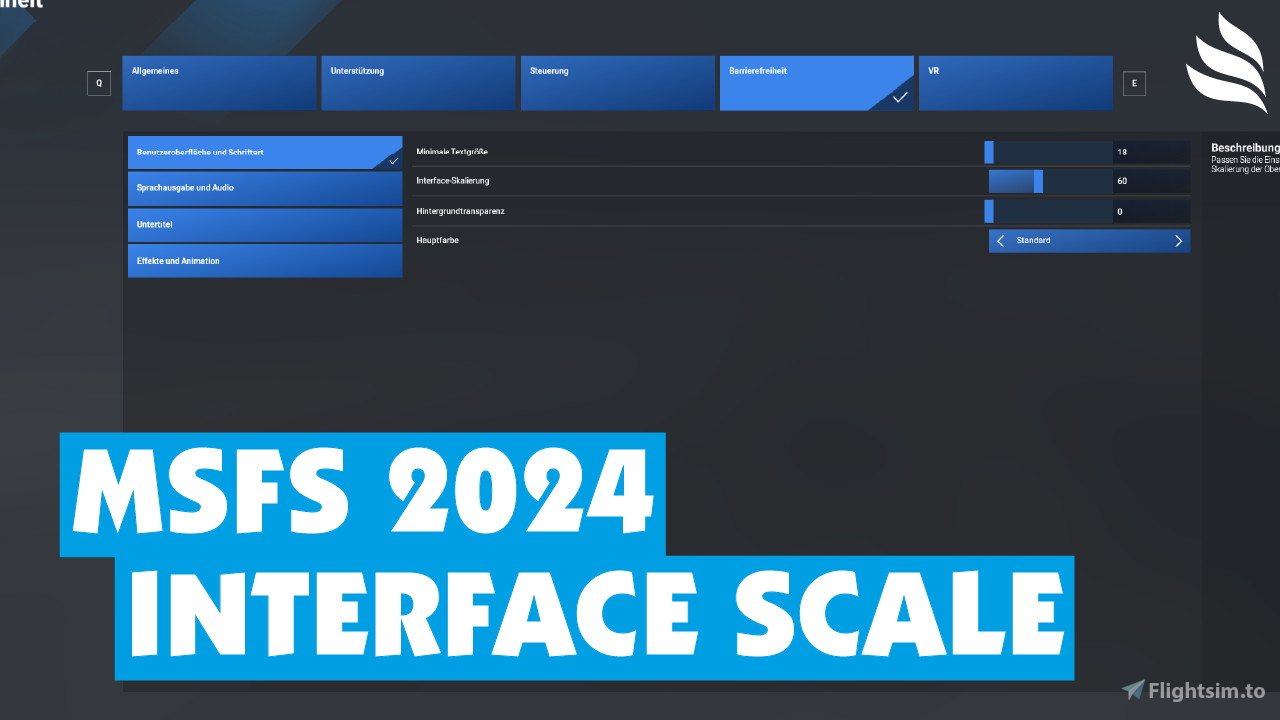
DescriptionThis small add-on adds the “Interface scale” option to the “Accessibility” menu. It allows the scaling of the font, as in MSFS 2020.
Note: Microsoft/Asobo has not integrated this option due to problems. This add-on activates this option. The menus may not be 100% perfect as a result. However, other displays, e.g. from GSX, can now be scaled better. Before you remove the add-on, please reset the scaling to 100.
Installation1. Unzip .zip file
2. Copy & Paste the folder "[cyg]screen-scaling-mod" into your "Community" folder
Originally developed by Cygnific (Cygnific on flightsim.to)
If you like the add-on, feel free to visit my YouTube channel, watch my videos, like them, leave me a subscription or donate something to me (if you want to; you don't have to) :-)
YouTube: Flight Level on YouTube
Donate: Flight Level on PayPal Donate
Microsoft Flight Simulator 2024: Interface Scale Option
This add-on introduces an "Interface Scale" option to the Accessibility menu in Microsoft Flight Simulator 2024, allowing users to adjust font size similar to the functionality in MSFS 2020. While the feature is not natively integrated by Microsoft due to certain challenges, this modification enables improved scaling for in-game menus and external displays like GSX. Users are advised to reset the scale to 100 before removing the add-on to maintain optimal display functionality.

Contributeurs

Soutiens

Avis des utilisateurs
6 avis
Historique des versions
Aucun historique de version disponible.
Connectez-vous pour participer à la discussion
Se connecterCommentaires(30)
3 days ago
Hello,
I am experiencing a serious UI scaling issue in Microsoft Flight Simulator 2024 (Steam), version 1.9.21.0, with the Interface Scale mod version 0.1.10.
Symptoms:
UI scaling is stuck at a maximum of 27% when the mod is disabled.
With the mod enabled, the slider can reach approximately 33%, but no higher.
Text is extremely small and menu items overlap throughout the simulator, including the main menu, aircraft selection and Accessibility settings.
Enabling the mod temporarily improves readability and reduces overlapping.
Disabling the mod causes the problem to return, especially after restarting MSFS 2024.
The minimum text size setting is saved correctly, but the UI scaling problem persists.
Troubleshooting already performed:
Windows 11, 1920 × 1080 resolution, 100% Windows display scaling.
NVIDIA RTX 4060 Ti.
Verified Steam game files.
Disabled all 1,198 add-ons using MSFS Addons Linker.
Confirmed that the Interface Scale mod is absent from the active Community folder when disabled.
Checked Windows high-DPI compatibility settings; no overrides are enabled.
Compared Interface.spb files: the original Steam file is 1,231 bytes, while the mod file is 1,469 bytes.
Tried enabling the mod, adjusting the slider, switching Accessibility pages to save the setting, and disabling the mod again.
Unfortunately, none of these steps has restored normal UI scaling.
Could you please advise how to safely reset the UI scaling to 100%, or whether an updated version of the mod is required for MSFS 2024 version 1.9.21.0?
I would prefer to avoid resetting my entire simulator profile or reinstalling the simulator.
Thank you very much for your assistance.
7 days ago
https://flightsim.to/addon/117217/andante-ui-scaling-msfs-2024-interface-size-control
12 days ago
EDIT on 10-18-2026. Thank you to 'SOAR' in the comment below for the assistance! Here are the steps I took after attempting many things, including deleting the sim and reinstalling it with NO luck.
- Go to "[Drive Letter]:\SteamLibrary\steamapps\common\MSFS2024\Packages\fs-base-spb\OptionsGeneral\Sections"
- Rename 'Interface.spb' to 'Interface.spb.bak' (as he stated)
- Start the game, reset the size to 100%
- In task manager (Processes), right click Microsoft Flight Simulator 2024, select 'End Task'.
-immediately delete '[cyg]screen-scaling-mod' from your community folder.
(do NOT rename 'Interface.spb.bak', although you may have to remember this file later.)
-Restart the sim.
Thank you again SOAR! Blue Skies!
11 days ago
Rename the following file to .bak or something
"(your path)\Microsoft Flight Simulator 2024\Content\Packages\fs-base-spb\OptionsGeneral\Sections\Interface.spb.bak"
Make sure your on 100% scale. then kill your sim with task manager , dont save anything.
then start the sim , unfortunately your back to the default size but it readable again.
Loading the mod back is not working , it wont save you scale.
Ik hope that the creator get a fix out soon..
14 days ago
Great find...... Thank you Its a little awkard but at least it is usable.
Thanks again
~k
about 7 hours ago
14 days ago
14 days ago
Which means I can currently not uninstall it, because it requires you to set it to 100 before deleting. That is not longer possible.
Update: I found a workaround. Change the scaling, then go to another section of the Accessibility options menu and save from there. That retains the setting.
14 days ago
12 days ago
23 days ago
about 1 month ago
about 1 year ago
der mod war bitter notwendig. dieses oversized konsolen-menü ist absolut unerträglich.
about 1 year ago
To anyone else having problems after removing this mod!
Reactivate the Mod. Start the Sim. Put the slider of size to 100 (to the right) and the screen will adjust and return to 33. Leave it like that!
You can now turn off the Sim and now you can remove the mod.
After that when you restart the Sim the screen menus are back to normal.
10 months ago
7 months ago
about 1 year ago
10 months ago
about 1 year ago
over 1 year ago