
Description
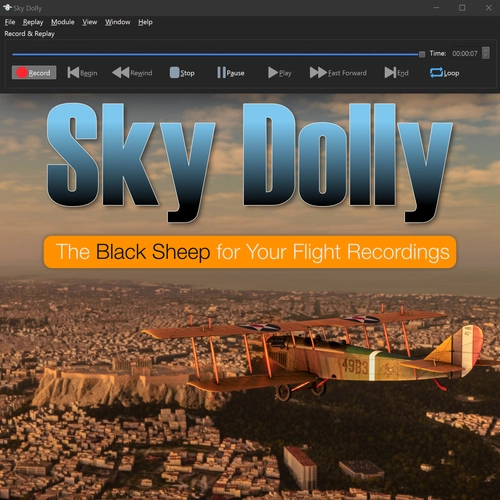
Sky Dolly - The Black Sheep for Your Flight Recordings
AboutSky Dolly is an external, stand-alone application that let's you record and replay your flights in Microsoft Flight Simulator (MSFS). It can also simultaneously replay previously recorded aircraft during recording, making it in effect possible to iteratively record your own formation flights.
Recording is done by storing so-called simulation variables (via the official SimConnect API) such as position, aircraft attitude and other simulation variables that represent the aircraft state (gears, flaps, spoilers, ...).
Modules
A plugin-based architecture makes Sky Dolly memory-efficient (minimal RAM usage) and extendable with new functionality. The following plugins - or modules - are currently available:
- Logbook - stores your flight data in an SQL database (SQLite) and provides easy access to your recorded flights, including various filter options
- Formation - record formation flights, even with different aircraft types. Already recorded aircraft are replayed while you record your current aircraft
- Location - the location module let's you quickly teleport to the selected location. Besides the position you also get control over the engine state (start, shutdown, keep), making it possible to define your own custom take-off points (for instance custom helipads)
Sky Dolly comes with over 100 default locations, all finetuned and with verified GPS coordinates. You can easily capture or add your own user locations, e.g. paste any GPS coordinate with CTRL + V into the location table.
Import & Export Plugins
Various file formats can be imported and exported:
Flight data
- SDLOG - import & export in Sky Dolly logbook format
- CSV - import & export, including formats from flightradar24.com, Flight Recorder (import only) and a simple position & attitude format
- IGC - International Gliding Commission - import & export
- KLM - import for flightaware.com, flightradar24.com and generic KML (Google Earth) export
- GPX - import and export of the GPS exchange format
- JSON - GeoJSON export
Locations
- SDLOG - import & export in Sky Dolly logbook format
- CSV - import & export, including Sky Dolly and Little Navmap formats
For instance you can literally import all world update POIs and airports and more from e.g. here: Little Navmap - MSFS POI Database (made available by Rysatko).
Preview Release
Note that this is an early pre-release version. While it should run stable and all its present features should work as intended it is far from feature complete.
Earlier Releases
In case you want to still use the previous Sky Dolly versions you may download all previous releases from the github release page (the ZIP archives are identical to the latest one available on flightsim.to).
Source Code
The source code may be found at:
https://github.com/till213/SkyDolly
Additional usage information (README) and a complete CHANGELOG are also available in the github.com source repository.
Verify Your Download (SHA-256 Checksums)
You may want to compute the SHA-256 checksum of your downloaded ZIP archive and compare it against the SHA-256 checksums published on github.com, to verify the file integrity of your downloaded copy.
Reporting Problems
Problems can be reported here:
https://github.com/till213/SkyDolly/issues
A free github.com account is required though. Smaller issues may also be reported in the comment section on flightsim.to.
Installation
- Unzip the ZIP archive to any location of your choice
- Run SkyDolly.exe
- Optional: you may associate Sky Dolly logbooks (files with the extension *.sdlog) with the Sky Dolly application:
- in File Explorer: right-click on the logbook file and choose Open with...
- Select the SkyDolly.exe application
- Make sure to enable the Always open with... checkbox
- The default logbook is located at: C:\Users\[Your Username]\Documents\Sky Dolly Logbook\
- Once the *.sdlog files are associated with Sky Dolly you can double-click on those files and a new application instance will start and open the selected logbook
Basic Usage
- Start a flight in Microsoft Flight Simulator (MSFS)
- In Sky Dolly, press the Record (key R) button
- Stop the recording (either hit key R again, or ESC for stop)
- Press the Play button (spacebar)
- Seek the play position (left and right arrow keys, page up/page down keys)
- Show flight information (key F)
- Hint: press key F again to close the Flight information dialog
- Show the recorded simulation variables (key V)
- Hint: Press key V again to close the Simulation Variables dialog
- Toggle the user interface between minimal and normal size (key M)
- Switch between the various modules with the function keys (F1, F2, F3, ...).
Load a Flight
- Select the desired flight in the logbook
- Press the Load button (or double-click the row)
- Note: double-clicking either the Title or Flight Number column will edit the title respectively flight number
Add Aircraft to Existing Flight ("Formation Flying")
- Switch to the Formation module (press F2)
- For each aircraft to be recorded press the Record button (press R): the plus (+) sign in the Record button icon indicates that aircraft will be added to the existing flight
Note again that the existing aircraft will be replayed during recording, so you know exactly where to fly.
- To record a new flight from scratch simply switch back to the Logbook module (press F1) and press the Record button (key R)
You may also load an existing flight in the Logbook module before switching to the Formation module. Once all aircraft have been added start replay, pause and seek in the timeline as usual.
Formation Module
- Aircraft may be deleted from a flight
- The last recorded aircraft becomes the user aircraft (the one being followed with the camera in MSFS)
- Before recording a new aircraft you may set its position relative to the current user aircraft
- You may switch the user aircraft at any time - also during replay!
- Want to fly for yourself together with the formation?
- Simply select the Take control of recorded user aircraft option in order to take control of the recorded user aircraft
- Or choose the Fly with formation to join the formation with the currently loaded user aircraft (so you can also join a single aircraft formation in an ad-hoc manner)
Database Backup and Optimisation
Database backups can be automatically scheduled (once per month, once per week, never, ...) and are done after exiting the Sky Dolly application (where they may also be skipped). Before migration an update is also done. All backup options are now in the File | Logbook Settings... dialog.
By default the backup databases will be located in the same folder as the original logbook, in a Backups subfolder, but can be changed once the Backup dialog shows up.
As flights are recorded and deleted the database file may grow considerably. Unused file space will be reclaimed at some point (by SQLite), but in case many flights have been deleted the database file can be optimised, by the Optimise command located in the File menu.
Recommendations
- Disable crash detection and engine/stress failure options in MSFS
Known Issues
- Depending on the aircraft type some controls (spoilers, flaps, gears, ...) are not properly replayed
- The stock helicopters from the "40th anniversary update" are not yet fully supported: while position replay works fine, not all flight controls (handles) are fully recorded.
- Helicpoters cannot be spawned as AI aircraft, making them "invisible" in formation flights (this is due to a current technical limitation in MSFS)
- Aircraft in formation flights - so-called AI aircraft - tend to jitter when flying nearby
- Flights imported from e.g. flightaware.com (KML) or flightradar24.com (CSV, KML) often have altitudes not aligned with the MSFS scenery, so aircraft either are below or above the runway when taking off or landing
- Bank angle calculation on imported flights is very basic (and will be improved)
- Error handling in Sky Dolly, specifically for import, is currently very minimalistic. In general:
- Make sure that you have selected the proper "flavour" (data source, e.g. flightradar24 or flightaware) for a given format
- The generic KML format tries to find a "track" element, but if no such track element is present then the same generic "File could not be imported" error message will be shown
Questions fréquemment posées
Sky Dolly
Sky Dolly records and replays your flights. The flight data ("simulation variables") is automatically persisted in a logbook which allows you to sort and filter your recorded flights. Various import and export formats such as GPX, KML, JSON or IGC ("international gliding organisation") are supported. Sky Dolly is an external application (running outside of MSFS), developed with usability and efficiency in mind.
Starred
Sélectionné à la main par notre équipe — cet addon améliore considérablement l'expérience MSFS et est un incontournable de votre setup.


Soutiens

IRISFLTSIM
CHF 200

hrjrkr
CHF 50
BetterPilot
CHF 20
avaiate72
CHF 20

xurp
CHF 15
hakimann
CHF 15
AvidAlmond14136
CHF 12
xtek
CHF 12

Killamarshian
CHF 11
TomOD
CHF 10
Davidbumble
CHF 10
hermann2441
CHF 10
bresebarsch44
CHF 10
DarrowOR
CHF 10
VT_Goding
CHF 10

SlowPoke
CHF 10
BeSharpGuy
CHF 10
webigs
CHF 10
ASFSim1
CHF 10
sergioyzf
CHF 10
Plucker
CHF 10
hermann2441
CHF 10
CptnDirt
CHF 10
JohannesZwilling
CHF 10
kurtobe
CHF 10
hgw49
CHF 10
Uliflieger
CHF 10
chris256
CHF 10
ever3030
CHF 10
remmet
CHF 10
spapa16
CHF 8
sherw58161
CHF 7
glider1001
CHF 6
ScruffyMutley
CHF 6
hardythedog
CHF 5
JJ_McClure
CHF 5
falkon111
CHF 5
andys05
CHF 5
tonemac
CHF 5
Franzl4974
CHF 5
Franzl4974
CHF 5
ErlandMatz
CHF 5
speedracer66
CHF 5
umberto45
CHF 5
Hornblower
CHF 5
deejaybox
CHF 5

bravo77whiskey
CHF 5
Guepfl
CHF 5
capitan
CHF 5
hajodoc2310
CHF 5
acroflyer
CHF 5
Santiluib3
CHF 5
mokusmisi
CHF 5
THL_EDDB
CHF 5
MikeAR0428
CHF 5
plinux24
CHF 5
CarsE
CHF 5
nscfireman
CHF 4

hatchettc182
CHF 3
Jetman104
CHF 2
didac
CHF 2
BjornNitmo
CHF 1
Avis des utilisateurs
168 avis
Historique des versions
This bug fix release fixes various flight import related regresssions, as introduced with Sky Dolly v0.18. Bug Fixes - An illegal data access ("crash") has been fixed that affected various flight import plugins, among them the KML FlightAware import [[Issue #179](https://github.com/till213/SkyDolly/issues/179)] - The IGC flight export plugin now properly exports coordinates in the western and southern hemisphere (no negative values, but a proper 'W' respectively 'S' character) - The IGC flight export now properly exports the pre-flight declaration section ("C records") - The (obsolete) task number has now the correct 4 (instead of 6) digits - The TAKEOFF declaration is now the actual first recorded position and the START declaration is now the coordinate of the first waypoint (previously it was the other way around) - In analogy for the FINISH (last waypoint coordinate) and LANDING (last recorded position) - The velocity, pitch bank and heading is calculated correctly again when augmenting imported flight data Under the Hood - Added more flight import unit tests, covering now also the "flight augmentation" code










Résumé des commentaires
Sky Dolly est largement apprécié par la communauté comme un outil de replay utile et facile à utiliser pour Microsoft Flight Simulator, avec beaucoup d'utilisateurs saluant ses fonctionnalités, sa prise en main intuitive et sa compatibilité, notamment avec MSFS 2024 malgré l'absence de mention officielle sur la page. Les utilisateurs mettent en avant l'efficacité de l'enregistrement et de la relecture, la gestion mémoire optimisée et la pertinence de l’outil pour la création de contenu (replays d’atterrissages, vols en formation, etc.). Cependant, des problèmes récurrents concernent la compatibilité ou la qualité de la relecture sur certains avions tiers (principalement Fenix A320, iFly 737 Max et certains hélicoptères), entre autres l'absence ou le dysfonctionnement des spoilers, inverseurs de poussée, trains d’atterrissage et variables personnalisées. De nombreux commentaires évoquent aussi des saccades, micro-coupures ou blocages – en particulier à l’atterrissage ou pendant les vols en formation – ainsi que des conflits de raccourcis clavier ou des soucis d’installation. Une évolution récente, la synchronisation forcée de l’heure pendant le replay, a provoqué de la confusion ; des solutions (désactivation de cette option dans les paramètres) sont toutefois régulièrement partagées par les utilisateurs et le développeur en commentaire. Les demandes de mise à jour et de support officiel pour MSFS 2024 sont fréquentes, le développeur semblant peu actif dernièrement. Malgré cela, la communauté reste globalement satisfaite et échange de nombreux conseils pour l'installation et le dépannage.
Résumé du 13 nov. 2026
Connectez-vous pour participer à la discussion
Se connecterCommentaires990
Sigh.
Ce commentaire a été supprimé