
![Singapore Airlines [9V-SQN] w/Cabin PMDG B777-200ER - Image 1](https://cdn.flightsim.to/images/27/singapore-airlines-9v-sqn-wcabin-pmdg-b777-200er-176187-1746259425-RKECU.jpg)
Description
INTRODUCTION
Singapore Airlines for the PMDG Boeing 777-200ER.
INCLUDED REGISTRATIONS
- 9V-SQN
FEATURES
- Nearly all custom Interiour, Exteriour and PBR textures by Atarium Liveries and Jviation
- Custom handcrafted Airline/aircraft specific logos and designs
- Custom airline specific cabin
INSTALLATION: 🚨
- Download the 2020 or 2024 Livery Version
- Open the PMDG Operations Center OC3 Hover to your 777-200ER 2020 or 2024 Installation
- Hit Import on the right bar and select the Registration ZIP file you desire
- Correct configurations come pre-installed also Found in the liveries folder (If you find something missing or being wrong, please text the right one via DM)
- If the config didnt install properly: Download the configuration file e.g. "JA743A.ini" into following direction: X:\Users\XXXX\AppData\Local\Packages\Microsoft.FlightSimulator_8wekyb3d8bbwe\LocalState\packages
- It can be possible that this file is a bit different on your end. Please check if you got a Store or Steam edition
- 2024 ONLY: MAKE SURE TO SELECT THE CUSTOM REGISTRATION OF THE AIRCRAFT IN MSFS24 MAIN MENU LIVERY SELECTION
KNOWN ISSUES
- The carpet is very low resolution. Therefore the iconic AUA carpet looks a bit weird. Nothing i can do here sadly other than deleting it fully.
- The PMDG 777-200ER has a fixed cabin model. It might not match the airline cabin model hence some imagination lead into the design.
- Some cabin textures are mirrored in the cabin. It might be you´ll find some Business class stuff in the economy or wise versa
- The 2024 Version has a different UV in the belly area. This has been adressed to PMDG already and let´s wait for a fix.
Website: https://www.atariumliveries.com/
If you like my work and you would like to support me you can donate to this link https://www.paypal.me/Atarium !
It´s of course not necessary and you are free to do so but it´s greatly appreciated!
Copies, Modifications or any reupload of all containing files is strictly forbidden. Those will be reported in the forum and could lead to legal consequences. Be fair. Respect peoples work!
Singapore Airlines [9V-SQN] w/Cabin PMDG B777-200ER
This add-on features the Singapore Airlines Boeing 777-200ER, specifically the aircraft registered as 9V-SQN, for use with the PMDG model in Microsoft Flight Simulator. It includes custom interior and exterior textures, along with airline-specific designs and a tailored cabin experience. Installation instructions are provided for both MSFS 2020 and MSFS 2024, detailing the necessary steps to integrate the livery correctly. Users should be aware of potential known issues with cabin texture alignment and resolution.

Avis des utilisateurs
2 avis
Historique des versions
Fix: Broken PAX window textures due to the latest PMDG update. Pretty sorry for another update today but the latest PMDG 772 update changed the window texture architecture so my glass was not working anymore.
Présent dans des collections(1)

Similaires
![PMDG 777-200ER | Singapore Airlines - 9V-SVJ 4K [No Cabin]](https://cdn.flightsim.to/images/27/pmdg-777-200er--singapore-airlines---9v-svj-4k-no-cabin-84767-1754024243-c8sMk.jpg?width=500)
PMDG 777-200ER | Singapore Airlines - 9V-SVJ 4K [No Cabin]
This add-on features a 4K repaint of the PMDG 777-200ER in the livery of Singapore Airlines, specifically the aircraft 9V-SVJ from around 2007, showcasing its original smaller titles. The package includes installation instructions and screenshots. Note that this add-on does not include a custom cabin and permissions are not granted for modifications or redistribution.
par Tank787
![[8K] Singapore Airlines 9V-SRI By WingtipLight](https://cdn.flightsim.to/images/27/8k-singapore-airlines-9v-sri-by-wingtiplight-179706-1746723904-cyJOj.jpg?width=500)
[8K] Singapore Airlines 9V-SRI By WingtipLight
This add-on features a detailed 8K livery for the PMDG 777-200ER, representing Singapore Airlines aircraft 9V-SRI from 2001. It includes instructions for installation and layout document recreation using "msfsJSONgen.exe" for proper functionality within Microsoft Flight Simulator. Ensure correct folder structure for optimal performance.
par WingtipLight
![PMDG 777-200ER | Singapore Airlines - 9V-SVN 4K [No Cabin]](https://cdn.flightsim.to/images/27/pmdg-777-200er--singapore-airlines---9v-svn-4k-no-cabin-84767-1752637964-qBFsb.jpg?width=500)
PMDG 777-200ER | Singapore Airlines - 9V-SVN 4K [No Cabin]
This add-on features a high-resolution 4K repaint of the PMDG 777-200ER in the Singapore Airlines livery, specifically the aircraft 9V-SVN as it appeared in 2018. Please note that this version does not include a custom cabin. Installation instructions and additional details are included in the downloaded zip file. Usage restrictions apply, prohibiting any modifications or redistribution of the textures included.
par Tank787
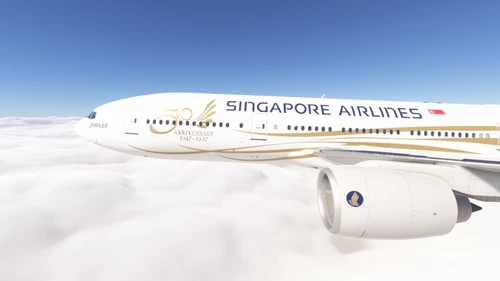
PMDG 777-200ER w/ cabin Singapore Airlines - 50th Anniversary (9V-SQA)
This add-on provides a detailed repaint for the PMDG 777-200ER, featuring the Singapore Airlines 50th Anniversary livery for aircraft 9V-SQA. A custom cabin and tablet background are included, with minor differences between MSFS 2024 and 2020. The package includes installation instructions for PMDG Operations Center 3. Redistribution or modification of the livery without permission is prohibited.
par alxcpt
Connectez-vous pour participer à la discussion
Se connecterCommentaires(25)
about 1 year ago
about 1 year ago
about 1 year ago
over 1 year ago
You may refer to the pictures in the link below -
https://www.planespotters.net/photos/reg/9V-SQD
over 1 year ago
over 1 year ago
over 1 year ago
over 1 year ago
over 1 year ago
You make simply wonderful liveries but I would like to ask you if we should expect liveries for Russian airlines for the Boeing 777-200er such as RedWings and Ikar?
Liveries for these airlines will hardly be made by third-party authors, but if it will be you, I think the liveries will be in great demand.
I would be grateful for an answer.
over 1 year ago
over 1 year ago
It you install one default livery via the OC3 where you installed your 772 as well you should get the liveries folder. Then you can easily install it with the instructions.
over 1 year ago
2.Create sub folders \SimObjects\Airplanes\PMDG 777-200 XXXX (Livery name)
3.add layout.json / manifest.json from 777f livery folder to pmdg-aircraft-77er-liveries folder
4.download the livery and extract files model, texture.xxxx and aircraft.cfg into this \PMDG 777-200 XXXX (Livery name) folder
5.drag layout.json onto MSFSLayoutGenerator.exe
6.add (") to base_container = (here)..\PMDG 777-200ER XX(here) in the aircraft.cfg file of the livery