
Description
You've got more tools than 2024 wants you to handle?
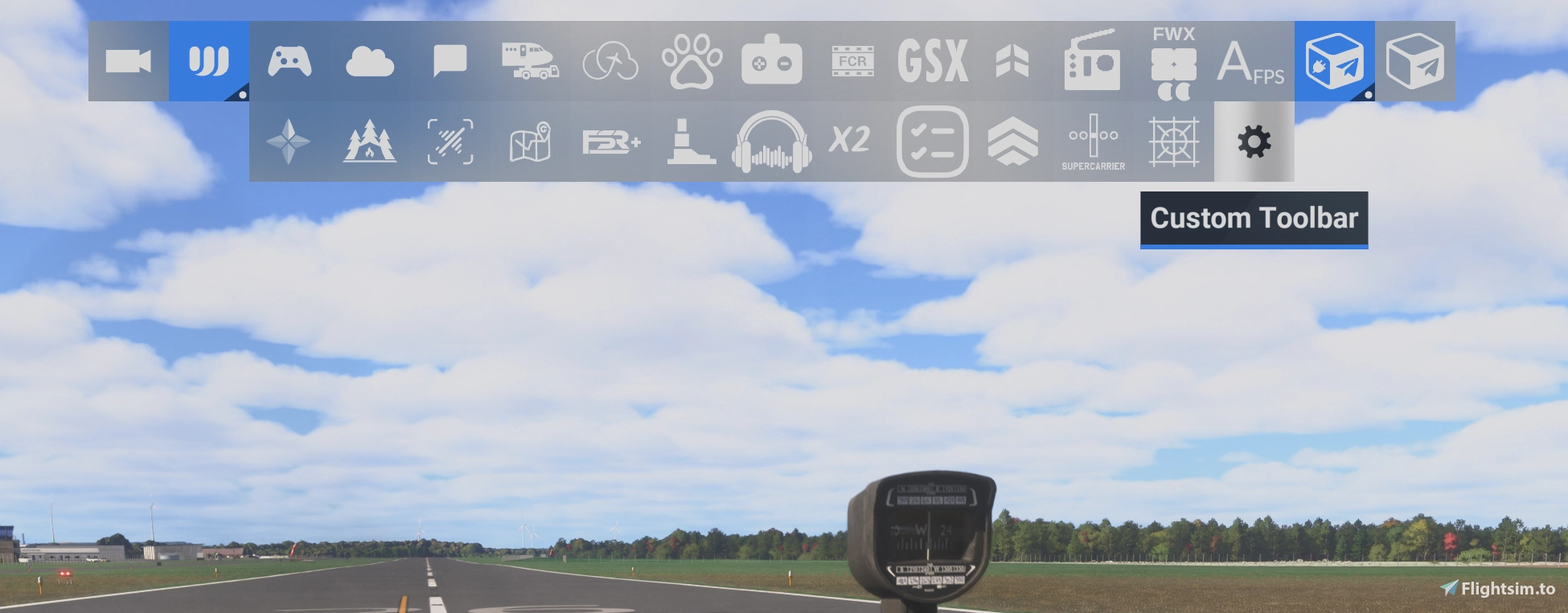
ENTER WRAPPING TOOLBAR!
The standard toolbar fails at providing space for all the goodies you might want it to display. Wrapping Toolbar will give you space for multiple rows of tools. This equals almost 42 billion tools (adjusted for inflation). The following features are implemented:
- 1.0.0+: Icon rows wrap
- 1.2.0+: The Custom Toolbar dialog is scrollable to allow you to enable and disable all of your tool icons.
- 1.3.0+: The Custom Toolbar dialog allows additional configuration: Icon zoom level (50% - 150%) and whether the toolbar handle should be hidden (on by default).
- 1.5.0+: Disabled toolbar icons in "Custom Toolbar" are remembered across simulator restarts. While MSFS 2024 seems to have this implemented (it's storing the state), this did not seem to work for 3rd party icons on at least some systems.
- 1.6.0+: The trigger area for the toolbar can be reduced in the "Custom Toolbar" dialog. This makes more elements clickable in the upper area of the screen.
- 1.7.0+: The "Small" trigger area is reduced further in size, settings for VR sare saved separately and 3 toolbar positions can be selected.
INSTALLATION
Unzip and drag "luzat-wrapping-toolbar" to your community folder.
COMPATIBILITY
Should work with at least MSFS 2024 SU 7.1 and 7.2 beta and possibly newer versions of 2024.
ADDITIONAL NOTES
- I removed the border around the toolbar, because the implementation does not work out that well with wrapping.
- The bar might work with more than >~45 items, but at some point icons will get cut off, especially with zoom levels >100%.
- It should work in VR if the toolbar is opened with the "VR - TOGGLE TOOLBAR" control (check assignment in settings).
- Chaseplane seems to hide the toolbar handle, too, by default. This mod allows you to turn the handle on or off even with Chaseplane installed.
- 1.3.0+ implements functionality similar to @heklac's "Handlebar Mod MSFS2024"
- 1.5.0+ implements functionality similar to @hazza_212's `t
oolbar-memory` - Other mods that replace the same files will be incompatible. I might implement additional suggestions, though.
PROBLEMS?
Drop me a message. If you can't find your community folder or unzip a file, please do some research first.
Microsoft Flight Simulator 2024 © Microsoft Corporation. Wrapping Toolbar was created under Microsoft's "Game Content Usage Rules" using assets from Microsoft Flight Simulator 2024, and it is not endorsed by or affiliated with Microsoft.
Questions fréquemment posées
Wrapping Toolbar
The Wrapping Toolbar add-on enhances the standard toolbar in Microsoft Flight Simulator: Icons can wrap around to allow a larger number of icons, icons can be scaled from 50% to 150%, the trigger area for the handlebar can be reduced, the handlebar indicator can be disabled, and the Custom Toolbar list is made scrollable. Apart from the removal of the toolbar borders, the design remains largely unchanged. Installation is simple, requiring users to place the unzipped folder into their community folder.


Soutiens

Avis des utilisateurs
10 avis
Historique des versions
- New: "Toolbar position" option in the Custom Toolbar dialog: Centered, Top or Bottom. - Changed: "Trigger area" set to "Small" now covers one row of icons and follows the toolbar position. - Changed: "Centered" places the toolbar slightly higher, so that two rows at 150 % fit without being cut off. - Changed: Settings changed in the Custom Toolbar dialog are applied immediately. - Fixed: Toolbar settings and turned-off icons were not restored for users without certain other add-ons installed. - Fixed: In VR, icons turned on in the Custom Toolbar dialog were turned off again. - Fixed: Turned-off icons that the simulator turns back on later (e.g. when a flight starts) are now hidden again. - Fixed: Add-ons that manage their own toolbar icon (e.g. Flow Pro) are no longer interfered with.
Connectez-vous pour participer à la discussion
Se connecterCommentaires(70)
about 2 hours ago
2 days ago
1 day ago
6 days ago
But unfortunately, the toolbar still doesn't remember which Icons I had enabled and which disabled.
Using MSFS24 on steam, and addon linker, if that makes a difference...
5 days ago
* a list of installed addons (especially ones that may modify the UI)
* the version of the addon that you are using (1.5.1?)
* if settings such as zoom level are restored
* if the state is not restored for all buttons
* whether those are not kept disabled or enabled (you disable them, but they are enabled? Or the other way round?)
* does the Custom Toolbar dialog show the correct state, even if the toolbar itself does not?
about 2 hours ago
14 days ago
13 days ago
13 days ago
13 days ago
13 days ago
13 days ago
13 days ago
13 days ago
16 days ago
15 days ago