

Description
What is this tool?
Even if we know that this tool already exists, we did it for the reasons above
This freeware MSFS Layout Generator is made for:
- New creators who want to make liveries, mods, or small tweaks but don’t know how to use the official SDK or the built-in MSFSLayoutGenerator.exe.
- Non-developers who simply like to modify small things in their Community folder (textures, configs, tweaks) for personal use, without having to install or learn the SDK.
- Instead of digging through developer tools, you just double-click, paste your package folder path, and the tool generates a valid layout.json.
✅ Compatibility
- Works with MSFS 2020 and MSFS 2024.
- Supports any kind of package: liveries, aircraft mods, scenery, utilities.
- Works for Windows, macOS and Linux
- Caution, Python is needed for this tool
IF YOU HAVE ANY QUESTIONS, PLEASE CONTACT US VIA DM, WE ALWAYS ANSWER
You can join our Discord Server to be informed about the new updates and follow us on Instagram
Easy Layout and Manifest Generator
The Easy Layout Generator is a freeware tool designed for Microsoft Flight Simulator users who want to create or modify packages without needing in-depth SDK knowledge. It simplifies the process of generating a valid layout.json file by allowing users to easily input their package folder path. This tool supports various types of packages such as liveries and mods, and is compatible with both MSFS 2020 and MSFS 2024. Currently, it is available for Windows only.


Soutiens

Avis des utilisateurs
5 avis
Historique des versions
What's new in v2: - Interactive mode: just run it, paste or drag in your package folder and answer a few questions (title, creator, manufacturer, version, release note). - Real file dates and sizes are written into layout.json. - Version control is now in your hands: the version only changes when you choose to bump it (patch / minor / major) or set it yourself. - Package type (aircraft, livery, scenery) is re-detected on every run. - Your existing manifest is respected: dependencies, release notes and custom fields are kept. - Your creator name is remembered, so you only type it once. - Smart warnings if the title, creator, type or livery dependency looks incomplete. - Command-line options for advanced users and scripts (--bump, --dependency, --type, --dry-run, --yes). - One single script and one launcher per platform, plus an optional desktop shortcut on Windows. - Caution Python is needed Requirements: Python 3.8 or newer. No other installation needed. How to use: double-click RUN_WINDOWS.bat (or RUN_MACOS_LINUX.sh), paste your package folder path, answer the questions, done. Tip: always double-check the dependency names in manifest.json against the base aircraft package before releasing. Created by HeliRomandy.
Similaires

Bell 407 Realism Chab Mod
The Bell 407 Chab Mod offers a more realistic experience of the Bell 407 helicopter in Microsoft Flight Simulator 2020. It includes adjustments to control responsiveness, including cyclic sensitivity and collective response, as well as improved stability while maintaining manual control feel. Modifications also encompass engine performance settings based on official documentation, enhancing fuel pressure behavior for a more authentic flight experience. The add-on consists of modified configuration files for streamlined installation.
par Romandy AI Studio

DR400 Realism Mod
The DR400R Cadet Realistic Mod transforms the default Asobo DR400 into an accurate simulation of a trainer aircraft, utilizing real-world flight manuals and pilot feedback. Key improvements include a reworked flight model, realistic engine performance, and enhanced cockpit systems, all aligning with genuine specifications. This mod is designed for students and flight schools looking for an authentic training supplement within Microsoft Flight Simulator.
par RomandyStudio
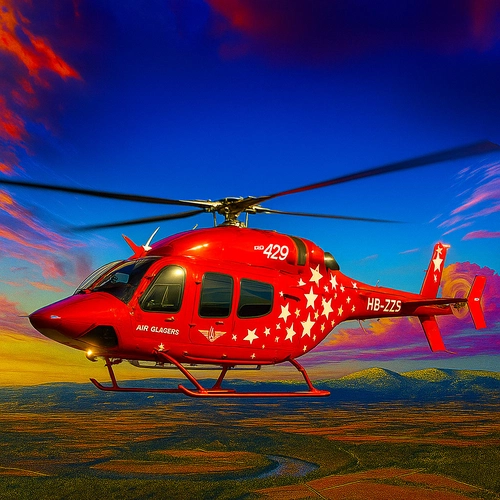
B429 NextGen
The B429 Realism Mod offers a comprehensive overhaul of the Bell 429 NextGen helicopter, utilizing real-world documentation to enhance flight dynamics and performance. Key features include realistic specifications for the PW207D1 engines, accurate limitations for torque and ITT, and finely-tuned flight characteristics based on Bells official manuals. This mod is compatible with MSFS 2020 and 2024, making it ideal for training, emergency medical services, and IFR operations.
par RomandyStudio
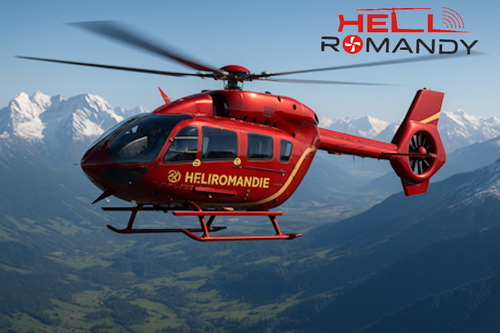
HPG H135 Improvment Mod
This add-on enhances the freeware Airbus H135 by Hype Performance Group, introducing refinements to flight mechanics and engine parameters. Key modifications include improved handling characteristics, increased rotor inertias, and refined engine configurations based on real-world data. The adjustments aim to create a more realistic flying experience without altering the original assets, ensuring compatibility with future updates. Users will need the original H135 installed to utilize this overlay tweak.
par Romandy AI Studio
Connectez-vous pour participer à la discussion
Se connecterCommentaires(22)
about 3 hours ago
about 3 hours ago
about 3 hours ago
about 3 hours ago
Thank you for your feedback.
You're right that the Python requirement should have been clearly mentioned in the description. This was an oversight on my part, and I'll make sure to correct it.
I understand your frustration, although I do feel that a two-star rating is rather harsh for a missing requirement in a free utility that has been available for over a year.
Nevertheless, your feedback is valid, and I appreciate you bringing this to my attention.
Kind regards,
HeliRomandy
about 3 hours ago
Ce commentaire a été supprimé
about 3 hours ago
about 3 hours ago
Ce commentaire a été supprimé
about 1 month ago
9 months ago
t work this should be removed
8 months ago
8 months ago
It doesn't work or at least it does but the secrets of its usage are being kept quiet. As other people have reported generates an error and does not work.
15 days ago
This tool works perfectly for a lot of users. It doesn't mean that you are wrong, but no "fake news" here we are not on a political aera. We don't have any motivation here in a free tools website to make something that doesn't work and HeliRomandy is becoming a known studio during the 1,5 past years. Of course all feedbacks are welcome and we ALWAYS take it into account, because without feedback it's complicated to improve our Devlopment Team. Please send us an email at support@romandy.tech and we will be happy to help you.
Best regards,
10 months ago
So I do not have python on my PC. Looks like without it the script will not work at all ?
Becasue I am trying to do to create a new layour.json but still getting this :
Running generator...
Python was not found; run without arguments to install from the Microsoft Store, or disable this shortcut from Settings > Apps > Advanced app settings > App execution aliases.
15 days ago
about 1 year ago
I do have a question though and sent you a DM.
12 months ago
about 1 year ago
about 1 year ago
Also, in general, we noticed that many people make liveries or small modifications just for their personal use, and they usually don’t go through the SDK to do it. For them, the layout file often turns into the most confusing and frustrating part. One of the goals of this tool is to make their life easier — to give a quick and simple way to update Layout and Manifest without having to dive into the SDK.
So yes — your assumption is spot on! 🚀
about 1 year ago
about 1 year ago