

Flightsim.to
    REX AccuSeason Advanced Edition maintenant disponible

    REX AccuSeason Advanced Edition maintenant disponible

    F

    Flightsim.to

    Author

    September 25, 2023
    Updates

    REX Simulations a publié une mise à jour passionnante pour son produit populaire, REX AccuSeason. Avec l'introduction d'AccuSeason Advanced Edition, les utilisateurs peuvent désormais profiter d'une multitude de nouvelles fonctionnalités et d'améliorations qui augmentent encore le réalisme et l'attrait visuel de leurs environnements virtuels. Ils ont développé AccuSeason Advanced Edition, qui introduit une gamme de nouvelles fonctionnalités qui améliorent non seulement la végétation mais aussi le terrain global et la représentation météorologique dans le simulateur.

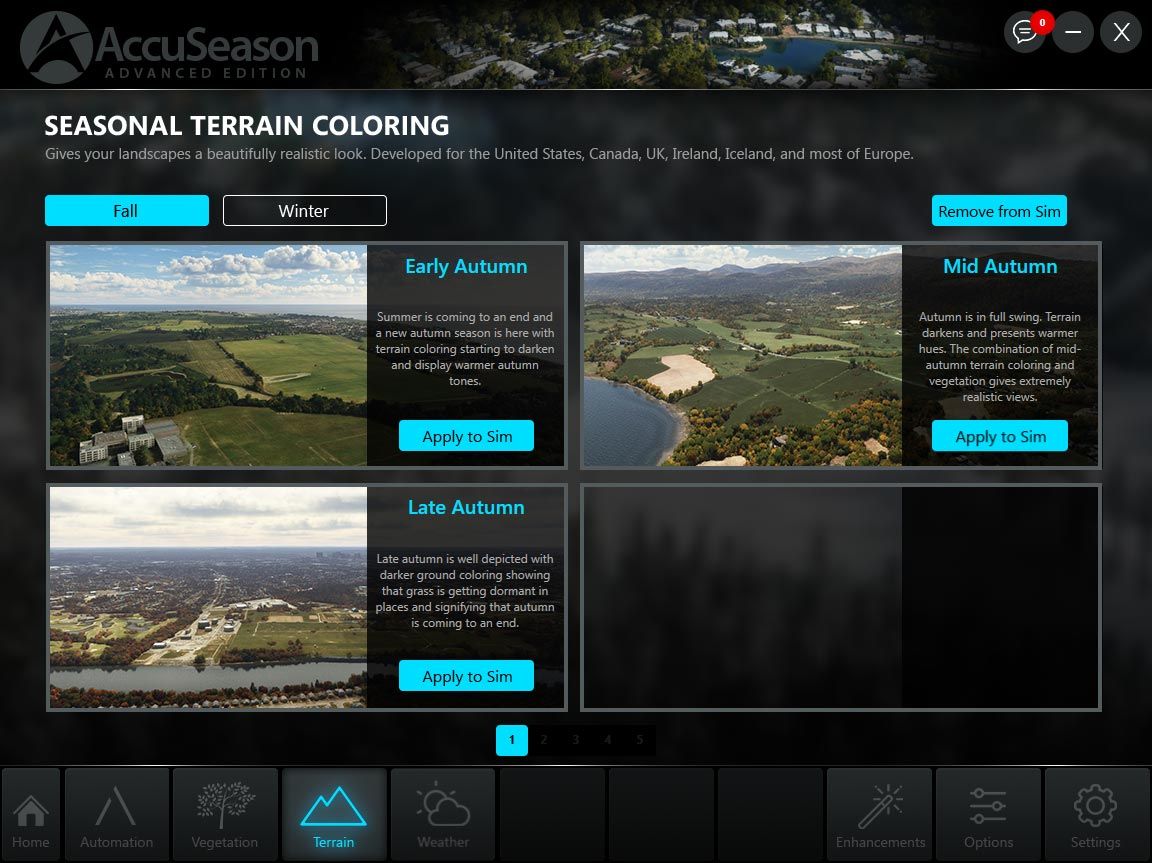
    Terrain Coloring

    L'une des caractéristiques les plus remarquables d'AccuSeason Advanced Edition est l'ajout de la coloration du terrain. Cette fonction permet aux utilisateurs non seulement d'ajuster la couleur des arbres, mais aussi de modifier le terrain pour qu'il corresponde mieux à l'environnement extérieur. En intégrant de manière transparente la fonction de coloration du terrain, REX a créé une représentation visuelle plus cohérente et plus réaliste du monde au sein du simulateur de vol. Actuellement, la coloration du terrain est disponible pour des régions telles que les États-Unis, le Canada, l'Europe, le Royaume-Uni, l'Irlande et l'Islande, et il est prévu de l'étendre à d'autres régions à l'avenir.
    Scénarios météorologiques

    AccuSeason Advanced Edition porte la représentation météorologique à un niveau supérieur en introduisant un large éventail de préréglages météorologiques axés sur les saisons. Avec plus de 38 options au choix, les utilisateurs peuvent sélectionner des scénarios météorologiques qui reflètent avec précision le charme et les défis uniques de climats spécifiques à différentes périodes de l'année.

    Types de végétation et d'arbres améliorés

    AccuSeason Advanced Edition ne se contente pas d'ajuster la hauteur et la couleur des arbres. REX a ajouté de nouveaux biomes, types d'arbres et autres caractéristiques de terrain pour mieux refléter la diversité de la végétation trouvée dans les différentes régions du monde. Par exemple, les trembles, connus pour leurs teintes jaunes éclatantes en automne, ornent désormais les paysages du Colorado, y compris des destinations populaires comme Aspen, Telluride et Breckenridge. Les mélèzes, qui arborent des teintes jaunes et orange étonnantes en automne, se trouvent dans les montagnes Cascade de Washington et dans d'autres régions septentrionales des États-Unis et du Canada.

    Densité de végétation réduite pour les villes

    AccuSeason Advanced Edition introduit une nouvelle fonctionnalité qui permet aux utilisateurs d'ajuster la densité de végétation dans ces zones. En réduisant la densité de la végétation, les environnements urbains virtuels deviennent plus réalistes et harmonieux, ressemblant de près à leurs homologues du monde réel.

    Resilient Coloring : Cohérence dans la représentation visuelle

    AccuSeason Advanced Edition aborde un problème courant dans les simulations de vol où la végétation peut apparaître décolorée en raison de textures de sol légères ou d'une coloration non naturelle dans l'image de sol sous-jacente. Pour résoudre ce problème, REX a introduit la coloration résiliente, une fonction contrôlée par l'utilisateur qui garantit une coloration cohérente de la végétation, même dans des conditions visuelles difficiles. Grâce à la coloration résiliente, les simulateurs peuvent profiter d'une représentation plus agréable et plus précise de la végétation.


    Automation et modes de personnalisation : Adapter l'expérience

    AccuSeason Advanced Edition offre deux modes de fonctionnement distincts : L'automatisation et la personnalisation. En mode Automatisation, l'application change automatiquement le feuillage saisonnier sur une base hebdomadaire, offrant une expérience globalement synchronisée tout au long de l'année. En outre, avec l'édition avancée, les utilisateurs peuvent désormais modifier la coloration du terrain en fonction des saisons. D'autre part, le mode Personnalisation permet aux utilisateurs de configurer manuellement les éléments saisonniers, tels que le feuillage, la coloration du terrain et les scénarios météorologiques, à l'aide d'un large éventail de préréglages.

    Mise à niveau vers AccuSeason Advanced Edition

    Les clients existants d'AccuSeason peuvent passer à AccuSeason Advanced Edition gratuitement. Pour ce faire, les utilisateurs peuvent télécharger la nouvelle mise à jour soit par le biais de l'application AccuSeason, soit en téléchargeant l'édition avancée à partir de leur compte sur le site web de REX. D'autres instructions de mise à jour sont disponibles ici. Si vous n'avez pas encore acheté REX AccuSeason, vous pouvez en obtenir une copie sur la boutique Flightsim.to.

    Comments

    D

    over 2 years ago

    Yeah,if only it worked.The installation always leads to a failed licence error and forces you to install the old oneEDIT Now it works fine
    J

    over 2 years ago

    Odd. Mine installed perfectly fine and I've been using it for a couple of days.
    A

    over 2 years ago

    Make sure you're adding the code into the REX AXIS and seeing it appear on there as the "Advanced Edition" under Products. I ran into a similar issue and it seemed to resolve once I logged in using my Axis account info after updating it in AXIS.

    over 2 years ago

    It seems that now worked ok.One question,do i uninstall the standard one or not ?
    r

    over 2 years ago

    I bought the original AccuSeason from Orbx. There's no option to update the original installation. There is a new product listing for this Advanced Edition but it says I need to purchase it. How do I go about this with Orbx? It should realize I purchased the original and let me install the new version free of charge. Thank you.
    A

    over 2 years ago

    I had attempted to uninstall my current install of Accuseason, but the process froze and I had to reboot my system. When I was satisfied that my Accuseason had been uninstalled, I attempted to install the latest version, but that caused errors. Somehow I managed to get the previous version installed and working, but when I check for updates, it says I have the latest one installed?? How can I check my Accuseason install to see what version it is, and what is the number for the newest? Pete
    T

    over 2 years ago

    I thougt that there's an new update available for AccuSeason Advanced Edition.... :(
    T

    over 2 years ago

    Unistall product. Then open your file explorer, go on drive C:/ and search with word "Accuseason". Delete every file and folder it founds. There is some files left after unsistalling product in your "users/appdata/roaming" etc. folders. After doing this install new version.

    over 2 years ago

    Well, I had done all of that, except I had forgotten about the app data/roaming folders. As a result, I am sure that messed things up. Now, if I try to uninstall Accuseason, I get a popup error, and am not able to uninstall it via the Control Panel.

    over 2 years ago

    T

    over 2 years ago

    If you uninstalled it first and then removed rest of files there shoudln't be anything left on your computer so you can perform clean install of "Advanced edition" and it should work just fine. You got error because there's nothing to uninstall.

    over 2 years ago

    The update doesn't work for me and I won't buy it again either.

    over 2 years ago

    I managed to uninstall everything and then install the newest version, but even though I entered the serial number from my REX account to register the new one, it is not being accepted. I submitted a help request, but no reply yet.
    S

    over 2 years ago

    The installer should do that for you. The average user would have no idea to do this if you hadn't mentioned it. No offense.
    T

    over 2 years ago

    Delete "profile.json" file located in the Documents/REX 7/REX AccuSeason Advanced Edition folder. Then try registering the product again using the right side of the application.
    C

    over 2 years ago

    Hate to inform all, but AccuSeason Advanced was the culprit that caused my MSFS to CTD every time I flew after Sim Update 13. It does not like the new Sim 13 update, worked fine on the previous MSFS version. Take it as you may, but if you have this and you have the Sim 13 Update and you are having CTD issues, uninstall the AccuSeason Advanced App and its fold on your C Drive, do a Registry cleaner (CCleaner is fine for this), and lastly go into your MSFS Community folder and remove all files that start with "rexaccuseason". REX is going to have to fix this before I install it again.

    over 2 years ago

    CCleaner is fine for thisNo no no. CCleaner is not fine for anything.Also, "cleaning" the registry is not recommended, as it doesnt need "cleaning", and may cause issues.

    over 2 years ago

    Check if you have Documents/REX 6/REX AccuSeason/profile.xml - the serial is in there. For the order number search in your old e-mails. Amazing how little some software devs care about their existing customers, we are supposed to remember where and how we bought every piece of software. This should have been a seamless upgrade through OrbX Central.

    over 2 years ago

    Whats your opinion guys, are the REX one or the Bijan one better? Please tell me your experience :)
    S

    over 2 years ago

    Works like a charm after following the installation manual.

    over 2 years ago

    CCleaner is spyware/malware, that's part of your CTD problem. Good luck getting that crap off of your system.

    over 2 years ago

    I can't see the one question that should be #1 in this thread. Graphics-wise is it better than Bijan's abandonware mod or not?
    E

    over 2 years ago

    Like what others has said, CCleaner does more harm to your computer than good. You don't need to "clean" your registry. Especially for Win10
