Flightsim.to

    Flight Tracking & Analysis

    Outils gratuits de suivi et d'analyse de vol pour MSFS 2020 et 2024. Analyse d'atterrissage, replays, enregistreurs et carnets de vol. Téléchargement gratuit. Parcourez 28 add-ons publiés par notre communauté.

    Dernière mise à jour
    Taildragger Trainer with Takeoff/Landing scoring

    Taildragger Trainer with Takeoff/Landing scoring

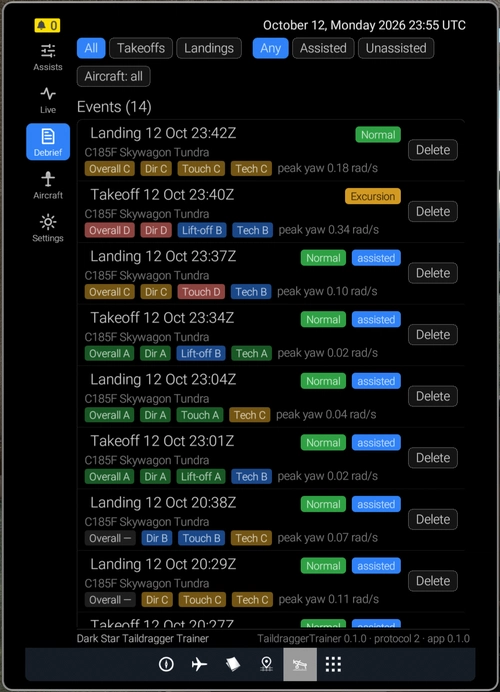
    Taildragger Trainer offers takeoff and landing evaluations for taildragger aircraft in Microsoft Flight Simulator, including experimental scoring and feedback features. A coach mode provides reminders for wind correction and rudder input, visible via the Live tab. Optional assists can help maintain runway alignment, though outcomes vary by aircraft. The add-on is a work-in-progress with extensive data and is tailored primarily for taildragger planes.

    DarkStarQQDarkStarQQ
    MSFS2024
    0.0(0)
    13
    595.6 KB
    3 weeks ago
    FlareWise

    FlareWise

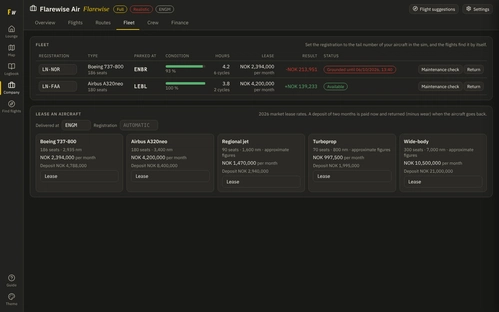
    FlareWise is a flight logging add-on for Microsoft Flight Simulator 2024 that tracks and rates all your landings. It provides a detailed logbook, flight history displayed on a world map, and access to real airline routes. Users can optionally manage their own airline, handling passengers, finances, and operations across multiple difficulty levels. The interface features several customizable visual themes.

    battlemean2battlemean2
    MSFS2024
    0.0(0)
    30
    52.9 MB
    3 weeks ago
    Cobalt Bridge – Flight Sim Companion

    Cobalt Bridge – Flight Sim Companion

    Cobalt Bridge is a desktop application that connects Microsoft Flight Simulator 2020 or 2024 to the Cobalt mobile app on iPhone or iPad over a local network. It provides access to live flight data, moving maps, flight progress, aircraft telemetry, weather, and flight recording features on mobile devices. Core tracking features are free, with optional paid upgrades for advanced remote controls and connectivity. The add-on requires Windows 10 or later, an iOS device with iOS 18 or later, and supports X-Plane 11 and 12 as well.

    CobaltSimCobaltSim
    MSFS2020/24
    3.7(3)
    132
    74.5 MB
    3 weeks ago
    ButterRate Monitor

    ButterRate Monitor

    Butter Rate Monitor is a standalone Windows utility for Microsoft Flight Simulator 2024 that displays a landing rate popup after touchdown. It categorizes landings as butter, smooth, regular, or hard, showing descent rate in feet per minute with customizable grading. The popup can be repositioned and its display duration adjusted. OBS Studio integration is included for easy livestream overlay, with no Community-folder installation required.

    jjstevensjjstevens
    MSFS2024
    0.0(0)
    48
    63.1 MB
    4 weeks ago
    CheckRide - AI Flight Instructor & Checkride Examiner (MSFS 2020/2024)

    CheckRide - AI Flight Instructor & Checkride Examiner (MSFS 2020/2024)

    CheckRide is an AI-powered flight instructor and checkride examiner add-on for Microsoft Flight Simulator 2020 and 2024. It evaluates complete flights, grading everything from startup procedures to landings based on real-world standards such as FAA and airline SOPs. Users receive detailed debriefs, oral feedback on mistakes, and optional AI-generated conversational analysis. A pass certificate with detailed performance metrics is issued for successful checkrides or high scores.

    ClearedToCodeClearedToCode
    MSFS2020/24
    5.0(4)
    386
    71.1 MB
    3 days ago
    FinalGrade

    FinalGrade

    FinalGrade is a free landing analysis and coaching tool for Microsoft Flight Simulator 2024. It evaluates your final approach and touchdown by capturing flight data to provide clear post-landing debriefs. The tool highlights key metrics such as vertical speed, G-force, airspeed, pitch, and bank at touchdown. Designed to support improvement, it offers a performance summary beyond simple landing rate statistics.

    I_am_JxkeI_am_Jxke
    MSFS2024
    5.0(1)
    30
    119.3 KB
    1 month ago
    Sims  integration with Bilawal Sidhu 3D God's Eye View

    Sims integration with Bilawal Sidhu 3D God's Eye View

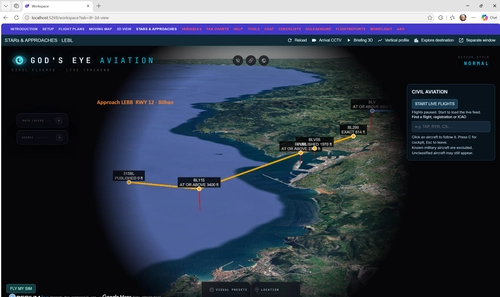
    This add-on integrates Bilawal Sidhu's God's Eye 3D Globe for real-time visualization of Microsoft Flight Simulator flights. It displays live aircraft telemetry such as position, altitude, and heading on a 3D globe, with multiple camera modes available. For IFR flights, the tool provides 3D route briefing and visualizes route procedures, approaches, and altitude constraints. A built-in demo and access to all Spanish airports and procedures are included for standalone exploration.

    0.0(0)
    34
    134.5 MB
    1 month ago
    SnapTrack - Automatic GPS Geotagging for MSFS Screenshots

    SnapTrack - Automatic GPS Geotagging for MSFS Screenshots

    SnapTrack is a free Windows tray app for Microsoft Flight Simulator 2020 and 2024 that automatically geotags your screenshots. It writes GPS coordinates (as standard EXIF/XMP and as readable text with a Google Maps link), altitude, heading, speed, aircraft, nearest airport and weather into each image, losslessly and offline. Works with Photo Mode, Game Bar, Steam, NVIDIA and ShareX. Includes a local dashboard with Open in Google Maps, a map gallery of flight tracks, a flight log with statistics and KML/GPX/GeoJSON export. No account, no key.

    ClearedToCodeClearedToCode
    MSFS2020/24
    5.0(2)
    70
    67.8 MB
    1 month ago
    XFlight Debrief – Free 0.1

    XFlight Debrief – Free 0.1

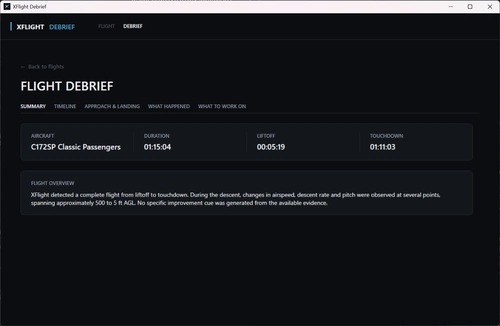
    XFlight Debrief Free 0.1 is a standalone Windows application for Microsoft Flight Simulator 2024 that records and analyzes flight telemetry to provide a factual post-flight debrief. The tool offers a detailed timeline, approach and landing analysis, and summarizes key events and observations from the flight. It identifies areas for improvement when evidence supports it, without assigning scores or grades. All processing is done locally and offline, ensuring data privacy and independence from the simulator’s SDK.

    XFlightAIXFlightAI
    MSFS2024
    0.0(0)
    9
    62.5 MB
    1 month ago
    Gees with auto-close and start-minimized options

    Gees with auto-close and start-minimized options

    Enhance your Gees experience with auto-close and start-minimized options. This mod adds new functionalities to the Gees tool, allowing for automatic closure when connection is lost and the option to start the tool minimized, providing a seamless integration with your simulator setup. Find out more about the original Gees tool on its flightsim.to page.

    RobsonMRobsonM
    MSFS2020
    0.0(0)
    1.2K
    759.43 KB
    4 years ago
    Showing 13 - 24 of 28 results