
Description
[Korean]
📢 업데이트 시 주의사항
대부분 Launching Option 을 켠 상태에서 이용하리라 생각됩니다.
기존 사용자들은 업데이트시 반드시 수동으로 한번 실행을 해주어야 합니다.
업데이트 후 수동 실행하면 윈도우 경고창이 뜨면서 실행할 거냐고 물어볼 것입니다.
이 앱은 CodeSign 을 받지 않았기 때문에 SmartScreen 컨펌을 위해서 업데이트 후 한번 실행해주셔야 합니다.
그렇지 않으면 시뮬레이터 실행시 자동으로 실행되지 않습니다.
따라서 반드시 업데이트 하고 나면 꼭 한번은 수동 실행해주세요!
=====================================================================================
❤️ 이 에드온에 대해서...
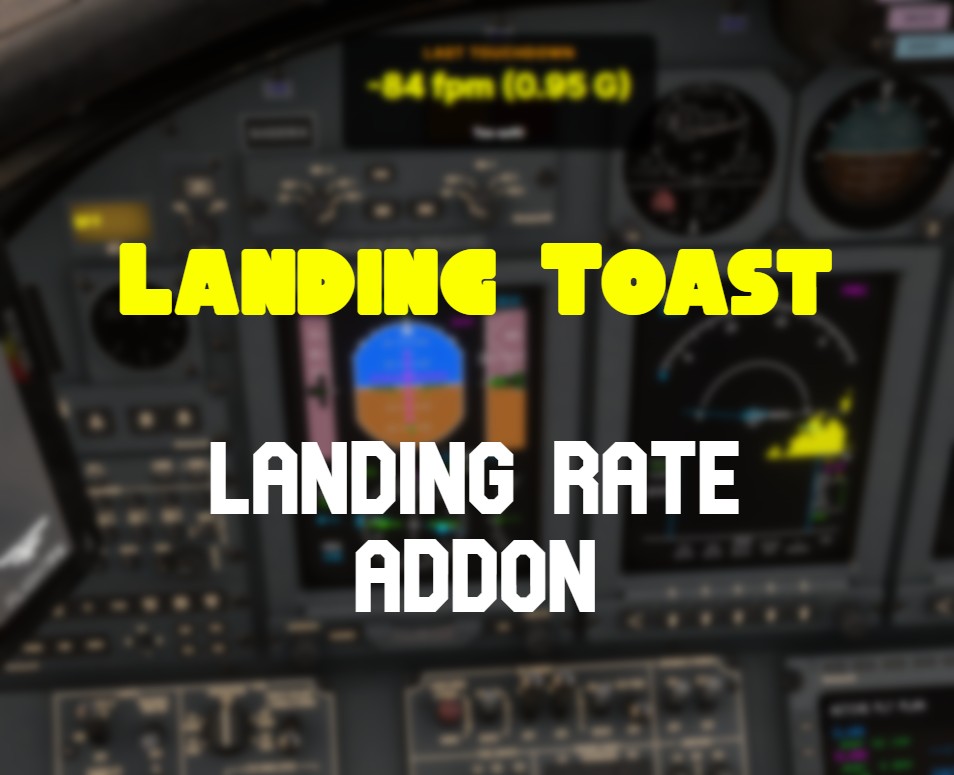
Landing Toast 는 활주로 터치다운 때 시뮬레이터 화면에 Landing Rate 와 G Force, GS 를 출력해주는 에드온 입니다.
이 에드온은 매우 심플하며, 단순히 랜딩 결과를 화면에 출력을 합니다.
파일럿은 현재 터치다운의 정확한 정보를 바로 알 수 있게 하는데 그 목적이 있습니다.
별도의 랜딩 결과에 대한 로그를 제공하지 않고, 현재의 랜딩 결과만 보여주는 아주 간단한 에드온 입니다.
Landing Toast 의 녹화기능은 MSFS 의 HDR 사용시 녹화가 제대로 되지 않습니다.
HDR 녹화기능은 지원하지 않습니다!
💚 기능
- Touchdown 때 Toast 형태로 화면에 애니메이션 되는 팝업을 정보와 함께 출력합니다.
- SimConnect 로 부터 제공받은 Landing Rate, G Force, 바람, 항공기 각도등 정보를 제공합니다.
- 착륙시 자동으로 영상 녹화를 지원합니다.
- 설정을 통하여, 출력 위치를 시뮬레이터 화면 윗쪽 또는 아랫쪽에 출력합니다.
- Ctrl+Shift+F11 키를 사용하여 최근에 랜딩한 정보를 화면에 다시 한번 출력할 수 있습니다. (활용 예> 스크린샷 찍기 위해..)
- 시뮬레이터 시작과 함께 이 에드온도 함께 시작할 수 있고, 시뮬레이터를 종료하면 이 에드온도 자동으로 종료할 수 있습니다.
🩵 종속성
- .NET 10
💜 설치방법
- 적당한 위치에서 압축해제 후 실행.
- 이 에드온은 별도로 실행하는 Application 입니다. Community 폴더에 복사하지 마십시요!
- ☞☞ 시뮬레이터 시작시 함께 시작 옵션 사용을 위해서 반드시 다운로드 폴더 같은 곳이 아니라 적당한 곳에서 실행해 주세요 ☜☜
💗사용방법
- LandingToast.exe 실행
- 실행 후 Setting 화면에서 Launching Option, Toast Position 설정 후 설정 창을 닫아주세요.
-> Launching Option 은 켜두는 것을 추천드립니다.
- 이후 Toast Position 을 변경하고자 할 때 트레이 아이콘에서 Setting 화면을 열어서 수정할 수 있습니다.
- Launching Option On 으로 설정하면 설정 완료 후 더 이상 별도의 신경을 쓰지 않아도 됩니다.
- 비행 후 터치다운 시 화면에 Toast가 출력됨을 확인할 수 있습니다.
- Ctrl+Shift+F11 키로 최근 터치다운 정보를 다시 한번 출력할 수 있습니다.
[English]
📢 Important Notice for Updates
It is assumed that most users have the Auto-launch option enabled.
Existing users MUST run the application manually at least once after updating.
When you run the new version manually, Windows may display a security warning (SmartScreen) asking for confirmation because this application is not code-signed. You must approve it manually (click 'Run anyway').
If you skip this step, Windows will block the application, and it will NOT start automatically with the simulator.
Therefore, please make sure to launch the app manually once after the update!
=====================================================================================
❤️ About this Add-on
Landing Toast is a utility that displays your Landing Rate and G-Force on the simulator screen directly upon runway touchdown. This add-on is designed to be extremely simple, focusing solely on presenting the immediate landing result. Its purpose is to provide the pilot with instant, accurate data regarding the current touchdown. It does not store separate logs but simply visualizes the "now" of your landing performance.
Note: The Landing Toast recording feature will not function correctly when MSFS HDR is enabled.
Disclaimer: HDR recording is currently not supported. Please disable HDR in your MSFS settings for the best recording results.
💚 Features
- Animated Popup: Displays an animated "Toast" style popup with landing data upon touchdown.
- Accurate Data: Provides Landing Rate and G-Force, Wind, Aircraft pitch, roll information, GS received directly via SimConnect.
- Support video recording during landing automatically.
- Customizable Position: You can set the display to appear at the Top or Bottom of the simulator screen.
- Replay Feature: Press Ctrl+Shift+F11 to re-display the most recent landing information on the screen. (Great for taking screenshots!)
- Auto-Start/Exit: The add-on can automatically start when the simulator launches and close when the simulator exits.
🩵 Dependencies
- .NET 10
💜 Installation
- Unzip the file to a permanent location of your choice and run the executable.
- IMPORTANT: This is a standalone External Application. DO NOT copy this into your Community folder!
- ☞☞ To use the "Auto-Start with Simulator" feature properly, please execute the file from a permanent directory (e.g., C:\Utils\LandingToast), NOT from a temporary folder like "Downloads". ☜☜
💗 How to Use
- Run LandingToast.exe. In the Setting window, configure the Launching Option and Toast Position, then close the settings window.
- Recommendation: We highly suggest enabling the Launching Option.
- If you need to change the Toast Position later, you can open the Setting window via the System Tray Icon.
- Once the Launching Option is set to On, you can simply "Set and Forget." The app will handle itself.
- Upon touchdown after your flight, you will see the Toast notification appear on your screen.
- Use Ctrl+Shift+F11 to recall the last touchdown information at any time.
=====================================================================================
If you have automatic execution problem, please check your %APPDATA%\Microsoft Flight Simulator 2024 folder.There have to be "Exe.xml" file. if not exists, Landing Toast will not be executed automatically even turned on at the app settings.
Landing Toast - Show Landing Rate to Simulator Screen
Landing Toast is an add-on for Microsoft Flight Simulator that displays real-time Landing Rate and G-Force information directly on the simulator screen upon touchdown. This utility features an animated pop-up that summarizes landing quality based on specific scoring rules, enabling pilots to immediately assess their landing performance. The add-on offers customizable display positions and includes a replay functionality for reviewing recent landings. It operates as a standalone application and requires .NET 10 for proper functionality.
Téléchargements suspendus
Le créateur a temporairement suspendu les téléchargements pour cet add-on. Veuillez réessayer plus tard.


Avis des utilisateurs
18 avis
Historique des versions
[English] - Fixed an issue where the bouncing calculation formula was incorrect [Korean] - 바운싱 계산식이 잘못됐던 문제 수정

Connectez-vous pour participer à la discussion
Se connecterCommentaires(107)
2 months ago
3 months ago
3 months ago
5 months ago
the correct info, when needed in an easy to digest formula...
however i had massive FPS drops when the popup appeared.
6 months ago
6 months ago
6 months ago
6 months ago
6 months ago
6 months ago
6 months ago
6 months ago
6 months ago
6 months ago
6 months ago
6 months ago
6 months ago
if u mean this folder, then no, there is no file called "Exe.xml"
6 months ago
6 months ago
6 months ago