
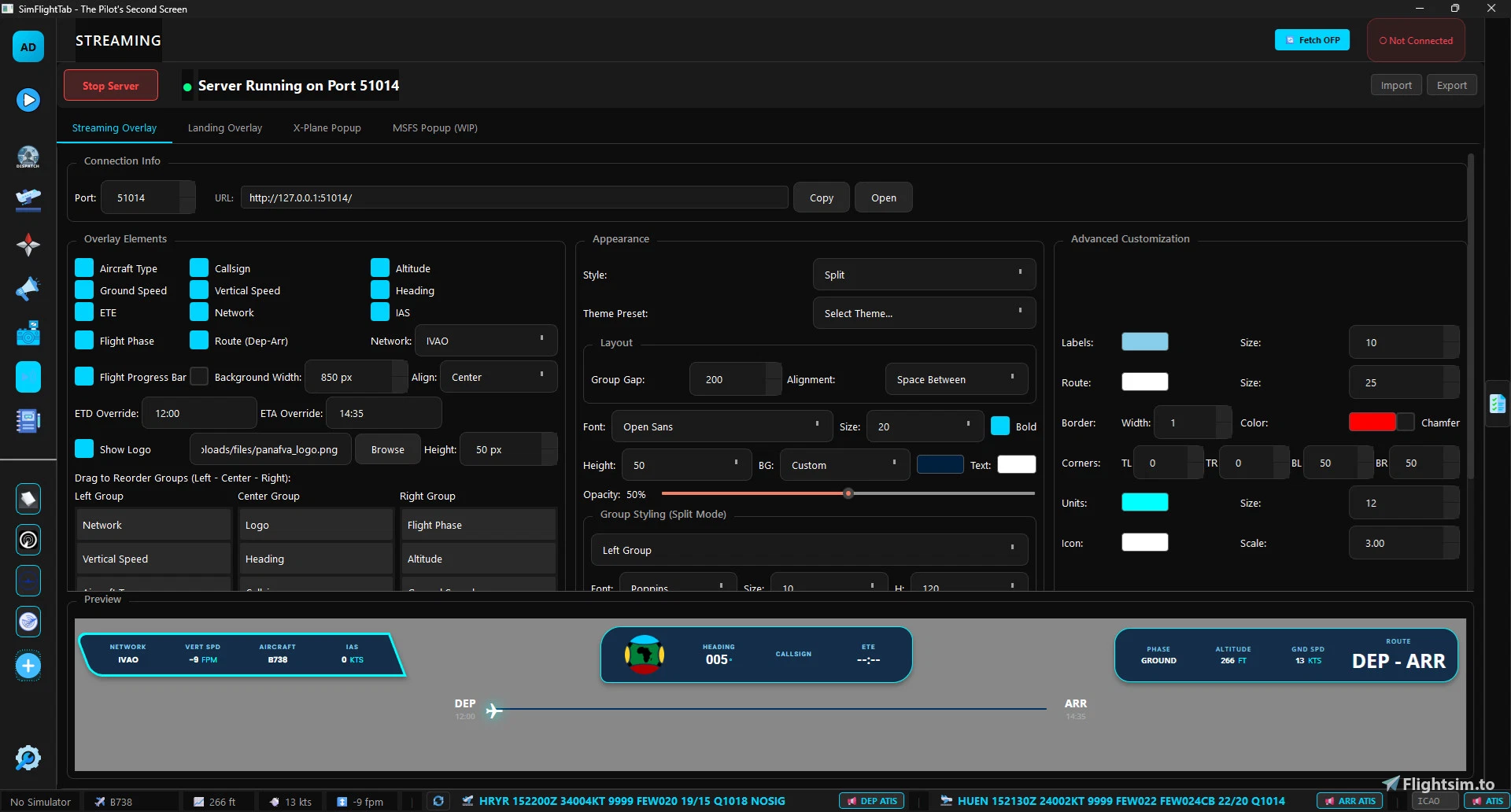
Description
SimFlightTab is a powerful, native desktop companion app designed for Microsoft Flight Simulator and X-Plane pilots. It provides a comprehensive suite of tools including SimBrief integration, real-time flight tracking, interactive checklists, streaming overlays, AI-powered cabin announcements, and much more. Built with Python and Qt, it's lightweight, fast, and completely free.
✨ Key Features
🛫 Flight Planning & Dispatch
SimBrief Integration - Fetch and display complete OFPs (Operational Flight Plans)
Real-World Flight Schedules - Search and import actual airline routes
Manual Flight Creation - Create custom flights with full flight plan details
Flight Maps - Interactive route visualization with departure and arrival charts
Automatic Flight Tracking - Auto-start flights on takeoff, auto-complete on landing
Flight Phase Detection - Real-time tracking of flight phases (Boarding, Taxi, Takeoff, Cruise, etc.)
✅ Interactive Checklists
CSV Import - Import aircraft-specific checklists in CSV format
Phase-Based Organization - Checklists organized by flight phase
Automatic Loading - Auto-load checklists based on aircraft type
Progress Tracking - Auto-save checklist progress
Custom Checklists - Create and manage custom checklists
📢 Cabin Announcements
AI-Powered TTS - Realistic cabin announcements using OpenAI, ElevenLabs, Azure, or system voices
ElevenLabs Integration - High-quality neural voices with full voice selection support
Customizable Scripts - Full announcement scripts with SimBrief variable support
Multiple Voice Options - Choose from OpenAI (alloy, echo, etc.) or your ElevenLabs library
Interphone Effect - Optional radio/interphone audio processing for realism
Phase-Triggered - Automatic announcements based on flight phase
Manual Control - Play any announcement on demand
Profile Management - Save announcement profiles per airline/aircraft
📺 Streaming Overlay
OBS Integration - Browser source overlay for streaming
Customizable Elements - Flight info, aircraft type, altitude, speed, heading, phase, and more
Logo Support - Upload and display custom airline/VA logos
Reorderable Groups - Organize overlay elements with drag-and-drop
Font Customization - Customize fonts, sizes, and colors
Real-Time Updates - Live data updates from simulator
Standalone Window - Can run as separate overlay window
🗺️ Navigation & Charts
Navigraph Integration - Embedded Navigraph chart viewer
Session Persistence - Stay logged in across app restarts
Custom Web Tabs - Add custom aviation websites (IVAO WebEye, LittleNavMap, etc.)
Full Browser Features - Complete web browsing within the app
📸 Screenshot Gallery
Auto-Detection - Automatically detects new screenshots from simulator
Geo-Tagging - Screenshots tagged with location, altitude, and flight data
Advanced Filtering - Filter by flight, aircraft, date, or location
Flight Association - Screenshots automatically linked to active flights
Full-Screen Viewer - View screenshots in full-screen with navigation controls
Metadata Display - View comprehensive EXIF and flight data
📖 Logbook & Statistics
Comprehensive Flight History - Detailed records of all flights
Landing Rate Detection - Automatic touchdown rate calculation and logging
Performance Analytics - Track flight times, landing rates, and statistics
Flight Status Tracking - Monitor planning, active, and completed flights
Export Capabilities - Export logbook data (planned feature)
🎮 Simulator Connectivity
MSFS Support - Full Microsoft Flight Simulator 2020/2024 support via SimConnect
X-Plane Support - X-Plane 11/12 support via custom UDP plugin
Live Data Stream - Real-time aircraft position, speed, altitude, and more
Mobile Support - Connect on any device on your local network
Auto-Reconnect - Automatic reconnection on simulator restart
Multiple Simulator Support - Switch between simulators seamlessly
⚙️ Advanced Features
Dark Theme UI - Beautiful, eye-friendly dark interface
Performance Optimized - Low CPU and RAM usage (~50-100MB)
Offline-First - All data stored locally, no account required
Profile System - Save different configurations for different airlines/aircraft
Settings Persistence - All settings saved and restored automatically
🚀 Installation
Using Pre-Built Installer (Windows)
Download the latest installer from Releases
Run SimFlightTab_Setup.exe
Follow the installation wizard
Optional: Install X-Plane plugin when prompted
Launch SimFlightTab from Start Menu
Q: Why can't I access VATSIM features in the app?
A: VATSIM services use Cloudflare protection that doesn't work with embedded browsers. Use the "Open in Browser" buttons to access VATSIM features in your regular web browser. All other app features work normally.
SimFlightTab - The Pilot's Second Screen
SimFlightTab is a desktop companion application for Microsoft Flight Simulator and X-Plane, designed to enhance the pilot experience. It features tools for flight planning, real-time tracking, interactive checklists, and AI-driven cabin announcements. Key integrations include SimBrief and Navigraph, along with streaming overlays for an immersive experience. The app is lightweight, fast, and available for free, supporting multiple platforms and offering a dark theme UI for user comfort.


Avis des utilisateurs
4 avis
Historique des versions
v0.4.2 (Current) - Overlay Customization: Added "Route Color" to theme presets and advanced customization options. - Theme Improvements: Updated all theme presets for consistent coloring; fixed "Red Alert" route color. - UX Improvements: Checklist sidebar now automatically hides when opening the Streaming page. - Progress Bar: Background color now correctly matches the main background theme (with custom opacity). - Settings: Improved Theme Export/Import to include all new customization fields. v0.4.1 2025-12-29 New Features - External Browser Integration: Added "Open in Browser" buttons to ChartFox and VATSIM-Radar. - Cloudflare Notices: Added warning messages explaining QtWebEngine limitations. - Enhanced Browser: Canvas reading, HTTP interceptor, CORS bypass. Changes - ChartFox: External browser button with VATSIM warning. - Custom Tabs: All tabs include "Open in Browser" button.
Similaires

RJFE - Gotō-Fukue Airport
RJFE - Gotō-Fukue Airport is a meticulously crafted add-on for Microsoft Flight Simulator, featuring an accurate representation of Fukue Airport in Nagasaki Prefecture, Japan. This detailed scenery includes custom 3D objects, such as the terminal, control tower, and hangars, enhanced with 4K PBR textures. The airport serves as a gateway to the scenic Gotō Islands, known for their rich culture and natural beauty.
par Devinci

iniBuilds A350 MiniFCU - Mobiflight
This add-on features a mini Flight Control Unit (MiniFCU) designed for the iniBuilds A350, created using the template of the A320s control interface. It aims to provide an efficient and functional control experience for users of the A350, offering a practical solution for those seeking enhanced cockpit management.
par Devinci
Connectez-vous pour participer à la discussion
Se connecterCommentaires(38)
about 1 month ago
3 months ago
2 months ago
3 months ago
4 months ago
I see Navigraph, FlightRadar
4 months ago
8 months ago
8 months ago
9 months ago
Excellent overlay and other features.
I am having problems with the flight phase entering CRUISE, can you confirm this or is there a setting somehere I can get it to trigger
9 months ago
Are you having issues with the streaming overlay "phase" indication or the Cabin announcements? For the latter you can change some settings in the Tweaks tab such as the vertical speed rates to determine when the app will consider cruise has been achieved.
Although I will consider adding a better approach for the next update.
9 months ago
9 months ago
9 months ago
9 months ago
9 months ago
9 months ago