

Description
"This is an independent freeware project for Microsoft Flight Simulator. It is not affiliated with, endorsed by, or connected to Navigraph, SimBrief, FlyingArt, or other SimBrief Panels"
This addon reads your generated SimBrief OFP and displays selected briefing information inside the simulator. No code, files, artwork, or assets from other briefing-panel addons are used.
The Brief Panel for MSFS 2024
SimBrief Flight Plan, OFP Viewer, Moving Map, Teleport, Live TAF, Live Metar Inside Microsoft Flight Simulator 2024
The Brief Panel is a powerful in-game toolbar panel for Microsoft Flight Simulator 2024 that brings your complete SimBrief Operational Flight Plan (OFP) directly into the cockpit.
No need to switch to a browser, tablet, or second monitor. Access your latest SimBrief dispatch, flight information, fuel planning, weather briefings, route map, and waypoint tools without ever leaving the simulator.
Key Features
✈️ SimBrief OFP Integration
Instantly download and display your latest SimBrief flight plan directly inside MSFS 2024.
View:
- Airline and flight number
- Aircraft type
- Departure airport
- Arrival airport
- Alternate airport
- Cruise altitude / flight level
- Cost Index (CI)
- Planned flight time
- Complete routing string
- Dispatch information
Perfect for pilots flying realistic airline operations.
📋 SUMMARY Tab
Get a clean overview of your entire flight.
Includes:
- Flight number
- Airline
- Aircraft
- Origin airport
- Destination airport
- Alternate airport
- Cruise level
- Cost Index
- Air time
- Full route string
Everything you need before pushback.
⛽ PAYLOAD & FUEL Tab
Monitor all major fuel and weight planning figures from SimBrief.
Displays:
- Block Fuel
- Taxi Fuel
- Extra Fuel
- Reserve Fuel
- Alternate Fuel
- Final Reserve Fuel
- FINRES + ALTN calculations
- Zero Fuel Weight (ZFW)
- Takeoff Weight (TOW)
- Estimated Landing Weight (ELW)
- Payload
- Cargo
- Passenger Count
- Baggage Count
🌦 WEATHER Tab
Stay current with live aviation weather throughout your flight.
View:
- Average Winds
- Top of Climb Winds
- Top of Descent Winds
- Temperature Profiles
- Departure METAR
- Arrival METAR
- Departure TAF
- Arrival TAF
Live NOAA Weather Refresh
SimBrief weather can become outdated after dispatch.
Each weather station includes a dedicated refresh button that downloads fresh weather directly from NOAA Aviation Weather services.
Features:
- Individual station refresh
- One-click refresh all
- Live METAR updates
- Live TAF updates
- No API keys required
Perfect for changing weather conditions and long-haul flights.
🗺 MAP Tab
A fully interactive moving map built directly into the simulator.
Features:
- Full route display
- Navlog waypoint plotting
- Departure airport marker
- Destination airport marker
- Moving aircraft position
- Real-time heading rotation
- Automatic route rendering
- Zoom and pan controls
Smart Follow Mode
The map automatically follows your aircraft position.
If you manually drag or zoom:
- Auto-follow pauses
- Press CENTER to instantly refocus the map
- Re-enable route tracking with one click
Perfect for situational awareness during every phase of flight.
📄 RAW OFP Tab
Need the original dispatch release?
View the complete raw SimBrief OFP exactly as generated by SimBrief.
Useful for:
- Flight planning
- Route verification
- Fuel checks
- Dispatch review
- VATSIM operations
📍 TELEPORT Tab
A unique utility feature for flight testing, content creators, and route exploration.
Every waypoint from your SimBrief route is listed including:
- Departure Airport
- SID Waypoints
- Enroute Fixes
- STAR Waypoints
- Destination Airport
Press GO to instantly reposition the aircraft at the selected waypoint using its planned altitude from the flight plan.
Excellent for:
- Flight training
- Approach practice
- YouTube content creation
- Route testing
- Aircraft development
For best results, use while paused or in slew mode.
Installation
- Download the latest release.
- Extract the ZIP file.
- Copy the msfs-brief-panel folder into your Microsoft Flight Simulator 2024 Community folder.
Example:
C:\Users\<YourName>\AppData\Local\Packages\Microsoft.Limitless_8wekyb3d8bbwe\LocalCache\Packages\Community\
- Launch Microsoft Flight Simulator 2024.
- Open the toolbar.
- Click The Brief Panel icon.
First-Time Setup
- Open the panel.
- Click SETTINGS.
- Choose either:
SimBrief Username
- SimBrief Pilot ID
- Enter your details.
- Press SAVE.
- Press FETCH to download your latest flight plan.
Settings persist between simulator sessions.
Why Use The Brief Panel?
Whether you're flying an Airbus A320, Boeing 737, Boeing 777, Airbus A350, Fenix, PMDG, iniBuilds aircraft, or any other airliner, The Brief Panel puts the information you need exactly where you need it: inside the cockpit.
CraigyBabyJ
Discord
Commentaires(30)
Connectez-vous pour participer à la discussion
Se connecter28 days ago
To be clear, this project was built from scratch and does not use FlyingArt’s code, assets, files, artwork, or branding. It reads publicly available SimBrief OFP data and presents it in its own layout with its own features.
I also want to point out that the addon does more than simply mirror another panel, including features such as waypoint teleport and additional displayed briefing information.
That said, I respect FlyingArt’s work and the community around Briefing Panel. I can see that the current name may cause confusion, so I’ll be renaming the addon and updating the listing to make it clearer that this is an independent project and is not affiliated with FlyingArt, Briefing Panel, Navigraph, or SimBrief.
If anyone has a specific concern about copied code, assets, or files, please point to the exact example so I can review it properly. General similarity in the type of SimBrief data displayed is not the same thing as copied code or stolen work.
about 1 month ago
Everyone - just compare the screenshots side by side and judge for yourself: https://flightsim.to/addon/48336/simbrief-panel
28 days ago
To be clear, this project was built from scratch and does not use FlyingArt’s code, assets, files, artwork, or branding. It reads publicly available SimBrief OFP data and presents it in its own layout with its own features.
I also want to point out that the addon does more than simply mirror another panel, including features such as waypoint teleport and additional displayed briefing information.
That said, I respect FlyingArt’s work and the community around Briefing Panel. I can see that the current name may cause confusion, so I’ll be renaming the addon and updating the listing to make it clearer that this is an independent project and is not affiliated with FlyingArt, Briefing Panel, Navigraph, or SimBrief.
If anyone has a specific concern about copied code, assets, or files, please point to the exact example so I can review it properly. General similarity in the type of SimBrief data displayed is not the same thing as copied code or stolen work.
about 1 month ago
28 days ago
To be clear, this project was built from scratch and does not use FlyingArt’s code, assets, files, artwork, or branding. It reads publicly available SimBrief OFP data and presents it in its own layout with its own features.
I also want to point out that the addon does more than simply mirror another panel, including features such as waypoint teleport and additional displayed briefing information.
That said, I respect FlyingArt’s work and the community around Briefing Panel. I can see that the current name may cause confusion, so I’ll be renaming the addon and updating the listing to make it clearer that this is an independent project and is not affiliated with FlyingArt, Briefing Panel, Navigraph, or SimBrief.
If anyone has a specific concern about copied code, assets, or files, please point to the exact example so I can review it properly. General similarity in the type of SimBrief data displayed is not the same thing as copied code or stolen work.
about 1 month ago
about 1 month ago
about 1 month ago
about 1 month ago
about 1 month ago
about 1 month ago
about 1 month ago
about 1 month ago
about 2 months ago
about 1 month ago
The Brief Panel
The Brief Panel is an in-game toolbar for Microsoft Flight Simulator 2024 that integrates your SimBrief flight plan directly into the cockpit. It provides access to your operational flight plan, detailed fuel and payload calculations, live weather data, and a moving map without leaving the simulator. Additional features include a full raw OFP viewer and waypoint-based teleporting for route exploration and training. Configuration uses your SimBrief credentials and provides updated information throughout your flight.
Téléchargements suspendus
Le créateur a temporairement suspendu les téléchargements pour cet add-on. Veuillez réessayer plus tard.

Avis des utilisateurs
4 avis
More Information
Historique des versions
The Brief Panel v1.1.0 — Update Notes This update focuses on readability, weather reliability, teleport accuracy, and general panel polish. RAW / OFP Tab The RAW OFP view is now much easier to read. Added A− / A+ font-size controls Added Ctrl + mouse wheel zoom Your selected OFP text size is remembered between sessions Increased the default text size so the OFP is more readable straight away Weather Improvements Weather fetching has been fixed and improved. Fixed live METAR / TAF fetching after the previous weather source stopped responding correctly Switched to a working weather source Added a loading spinner when pressing GET, so it is clear the panel is fetching data Weather results now show a green “last fetched HH” timestamp so you can see how current the data is Teleport Fixes Teleporting to departure and arrival airports should now behave much better. Fixed an issue where teleporting to an airport could place the aircraft too high above the ground The panel now reads the actual ground level at the airport instead of relying on incorrect elevation data from the flight plan Minimize / Window Behaviour Panel minimizing has been cleaned up. Fixed the blank black window that could appear when minimizing The panel now collapses correctly to the title bar, both docked and undocked Removed the transparent gap that could appear between the title bar and the page content Map Updates The map view has had a few small but useful layout fixes. Fixed the zoom-out button showing as a broken box instead of a minus sign Moved the zoom controls to the bottom-left so they no longer cover route information Moved the aircraft position and heading readout neatly under the waypoint count Settings Page The settings page has been tidied up. Lookup method and username / ID field now sit on one cleaner row Username / ID field is now labelled more clearly Added an About Me section Added a community / Discord credits strip General Polish A few small quality-of-life fixes have also been included. Larger, easier-to-grab scrollbars across the panel Scrollbars now highlight blue while being dragged Fixed an issue where [object Object] could appear in the flight number row when the OFP had no airline data
Similaires

✈️ MFS Cleaner / Fixer
Clean, fix and maintain Microsoft Flight Simulator 2020 and 2024 with cache cleanup, DLSS management, startup control, MSFS 2024 settings editing, automatic backups and recovery tools.
par CraigyBabyJ

Auto Skip "Ready To Fly"
Auto "Ready To Fly" Skip for Microsoft Flight Simulator 2024 A lightweight quality-of-life mod for Microsoft Flight Simulator 2024 that automatically skips the “Ready to Fly” confirmation screen and takes you straight into the game.
par craigybabyj

Landing Stats + Competitive Leaderboards
BeatMyLanding is a Windows telemetry agent for Microsoft Flight Simulator that provides an in-sim post-landing toast overlay with a detailed landing score. It automatically logs each landing to online leaderboards, tracking performance across global, temporal, and filtered categories. The scoring system uses multiple penalty factors and adjusts for landing difficulty, enabling comparative analysis. A pilot profile, leaderboard filters, and optional Discord integration are also included.
par craigybabyj
Briefy — The SimBrief Panel
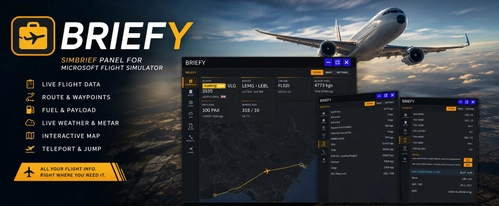
Briefy is an in-game toolbar panel for Microsoft Flight Simulator providing direct access to your SimBrief Operational Flight Plan in the cockpit. It features a moving map, waypoint teleportation, live METAR and TAF weather data, and real-time in-sim weather information. The addon includes dashboards for flight and fuel planning, interactive route mapping, and multiple customization options. No external devices or browser switching required for flight planning and dispatch integration.
par craigybabyj
about 1 month ago