
Description
Release Notes v0.25.0
OPS ROOM v0.25.0 Release NotesBug reports go straight to OPS ROOM
- The in-app Report Bug flow now sends reports (and optional diagnostic files) directly to the OPS ROOM server instead of a third-party script, where the team can review and act on them.
- Existing installs switch over automatically on next launch, nothing to configure.
Everything new in this release. OPS ROOM has grown from an operations console into a full flight-deck companion: a continuous flight data recorder, a first-party performance calculator, live dispatch OFP with electronic crew sign-off, in-sim NOTAM closure markers, and a rebuilt telemetry backbone.
Highlights
- Black Box: a continuous flight data recorder with in-sim replay.
- First-party performance calculator for the whole supported fleet.
- Live OFP: planned vs actual times, fuel and weights, with signing.
- Smoother, consistent telemetry: the simulator is read once and every module shares the same data, so what you see always matches Flight Watch.
- NOTAM closure markers rendered in the simulator (runway/taxiway X mats).
- In-game tablet panel for MSFS 2020 and 2024: the whole OPS ROOM in a tablet shell on the sim toolbar.
- Native EFB app for MSFS 2024: the whole OPS ROOM inside the cockpit tablet, alongside the toolbar panel.
- RainViewer precipitation layer and live FAA NOTAMs on the map.
- Discord community integration: Rich Presence, flight sharing and a public leaderboard.
- Hundreds of stability and quality fixes across every module.
Black Box: flight data recorder (new module)
- Continuous recording at up to 30 Hz on the takeoff roll / approach / landing, 20 Hz in taxi / climb / descent and 10 Hz in cruise.
- In-sim replay that puts your real flight back into the simulator, with scrubbing, pause, resume, loop and replay speed controls.
- Full flight-path and motion capture: position, attitude, speeds, controls, engines, flaps, gear, autopilot and aircraft systems.
- Engine and systems gauges with a readable, styled instrument view.
- Landing reconstruction: touchdown speed, vertical speed, G-loading and bounce detection.
- Export recordings to CSV, GPX and KML.
- Auto-record watchdog starts/stops recording around engine-on, taxi-out and taxi-in; interrupted recordings are recovered and orphaned recordings finalise on-blocks.
Telemetry: smoother and more reliable
- The simulator is now read through a single shared data path, so Flight Watch, Black Box, RAAS, announcements and PIREP all work from the same consistent picture.
- No more sim stutters when modules poll, since the sim is read once.
- FSUIPC remains the primary data source; SimConnect steps in automatically when FSUIPC is unavailable.
- If both sources are lost the UI shows STALE / TELEMETRY LOST instead of silently replaying the last good data.
- Black Box recordings always match what Flight Watch shows, so the values you see on screen are exactly what gets recorded.
- Fenix data enrichment no longer slows recording through takeoff and landing.
Performance calculator (new)
- The Performance tab no longer depends on SimBrief TLR.
- Tier-1 exact engines: A320neo (FlyByWire A32NX limiting-factor model) and Boeing 737-800 (komed3 tables), plus the A350-900/1000 takeoff data.
- Scaled across every other A32x / 737 variant, with PERF2601 curves and SimBrief TLR as the last-resort fallback for the rest of the fleet.
- Outputs V1 / VR / V2 (or VLS / VREF), flap recommendation, flex / assumed temperature, runway-required distance, pitch trim and takeoff / landing modes.
- Auto-fills ZFW, ZFW CG, runway, wind, temperature and QNH from SimBrief and a live METAR; the only manual field, ZFW CG % MAC, is highlighted.
- Live simulator weight (gross + derived ZFW) fills with a note when it deviates from the plan; weights follow the Host KG/LB preference.
Live OFP: dispatch board (new)
- Planned vs actual times, fuel and weights with a delta column.
- Auto-fills actuals from the simulator, GSX and the Fenix EFB loadsheet: ZFW, TOW, LDW, PAX, bag/cargo and fuel at every phase.
- Recovers PAX / bag / payload actuals after a mid-flight restart.
- Weight & balance loadsheet with a real-pilot electronic signature (typed or drawn, PC and tablet).
Electronic crew sign-off (new)
- Pre-departure Loadsheet sign-off after weights sync.
- Post-arrival Flight Completion sign-off: review the whole flight (times, fuel, weights) and sign before the logbook closes; the PIREP builds after signing.
- Both signatures are stored per flight and shown in the logbook detail and printed records.
Flight analysis & PIREP
- Full PIREP rebuilt: runway profiles, stability gates, touchdown metrics, score breakdown and passenger satisfaction.
- Passenger satisfaction now reacts to hard landings, not just schedule; landing rate, comfort, schedule and operations are scored honestly.
- Airline and pilot economy with GSX service receipts, revenue, costs and opening/closing balances.
- Fixed the "insufficient telemetry" on departure/approach/landing, so analysis now completes whenever the recording is complete.
- Landing/approach charts (glidepath, speed, vertical speed) fixed so they no longer show random peaks.
NOTAMs & closure markers
- Live FAA NMS NOTAMs with a source selector (Live / Flight plan / Combined), briefing enrichment and Status Board live rows.
- In-sim closure markers: runway threshold X mats, taxiway X mats placed on the real taxiway geometry, alternating Type III barricades and a portable lighted X trailer, shipped as an MSFS Community package for 2020 and 2024.
- TFR/FDC proximity alerting (opt-in).
- NOTAMs are served through the OPS ROOM server, so airport lookups never hit FAA request limits.
- Conditional ("crane will only operate when runway closed") and equipment-out-of-service NOTAMs are correctly filtered out.
In-game tablet panel (new)
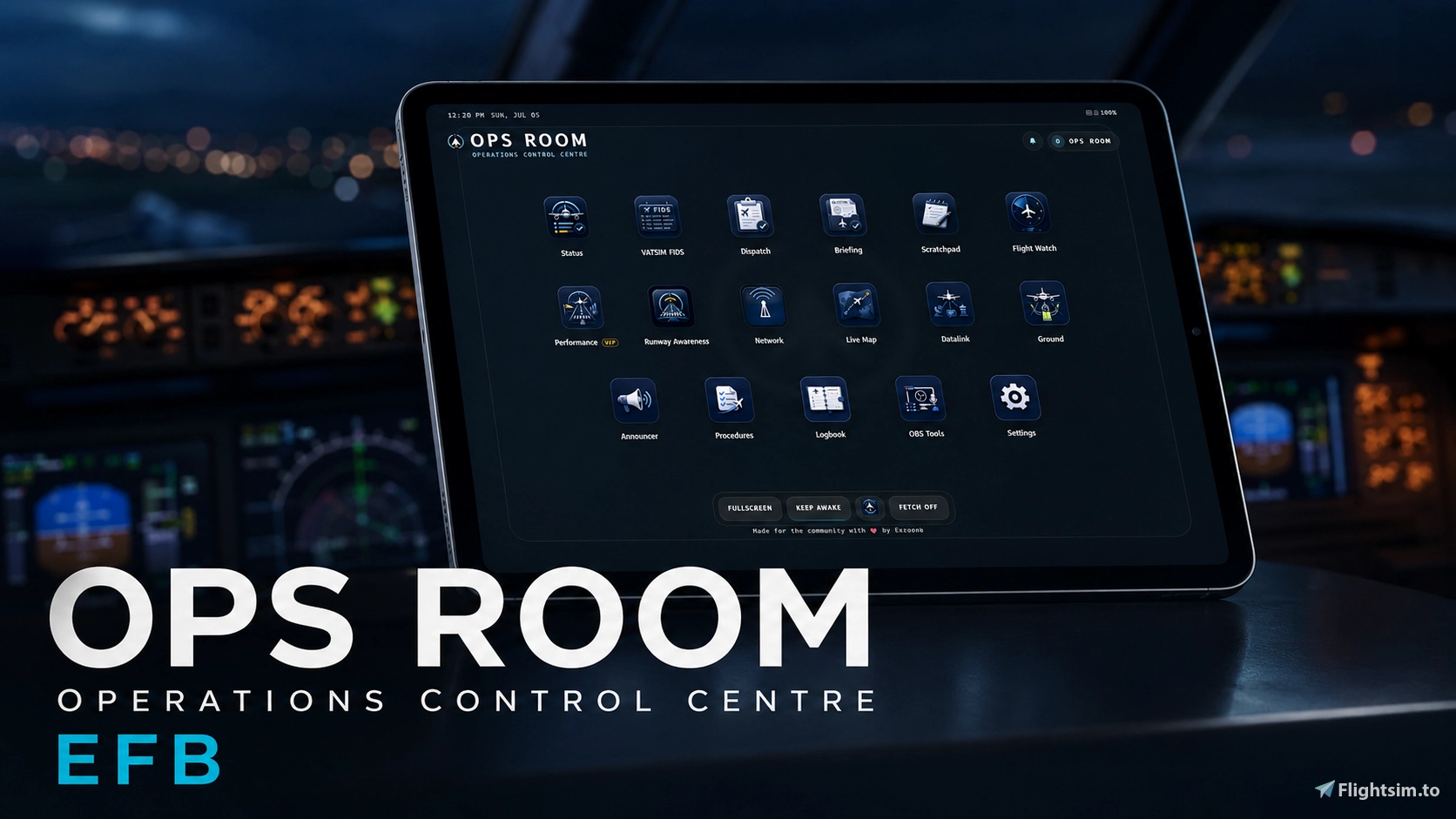
- A real tablet shell inside the simulator for MSFS 2020 and MSFS 2024. The OPS ROOM button on the toolbar opens the entire operations console as a tablet: status, FIDS, dispatch, briefing, scratchpad, flight watch, performance, runway awareness, network, live map, datalink, ground, announcer, procedures, logbook, black box, finances and OBS tools.
- The panel talks to the OPS ROOM desktop app on your PC, so it always shows the same live data as every other terminal.
- If OPS ROOM is not running, the panel shows a START OPS ROOM screen and connects automatically the moment the app is launched.
- Ships as an MSFS Community package for 2020 and 2024 and installs itself into your Community folder (Store and Steam editions) during setup or on first launch.
- For the crispest experience, use the desktop app, a browser, or an iPad over the local network.
EFB app for MSFS 2024 (new)
- OPS ROOM also runs as an app inside the native MSFS 2024 EFB, so it sits in the cockpit tablet alongside your other in-sim apps.
- Opens the full operations console in the tablet, keeping you in the cockpit without the toolbar panel or an alt-tab.
- Talks to the OPS ROOM desktop app on your PC, so it always shows the same live data as every other terminal. If OPS ROOM is not running, the app shows a waiting screen and reconnects automatically.
- Ships as an MSFS Community package for 2024 only (MSFS 2020 has no EFB) and installs itself into your Community folder during setup or on first launch.
- The EFB app is a cockpit convenience view; for the crispest experience, use the desktop app, a browser, or an iPad over the local network.
Map & weather
- RainViewer precipitation layer, server-cached so the live radar renders without per-user calls.
- NOTAM layer is now visible and clickable (was previously invisible).
- OpenAIP airspace and local surface data (taxiways, aprons, stands) for zoomed-in maps.
GSX / Ground Control
- Operator selection priority is now airline match → [GSX choice] → any operator, so a Lufthansa flight always tries Lufthansa first.
- Pushback is no longer mislabelled as taxi-out: movement before off-blocks is classified as pushback, off-blocks records at first movement, and taxi-out only begins after genuine forward taxi is proven.
- Boarding / catering / water requests and completion are monitored and confirmed end-to-end.
- Arrival services captured as receipts; flights finalise five minutes after parking (engines off, brakes set) even if GSX latches are lost.
- Flaky GSX connections are handled safely so they can no longer freeze the app.
Announcements & RAAS
- Announcer volume now follows the camera live: switching cockpit / cabin / external re-applies the volume mid-announcement.
- Hotkeys (pause / mute) and automatic boarding-service triggers.
- RAAS global overlay, with NOTAM closure callouts de-duplicated so they fire once per closure instead of repeating on every runway callout.
Community & Discord (new)
- Discord Rich Presence shows your live flight on your profile (callsign, route, phase, altitude), no OAuth needed.
- One-click Connect Discord in Host Setup and System.
- Opt-in takeoff / landing posts to your community channel, with landing rate and G.
- Public leaderboard and live "who's flying now" feed on opsroom.live.
- Three-way visibility (Discord only / public / hidden), all opt-in and flight-data only.
Integrations
- ChartFox: optional chart catalogue rendering inside Briefing; chart downloads behave like a normal browser, so providers that block automated downloads load correctly.
- CPDLC over Hoppie: full controller-pilot datalink (logon, uplink / downlink, PDC requests) beyond the old template view.
- Fenix A320: EFB loadsheet sync (PAX, cargo, MACZFW / MACTOW), GSX loading coordination and takeoff-performance probe.
- PMDG 777: SDK integration with EULA handling.
- Aircraft adapters: installable adapter catalogue for add-on aircraft.
- GSX receipts and thermal/POS printer support with a preview dropdown for every wired receipt type (CPDLC, Live OFP, printer test, GSX receipt).
UI / UX
- Host Setup panels are collapsible (remembered), the SAVE button is pinned, and the Status tab shows a compact strip.
- Checkboxes show proper ticks, text lifted onto a readable scale, and the dimmest colours now meet contrast guidelines.
- No more "?" glyphs: arrows, minus and greater-or-equal symbols render correctly across the logbook, finance, PIREP, OBS and PDF surfaces.
- OBS overlays fixed: real route arrows, resilient when a data source is unavailable, no clipping, correct scale anchoring and true source aspect ratio.
- Module launcher tidied (no 05A/05B/12A/12B confusion), Scratchpad tile restored, EFB and classic orders match.
- iPad / tablet polish: icons load correctly on every screen.
- Destructive actions (delete record, reset career) are visually distinct; form fields show validation errors.
Reliability & performance
- App reloads are fast again: shutdown completes cleanly instead of being force-killed.
- Fixed a crash caused by simulator connection error storms.
- Chart downloads behave like a normal browser, so providers that block automated downloads load correctly.
- Printer list works in the packaged build; printer settings persist; receipt previews render exactly as they will print.
- LAN / tablet access defaults to on for fresh installs and migrates once.
- Flight phase detection hardened (no phase jumping on climb, correct landing classification, recovered takeoffs).
Other fixes in this release
- RAAS / NOTAM closure-alert de-duplication.
- GSX auto engine-start no longer probes a non-existent engine.
- Live OFP "standing by" while a flight is active fixed.
- One flight no longer produces dozens of tiny Black Box recordings.
- ChartFox chart downloads handle blocked-request cases correctly.
- SimConnect connection errors no longer flood the log and recover automatically.
- Live OFP delta units and overflow.
- Passenger count no longer shows "KG".
- PAX / payload auto-fill on Fenix.
- MACTOW CG auto-fill from the Fenix EFB.
- Black Box aircraft data now survives a SimConnect outage.
- Plus ~80 further fixes across recording, replay, telemetry, PIREP, GSX, OFP and the UI.
Aircraft compatibility, simulator fallback behaviour and online network etiquette follow the same conventions as previous public releases.
OPS ROOM is a standalone Windows companion app for Microsoft Flight Simulator 2020 and Microsoft Flight Simulator 2024.
It runs locally on your simulator PC and gives you an operations-style control centre for flight prep, monitoring, ground workflows, announcements, notes, logs, streaming tools and simulator companion features.
Website: OPS ROOM: Professional Operations for Flight Simulation
Discord: https://discord.gg/Dv6fNAjhAt
Please test it with real flights, break it, report what feels wrong, and help shape the project before v1.0.
0. Under Development / Upcoming Features
OPS ROOM is still in active public beta. Planned improvements include:
• In built LIDO Charts
• RAAS taxi-out, runway crossing, landing rollout and vacating logic improvements
• Cleaner iPad / EFB module icons and better tablet layout polish
• Enhanced Live Map with aviation layers, traffic, ATC, weather and SimBrief route display
• Airport zoom-in mode with runways, taxiways, aprons, stands and ownship position
• Better diagnostics, updater refinements, documentation updates and user-feedback fixes
Planned features may change based on testing, compatibility and user feedback.
1. New in v0.24.0
Runway Awareness / RAAS
v0.24.0 adds the first public version of the OPS ROOM Runway Awareness system.
New RAAS features:
- runway detection on the ground
- approaching runway alerts
- on runway alerts
- remaining runway callouts
- clean RAAS display page
- FT/M unit toggle
- voice-pack support using Opus audio clips
- fallback text-to-speech when clips are not available
- Test Alert button
- saved RAAS unit setting
The RAAS page has also been simplified. Normal users now only see the main RAAS display, unit selection, Test Alert and voice-pack status.
Other changes since v0.23.0
This version also includes:
- future updates via the app
- MSFS 2024 Camera Bridge improvements
- FIDS camera panel refinements
- Briefing/OFP viewer improvements
- PIREP and logbook improvements
- iPad/browser usability fixes
- Live Map improvements
- updater and packaging polish
- GSX workflow reliability improvements
- internal diagnostics and startup fixes
2. Main Features
OPS ROOM currently includes:
- Status Board
- VATSIM FIDS
- Dispatch
- Briefing
- Flight Watch
- Performance planning aid for simulation use only, WIP
- Network / Comms
- Live Map
- Datalink templates
- Ground Control / GSX workflows
- Announcements
- Procedures
- Scratchpad with type, pen and eraser modes
- Logbook / PIREP
- OBS Tools
- System / Host Tools
- Experimental MSFS 2024 Camera Bridge
- Runway Awareness / RAAS
OPS ROOM is not meant to replace your aircraft EFB, SimBrief, vPilot, Navigraph or GSX. It is meant to sit around them as an operations layer.
3. RAAS Audio Pack Setup
RAAS can use external Honeywell-style audio clips.
Recommended audio pack:
https://forums.x-plane.org/files/file/89482-x-raas-better-sounds-mod-real-honeywell-audio/
Basic setup:
- Download the audio pack.
- In OPS ROOM, open the RAAS page.
- Click Set Folder.
- Select the folder that contains the RAAS audio files.
- OPS ROOM should show Voice pack loaded.
- Use Test Alert to confirm audio and text display.
If no voice pack is loaded, OPS ROOM can still use text-to-speech fallback.
4. MSFS 2024 Camera Bridge, Experimental
This build includes an early MSFS 2024 Camera Bridge.
From the VATSIM FIDS page, you can select an aircraft and use the floating camera panel to follow it in MSFS 2024.
Camera presets currently include:
- Tail Follow
- Left Spotter
- Right Spotter
- Front 3/4
- Tower Static
- Orbit
This feature is still experimental and may behave differently depending on MSFS 2024 state, SimConnect state and the in-sim Addons Camera panel.
5. Installation
- Download the ZIP from Flightsim.to.
- Extract it to a normal folder, for example: C:\OPS ROOM
- Do not run OPS ROOM directly from inside the ZIP.
- Open the extracted folder.
- Start OPS ROOM using the included Windows launcher/executable.
- If Windows SmartScreen appears, choose More info, then Run anyway only if you trust the download source.
- For best results, start Microsoft Flight Simulator first, then start OPS ROOM.
- Go to System > Open Host Setup and setup your Simbrief, VATSIM CID, Hoppie, Announcements folder path, etc for the best experience. (Announcement packs here: https://discord.gg/ZqZSSfeW9W)
OPS ROOM runs locally on your PC. It also provides a browser/iPad-friendly interface over your local network.
6. Notes for Testers
Useful feedback includes:
- aircraft used
- MSFS 2020 or MSFS 2024
- what worked
- what failed
- what felt confusing
- screenshots or short clips
- logs if something crashes or gets stuck
Logs are usually located here:
%LOCALAPPDATA%\Ops Room\logs\
Please report bugs through the app or in the Flightsim.to comments with enough detail to reproduce the issue.
7. Important Notes
OPS ROOM is for flight simulation only. It is not for real-world aviation use.
This project is not affiliated with Microsoft, Asobo, iniBuilds, Fenix, PMDG, FSLabs, VATSIM, SimBrief, Navigraph, GSX, FSDreamTeam or any other third-party service or developer. All names belong to their respective owners.
If you enjoy the project and want to support development, you can buy me a coffee:
https://buymeacoffee.com/exzonom
Thank you for testing OPS ROOM.
Questions fréquemment posées
OPS ROOM: Free Cockpit Ops Suite for MSFS 2020/2024
OPS ROOM is a free all-in-one cockpit operations suite for Microsoft Flight Simulator 2020 and 2024. Dispatch with live SimBrief OFPs and signed loadsheets, Black Box flight recording with landing analysis and replay, Flight Watch, RAAS runway awareness, live FAA NOTAMs, VATSIM FIDS, CPDLC datalink over Hoppie, GSX ground automation, automated cabin announcements, logbook, PIREP and thermal receipt printing. Runs on your PC, in any tablet browser, as a toolbar panel inside the sim, and as a native app in the MSFS 2024 EFB. Free during public beta, get it at opsroom.live.


Contributeurs



Avis des utilisateurs
12 avis
Historique des versions
# OPS ROOM v0.25.1 Release Notes ## Hotfix - Fixed a Windows startup crash affecting some systems when OPS ROOM enumerated printers through the native spooler API. - Printer discovery now runs only when requested and uses a safer Windows fallback path. - Added watchdog logging for unexpected native process exits, including the Windows process exit code.
Connectez-vous pour participer à la discussion
Se connecterCommentaires(70)
2 months ago
This build is mainly for testing and feedback. If something breaks, please mention:
- MSFS version
- aircraft used
- what you were testing
- what happened
- logs/screenshots if possible
Known experimental areas right now are the MSFS 2024 camera feature, camera release/reacquire behaviour, and some aircraft-specific GSX flows.
Useful logs:
%LOCALAPPDATA%\Ops Room\logs\
Thanks for helping test OPS ROOM.
about 8 hours ago
about 3 hours ago
3 days ago
3 days ago
4 days ago
3 days ago
3 days ago
3 days ago
There is a buymeacoffee link if you would like to support xD
Is it helpful for your VA? Would like to see a proper VA integration if possible, and what exactly would you like to be added? Thank you again :)
12 days ago
12 days ago
Thank you for reminding me, it will be done in the next update :))
Also, you can join the Discord for any support or feedback!
16 days ago
16 days ago
16 days ago
16 days ago
15 days ago
24 days ago
24 days ago
25 days ago
25 days ago