
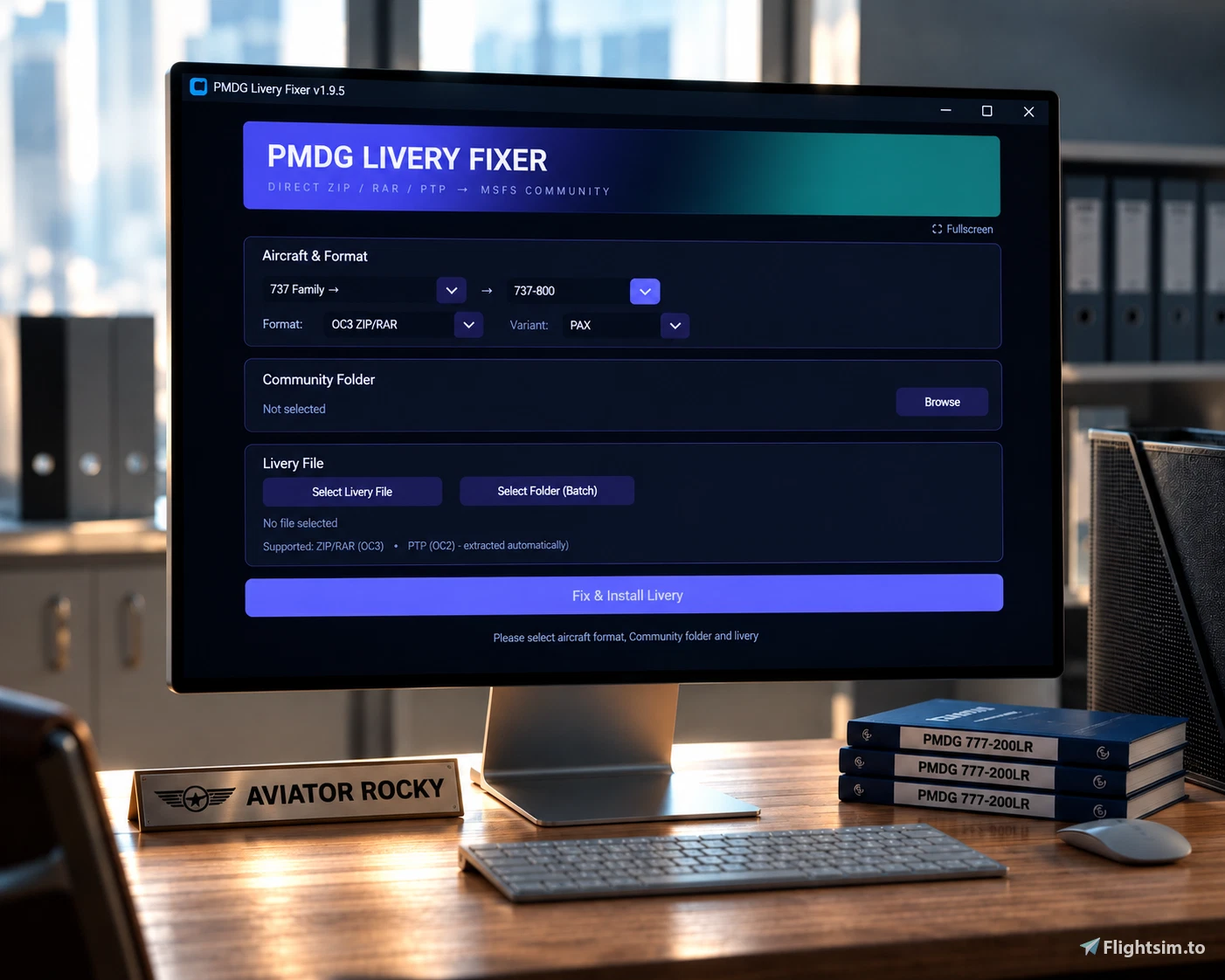
Description
================================================================================
Made by Rocky. AviatorRocky.
================================================================================
WHAT IT DOES
737-600, 737-700, 737-800 (PAX/BCF/BDSF/BBJ2), 737-900, 737-900ER, 777-200ER, 777-200LR, 777-300ER, 777F, AND DC-6 (A/B)
================================================================================
PMDG Livery Fixer is a simple tool that takes your PMDG livery file and
installs it directly to your MSFS Community folder. No OC3. No manual
extraction. No complicated steps. Intended for people who face issues using the PMDG Operations Center and it isn't installing their liveries properly.
Supported Formats:
• 737-600 (OC3) → ZIP/RAR files, or select a whole folder to batch-install several at once
• 737-600 (OC2) → PTP files (extracted automatically - single fixed winglet config, nothing to choose)
• 737-700 PAX (OC3) → ZIP/RAR files, or select a whole folder to batch-install several at once
• 737-700 PAX (OC2) → PTP files (extracted automatically, choose BW or SSW winglets)
• 737-700 BDSF (OC3) → ZIP/RAR files, or select a whole folder to batch-install several at once
• 737-700 BDSF (OC2) → PTP files (extracted automatically, choose BW or SSW winglets)
• 737-800 PAX (OC3) → ZIP/RAR files, or select a whole folder to batch-install several at once
• 737-800 PAX (OC2) → PTP files (extracted automatically, choose BW or SSW winglets)
• 737-800 BCF (OC3) → ZIP/RAR files, or select a whole folder to batch-install several at once
• 737-800 BCF (OC2) → PTP files (extracted automatically, choose BW or SSW winglets)
• 737-800 BDSF (OC3) → ZIP/RAR files, or select a whole folder to batch-install several at once
• 737-800 BDSF (OC2) → PTP files (extracted automatically, choose BW or SSW winglets)
• 737-800 BBJ2 (OC3) → ZIP/RAR files, or select a whole folder to batch-install several at once
• 737-800 BBJ2 (OC2) → PTP files (extracted automatically, choose BW or SSW winglets)
• 737-900 (OC3) → ZIP/RAR files, or select a whole folder to batch-install several at once
• 737-900 (OC2) → PTP files (extracted automatically, choose BW or SSW winglets)
• 737-900ER (OC3) → ZIP/RAR files, or select a whole folder to batch-install several at once
• 737-900ER (OC2) → PTP files (extracted automatically)
• 777-200ER (OC3) → ZIP/RAR files, or select a whole folder to batch-install several at once
• 777-200LR (OC3) → ZIP/RAR files, or select a whole folder to batch-install several at once
• 777-300ER (OC3) → ZIP/RAR files, or select a whole folder to batch-install several at once
• 777-300ER (OC2) → PTP files (extracted automatically)
• 777F (OC3) → ZIP/RAR files, or select a whole folder to batch-install several at once
• 777F (OC2) → PTP files (extracted automatically)
• DC-6A / DC-6B (OC3) → ZIP/RAR files, or select a whole folder to batch-install several at once
• DC-6A / DC-6B (OC2) → PTP files (extracted automatically)
PAX- Passenger
BDSF- Bedek Special Freighter
BCF- Boeing Converted Freighter
BBJ2- Boeing Business Jet
================================================================================
HOW TO USE
================================================================================
For 737-600, 737-700, 737-800, 737-900, 737-900ER, 777-200ER, 777-200LR, 777-300ER, 777F & DC-6 (OC3 ZIP/RAR):
1. Use the PMDG_Livery_Fixer_Setup.exe
2. Run PMDG_Livery_Fixer.exe
3. Select your aircraft from the dropdown - for the 737 family, pick "737 Family" then choose 737-600/700/800/900/900ER from the second dropdown
4. Set the Format to "OC3 ZIP/RAR"
5. For 737-700 or 737-800, also pick the Variant (PAX, BCF, BDSF, or BBJ2)
6. Click "Select Livery File" and choose your livery ZIP or RAR - or click
"Select Folder (Batch)" instead to install every ZIP/RAR in a folder at once
7. Click "Browse" and select your MSFS Community folder
8. Click "Fix & Install Livery"
9. Done. Launch MSFS and select your livery.
For 737-600, 737-700, 737-800, 737-900, 737-900ER, 777-300ER, 777F & DC-6 (OC2 PTP):
1. Run PMDG_Livery_Fixer.exe
2. Select your aircraft, then set the Format to "OC2 PTP"
3. If you selected DC-6, also choose the DC-6A or DC-6B variant
4. If you selected 737-700, 737-800, or 737-900 (any variant - PAX, BCF, BDSF, or BBJ2), also choose BW or SSW winglets to match your livery (737-600 has no winglet choice - it's skipped automatically)
5. Click "Select PTP File" and choose your .ptp file - or click "Select
Folder (Batch)" instead to install every .ptp file found in that folder AND
its subfolders at once. If your aircraft has a winglet choice, a popup will
ask you to confirm BW or SSW for each file before installing
6. Click "Browse" and select your MSFS Community folder
7. Click "Fix & Install Livery"
8. Launch MSFS and select your livery
================================================================================
REQUIREMENTS
================================================================================
• Windows 10 / 11
• Microsoft Flight Simulator 2020
• PMDG 737-600, PMDG 737-700, PMDG 737-800, PMDG 737-900, PMDG 777-200ER, PMDG 777-200LR, PMDG 777-300ER, PMDG 777F, or PMDG DC-6 (purchased)
• PMDG livery file (ZIP/RAR for OC3, PTP for OC2)
• Internet connection on first use ( MSFSLayoutGenerator.exe - only ever downloaded once)
• .NET Framework 4.7.2 or later (required for PTP extraction)
================================================================================
TROUBLESHOOTING
================================================================================
1. Livery installs but the layout.json refresh silently doesn't happen
→ The tool tries to download and run MSFSLayoutGenerator.exe automatically
on first use. If your connection is down or the download fails, the install
still completes fine using the tool's own layout.json - this is just a
polish step, not a required one, and doesn't block anything. If you want to
confirm it, get it manually from:
https://github.com/HughesMDflyer4/MSFSLayoutGenerator/releases
2. Antivirus flags the tool
→ Common false positive with Python executables.
3. RAR extraction fails
→ Make sure 7-Zip or WinRAR is installed. The tool searches for them automatically - if it still can't find one, it will ask you to manually locate the 7z.exe or UnRAR.exe file.
4. No thumbnail shown on the success screen
→ Not all liveries include a thumbnail.jpg in their texture folder - if one isn't present, the tool just shows the regular text confirmation instead.
5. Livery doesn't appear
→ Verify you selected the correct Community folder
→ Confirm the matching PMDG aircraft (737-600 / 737-700 / 737-800 / 737-900 / 737-900ER / 777-200ER / 777-200LR / 777-300ER / 777F / DC-6) is installed
→ For 737-700/800/900 PTP liveries, double check you picked the matching BW or SSW winglet option (not applicable to 737-600 - it has no winglet choice)
6. PTP extraction fails
→ Make sure you have .NET Framework 4.7.2 or later installed.
→ Download it from: https://dotnet.microsoft.com/download/dotnet-framework
→ Visual C++ Redistributable
Check Control Panel > Programs > Programs and Features for "Microsoft Visual C++ 2017-2026 Redistributable (x64)". If its not there grab it here and install it, then restart your pc:
https://learn.microsoft.com/en-us/cpp/windows/latest-supported-vc-redist
→ A log file will be created named "PMDG_Livery_Fixer_diagnostic.log", Please send the report to me via private message.
7. Batch mode says "no files found"
→ OC3 batch mode only scans the top level of the folder you select (not
subfolders) - make sure your ZIP/RAR archives are directly inside the
folder you pick, not nested inside another folder.
→ PTP batch mode scans the folder you select AND every subfolder inside it,
so this is more likely to mean there are genuinely no .ptp files anywhere
under the folder you picked.
8. One livery in a batch failed but the rest installed fine
→ This is expected - batch mode installs everything that's valid and reports anything that fails at the end instead of stopping the whole batch. Check the summary popup for the specific reason, and make sure every file in the batch actually matches the aircraft/variant you selected before starting.
================================================================================
IMPORTANT NOTES
================================================================================
• Works with PMDG 737-600, PMDG 737-700, PMDG 737-800 (PAX/BCF/BDSF/BBJ2), PMDG 737-900, PMDG 777-200ER, PMDG 777-200LR, PMDG 777-300ER, PMDG 777F, and PMDG DC-6 (A/B)
• OC3 ZIP/RAR must contain: aircraft.cfg, livery.json, model.* (or, for DC-6
and 737-600, a plain "model" folder), texture.* - options.ini is also
required for most 737/777 variants, but is not used by DC-6, 737-800 BBJ2,
or 737-700 BDSF
• Batch mode assumes every file in the selected folder is the same aircraft
and variant you've picked in the dropdowns - don't mix e.g. BCF and BBJ2
liveries in the same batch folder
• OC3 batch mode only looks at the top level of the folder you pick. PTP
batch mode looks inside subfolders too, since PTP fleet packs are often
organized one subfolder per registration
• OC2 PTP is extracted automatically, no manual steps required
• layout.json is generated and refreshed automatically - no manual drag-
and-drop layout.json step needed anymore
• Make sure the PMDG Livery Fixer.exe is along with the other files that came along with the installation, If you move it to another location the tool installs the other files to where you moved it.
• Not affiliated with PMDG or Microsoft
• Always make sure to keep a backup of your files
================================================================================
VERSION
================================================================================
v1.9.5
================================================================================
SUPPORT
================================================================================
For issues, questions, or feedback, please leave a comment or feel free to message me privately.
For uninstallation of the tool just run the uninstaller which can be found inside of the PMDG Livery Folder
Thanks for using my tool and have a great flight ahead!
Credits
Special thankyou to-
StarNumber12046 (Github)
HughesMDFlyer4 (Github)
Questions fréquemment posées
PMDG Livery Fixer/Installer (MSFS 2020)
PMDG Livery Fixer/Installer is a utility for MSFS 2020 that streamlines the installation of liveries for the PMDG 737-700 (PAX/BDSF), 737-600, 737-800 (PAX/BCF/BDSF/BBJ2), 737-900, 737-900ER, 777-200ER, 777-200LR, 777-300ER, 777F, and DC-6 (A/B) aircraft. It supports ZIP, RAR, and PTP livery formats and installs them directly to the Community folder without requiring manual extraction or use of the PMDG Operations Center. The tool is compatible with Windows 10 or 11. It is designed to resolve issues with livery installation for users experiencing problems with official tools.

Avis des utilisateurs
14 avis
Historique des versions
1. Added 737-700 BBJ Variant compatibility 2. Worked on some minor issues regarding the liveries not showing up.
Connectez-vous pour participer à la discussion
Se connecterCommentaires(82)
18 days ago
about 1 hour ago
6 days ago
any help will appreciated
6 days ago
18 days ago
18 days ago
18 days ago
18 days ago
18 days ago
18 days ago
20 days ago
I am using MSFS 2020
20 days ago
19 days ago
20 days ago
When I try to install it using OC2 PTP, I get an error related to CabLib.dll.
When I try OC3 ZIP/RAR, it gives me an error saying that it cannot extract the archive because it cannot find the required files.
The ZIP/RAR contains only the .ptp file, so I’m not sure what I’m doing wrong. Could you please help me figure out how to install it?
Thank you!
20 days ago
22 days ago
22 days ago
about 1 month ago
29 days ago
25 days ago