
Description
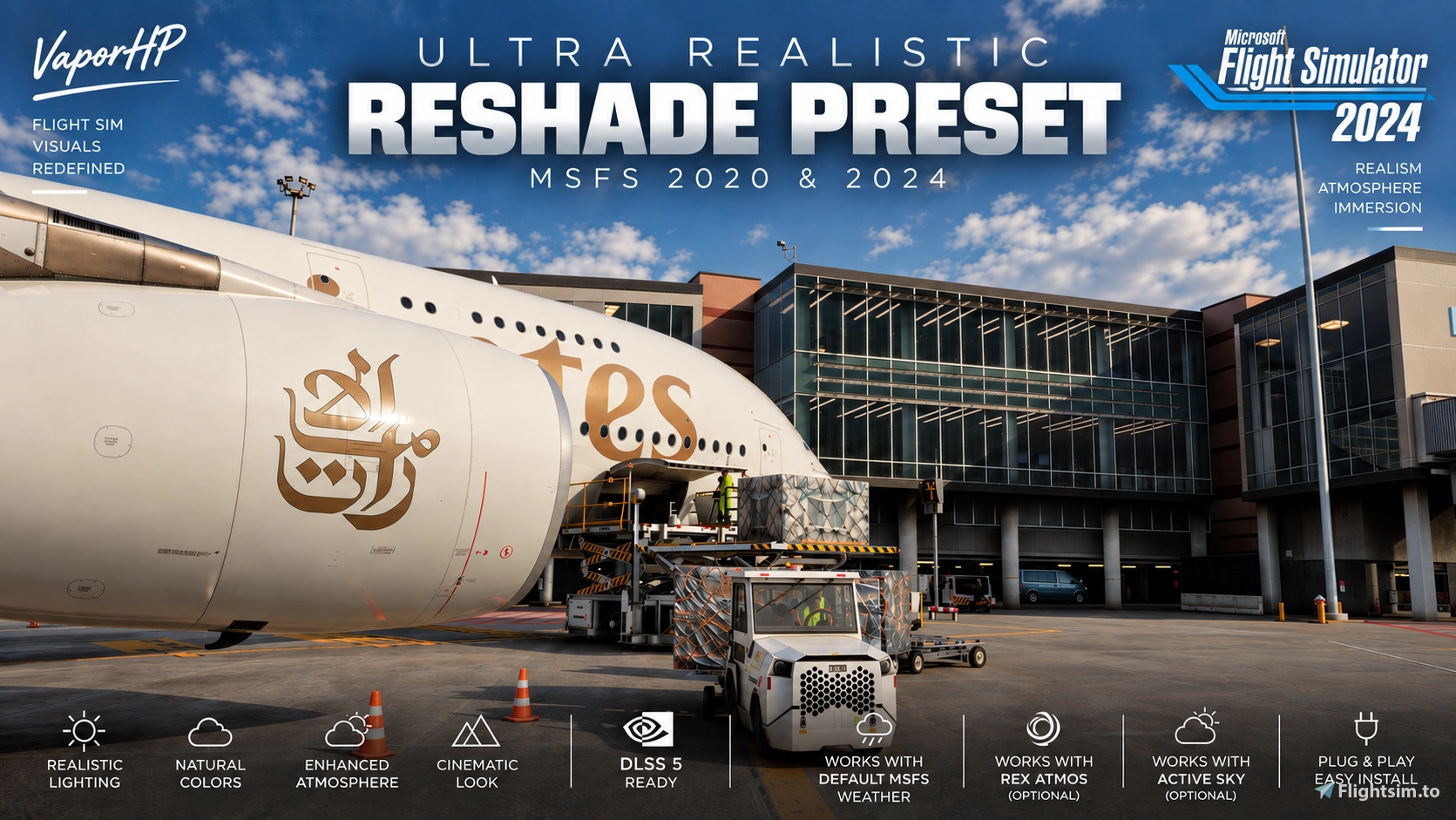
Transform your Microsoft Flight Simulator visuals with a realistic ReShade preset designed for both MSFS 2020 and MSFS 2024.
This preset focuses on creating a natural, realistic, and cinematic look without making the simulator overly saturated or heavily filtered.
It enhances lighting, contrast, atmospheric depth, shadows, colors, clouds, and aircraft detail while preserving the natural appearance of Microsoft Flight Simulator. This Reshade was made using the base Reshade from @https://flightsim.to/profile/filippaflink
The goal is simple:
Make MSFS look closer to real aviation footage. ✈️
Designed to look great during daytime, nighttime, sunrise, sunset, overcast, and low-visibility conditions.
✨ Features
- More realistic and natural colors
- Improved contrast and lighting
- Enhanced cloud and sky appearance
- Better atmospheric depth and haze
- Cleaner aircraft details
- Refined shadows and highlights
- More cinematic sunrises and sunsets
- Balanced for day & night flying
- Works with default MSFS weather
- Works alongside Active Sky
- Works alongside REX Atmos
- Works alongside NVIDIA DLSS 5 Neural Rendering
- Compatible with MSFS 2020 & MSFS 2024
- Designed to stay realistic without excessive saturation or filtering
Weather/atmosphere add-ons and DLSS 5 Neural Rendering are completely optional.
The preset works on its own with the default MSFS weather and atmosphere.
🎥 See It In Action
Want to see how the preset actually looks while flying?
▶️ YouTube Showcase:
If you enjoy the preset, consider liking the video and subscribing for more MSFS content! 🙌✈️
📥 Installation Guide
1. Download My Preset FIRST
Download and extract the preset from Flightsim.to.
Inside the download, you'll find my ReShade preset file named vapor.ini.
Keep this file somewhere easy to find because you'll select it during the ReShade installation.
2. Download ReShade
Download the latest compatible version of ReShade directly from the official ReShade website:
👉 ReShade:
3. Install ReShade
- Open the ReShade installer.
- Select Microsoft Flight Simulator from the application list, or browse to the simulator's executable.
- Select DirectX 10/11/12 when asked which rendering API to use.
- When ReShade asks you to select a preset, click Browse.
- Select
vapor.inifrom the extracted download folder. - Click Next.
- ReShade will identify the shader/effect packages referenced by
vapor.ini. - Allow ReShade to download and install the required effects.
- Continue until you reach the Add-ons page.
- No additional ReShade add-ons are required for this preset, so you can continue through this page.
- Finish the installation.
- Launch Microsoft Flight Simulator and enjoy! 🙌✈️
⭐ IMPORTANT
Make sure you select vapor.ini DURING the ReShade installation.
This allows ReShade to identify the effect packages used by the preset and install them automatically when available.
You do NOT need to manually recreate all of my filter settings.
The vapor.ini file already contains the settings needed for the preset.
If an effect is missing, check that its required shader package was successfully installed.
🔧 RTX 50 Series – Red Artifacts / Rainbow Colors Fix
Some users, particularly those using NVIDIA RTX 50 Series GPUs with ReShade and DLSS 5 Neural Rendering, have reported red particles, rainbow colors, or distorted visuals.
Here are a few community-reported fixes you can try:
✅ Fix 1 – NVIDIA Anisotropic Filtering (Recommended First)
- Open NVIDIA Control Panel.
- Go to Manage 3D Settings → Program Settings.
- Select Microsoft Flight Simulator 2024.
- Find Anisotropic Filtering.
- Set it to Application-controlled.
- Click Apply and restart the simulator.
Why? Forcing 16x Anisotropic Filtering through the NVIDIA driver has been linked to these artifacts by users. Allowing MSFS to control texture filtering may resolve the issue without disabling any ReShade effects.
✅ Fix 2 – Disable qUINT Lightroom
If the issue persists:
- Open the ReShade overlay in MSFS.
- Find
qUINT_lightroom.fx. - Uncheck the effect.
- Check whether the red artifacts disappear.
Some RTX 5090 users have reported that this removes the red noise.
✅ Fix 3 – Disable Cinetools LUT
If disabling Lightroom doesn't completely fix it, try disabling PD80_02_Cinetools_LUT as well.
One user reported needing to disable both effects to eliminate the artifacts.
💡 Important: These are community-reported workarounds, not guaranteed fixes. The exact cause hasn't been confirmed, and results may vary depending on your GPU, drivers, ReShade version, and DLSS 5 setup.
I recommend trying Fix 1 first so you can hopefully enjoy the full preset without disabling any effects. ✈️
🌤️ My Weather & Atmosphere Setup
For anyone wondering what I personally use in my screenshots and videos:
- Weather Injection: Active Sky
- Weather: AB MSFS — Realistic Live Weather Set — 10/14/2025
- Atmos: AB MSFS — Realistic Atmos Set — 10/14/2025
- Enviro: REX RealLife v2 — Less Blue, More Neutral Enviro Set — 05/04/2026
- EV Exposure: 0.00
Some users have had trouble finding the older AB MSFS presets, so those specific versions may no longer be publicly available. I still have them installed.
None of these are required. My ReShade preset works with the default MSFS weather and atmosphere or whatever weather setup you prefer.
✨ AB MSFS Preset Update
The creator of AB MSFS Atmos presets, abennett, recently confirmed that he released an updated preset called AB MSFS 2024 Realism (10/01/2026).
The new version includes some adjustments to his original presets, and he has also cleaned up several older versions.
If you can't find the older AB MSFS presets I use, I recommend checking out his newer AB MSFS 2024 Realism preset instead!
I personally still use the older versions listed above, so results may look slightly different with the updated preset.
AB MSFS is completely optional. My vapor.ini ReShade preset works with default MSFS weather and atmosphere too.
⚙️ Recommended Visual Settings
For results closer to my screenshots and videos, I recommend starting with:
- EV Exposure: 0.00
- HDR: Off (my personal setup)
- ReShade: Use
vapor.iniwithout changing its settings initially. - Weather: Default MSFS weather or your preferred weather injector.
- Atmosphere: Default MSFS atmosphere or your preferred visual presets.
These are recommended starting points, not requirements.
Your monitor, HDR configuration, graphics settings, and weather conditions can all affect how the preset looks.
🎮 NVIDIA DLSS 5
I personally use NVIDIA DLSS 5 Neural Rendering through RenoDX alongside this ReShade preset in my screenshots and videos.
DLSS 5 Neural Rendering is completely optional and is NOT required to use this preset.
It runs separately from the ReShade preset and should not be confused with DLSS Super Resolution.
The ReShade preset works without DLSS 5 and can be used with your preferred MSFS graphics setup.
🖥️ My PC Specs
The screenshots and videos shown were captured using:
CPU: AMD Ryzen 9 9950X3D
GPU: NVIDIA GeForce RTX 5090 Founders Edition
RAM: 64GB DDR5 6000MHz
Resolution: 1440p
⭐ You Do NOT Need These Specs
The ReShade preset itself is relatively lightweight, although individual effects can affect performance.
Your overall performance will depend much more on your resolution, MSFS graphics settings, aircraft, scenery, traffic, weather, and other add-ons.
Lower-end systems can still use the preset, but performance will vary.
❗ Important
Your results may look slightly different depending on:
- Weather & time of day
- EV exposure
- HDR settings
- Monitor calibration
- MSFS graphics settings
- Weather/atmosphere add-ons
- DLSS 5 Neural Rendering settings
- ReShade version
- Aircraft & scenery
For the closest results to my screenshots, I recommend starting with vapor.ini exactly as provided and setting your EV Exposure to 0.00.
DLSS 5 Neural Rendering, AB MSFS, Active Sky, REX Atmos, and other graphics/weather add-ons are NOT required to use this preset.
If you have any questions or run into an issue, feel free to leave a comment on the download page and I'll try my best to help.
Thank you for downloading and enjoy! 🙌✈️
Ultra Realistic ReShade Preset | DLSS 5 Ready | MSFS 2020 & 2024
This ReShade preset enhances Microsoft Flight Simulator 2020 & 2024 with realistic, natural and cinematic visuals. It improves color balance, lighting, contrast, atmospheric depth, clouds, skies and aircraft detail while maintaining an authentic look. Designed for both day and night flying, it works with default MSFS weather, Active Sky, REX Atmos and DLSS 5 Neural Rendering. ✈️
Contributeurs
Avis des utilisateurs
21 avis
Historique des versions
Changelog – Visual Update - Improved overall contrast and depth - Brighter, more detailed cockpit shadows - Improved sky and cloud definition - More natural and balanced colors - Refined midtone and highlight exposure - Reduced excessive sharpening for a cleaner image - Improved color separation without oversaturation - Refined bloom for more realistic lighting - Better balance between cockpit and exterior brightness - General visual tuning for a more natural and realistic look
Connectez-vous pour participer à la discussion
Se connecterCommentaires(147)
about 1 month ago
BTW I am the creator of AB MSFS Atmos presets.
As it happens I finally got round to releasing a new preset (just a bit tweaked from the originals) today, and tidied up a load of old ones.
If you want to try it with AB MSFS 2024 Realism (dates 10/01/2026), it would be awesome.
about 4 hours ago
3 days ago
8 days ago
12 days ago
14 days ago
16 days ago
Merci pour ce magnifique travail, j'ai juste des scintillements dans le cockpit qui disparaissent et réapparaissent
18 days ago
19 days ago
16 days ago
19 days ago
16 days ago