
Description
SimFlightPath is a flight path recorder for Microsoft Flight Simulator
This program records all your flight paths while you're flying in MSFS and makes them available in the Flights page.
Flights can then be double-clicked to view them in any program that supports GPX or KML formats, like Google Earth Pro or GPXSee.
Simply start SimFlightPath and leave it running in the background while using Flight Simulator.
Flight recording begins when you release the aircraft's parking brake and stops when you apply it again after landing, or when the engines are switched off.
SimFlightPath doesn't include a flight path viewer so you'll have to install one separately.
Once it's installed, make it the default program to open GPX or KML files.
You can then double-click any flight in the Flights page and the file will be opened in the viewer just as if you double-clicked a file in Windows Exporer.
SimFlightPath has been tested with the following viewers: Google Earth Pro, GPXSee, Viking, GpsPrune.
Flight paths can also be exported as GPX or KML files to be used in any program or web service that supports them.
How do I share my flight paths?SimFlightPath can upload a flight path to your Dropbox account and generate a GPS Visualizer Atlas share link.
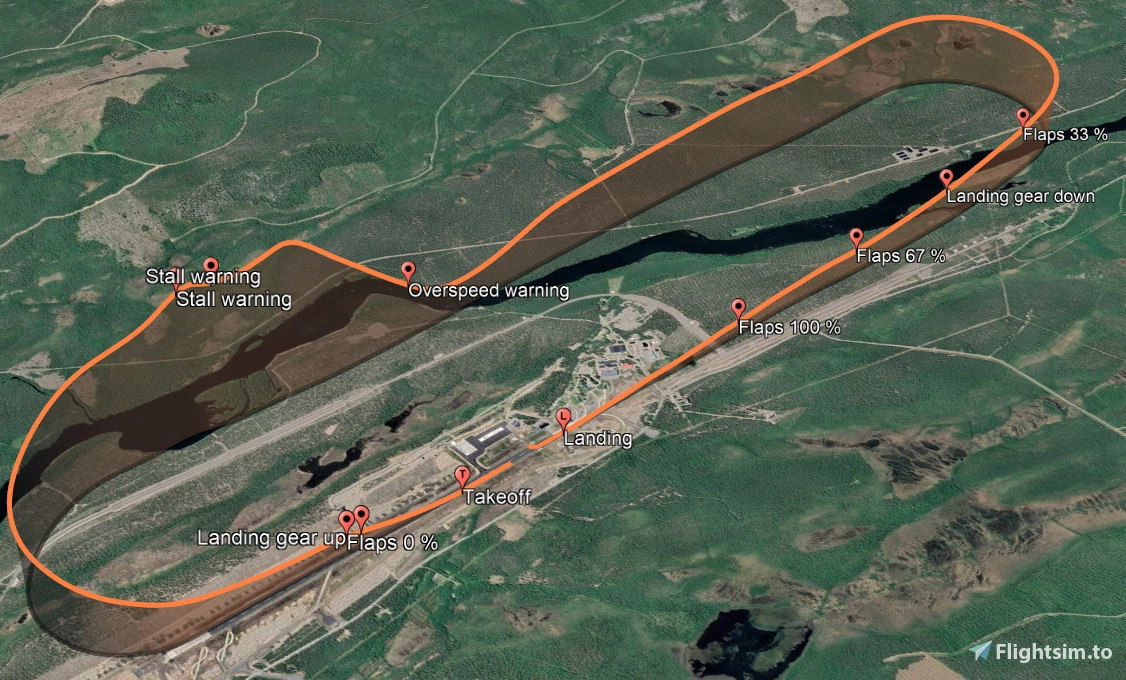
ScreenshotsIncluded screenshots show the user's interface and previews of flight paths rendered by Google Earth Pro and GPS Visualizer.
Known IssuesIn-game text notifications are not displayed since MSFS Sim Update 5.
SimFlightPath
SimFlightPath is a flight path recorder add-on for Microsoft Flight Simulator, allowing you to record and view your flight paths in GPX or KML formats using external programs like Google Earth Pro. Simply run SimFlightPath in the background while flying, and your paths will be saved automatically. Additionally, you can share your flight paths by uploading them to Dropbox and generating GPS Visualizer Atlas links.





Avis des utilisateurs
21 avis
Historique des versions
Bugfix release - DirectoryNotFoundException errors when double-clicking a flight should be fixed. - Added a more specific error message for Win32Exception "Application not found".
Connectez-vous pour participer à la discussion
Se connecterCommentaires(57)
over 5 years ago
Probably the most efficient software to automatically log your flight experiences. Definitely recommend the export to Google Earth application as the 3D visualization is mind blowing.
about 1 month ago
I love the app, I have been using it for a few years! Thank you!
I study every detail of every flight. The 3D ribbon is a great visual aid. Especially when flying hands on without autopilot.
Kurt
12 months ago
almost 2 years ago
Since few flights when I start flight with FS 2020, Flight Sim Path closed himself. I need to start it again in oreder to register the flight.
over 2 years ago
almost 3 years ago
thanks
Nombre de registro:Application
Origen: .NET Runtime
Fecha: 18/11/2023 07:00:40 p. m.
Id. del evento:1023
Categoría de la tarea:Ninguno
Nivel: Error
Palabras clave:Clásico
Usuario: No disponible
Equipo: Kanuto
Descripción:
Application: SimFlightPath.exe
CoreCLR Version: 5.0.621.22011
.NET Version: 5.0.6
Description: The process was terminated due to an internal error in the .NET Runtime at IP 00007FFD7BA5A037 (00007FFD7B890000) with exit code c0000005.
XML de evento:
1023
0
2
0
0
0x80000000000000
4806
Application
Kanuto
Application: SimFlightPath.exe
CoreCLR Version: 5.0.621.22011
.NET Version: 5.0.6
Description: The process was terminated due to an internal error in the .NET Runtime at IP 00007FFD7BA5A037 (00007FFD7B890000) with exit code c0000005.
Nombre de registro:Application
Origen: Application Error
Fecha: 18/11/2023 07:00:41 p. m.
Id. del evento:1000
Categoría de la tarea:Eventos de bloqueo de aplicación
Nivel: Error
Palabras clave:
Usuario: KANUTO\Albatroos
Equipo: Kanuto
Descripción:
Nombre de la aplicación con errores: SimFlightPath.exe, versión: 1.8.0.0, marca de tiempo: 0x62577b55
Nombre del módulo con errores: coreclr.dll, versión: 5.0.621.22011, marca de tiempo: 0x607f4c79
Código de excepción: 0xc0000005
Desplazamiento de errores: 0x00000000001ca037
Identificador del proceso con errores: 0x0x2EE8
Hora de inicio de la aplicación con errores: 0x0x1DA1A481A1BE514
Ruta de acceso de la aplicación con errores: C:\Program Files\SimFlightPath\SimFlightPath.exe
Ruta de acceso del módulo con errores: C:\Program Files\dotnet\shared\Microsoft.NETCore.App\5.0.6\coreclr.dll
Identificador del informe: 9d9503da-372f-4238-b8ee-bc0ed75b5770
Nombre completo del paquete con errores:
Identificador de aplicación relativa del paquete con errores:
XML de evento:
1000
0
2
100
0
0x8000000000000000
4807
Application
Kanuto
SimFlightPath.exe
1.8.0.0
62577b55
coreclr.dll
5.0.621.22011
607f4c79
c0000005
00000000001ca037
0x2ee8
0x1da1a481a1be514
C:\Program Files\SimFlightPath\SimFlightPath.exe
C:\Program Files\dotnet\shared\Microsoft.NETCore.App\5.0.6\coreclr.dll
9d9503da-372f-4238-b8ee-bc0ed75b5770
almost 3 years ago
I'll have to update the .NET version for SimFlightPath in a future release.
about 3 years ago
over 3 years ago
Hello! Thank you for a very nice track recorder. However, would it be possible to use the in sim clock instead of real time ?
When using sim rate, it falsely records ground speed as double or even four times the speed and as a result, duration will not be correct for the flight.
Or perhaps make it an option?
Thanks!
over 3 years ago
Hi Romanito can you clarify what sets the logging period in SimFlightPath? We have some situations where it seems variable and sometimes extends out to 12s but haven't worked out the pattern.
over 3 years ago
Hi, flight data is saved every second, but it may be skipped if there was no significant change in bearing or vertical speed. This reduces log size for flights in straight lines (e.g. when auto pilot is on).
Save points are forced at least once every 12s though.
over 3 years ago
thanks - very helpful reply. We look at the tracklogs quite carefully for sim glider flights and actually the SimFlightPath logging flipping to 12 seconds is an indicator of the pilot using autopilot (which isn't really a gliding thing) exactly as you explained.
almost 4 years ago
Hi !
The synchronization with Dropbox is no longer working, this error message appears after pressing the Authentication button (in the Settings tab): This application cannot associate other users: it has been suspended pending review.
Otherwise the app is really practical and very well made, it's more than a good idea.
almost 4 years ago
Most of the time, the app closes before landing, without notice. Do you have any idea why?
almost 4 years ago
In Windows, press Win+R and enter this:
%localappdata%\SimFlightPath
then press Enter.
Is there a file named AppLog.txt there? If so, please send the content to me in a private message. I'll see what I can do.
almost 4 years ago
hmm I see no file there. However, I put an exclusion in Windows defender and it seems ok so far.
almost 4 years ago
i really love it !!
is there any way to "Replay" the line ?
so i can watch from start to end..i cant make it work somehow on google earth pro
almost 4 years ago
Thanks for your feedback.
You can somewhat replay a flight path in Google Earth Pro: https://sites.google.com/site/kmltouring/tour-a-path
In Options / Touring, set Camera Tilt Angle to 89.0 and Camera range to 10.0, this is as close as I could get to an aircraft "point of view".
almost 4 years ago
This is working like a boss for us MSFS glider pilots. Launch on startup and we have takeoff-to-landing GPX files automatically for every flight. Our gliders on here have over 100,000+ downloads so there's quite a few of us and I guess that'll go up when the Asobo gliders arrive this week. Providing the time with decimal seconds is particularly appreciated as that give us smooth velocities from the tracklog (just milliseconds would be ok if you ever want to trim that). Also the 'end flight when stationary on landing' is a great workaround for our in-air use of combined spoilers/wheelbrake. Many thanks for such great freeware!