

Flightsim.to
    OsakaBay - Image 2

    Description

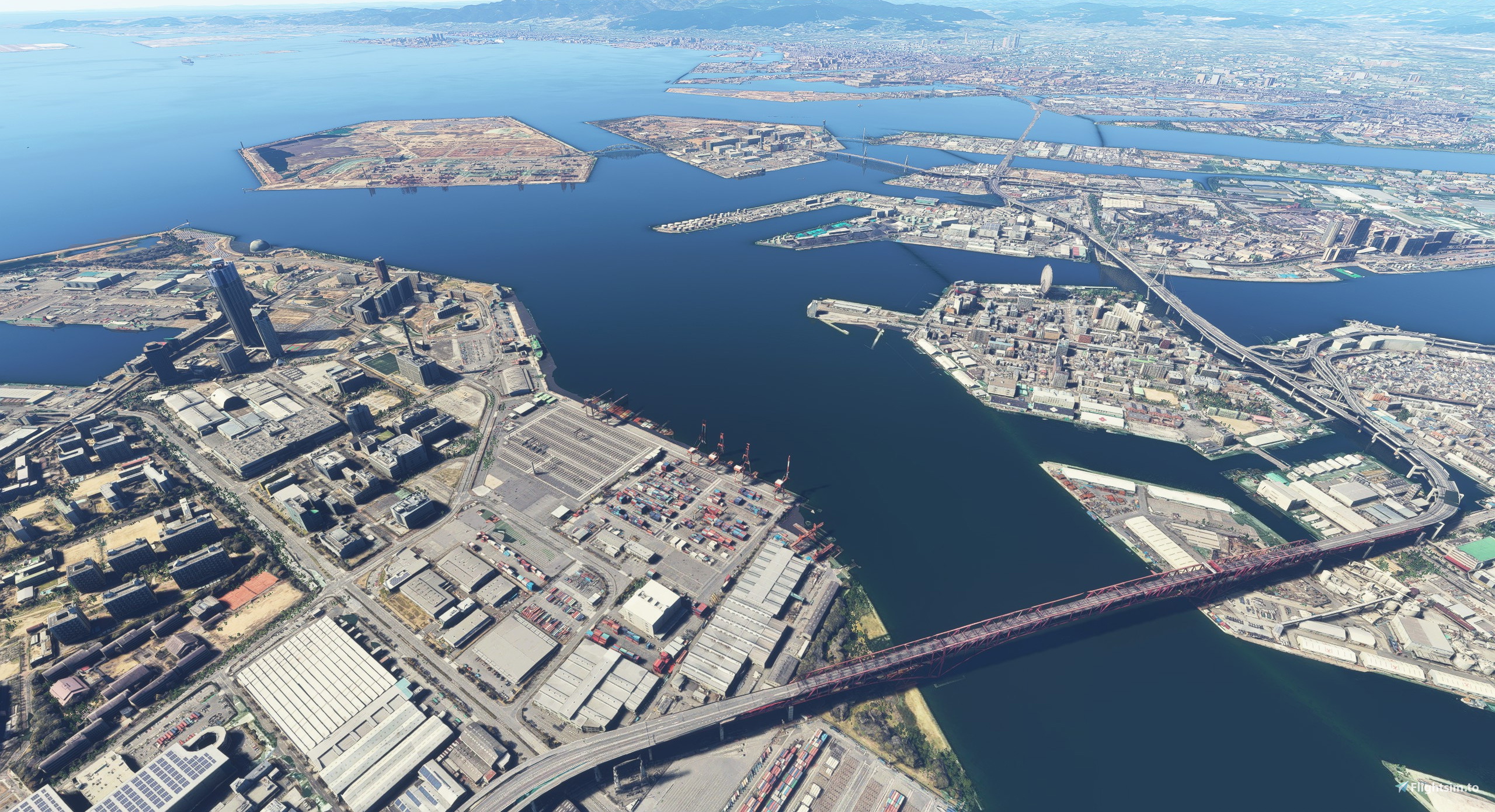
    これは大阪湾全体を高画質化、夜景を追加するシーナリーです。(グーグル・アースマップデータ利用)
    シーナリーの適用範囲は六甲アイランドから関西国際空港付近までの大阪湾、埋立地です。
    湾全体の高層建築物に航空障害灯を追加してます。

    アップデートで大幅にファイルサイズ増加してます。2.78GB→4.25GB
    【重要】ハイスペックPCを用意して下さい。さもないと碌なFPSは出ません。【重要】
    製作者環境:i5 9600K、RTX3070、WQHD FPS30以上は出ています。

    【超重要】このシーナリーを利用する時は、他の地域のシーナリーを同時利用しないことをお勧めします。


    遠慮なく、是非連絡下さい。ツイッターユーチューブ、flight.toなんでも結構です。


    ver1.2.0の変更点(適用範囲の追加)
    ・JR六甲道駅周辺
    ・此花区
    ・JR住吉駅(神戸)
    ・西宮駅周辺
    ・JR甲子園口周辺
    ・立花駅周辺
    ・地下鉄大日駅周辺、トリプルタワマン
    ・吹田駅周辺
    ・阪急摂津市駅周辺
    ・京阪くずは駅周辺
    ・千里中央駅周辺
    ・万博記念公園、パナソニックスタジアム一帯
    ・さくらであい館

    追加した地域にはほぼ照明を追加しています。
    シーナリー名は「OsakaBay」ですが湾岸地域以外も追加しています

    「リクエストしたのに追加されてない!」ということが有ればごめんなさい、見落としているか忘れています。

    夜景の動画 https://www.youtube.com/watch?v=lkYyBPe_hzE


    インストール
    導入推奨の別ADD-ON
     「EDHK Lights & Objects Developers Pack (Asset-Pack)by MrMo
    (夜景再現のため、大半の照明は上記ADD-ONのAssetーPackを利用しています。導入しないでもシーナリーは使用できますが、夜景は再現されません。)
    ダウンロード、解凍後、Comunittyフォルダへコピーしてください。

    以前のバージョンご利用の方は、以前のバージョンをすべて削除を行った上、現バージョンをコピーして下さい。


    ZIPフォルダ解凍の失敗が報告されています。
    おそらく、WIONDOWS標準のエクスプローラーでの解凍が原因です。
    (私の環境下でも”ピンク”が再現されました。)
    「Laplus」や「WinRAR」などの解凍ソフトでの解凍をおすすめします。
    (解凍後のフォルダサイズが4.25GBであれば正常です。)
    またMODの管理、トラブル回避のため、「MSFS ADD-ON LINKER」のご利用をお勧めします。
    (圧縮フォルダの解凍機能も含まれています。)


    既知の問題
    ・地形データの隙間
    ・遠景において、夜景が表示されない時がある。

    今後の予定
    ・夜景対応地域の拡大
    ・南港地域の修正
    ・適用範囲の見直し


    私の他のシーナリーも是非御覧ください!
    https://jp.flightsim.to/profile/macmillan61/uploads

    TwitterでシーナリーのアップやらMSFSのこと呟いてます。
    https://twitter.com/MacmillanFlight

    私のユーチューブチャンネルもチェックしてください
    (シーナリー利用した動画をアップしています)
    https://www.youtube.com/channel/UCJpSqeHv7MG6Th6xDXFpJFw


    This is a scenery that enhances the image quality of the entire Osaka Bay and adds a night view. (Using Google Earth map data)
    The scope of the scenery is Osaka Bay and reclaimed land from Rokko Island to the vicinity of Kansai International Airport.
    We are adding aviation obstruction lights to the high-rise buildings throughout the bay.

    The file size has increased significantly with the update, from 2.78GB to 4.25GB.
    [Important] Please prepare a high-spec PC. If you don't, you won't get a good FPS. [Important]

    When using this scenery, it is recommended that you do not use other regional sceneries at the same time.


    Changes in ver1.2.0 (Addition of applicable scope)
    Around JR Rokkomichi Station
    Konohana-ku
    JR Sumiyoshi Station (Kobe)
    Around Nishinomiya Station
    Around JR Koshienguchi
    Around Tachibana Station
    Around Dainichi subway station, triple towers
    Around Suita Station
    Around Hankyu Settsu-shi Station
    Around Keihan Kuzuha Station
    Around Senri-chuo Station
    Expo Park and Panasonic Stadium area
    Sakura Deai-kan

    Most of the lighting has been added to the added areas.
    The name of the scenery is "OsakaBay", but I've also added areas outside the bay area.

    https://www.youtube.com/watch?v=lkYyBPe_hzE


    install
    Another ADD-ON recommended for introduction
    "EDHK Lights & Objects Developers Pack (Asset-Pack) by MrMo"
    (To reproduce the night view, the lighting of the above ADD-ON Asset-Pack is used.)
    After downloading and unzipping, copy it to the Comunitty folder.

    There have been reports of ZIP folder decompression failures.
    This is probably due to decompression in WIONDOWS standard Explorer.

    If you are using a previous version, please delete all previous versions and then copy the current version.


    There have been reports of ZIP folder decompression failures.
    This is probably due to decompression in WIONDOWS standard Explorer.
    (The "pink" was reproduced in my environment, too.
    We recommend using a decompression software such as "Laplus" or "WinRAR".
    (It is normal if the unzipped folder size is 4.25GB.
    We also recommend the use of "MSFS ADD-ON LINKER" to manage the mods and avoid problems.
    (This includes the decompression function of the compressed folder.


    Known issues
    ・ Gap of terrain data
    -In the distant view, the night view may not be displayed.


    Future plans
    ・ Expansion of night view area
    ・ Correction of Nanko area
    ・ Review of scope of application


    Check out my other scenery!
    https://jp.flightsim.to/profile/macmillan61/uploads

    Check out twitter!(I'm tweeting about scenery updates and MSFS.)
    https://twitter.com/MacmillanFlight

    Check out my youtube channel
    (The video using the scenery is uploaded)
    https://www.youtube.com/channel/UCJpSqeHv7MG6Th6xDXFpJFw

    Commentaires(60)

    Connectez-vous pour participer à la discussion

    Se connecter
    C

    over 2 years ago

    Too much detail and too far out, but missing downtown Osaka, which results in a huge FPS loss to miss the most important part of Osaka. It have some tall buildings east and north or Osaka (thus, NOT Osaka bay), but not in Osaka. This mod is too weird.
    l

    almost 4 years ago

    Not sure what happened after WU 10 but now this scenery for me which I love shows up all Pink. Makes me very sad as I lived in Nagayoshi for almost 15 yrs and this always brought a smile to my face. sadly now it is un-usable for me atleast hopefully a update can fix it! giving it 5 stars because I know what it used to look like and it was awesome.

    w

    about 4 years ago

    Thank you for great work!

    Technobrain released RJTT include airport bridge. May be update without bridge version?

    i

    over 4 years ago

    Japanese version below>>>

    Hi there macmillan!!

    First of all I want to tell you I absolutely love all your other sceneries - like Naha. But in this one, I have to admit that it is virtually unusable as the game stutters very intensely and the FPS drops are too much. I understand that you want to have as much area included. But I would prefer if you could separate your sceneries by smaller areas, or just optimise the whole package. Please make your wonderful work usable for us again. It is very bad for me, even with RTX3070 and AMD Ryzen 7 5800x.

    こんにちはがマクミラン!! 


    まず第一に、私はあなたの他の風景が絶対に大好きです-那覇のように。 しかし、私はゲームが非常に激しく吃音し、FPSがあまりにも多く低下するので、この風景は事実上使用できないことを認めなければなりません。 私はあなたが含まれているように多くの領域を持っていることを理解しています。 しかし、私はあなたがより小さな領域であなたの風景を分けることができれば、または単にパッケージ全体を最適化することができれば好むでしょう。 私はRTX3070とAMD Ryzen7 5800xを持っていますが、まだパフォーマンスが悪いです。 あなたの素晴らしい作品を再び私たちのために使用可能にしてくださ

    m

    over 4 years ago

    茶色がやや強い感じに見えるのですが、色味を調整することは可能でしょうか?

    m

    over 4 years ago

    調整することは可能です。

    ただし、イチからGoogle Earthの吸い出しを行わなければならなくなり

    なかなかの大作業になってしまうのですぐに行うのはなかかなk難しいです

    申し訳ないです

    m

    over 4 years ago

    お返事ありがとうございます!

    それは大変ですね。。。承知しました。😀

    j

    over 4 years ago

    Hello,


    Is there any chance we get more optimized version of this addon, for some no so high end computers this is impossible to run. I even struggle on 2070 SUPER.


    Thanks!

    m

    over 4 years ago

    This will be an issue for future consideration.

    The current version, however, is a heavy scenery, since it is designed to cover the areas that you have requested as much as possible, while ignoring the size.

    j

    over 4 years ago

    Understood, thank you for your answer.

    t

    over 4 years ago

    今日だけで10回は飛びました笑 

    三ノ宮はKAZU氏のKOBE Scenery Ver2.1を利用させて頂いているのですが、計ったように融合します。ただ摩耶大橋出口から西側の生田川出口間ぐらいですっぽり抜け落ちて、阪神高速も道路も街もデフォルトなんですね。。

    これが満たされると神戸ー大阪間の湾岸はほぼ完璧な気がします。


    私の環境は

    AMD Ryzen 9 5900X  RTX3070Ti 32Mb 1920のFullでウルトラ設定ですが、30FPSは出ていて全く問題なくセスナがヌルヌル動きます。

    我が街をのんびり飛ぶのはいいですね。知らなかった場所を発見したりで最高です。家内は外人なのであまり詳しくないので、食い入るように見て楽しんでいます。

    本当にありがとうございます。😄

    m

    over 4 years ago

    今後の予定として、神戸三ノ宮方面の拡大を行う予定です。

    ただ、1.2.0を上手く適用できない方が複数人おられますので、そちらを先に

    解決して取り掛かります。

    いつもアドバイス頂いてありがとうございます。非常に助かります

    t

    over 4 years ago

    素晴らしい。

    この際は東は阪神高速が西淀川区の千船、西は兵庫区の手前で切れているので、和田岬も含めて延長してして欲しいですぐらいです。

    ありがとうございます。Super Great!!!😄

    m

    over 4 years ago

    お褒めの言葉ありがとうございます!

    素晴らしいシーナリーなのはtarukuuさんも含め、大阪兵庫に詳しい方々の

    アドバイスを頂いたからこそです。

    東は阪神高速が西淀川区の千船、西は兵庫区の手前の件了解しました。

    次回アップデートに反映させます。

    その他お気づき、追加、何なりとおっしゃって下さい、基本的にすべて反映させます。

    MSFS 2020MSFS 2024

    OsakaBay

    Enhance your flight simulation experience with the OsakaBay scenery add-on, which elevates the image quality of Osaka Bay and introduces night views using Google Earth map data. This scenery features added aviation obstruction lights to high-rise buildings throughout the bay, ensuring a realistic flying environment. Attention to file size increase and high-spec PC requirements is advised for optimal performance. Explore this detailed scenery extension and discover the beauty of Osakas bay area at night.

    Téléchargements3K
    Version1.2.0
    Taille du fichier1.98 GB
    PubliéIl y a 4 ans
    Mis à jourIl y a 4 ans

    Avis des utilisateurs

    4.5

    10 avis

    5
    60%
    4
    10%
    3
    20%
    2
    0%
    1
    0%

    More Information

    Simulateur
    MSFS2020
    Sub-CategoryCities
    PaysJapan
    ICAONULL

    Historique des versions

    Changes in ver1.2.0 (Addition of applicable scope) Around JR Rokkomichi Station Konohana-ku JR Sumiyoshi Station (Kobe) Around Nishinomiya Station Around JR Koshienguchi Around Tachibana Station Around Dainichi subway station, triple towers Around Suita Station Around Hankyu Settsu-shi Station Around Keihan Kuzuha Station Around Senri-chuo Station Expo Park and Panasonic Stadium area Sakura Deai-kan

    Similaires

    Honolulu

    Honolulu

    Explore the photogrammetry scenery of Honolulu, including the iconic Pearl Harbor area with optimized performance for better FPS. Discover Waikiki, Honolulu downtown, and more with this detailed addon. Enhance your experience by adding free mods for carriers, battleships, and military airplanes in Pearl Harbor and surrounding bases. Support the creator for future updates if you enjoy this mod.

    par steveli

    4.1
    Downtown Los Angeles

    Downtown Los Angeles

    Various buildings and monuments that are missing from Los Angeles in the game that shoudn't be. Wilshire Grand Center, SoFi Stadium, 801 S Grand, 825 S Hill, 888 S Hope, 1000 Grand, Apex the One, Atelier, Aven Apartments, Metropolis Towers, Level Los Angeles

    par senecadriver

    4.7
    Paris

    Paris

    Explore the iconic cityscape of Paris in Microsoft Flight Simulator. This detailed add-on captures the essence of the French capital, featuring famous landmarks and architectural marvels. With accurate GPS coordinates, immerse yourself in the beauty of Paris, known for its historical significance and vibrant culture. Download now and experience the City of Light from a whole new perspective.

    par Thalixte

    4.5
    Dubai City Pack

    Dubai City Pack

    Explore a detailed rendition of Dubai City and Jebbel Ali Port featuring over 250 custom buildings and various landmarks like the iconic hotels and tourist attractions. While focusing on enhancing the daytime visuals, this pack offers improved textures for select buildings, promising a refreshing experience for simmers. Additionally, adjustments have been made to SkyDive Dubai Airport to address previous elevation issues, ensuring a more immersive flight into this dynamic cityscape.

    par risuali

    4.7