
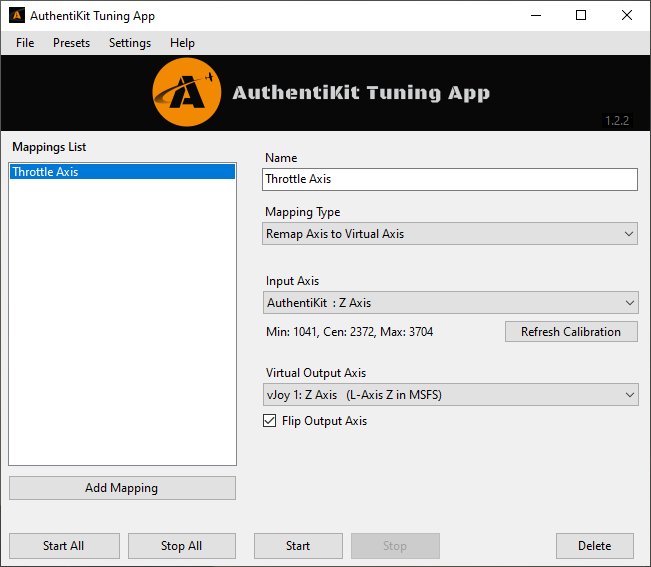
Description
This software maps joystick buttons and encoders to virtual outputs that can be tuned for an optimal in-sim experience. Outputs can be virtual axes, or virtual buttons, as featured in SimHanger Flight Simulation's YouTube review and tutorial.
A typical use case would be mapping your AuthentiKit Spitfire Mk IX or Honeycombe Bravo trim wheel buttons to a single virtual axis that you use in sim. This fixes the sensitivity problem for button based trim wheels in MSFS. What's more, you can tune the sensitivity of the axis to approximate the correct turn rate of the trim wheel in sim.
More detailed documentation can be found on the AuthentiKit website: https://authentikit.org/atk-html/tuning/
This software and all its prerequises are completely free to use. You'll need vJoy 2.2.1.1 if you're on Windows 10, or vJoy 2.1.9.1 if you're on Windows 11, then you can install in and run the AuthentiKit Tuning App 😀
If you have any questions feel free to join our Discord Server: https://discord.com/channels/780009940982300703/928665683456319489
Authentikit Tuning App
For tuning the sensitivity of your trim wheels and more! This software maps joystick buttons and encoders to virtual outputs that can be tuned for an optimal in-sim experience. Outputs can be virtual axes, or virtual buttons, as featured in SimHanger Flight Simulation's YouTube review and tutorial.

Soutiens
Avis des utilisateurs
1 avis
Historique des versions
🥳 Features - Map physical button to 2 output buttons, alternating pulses (Remap Button to Multiple Buttons) - Map physical button to 2 output buttons, latching (Remap Button to Multiple Buttons) - Pulse output buttons as an input button changes state (Button-Change to Pulse) 🔧 Fixes - Auto detect input button hangs when no buttons available
Connectez-vous pour participer à la discussion
Se connecterCommentaires(13)
almost 2 years ago
I am unable to fly any GA planes without Authentikit.
almost 3 years ago
about 2 years ago
about 2 years ago
I mean when it starts automatically with windows. It starts like a normal window. It would be nice to have it start to systray. It's one of the apps I have to click to minimize after a windows start... :D
Thanks!
about 3 years ago
over 3 years ago
Downloaded this last version and dont start.
Error on Startup.
Object reference not set to an instance of an object.
Can I try prevuis version that work properly for me?
Cheers my friend
over 3 years ago
same on my side.read over at github they are aware of this and working on a fix. cheers. if you want to try here's the link to the previous version https://github.com/Colmanian/AuthentiKit-Trim-Calibration/releases/tag/v1.2.2
about 4 years ago
Can confirm that also working here-thanks for the update.
over 4 years ago
Having identical problems. Tried re installing in the right order again but same problems. Gave up and uninstalled it. Dont't think its to do with NET runtime clashes as I only had the recommended one installed.
about 4 years ago
This should now be fixed in the latest release. If you could I'd be really grateful if you could check it out and update your review accordingly if you're satisfied :) Many Thanks, Ian.
over 4 years ago
I cannot get this app to work. It's user interface is a jumble of overlapping labels and dialog boxes. I've installed both version 1 and 1.1. There's a MSFS Bravo preset in 1.1, so I've clicked that rather than try to enter values in the settings drop-down menus which are all very difficult to see, but using the preset or the tedious attempts at inputting my button and axis values, the app gives me no control of the trim wheel on the Bravo.
When I installed the NET runtime, I found that there was already an x64 version of that runtime on my computer. Not knowing what installed program depends on the x64 version, I'm loathe to uninstall it. Could the existence of both the x86 and x64 versions be what's causing all the difficulty with the UI and the function of the Tuning App?
UPDATE 31/07/22: With version 1.2.2, the jumbling of the user interface has been fixed for my 2K resolution. It now shows up exactly as depicted in the videos and on flightsim.to. Thanks a million, Ian. 5 stars
about 4 years ago
This should now be fixed in the latest release, both the scaling issue and the .NET issue. If you could I'd be really grateful if you could check it out and update your review accordingly if you're satisfied :) Many Thanks, Ian.
about 2 years ago